ESP8266 Or MKR1000?

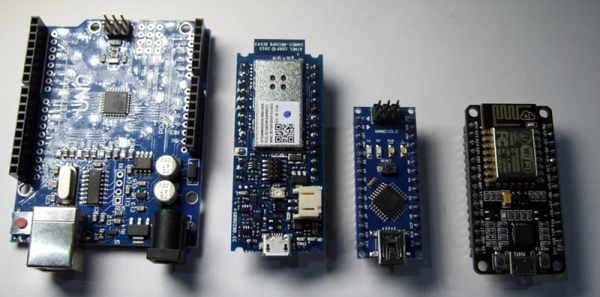
If you are a regular Hackaday reader, you’ve probably seen plenty of ESP8266 projects. After all, the inexpensive device is a workhorse for putting a project on WiFi, and it works well. There is a processor onboard, but, most often, the onboard CPU runs a stock firmware that exposes an AT command set or Lua or even BASIC. That means most projects have a separate CPU and that CPU is often–surprise–an Arduino.

It isn’t a big leap of logic to imagine an Arduino with an integrated WiFi subsystem. That’s the idea behind the MKR1000. But the real question you have to ask is: is it better to use an integrated component or just put an Arduino and ESP8266 together?

[Andreas Spiess] not only asked the question, but he answered it in a YouTube video (see below). He examines several factors on the MKR1000, the Arduino Due and Uno, and several other common boards. The examination covers performance, features, and power consumption.

Continue reading “ESP8266 Or MKR1000?”

Connect All Your IoT Through Your Pi 3

If you’re playing Hackaday Buzzword Bingo, today is your lucky day! Because not only does this article contain “Pi 3” and “IoT”, but we’re just about to type “ESP8266” and “home automation”. Check to see if you haven’t filled a row or something…

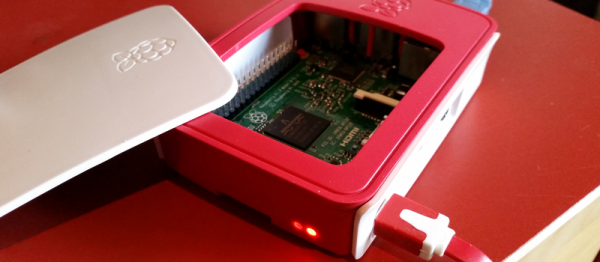
Seriously, though. If you’re running a home device network, and like us you’re running it totally insecurely, you might want to firewall that stuff off from the greater Interwebs at least, and probably any computers that you care about as well. The simplest way to do so is to keep your devices on their own WiFi network. That shiny Pi 3 you just bought has WiFi, and doesn’t use so much power that you’d mind leaving it on all the time.

Even if you’re not a Linux networking guru, [Phil Martin]’s tutorial on setting up the Raspberry Pi 3 as a WiFi access point should make it easy for you to use your Pi 3 as the hub of your IoT system’s WiFi. He even shows you how to configure it to forward your IoT network’s packets out to the real world over wired Ethernet, but if you can also use the Pi 3 as your central server, this may not even be necessary. Most of the IoT services that you’d want are available for the Pi.

Those who do want to open up to the world, you can easily set up a very strict firewall on the Pi that won’t interfere with your home’s normal WiFi. Here’s a quick guide to setting up iptables on the Pi, but using even friendlier software like Shorewall should also get the job done.

Still haven’t filled up your bingo card yet? “Arduino!”

Slim And Classy Word Clock Shows The Weather Too

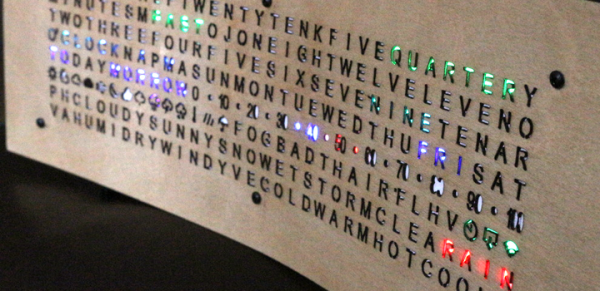
Word clocks are a neat twist on traditional timepiece user interfaces. Spelling out the time with words and phrases rather than numerals fancies up a clock nicely. And if you add the current weather and forecast to the display, you get this attractive and handy word-based time and weather display.

For this clock, one of the many custom builds on [GMG]’s site that betray a certain passion for unusual timepieces, an 8×32 array of Neopixels lives behind a laser-cut sheet of steam-bent birch plywood. Each pixel is masked by either an alphanumeric character or an icon representing weather conditions. An ESP8266 fetches time and weather data and drives the display serially, controlling the color of each cell and building up the display. The video below shows the clock doing its thing.

Sure, we’ve featured plenty of word clocks before, even some with weather display, but we like the slim and understated design of this build. We’re particularly impressed by the lengths [GMG] took in packing as much capability into the 256-pixel display as possible, like the way “today” and “tomorrow” overlap. And if you’ve got an eye for detail, you might spot what gets displayed when it’s over 80° and 80% relative humidity.

Continue reading “Slim And Classy Word Clock Shows The Weather Too”

Energy Monitor Optically Couples To Smart Meter

Hackers love to monitor things. Whether it’s the outside temperature or the energy used to take a shower, building a sensor and displaying a real-time graph of the data is hacker heaven. But the most interesting graphs comes from monitoring overall power use, and that’s where this optically coupled smart-meter monitor comes in.

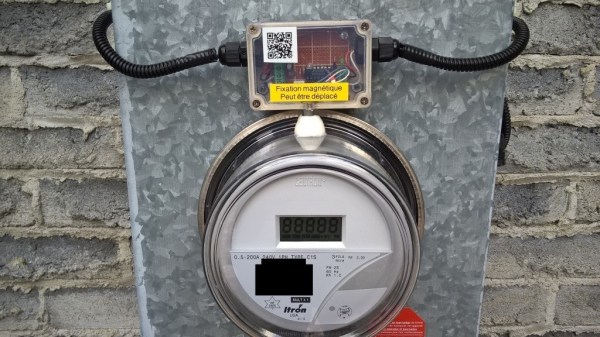
[Michel]’s meter reader is pretty straightforward. His smart wattmeter is equipped with an IR LED that pips for every watt-hour consumed, so optical coupling was a natural approach. The pulse itself is only 10 ms wide, so he built a pulse stretcher to condition the pulse for a PIC microcontroller. The PIC also reads the outside temperature with a DS18B20 and feeds everything to the central power monitor, with an LCD display and a classic Simpson meter to display current power usage. The central monitor sends the power and temperature data to Thingspeak, along with data from [Michel]’s wood-stove monitor and a yet-to-be-implemented water heater monitor.

[Michel] is building out an impressive suite of energy and environmental monitors for his Quebec base of operations. We’re looking forward to seeing how he monitors that water heater, and to see what other ideas he comes up with.

Continue reading “Energy Monitor Optically Couples To Smart Meter”

USB-less WiFi For The Pi Zero

Since the introduction of the Raspberry Pi Zero, the hacker, maker, and hobbyist electronics world has been thrown into turmoil. ‘The Raspberry Pi Foundation is corrupt,’ the detractors said, ‘and the Pi Zero is just a marketing ploy to get their name out.’ Others chimed in that the Raspberry Pi Zero doesn’t even exist. Despite what a million monkeys on a million keyboards say, the Raspberry Pi Zero does exist and is very cool, despite how limited it is. There’s only one USB port, but that doesn’t mean you can’t have WiFi. [ajlitt] came up with a WiFi hat for the Pi Zero that goes right through the GPIO pins, and shouldn’t cost more than a few dollars to implement on any Raspberry Pi.

There is no Ethernet port on the Pi, and apart from a single USB OTG port, no apparent high-speed interfaces to the outside world. On the other hand, there’s a few things hidden deep down in the SoC on the Pi including two MMC controllers. One of these controllers is used for the SD card, but the second can be broken out on a few GPIO pins. By tapping into those pins and configuring the kernel just right, SDIO is available on the GPIO pins, giving the Pi WiFi through a cheap ESP8266 module.

We’ve seen [ajlitt]’s work on SDIO devices on the Pi before, but he’s slowly been reworking this build with the Pi Zero in mind. It didn’t begin as a project for the Hackaday Prize, but already it’s one of the more popular entries so far. Of course there are thousands of projects on Hackaday.io that aren’t entered into the Hackaday Prize this year, and if you’re behind one of those, this is your call to step up.

The HackadayPrize2016 is Sponsored by:

Make Your Own ESP8266 Breadboard Adapter

Want to play around with the ESP8266? You’ll need a breadboard adapter, which allows you to connect the ESP8266 to a breadboard as you refine your design. Sure, you could just buy one, but where’s the fun in that?

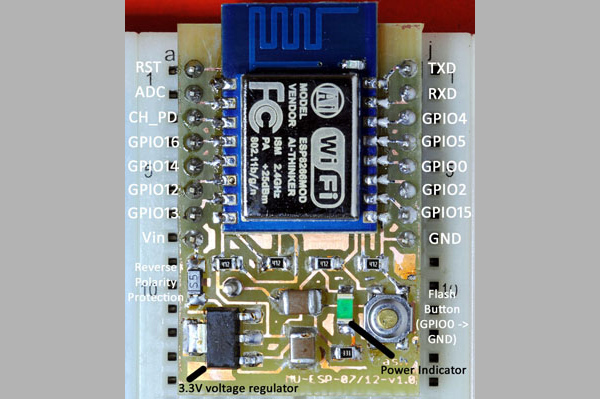
[Markus Ulsass] designed a simple breadboard adapter for his ESP8266 that can be easily etched and built at home, but which has most of the features of the commercial versions. His adapter features a voltage regulator that can handle anything up to 7 volts and which has reverse polarity protection and a reset switch that puts the ESP8266 into flash mode, where it can be reprogrammed.

It’s a neat, simple build that makes it easier to tap into the power of the ESP8266 , which can be used to do everything from running a webcam to automating your home.

Alarm System Upgrade Tips The Functionality Scale

Residential-grade commercial alarm systems are good at a few things but terrible at others, like keeping pace with telephone technology. So what to do when a switch to VOIP renders your alarm system unable to call in reinforcements? Why not strip out the old system and roll your own value-added alarm and home automation system?

Generally, the hardest part about installing an alarm system is running the wires to connect sensors to the main panel, so [Bill Dudley] wisely chose to leverage the existing wiring and just upgrade the panel. And what an upgrade it is. [Bill]’s BOM reads like a catalog page from SparkFun or Adafruit – Arduino MEGA 2560, Ethernet shield, a sound board, stereo amplifier, X10 interface, and a host of relays, transformers, and converters. [Bill] is serious about redundancy, too – there’s an ESP8266 to back up the wired Ethernet, and a DS3231 RTC to keep the time just in case NTP goes down. The case is a bit crowded, but when closed up it’s nicely presentable, and the functionality can’t be beat.

Rehabilitating old alarm systems is a popular project that we’ve covered plenty of times, like this Arduino upgrade for a DSC 1550 panel. But we like the way [Bill] really went the extra mile to build add value to his system.