Rule Your Furnace With This Network-enabled Thermostat

diy_thermostat

Adafruit forum member [Stephanie] embarked on a mission to replace the thermostat in her home with one that was far more robust and full of electronic goodies.

Her goal was to build a networked thermostat that allowed for 2-way communications between the base station and any other networked device, such as her laptop or iPhone. She wanted to not only be able to monitor her furnace and air conditioning systems remotely, but to control the units from afar as well.

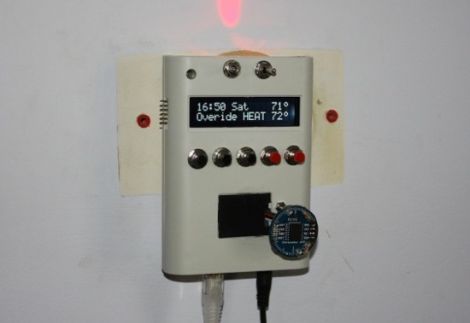
The brains of the thermostat have changed throughout the project, becoming simpler as time went on. It is now controlled with just an ATMega328 mounted to the back of an LCD display with a Wiznet network module where an Adafruit Ethernet shield used to reside. The thermostat shows the current temperature, set temperature, and time on the front mounted LCD, the latter of which is provided by a Chronodot module. It also has an on board LED that can be seen from afar, indicating whether the heat or air conditioning is running,

Right now the thermostat can be controlled at the unit itself, or remotely using a Telnet session. [Stephanie] is currently happy with the setup, but future plans include creating an iPad application to provide a more user-friendly interface.

If you are interested in learning more, or building one yourself, be sure to swing by her blog for a far more in-depth look at the build process.

Control Your Home Theater From Anywhere In The World

ether_ir

Using IR repeaters for larger home theater setups is not uncommon, but they usually are quite simple. A series of IR receivers are placed throughout a home, all wired to repeat the signals in a central closet where all of the AV equipment is located. [Bill] constructed a solution that works much like a standard IR repeater setup, however his requires no receivers, and it can be used anywhere in the world, provided you have Internet access.

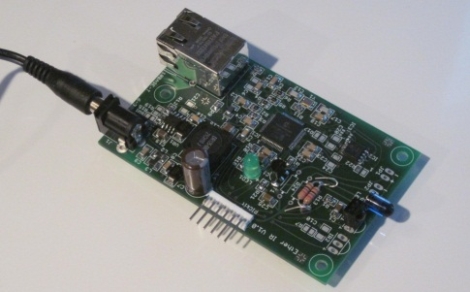
His project, called Ether IR, is an Internet-enabled IR repeater. It consists of an Ethernet-connected module with an IR LED mounted on it, capable of controlling your AV equipment. The board is hooked up to your LAN, and relays commands to your home theater via a simple web page. The equipment can then be controlled from any Internet-connected device, such as a mobile phone or tablet PC.

The entire project is open-source, so [Bill] has included schematics, instructions, and a bill of materials so that you can construct your own. The only issue at this point is the software portion of the project. The software is free, but the distribution method is in question – once things are sorted out, he will ensure that you can obtain the software for your Either-IR from him or directly from the Ethernet chip’s manufacturer.

Earthquake Alert System


[Roteno’s] submission for the 555 timer design contest is an Internet connected earthquake alert system. It monitors the USGS website for earthquake data and plays a tune when an earthquake occurs. The data is available as a feed in the form of a TXT file which is pretty easy to parse using cURL. He chose an LPCXpresso board (which is an ARM development platform that can run a Linux kernel) along with an XPORT module to handle the Ethernet traffic.

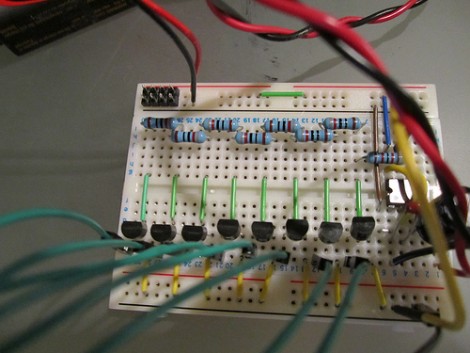
So where does the 555 timer see some action? It is responsible for playing the tone when an earthquake is detected. But playing just one pitch isn’t much fun. Instead, [Roteno] built the circuit above which creates a resistor network switched by a series of transistors. This way he can use GPIO from the microcontroller to choose different pitches. Check out the video after the break to hear the results. At power-up all eight pitches are played as a test, and the alert sound varies in pitch and tempo based on the magnitude of the earthquake.

Continue reading “Earthquake Alert System”

Have A Face For Radio?

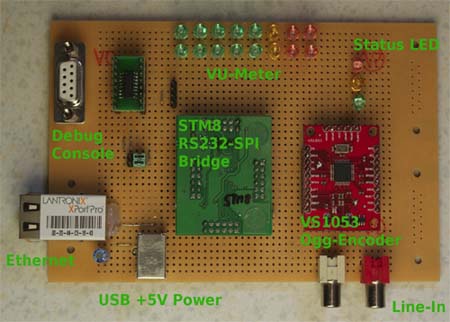
The help of fellow members of the Austrian technology collective/hackerspace [Otelo] allowed [Georg] to develop a networked audio streaming board, with less than $20 worth of components. Dubbed the OggStreamer for obvious reason, it’s designed to relay audio from a mixing board to an Icecast server (an open source implementation of SHOUTcast) in real-time. The board is based on the STM8 Discovery kit and the Xport Pro. It features stereo input, an onboard OGG Vorbis encoder, and (to top it off) is running uClinux. We think it’s very well thought out – but don’t take our word for it… the OggStreamer won second place last year in the Lantronix XPort Pro Design Contest, and [Georg] has documented it extensively (pdf).

Ego Box Monitors Web Hits

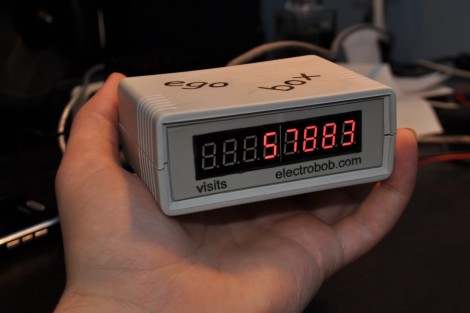
[Bogdan’s] latest project is a box that displays web hits for a chosen site. He calls it the Ego Box because depending on how traffic goes it either bloats or crushes your ego. This provides similar functionality as our Troll Sniffing Rat but the biggest difference is that this is a stand-alone Ethernet device. That’s thanks to the ENC28J60 Ethernet controller chip which manages the stack and has been quite popular in DIY electronic projects. In order to monitor your hits [Bogdan] crafted a bit of code to add to the header of your index page. It increments the counter file each time the page is loaded, and the Ego Box simply monitors that file, displaying the traffic on an eight digit 7 segment display.

[via Adafruit]

Adding A Serial Port Through An RJ45 Connector

[Mike Lu] likes to add serial ports to his routers to use for debugging but he didn’t want to drill holes in his new RT-N12. After a bit of head-scratching he thought about repurposing the four unused wires on one of the RJ45 Ethernet connectors. This would allow him to interface with the necessary signals and still have the option of using that port for a network connection. The first step was to build the circuit to output the correct serial levels and connect it to the unused pins on the jack. Next, to separate serial and Ethernet on the outside of the router he build a short adapter cable.

This is an elegant solution if you’re looking for zero case modifications. But if you don’t mind a few inconspicuous holes we love the serial port used on this Dockstar.

Ethernet Connection Using Capacitive Coupling

Wanting to save space and weight on his project build [Florin] set out to find a way to add Ethernet connectivity without the magnetics. His ill-advised first try involved directly coupling two switches, frying both in the process. After some research he found that Ethernet hardware manufacturers have considered the need for devices without the magnetics and there are several application notes available on the subject. [Florin] followed the information that Realtek has for their devices and learned that they can be couple capacitively. After depopulating the magnetics from a second pair of switches he wired up some resistor-capacitor networks on a breadboard and got the connecting to work.