People who were subscribed to updates on the Alexa Connect Kit (ACK) would recently have received an email informing that this kit is now available for sale. Last time we covered the ACK was back in September of 2018, the ‘release’ moniker meant ‘preview’ and there wasn’t any hardware one could actually purchase.
Over a year a later it seems that we can now finally get our grubby mitts on this kit that should enable us to make any of our projects Alexa-enabled. What this basically seems to mean is that one can spend close to 200 US dollars on an Arduino Zero and an Arduino shield-mounted WM-BN-MT-52 module from USI (though not listed on their site, but similar to the WM-BN-BM-22?) that integrates a 192 MHz Cortex-M MCU and a WiFi/Bluetooth module, as summarized on the Amazon Developer page for the ACK.
Back at the 2017 Superconference, Hackaday Managing Editor Elliot Williams started his talk about the so-called “Internet of Things” by explaining the only part he doesn’t like about the idea is the Internet… and the things. It’s a statement that most of us would still agree with today. If anything, the situation has gotten worse in the intervening years. Commercial smart gadgets are now cheaper and more plentiful than they’ve ever been, but it seems like precious little has been done to improve their inherent privacy and security issues.
But his talk doesn’t serve to bash the companies producing these devices or even the services that ultimately folded and left their customers with neigh useless gadgets. That’s not his style. The central theme of “Nexus Technologies: Or How I Learned to Love WiFi”is that a smart home can be wonderful thing, assuming it works the way you want it to. Elliot argues that between low-cost modular hardware and open source software, the average hacker has everything they need to build their own self-contained home automation ecosystem. One that’s not only cheaper than what they’re selling at the Big Box electronics store, but also doesn’t invite any of the corporate giants to the party.
Of course, it wasn’t always so. A decade ago it would have been all but impossible, and five years ago it would have been too expensive to be practical. As Elliot details his journey towards a truly personal smart home, he explains the advances in hardware and software that have made it not just possible on the DIY level, but approachable. The real takeaway is that once more people realize how cheap and easy it is to roll your own smart home gadgets, they may end up more than willing to kick Big Brother to the curb and do IoT on their own terms.
This previously unpublished recording somehow slipped between the cracks of the editing room floor but upon recent discovery, it’s still just as relevant today. Take a look at Elliot’s view on Nexus Technologies, then join us after the break for a deeper dive. Make sure to subscribe to Hackaday’s YouTube channel to get in on the 2019 Hackaday Superconference live stream starting Saturday, November 16th.
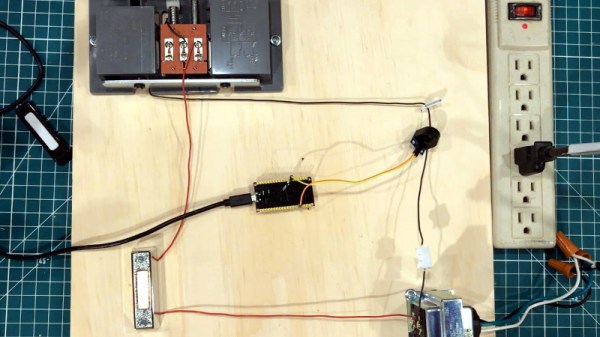
Over the years we’ve seen several attempts at adding Internet connectivity to the lowly wired doorbell. Generally, these projects aim to piggyback on the existing wiring, bells, and buttons rather than replace them entirely. Which invariably means at some point the AC wiring is going to need to interface with a DC microcontroller. This is often where things get interesting, as it seems everyone has a different idea on how best to bridge these two systems.
That’s the point where [Ben Brooks] found himself not so long ago. While researching the best way to tap into the 20 VAC pumping through his doorbells, he found a forum post where somebody was experimenting with optocouplers. As is unfortunately so often the case, the forum thread never really had a conclusion, and it wasn’t clear if the original poster ever figured it out.
DIY optocouplers wrapped in electrical tape
[Ben] liked the idea though, so he thought he would give it a shot. But before investing in real optocouplers, he created his own DIY versions to use as a proof of concept. He put a standard LED and photoresistor together with a bit of black tape, and connected the LED to the doorbell line with a resistor. Running the LED on 60 Hz AC meant it was flickering rapidly, but for the purposes of detecting if there was voltage on the line, it worked perfectly.
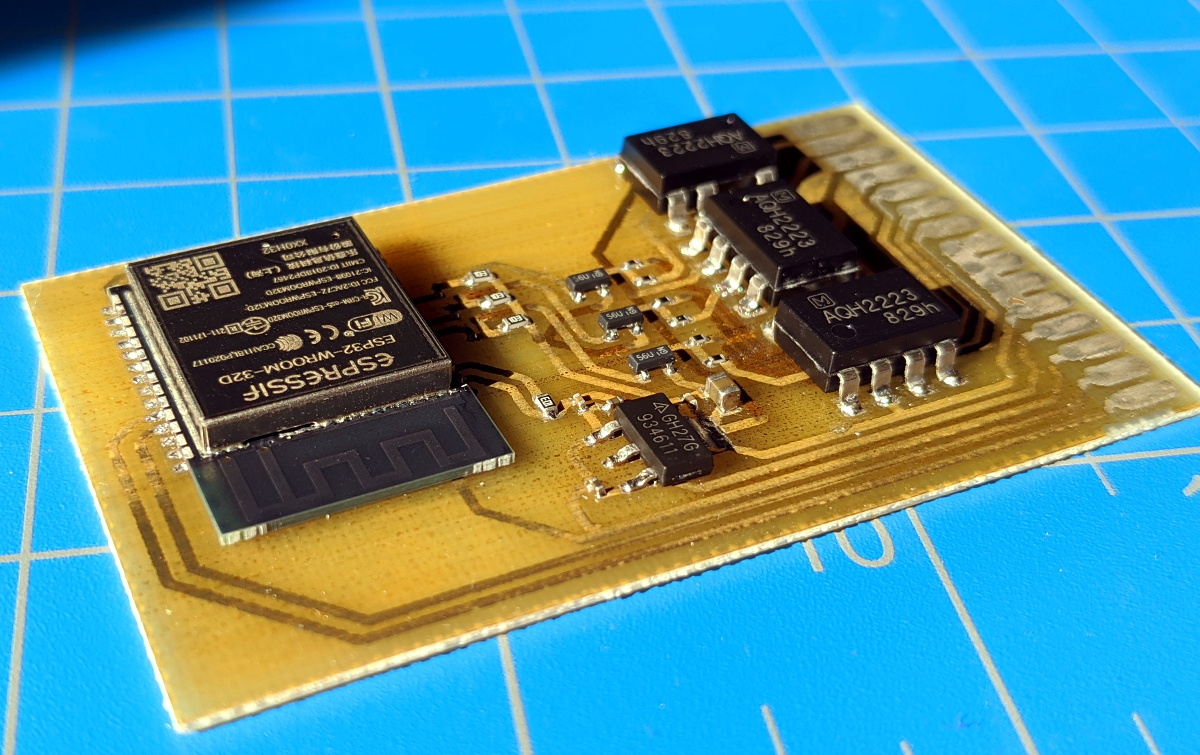
Wanting something slightly more professional for the final product, [Ben] eventually evolved his proof of concept to include a pair of 4N35s, a custom PCB, and a 3D printed enclosure. Powered by a Particle Xenon, the device uses IFTTT to fire off smartphone notifications and blink the lights in the house whenever somebody pushes the bell.
Curtains are about as simple as household devices get, but they can be remarkably troublesome to automate. Everyone’s window treatments are slightly different, which frustrates a standardized solution. [dfrenkel] has a passion for DIY and wanted his mornings flooded with sunlight for more peaceful awakenings, so the MorningRod Smart Curtain Rod was born.
Replacing the curtain rod with aluminum extrusion and 3D printed fixtures goes a long way towards standardizing for automation.
MorningRod’s design takes advantage of affordable hardware like aluminum extrusions and 3D printed parts to create a system that attempts to allow users to keep their existing curtains as much as possible.
The curtain rod is replaced with aluminum extrusion. MorningRod borrows ideas from CNC projects to turn the curtain rod into a kind of double-ended linear actuator, upon which the curtains are just along for the ride. An ESP32 serves as the brains while a NEMA17 stepper motor provides the brawn. The result is a motorized curtain opening and closing with a wireless interface that can be easily integrated into home automation projects.
[dfrenkel] is offering a kit, but those who would prefer to roll their own should check out the project page on Thingiverse.
Do you have a Raspberry Pi? What is it being used for right now? If you’re like the majority of people who replied to [Michael Hall’s] poll on Twitter, it’s likely yours is sitting on a shelf doing nothing too. So why not just turn it into an IoT device for your home?
[Michael] wrote an easy-to-follow guide focusing on getting the EdgeX Foundry IoT platform running on the Raspberry Pi. It is designed to be a unified multi-platform base for IoT devices hosted by the Linux Foundation, making it easy to control and integrate them into other systems. The framework for this consists of two parts, a Device Service running on your Pi, and the rest of the services running on a desktop or laptop where you’ll be monitoring it.
His guide goes into detail on how to get both parts working on your computer and your Pi using Docker for ease of installation. As for the IoT device, he uses the built-in PIR sensor example to show how to configure it without having to write any programming. You can then monitor the device’s sensors, which you can just connect straight to the Pi’s GPIO pins, from your desktop. Since the EdgeX software is designed to run on any flavor of Linux, this should make it easy to repurpose any forgotten single-board computer into the beginnings of a home automation system.
However, if you are confident in your programming skills, you’re probably looking for something slimmer such as the ESP8266 family of microcontrollers to do your bidding. Why not try an energy monitor or a smoke detector project with them?
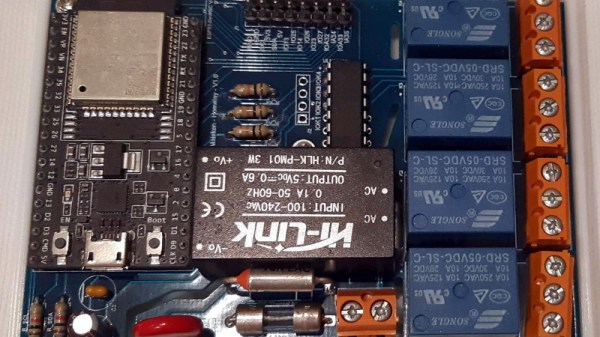
The ESP8266 and ESP32 are fast becoming the microcontroller of choice for, well, everything. But one particular area we’ve seen a lot of activity in recently is home automation; these boards make it so incredibly easy and cheap to get your projects online that putting together your own automation system is far more appealing now than it’s ever been. Capitalizing on that trend, [hwhardsoft] has been working on a ESP enclosure that’s perfect for mounting on the living room wall.
Of course, there’s more to this project than an admittedly very nice plastic box. The system also includes a ILI9341 2.4 inch touch screen LCD, an integrated voltage regulator, and even a section of “perfboard” that gives you a spot to easily wire up ad-hoc circuits and sensors. You don’t even need to switch over to the bare modules either, as the PCB is designed to accommodate common development boards such as the Wemos D1 Mini and NodeMCU.
Despite its outward appearance, this project is very much beginner friendly. Utilizing through hole components, screw down terminals, and a impeccably well-labeled silkscreen, you won’t need to be a hardware expert to produce a very slick gadget the whole family can appreciate.
There was a time when you had to get up from the couch to change the channel on your TV. But then came the remote control, which saved us from having to move our legs. Later still we got electronic assistants from the likes of Amazon and Google which allowed us to command our home electronics with nothing more than our voice, so now we don’t even have to pick up the remote. Ushering in the next era of consumer gelification, [Nick Bild] has created ShAIdes: a pair of AI-enabled glasses that allow you to control devices by looking at them.
Of course on a more serious note, vision-based home automation could be a hugely beneficial assistive technology for those with limited mobility. By simply looking at the device you want to control and waving in its direction, the system knows which appliance to activate. In the video after the break, you can see [Nick] control lamps and his speakers with such ease that it almost looks like magic; a defining trait of any sufficiently advanced technology.
So how does it work? A Raspberry Pi camera module mounted to a pair of sunglasses captures video which is sent down to a NVIDIA Jetson Nano. Here, two separate image classification Convolutional Neural Network (CNN) models are being used to identify objects which can be controlled in the background, and hand gestures in the foreground. When there’s a match for both, the system can fire off the appropriate signal to turn the device on or off. Between the Nano, the camera, and the battery pack to make it all mobile, [Nick] says the hardware cost about $150 to put together.
But really, the hardware is only one small piece of the puzzle in a project like this. Which is why we’re happy to see [Nick] go into such detail about how the software functions, and crucially, how he trained the system. Just the gesture recognition subroutine alone went through nearly 20K images so it could reliably detect an arm extended into the frame.