Sega Genesis Finally Gets Long-Awaited Stock Ticker App 37 Years After Launch

Until now, if you were seated at your Sega Genesis and wanted to check your stock portfolio, you were out of luck. You had to get a smartphone, or a computer, or maybe even a television to look up stock prices and understand your financial position. Thankfully, though, Sega’s neglect of its hero platform has finally been corrected. [Mike Wolak] has given the 16-bit console the real-time stock ticker it so desperately needed. 

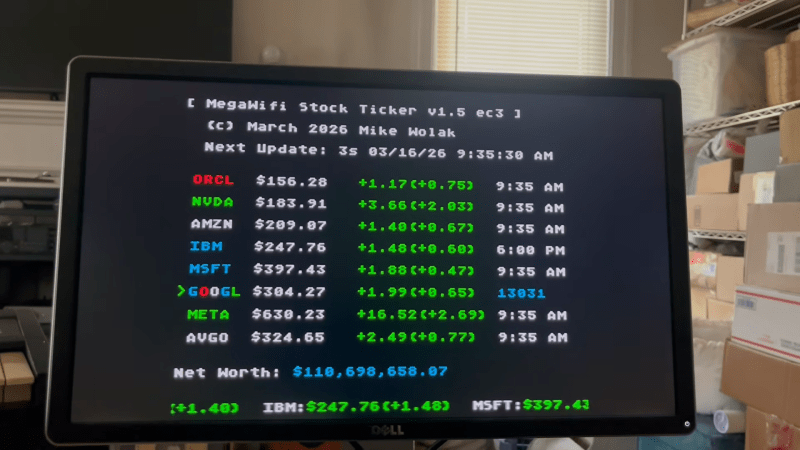
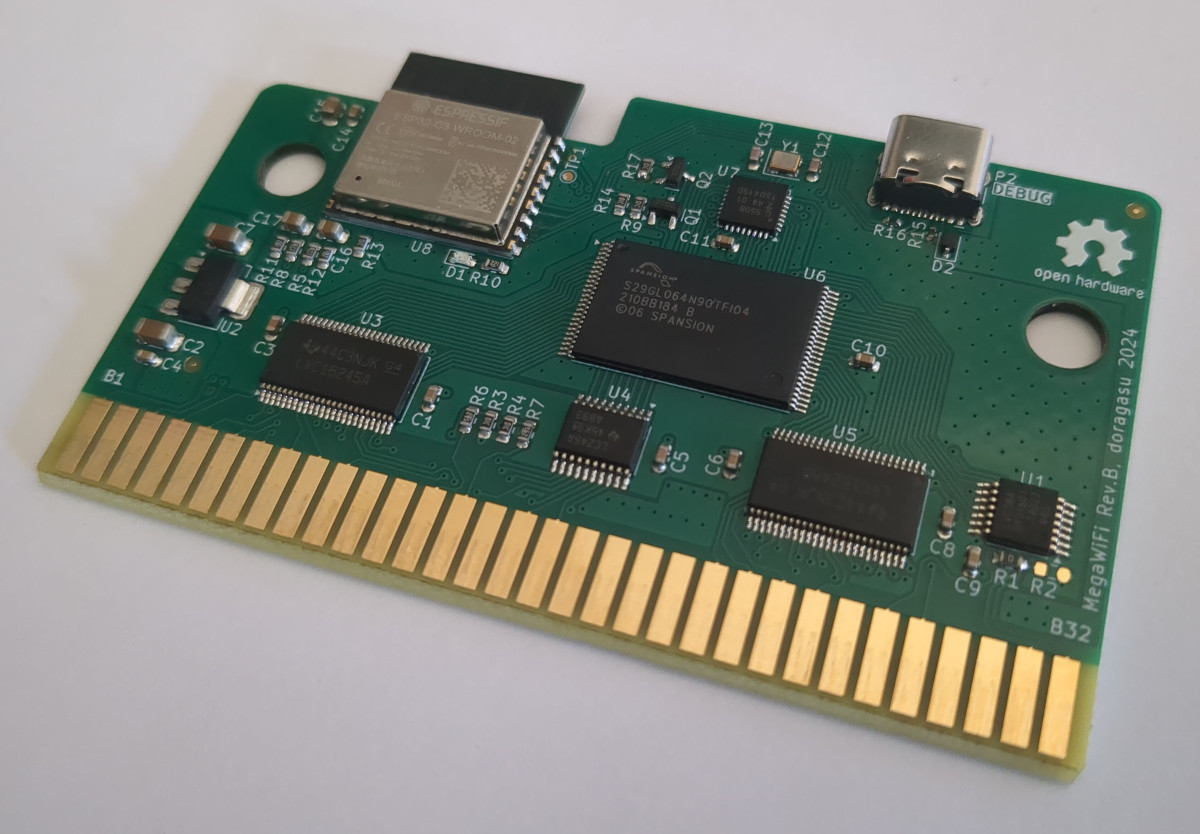
The build runs on a MegaWiFi cartridge, which uses an ESP8266 or ESP32 microcontroller to add WiFi communication to the Sega Genesis (or Mega Drive). [Mike] wrote a custom program for the platform that would query the Finnhub HTTPS API and display live stock prices via the Genesis’s Video Display Processor. It does so via a clean console-like interface that would be familiar to users of other 16-bit machines from this era, though seeing so much textual output would have been uncommon.
By default, the stock ticker is set to show prices for major tech stocks, but you can set it up to display any major symbol available in the Finnhub data stream. You can configure up to eight custom stocks and input your holdings, and the software will calculate and display your net worth in real time.

All the files are available for those eager to monitor their portfolios on a Sega, as the financial gods intended. [Mike] notes it took a little work to get this project over the line, particularly as the ESP32-C3 doesn’t support HTTPs with stock firmware. A few other hacks were needed to keep the Genesis updating the screen during HTTP queries, too.

If you have a concentrated portfolio and a spare Sega Genesis, this could be a fun retro way to keep an eye on your holdings. Alternatively, you might prefer to go the classic paper tape route.

Continue reading “Sega Genesis Finally Gets Long-Awaited Stock Ticker App 37 Years After Launch”
Reverse Engineering The SEGA Mega Drive

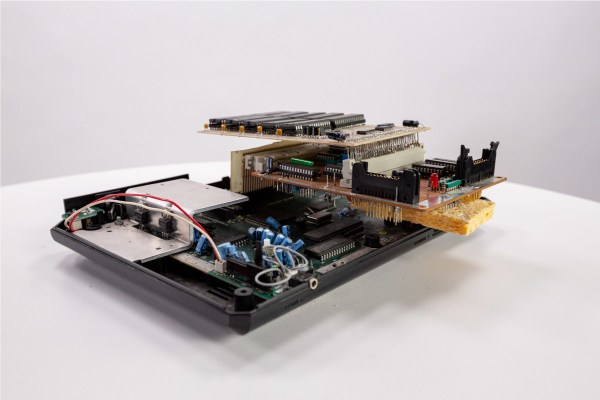
With the widespread adoption of emulators, almost anyone can start playing video games from bygone eras. Some systems are even capable of supporting homebrew games, with several having active communities that are still creating new games even decades later. This ease of programming for non-PC platforms wasn’t always so easy, though. If you wanted to develop games on a now-antique console when it was still relatively new, you had to jump through a lot of hoops. [Tore] shows us how it would have been done with his Sega Mega Drive development kit that he built from scratch.

While [Tore] had an Atari ST, he wanted to do something a little more cutting edge and at the time there was nothing better than the Mega Drive (or the Genesis as it was known in North America). It had a number of features that lent the platform to development, namely the Motorola 68000 chip that was very common for the time and as a result had plenty of documentation available. He still needed to do quite a bit of reverse engineering of the system to get a proper dev board running, though, starting with figuring out how the cartridge system worked. He was able to build a memory bank that functioned as a re-writable game cartridge.

With the hard parts out of the way [Tore] set about building the glue logic, the startup firmware which interfaced with his Atari ST, and then of course wiring it all together. He was eventually able to get far enough along to send programs to the Mega Drive that would allow him to control sprites on a screen with the controller, but unfortunately he was interrupted before he could develop any complete games. The amount of research and work to get this far is incredible, though, and there may be some helpful nuggets for anyone in the homebrew Mega Drive community today. If you don’t want to get this deep into the Mega Drive hardware, though, you can build a cartridge that allows for development on native Sega hardware instead.

Can You Visualise A Sega Cart From 2017?

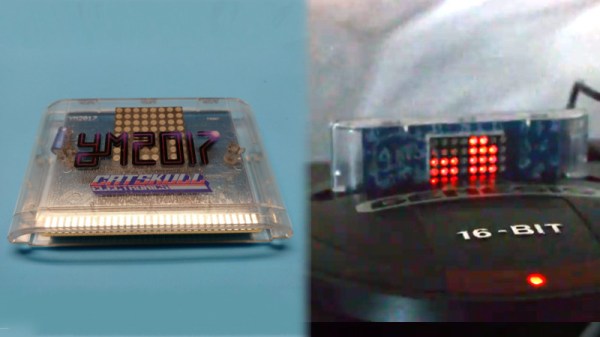
The Sega Genesis, or Mega Drive if you’re not from North America, isn’t exactly this summer’s hottest new console, but it still has a huge following 29 years after launch. Fans range from retro Sonic enthusiasts to hardcore chiptune composers, and this year, Catskull Electronics is releasing a Genesis compilation album on a cartridge with a rather special feature.

The cartridge sports an 8×8 LED matrix, which acts as a visualiser for the audio coming out of the console. They’re controlled with a combination of data and address lines with some buffers and 74-series glue logic to make it all work together. Special attention was paid to make sure the LED matrix doesn’t just respond to all activity on the bus, though it would perhaps be cool to see some blinkenlights on a 90s console one day.

Each row of LEDs is attached to an address line, and each column to a data line. It’s a fairly basic multiplexing setup which sees each LED only actually lit for a fraction of a second, but sweeping the display at speed creates a lasting display. The image data is stored as an 8×8 sprite in the system RAM, and updated with the sound level of each channel from the Genesis’s audio subsystem.

The team are looking to release the ROM code in future to inspire copycat designs, which has the potential to spawn even more Genesis cart releases in future. We look forward to seeing what else the community comes up with. And if you’re a die-hard Genesis fan, there are other ways to listen to those classic tunes too.

Hackaday Links: November 13, 2016

The Travelling Hackerbox is going International. I wrote a post on this earlier in the week, and I’m still looking for recipients for the box that are not in the United States. The sign-up form is right here, [the sign up form is now closed] and so far we have good coverage in Canada, Australia, NZ, Northern Europe, and a few in Africa. If you ever want to be part of the Travelling Hackerbox, this is your chance. I’m going to close the sign-up sheet next week. Sign up now.

Like the idea of a travelling hackerbox, but are too impatient? Adafruit now has a box subscription service. Every quarter, an AdaBox will arrive on your doorstep packed to the gills with electronic goodies.

The very recently released NES Classic edition is the 2016 version of the C64 DTV — it’s a Linux system, not as elegant, and there’s little hacking potential. If you want to increase the amount of storage, desolder the Flash chip (part no. S34ML04G200TFI000), and replace it with a larger chip. The NES Classic edition isn’t the coolest retro system coming out — Genesis is back, baby. Brazil has had a love affair with the Genesis/Mega Drive because of their bizarre import restrictions. Now, the manufacturer of the Brazilian Sega clones is releasing a Linux-ified clone. Does anyone know how to export electronics from Brazil?

The CFP deadline for the SoCal Linux Expo is fast approaching. You have until the 15th to get your talks in for SCALE.

Let’s talk about dissolvable 3D printer support material. One of the first materials able to be printed and removed by dissolving in water was PVA. Makerbot sold it for use in their dual extruder machines. PVA does dissolve, but it degrades at higher temperatures and kills nozzles. HIPS can be dissolved with limonene, but it’s really only for use in conjunction with ABS. This week, E3D released their Scaffold support material. It’s a PVA/Polyvinyl alcohol filament — ‘the stuff gel caps are made out of’ was the line we got when E3D previewed Scaffold at MRRF last March. It’s a support material that’s water dissolvable, compatible with most filaments, and is able to produce some amazing prints. It’s available now, but it is a bit pricey at £45 for half a kilo. Brexit is a good thing if you’re paid in dollars.

If you’re into chiptunes, you’ve heard about Little Sound DJ. LSDJ is a cart/ROM capable of toggling all the registers on the Game Boy sound chip, sequencing bleeps and bloops, and generally being awesome. The recently released Nanoloop Mono is not Game Boy software. It’s a few op-amps and a PIC micro pasted on a board that turns the Game Boy into a synth. You get a significantly more 80s sound with the Nanoloop Mono over LSDJ, audio input, and a step sequencer.

3 Billion Devices And A Sega Genesis Run Java

A few years ago, [Mike]’s friend gave him an old Sega Genesis with the very cool and somewhat rare SegaCD drive attached. The SegaCD gave him an idea – while it’s not easy to burn a cartridge and play homebrew games on a real Genesis console, everyone has a CD burner somewhere. [Mike] began writing his demo and then realized adding Java would be easy on the 68000. The result is Java on three billion devices and a Sega Genesis.

This project is built around Java Grinder a Java byte code compiler that will compile classes, factories, and all the horrible Java design.design.pattern.pattern.patterns() into assembly language. Already, there are a lot of platforms supported by Java Grinder, including the Commodore 64, the TI99, and thanks to some work from [Joe Davisson], the Apple IIgs

With a byte code compiler, an assembler, and an API for the Sega-specific hardware, [Mike] set about building his demo. Since this was a Sega, it needed the ‘SEGA’ sound at the start. [Mike] ended up recording his voice saying ‘JAVA!’ This plays through the Z80 on the Genesis.

The complete demo – viewable in its emulated format below – has everything you would expect from a proper demo. Starfields, dancing sprites, and even a Mandelbrot pattern make it into the three-minute long demo.

Continue reading “3 Billion Devices And A Sega Genesis Run Java”

Fixing Sega Cartridges With Old BIOS Chips

For one reason or another, [Dragao] has an old Sonic The Hedgehog cartridge that throws an illegal instruction somewhere in the Marble Zone stage. While the cause of this illegal instruction is probably cosmic rays, how to repair this cartridge isn’t quite as clear. It can be done, though, using BIOS chips from an old computer.

[Dragao] got the idea of repairing this cartridge from Game Boy flash carts. These cartridges use chips that are a simple parallel interface to the address and data lines of the Game Boy’s CPU, and Sega Genesis / Mega Drive flash cart would work the same way. The problem was finding old DIP flash chips that would work. He eventually found some 8-bit wide chips on the motherboard of an old computer, and by stacking the chips, he had a 16-bit wide Flash chip.

To program the chips, [Dragao] wired everything up to an Arduino Mega, put a ROM on the chip, and wired it up to the old Sega cartridge. Surprisingly or unsurprisingly, everything worked, and now [Dragao] has a fully functioning copy of Sonic The Hedgehog.

Hackaday Links: August 15, 2012

An Octopart for RC equipment

When [Zach] started building a quadcopter he found it very difficult to source the required parts. Thus was born CompareRC, an aggregation of several online RC retailers. There’s over 150,000 parts in the database, all searchable and sortable by lowest price.

Segway iPad Skype teleconferencing robot

It’ll be a while until robots completely eliminate the need for any human interaction, but until then there’s Double. It’s a two-wheeled balancing robot with an iPad dock, controllable via a remote iPad.

Free electronic design

In case you weren’t aware, Fedora has an electronic design distro that includes just about everything needed to build electronic circuits called Fedora Electronic Lab. FEL has PCB designers, circuit simulators, editors for just about everything, and support for PICs, AVRs, and 8051 micros. Thanks for sending this in, [Simon].

Make your own Megadrive ROMs

Last month, [Lee] sent in a build where he connected an Arduino Mega to an old Sega Genesis/Megadrive cartridge. He’s figured out how to read the contents of the cartridge now, allowing you to preserve your 100% complete Sonic & Knuckles / Sonic 3 save for time immemorial.

A surprising amount of graphics tutorials

Khan Academy, every autodidacts best friend, is now teaching computer science. Right now, there is a heavy focus on drawing graphics, and everything is coded in the browser (using Javascript…), but at least it’s a start. The fundamentals of programming are platform and language agnostic, so this looks to be a great way to learn programming.

Here’s a blog post from the lead dev of the Khan CS project.