Google's Piano Genie

Piano Genie Trained A Neural Net To Play 88-Key Piano With 8 Arcade Buttons

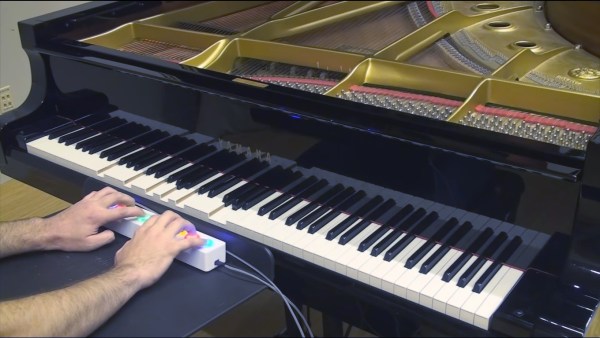
Want to sound great on a Piano using only your coding skills? Enter Piano Genie, the result of a research project from Google AI and DeepMind. You press any of eight buttons while a neural network makes sure the piano plays something cool — compensating in real time for what’s already been played.

Almost anyone new to playing music who sits down at a piano will produce a sound similar to that of a cat chasing a mouse through a tangle of kitchen pots. Who can blame them, given the sea of 88 inexplicable keys sitting before them? But they’ll quickly realize that playing keys in succession in one direction will produce sounds with consistently increasing or decreasing pitch. They’ll also learn that pressing keys for different lengths of times can improve the melody. But there’s still 88 of them and plenty more to learn, such as which keys will sound harmonious when played together.
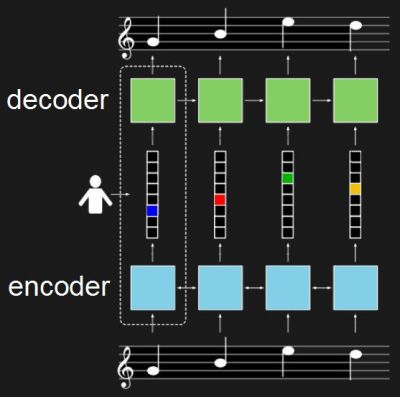
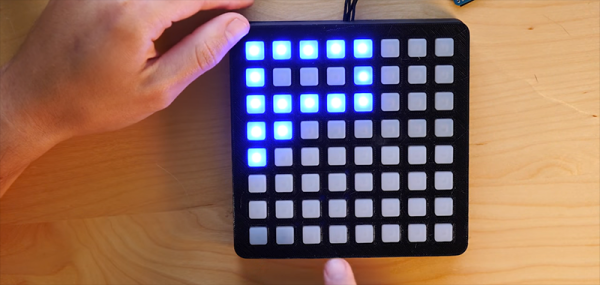
Piano Genie training architectureWith Pinao Genie, gone are the daunting 88 keys, replaced with a 3D-printed box of eight arcade-style buttons which they made by following this Adafruit tutorial. A neural network maps those eight buttons to something meaningful on the 88-key piano keyboard. Being a neural network, the mapping isn’t a fixed one-to-one or even one-to-many. Instead, it’s trained to play something which should sound good taking into account what was play previously and won`t necessarily be the same each time.

To train it they use data from the approximately 1400 performances of the International Piano e-Competition. The result can be quite good as you can see and hear in the video below. The buttons feed into a computer but the computer plays the result on an actual piano.

For training, the neural network really consists of two networks. One is an encoder, in this case a recurrent neural network (RNN) which takes piano sequences and learns to output a vector. In the diagram, the vector is in the middle and has one element for each of the eight buttons. The second network is the decoder, also an RNN. It’s trained to turn that eight-element vector back into the same music which was fed into the encoder.

Once trained, only the decoder is used. The eight-button keyboard feeds into the vector, and the decoder outputs suitable notes. The fact that they’re RNNs means that rather than learning a fixed one-to-many mapping, the network takes into account what was previously played in order to come up with something which hopefully sounds pleasing. To give the user a little more creative control, they also trained it to realize when the user is playing a rising or falling melody and to output the same. See their paper for how the turned polyphonic sound into monophonic and back again.

If you prefer a different style of music you can train it on a MIDI collection of your own choosing using their open-sourced model. Or you can try it out as is right now through their web interface. I’ll admit, I started out just banging on it, producing the same noise I would get if I just hammered away randomly on a piano. Then I switched to thinking of making melodies and the result started sounding better. So some music background and practice still helps. For the video below, the researcher admits to having already played for a few hours.

This isn’t the first project we’ve covered by these Google researchers. Another was this music synthesizer again using neural networks but this time with a Raspberry Pi. And if our discussion of recurrent neural networks went a bit over your head, check out our overview of neural networks.

Continue reading “Piano Genie Trained A Neural Net To Play 88-Key Piano With 8 Arcade Buttons”

Hurdy-Gurdy Gets Modernized With MIDI Upgrades

If you’ve never heard a hurdy-gurdy before, you’re in for a treat. Not many people have, since they’re instruments which are uncommon outside of some eastern European communities. Think of a violin that replaces the bow with a hand-cranked wheel, and adds some extra strings that function similar to drones on a bagpipe. The instrument has been around for hundreds of years, but now it’s been given an upgrade via the magic of MIDI.

All of these new features come from [Barnaby Walters] who builds hurdy-gurdys by hand but has recently been focusing on his MIDI interface. The interface can do pitch-shifting polyphony, which allows the instrument to make its own chords and harmonies. It also has a hybrid poly synthesizer, which plays completely different sounds, and can layer them on top of one another. It can also split the keyboard into two instruments, where the top half plays one sound and the bottom half another. It’s an interesting take on an interesting instrument, and the video is definitely worth a look.

The hurdy-gurdy isn’t a commonly used instrument for hacking compared to something like drums or the violin, of course. In fact we had to go back over ten years to find any other articles featuring the hurdy-gurdy, the Furby Gurdy. It was an appropriately named instrument.

Thanks to [baldpower] for the tip!

Continue reading “Hurdy-Gurdy Gets Modernized With MIDI Upgrades”

Racing The Beam And Dropping Some Beats

The heart of the Atari 2600 wasn’t the 6502 (or the 6507 for the pedants), it was the TIA chip. This is the chip responsible for drawing graphics on the display, racing the beam, and extremely limited support for sound generation. We haven’t seen many attempts of using the Atari 2600 for chiptunes, but that doesn’t mean it can’t be done. [John Sutley]’s Syndrum, a take on an Atari 2600 drum machine is nearly a work of art. It’s a custom cartridge for the wood-paneled Atari, and an impressive input device that turns this classic console into a beat machine

Did the Atari 2600 ever come with a drum machine cartridge? Maybe. Probably not. [John] originally built this project to experiment with the TIA chip, but found it was less tonal than a kazoo. That struck ‘Atari synthesizer’ off the list and replaced it with an ‘Atari drum machine’. There are two key parts of the build here, the first being a repurposed Asteroids cartridge that had the PROM replaced with a ZIF socket. This allows [John] to easily burn new code to an EEPROM, stuff it in the socket, and run it on the Atari. All the code was developed with batari Basic, a BASIC-inspired language that spits out .bin files for the Atari.

But running code on the Atari is just one half of this build. To do a drum machine, you somehow need to tell the Atari when to play each sound. Given the lack of expansion capabilities for the Atari, [John] turned to the controller port. The Syndrum uses Arduino Nano to bridge the DE9 controller connector to a MIDI port. Yes, it’s real MIDI, on a machine that could probably never do MIDI natively (although we’d love to see someone try).

Need a video of this mind-blowing hack in action? Here you go:

Continue reading “Racing The Beam And Dropping Some Beats”

The Spirit Of The 80s Lives On In A MIDI Harmonica

In the 1980s, there was a synthesizer that you could play like a harmonica. This device was called the Millioniser 2000. It utilized HIP (Harmonica In Principle) technology. The Millioniser 2000 was a breath controller wrapped in chrome-colored plastic embossed with its logo in an odd, pre-vaporwave aesthetic, and connected to a gray and green sheet metal enclosure loaded up with DIN jacks. The Millioniser 2000 is absolutely the pinnacle of late 70s, early 80s design philosophy. If it were painted brown, the Universe would implode.

Because of the rarity and downright weirdness of a harmonica synthesizer from the 80s, prices on the used market are through the roof. Musicians are a weird bunch. However, this does give someone the opportunity to recreate this bizarre instrument, and that’s exactly what [John Lassen] did for his entry for the Hackaday Prize.

While this isn’t as complex as the Millioniser 2000, it does have the same basic user interface. There’s a pressure sensor that measures how much you’re blowing. There’s a slider to change which notes are played, and there are a few buttons to change parameters, like the MIDI channel, a midi controller, or a transpose function. The electronics, like so many of the entries to the Musical Instrument Challenge in the Hackaday Prize, are built around the Teensy and it’s incredible audio library.

Finally, An Open Source MIDI Foot Controller

MIDI has been around for longer than most of the readers of Hackaday, and you can get off my lawn. In spite of this, MIDI is still commonly used in nearly every single aspect of musical performance, and there are a host of tools and applications to give MIDI control to a live performance. That said, if you want a MIDI foot controller, your best bet is probably something used from the late 90s, although Behringer makes an acceptable foot controller that doesn’t have a whole bunch of features. There is obviously a need for a feature packed, Open Source MIDI foot controller. That’s where the Pedalino comes in. It’s a winner of the Musical Instrument Challenge in this year’s Hackaday Prize, and if you want a MIDI foot controller, this is the first place you should look.

With the Pedalino, you can change the presets of your guitar rig, turn old MIDI equipment into something that’s USB-compatible, give you hands-free or foot-occupied ways to control your rig during a live performance, and it can be expanded with WiFi or Bluetooth. This is a full-featured MIDI controller, with three user profiles, and it can control a maximum of 48 foot switches. That’s an impressive amount of kit for such a small device; usually you’d have to spend hundreds or even thousands of dollars for a simple MIDI controller, and the Pedalino does everything with very cheap hardware.

While the Pedalino is just in its prototype phase now, there is obviously a market for a feature-packed MIDI foot controller. It might just be a breadboard and a Fritzing diagram, but there’s significant work being done on the software side, and we’re looking forward to this being stuffed into a gigantic aluminum enclosure and velcroed to a pedal board.

Elegant Drum Machine From Teensy

Playing the drums is pretty hard, especially for the uncoordinated. Doing four things at the same time, all while keeping an even tempo, isn’t reasonable for most of us. Rather than hiring a drummer for your band who is well versed in this art, though, you might opt instead to outsource this job to a machine instead. It’s cheaper and also less likely to result in spontaneous combustion.

This drum machine is actually a MIDI Euclidean sequencer. Euclidean rhythms are interesting in their own regard, but the basics are that a common denominator between two beats is found in order to automatically generate complicated beats. This particular unit is running on a Teensy 3.5 and consists of four RGB rotary encoders, an SSD1306 LCD, four momentary buttons, and four 16 LED Neopixel rings. Setting each of the dials increases the number of beats for that particular channel, and it can be configured for an almost limitless combination of beats and patterns.

To really get a feel of what’s going on here, it’s worth it to check out the video after the break. MIDI is also a fascinating standard, beyond the fact that it’s one of the few remaining standards created in the 80s that still enjoys active use, it can also be used to build all kinds of interesting instruments like one that whacks wine glasses with mallets or custom synthesizers.

Thanks to [baldpower] for the tip!

Continue reading “Elegant Drum Machine From Teensy”

An Open Controller For Woodwind Instruments

Engineers, hackers, and makers can most certainly build a musical gadget of some kind. They’ll build synths, they’ll build aerophones, and they’ll take the idea of mercury delay line memory, two hydrophones, and a really long tube filled with water to build the most absurd delay in existence. One thing they can’t seem to do is build a woodwind MIDI controller. That’s where [J.M.] comes in. He’s created the Open Woodwind Project as an open and extensible interface that can play sax and clarinet while connected to a computer.

Early prototype to test out variable resistive pressure pads

If you want to play MIDI, there are plenty of options for keyboards, drum sets, matrix pads, and even strings. If you want to play a MIDI saxophone, there aren’t many options. Keytars, for example, are more popular than MIDI woodwind controllers. [J.M.] is changing this with a MIDI controller that recreates electronic aerophones electronically.

The controller itself uses a Teensy 3.2 loaded up with an ARM Cortex M4, two MPR121 touch controllers for 24 channels of capacititve touch capability, and a pressure sensor to tell the computer how strong the user is blowing. All of this works, and [J.M.] has a few videos showing off the capabilities of his homemade controller. It’s a great piece of work, and there are a few extentions that make this really interesting: there’s the possibility of adding CV out so it can be connected to modular synths, and the addition of accelerometers to the build makes for some very interesting effects.

Check out the video below.

Continue reading “An Open Controller For Woodwind Instruments”