Nintoaster: The Next Generation

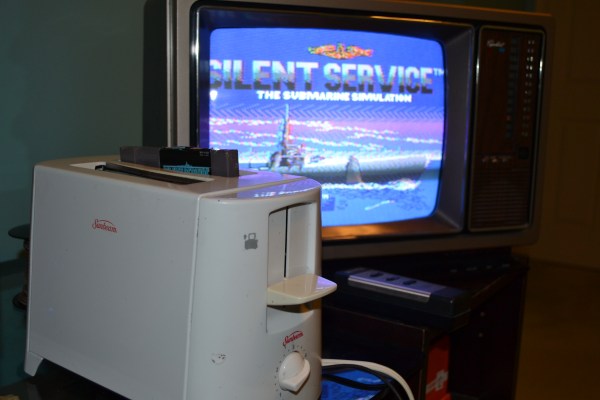
The original Nintendo Entertainment System is affectionately called “the toaster” due to the way the cartridge is inserted. [MrBananaHump] decided to take things a bit literally and installed a NES inside an actual toaster. This isn’t [MrBananaHump’s] design, the Nintoaster comes to us from [vomitsaw], who also built the SuperNintoaster. Since [vomitsaw] was kind enough to document his original build, [MrBananaHump] was able to build upon it.

The target toaster for this build was a plastic Sunbeam model found at a thrift store for $5. [MrBananaHump] gutted the toaster and cleaned out years of toast crumbs. The Nintendo mainboard would fit perfectly inside a toaster, except for two things – the RF Modulator and the expansion port. The expansion port was never used in the US version of the NES so it can be desoldered and removed. The RF also needs to be desoldered and relocated.

By far the biggest job in this casemod is hand-wiring each of the 72 pins for the cartridge port. It’s a tedious job, and it probably won’t look pretty. Keep your wires short, and things will probably work thanks to the relatively low clock speed of the NES.

The cartridge goes in one toast slot. [MrBananaHump] mounted his controller ports, power and reset buttons in the second slot. A bit of expanded metal grid completes the slot. Sure, it’s not exactly pretty inside, but with the case on, this becomes a rather nice looking build.

We’ve seen numerous Nintendo casemods over the years, just one other example is this N64 in an N64 controller.

A DIY NES Advantage Controller For The NES Classic

If you were a child of the ’80s, there is a good chance that you had a Nintendo console in your youth, the classic 8-bit NES. And if you were one of those NES owners, it’s therefore probably that the peripheral you lusted after was Nintendo’s arcade-inspired Advantage controller. This replaced the game pad with a full-size arcade joystick and buttons, and has become an expensive and sought-after accessory in the years since.

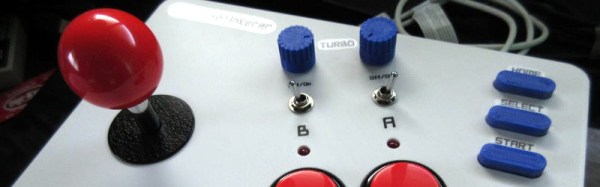
[Bbtinkerer] has a NES Classic, and having gone through more than one joystick that just wasn’t up to the pressures of intensive gaming, decided to have a go at building one himself. The Advantage was the obvious model to copy, and thanks to the Wii Retropad Adapter project, he was able to do so.

Faithful to the original in its layout, the new Advantage clone features a Turbo mode for rapid fire, though rather than the buttons you’d have had in the ’80s this model features a toggle switch. The joystick mechanism used was a Sanwa JLF, and the buttons were Sanwa OBSF-30s. He’s posted a video showing the finished item being put through its paces.

Continue reading “A DIY NES Advantage Controller For The NES Classic”

The Nintendo PlayStation: Finally Working

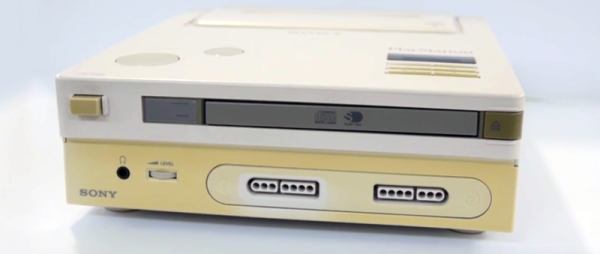
The Nintendo PlayStation is not a misnomer. Before the PS1, Sony teamed up with Nintendo to produce a video game console that used CD-ROMs as a distribution platform. These plans fell through, Sony went on to design the PS1, Nintendo the N64, but a few prototype ‘Nintendo PlayStations’ made it out into the wild. One of these unbelievably rare consoles was shipped to a company that eventually went into bankruptcy. The console was found when the contents of an office building were put up for auction, and last year, [Ben Heck] tore it apart.

It’s taken a year, but now this Nintendo PlayStation is finally working. This console now plays audio CDs and games written by homebrewers. The hardware lives, and a console once forgotten lives once more.

The last time [Ben Heck] took a look at the Nintendo PlayStation, the CD-ROM portion of the console was non-functional. The Super Nintendo was still functional, but for this prototype, the CD-ROM was completely self-contained and required a ‘boot cartridge’ of sorts to access anything on a CD. Somehow or another — [Ben] thinks it was a wonky cable or a dead cap — The CD-ROM came to life. Yes, jiggling a cable was the extent of the repair, after spending an inordinate amount of time reverse engineering the console.

With the CD-ROM working, [Ben] got audio playing and tried out of the few homebrew games for this PlayStation prototype. Super Boss Gaiden didn’t quite work because this game was designed to load in chunks. Another game written for this console, Magic Floor, was small enough to fit in the entirety of the CD-ROM’s buffer and loaded correctly. That doesn’t mean the game worked; there are some slight differences between the Nintendo PlayStation emulator and the actual hardware that now exists. [Ben] emailed the author of Magic Floor, and now, after a quarter-century, the Nintendo PlayStation works.

What’s next for the Nintendo PlayStation? Well, now the emulator for this system can correctly reflect the actual hardware, and hopefully the homebrewers can figure out how to write a game for this system.

Continue reading “The Nintendo PlayStation: Finally Working”

Arbitrary Code Execution Is In Another Castle!

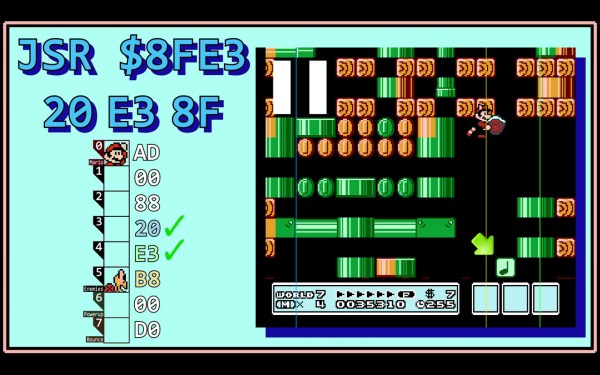
When one buys a computer, it should be expected that the owner can run any code on it that they want. Often this isn’t the case, though, as most modern devices are sold with locked bootloaders or worse. Older technology is a little bit easier to handle, however, but arbitrary code execution on something like an original Nintendo still involves quite a lot of legwork, as [Retro Game Mechanics Explained] shows with the inner workings of Super Mario Brothers 3.

While this hack doesn’t permanently modify the Nintendo itself, it does allow for arbitrary code execution within the game, which is used mostly by speedrunners to get to the end credits scene as fast as possible. To do this, values are written to memory by carefully manipulating on-screen objects. Once the correct values are entered, a glitch in the game involving a pipe is exploited to execute the manipulated memory as an instruction. The instruction planted is most often used to load the Princess’s chamber and complete the game, with the current record hovering around the three-minute mark.

If you feel like you’ve seen something like this before, you are likely thinking of the Super Mario World exploit for the SNES that allows for the same style of arbitrary code execution. The Mario 3 hack, however, is simpler to execute. It’s also worth checking out the video below, because [Retro Game Mechanics Explained] goes into great depth about which values are written to memory, how they are executed as an instruction, and all of the other inner workings of the game that allows for an exploit of this level.

Continue reading “Arbitrary Code Execution Is In Another Castle!”

FPGA Emulates NES Cart; Prototype So Cyberpunk

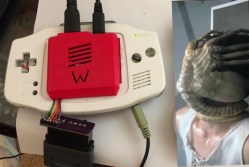
By now, most of us have had some experience getting ROMs from classic video games to run on new hardware. Whether that’s just on a personal computer with the keyboard as a controller, or if it’s a more refined RetrioPie in a custom-built cabinet, it has become relatively mainstream. What isn’t mainstream, however, is building custom hardware that can run classic video games on the original console (translated). The finished project looks amazing, but the prototype blows us away with it’s beauty and complexity.

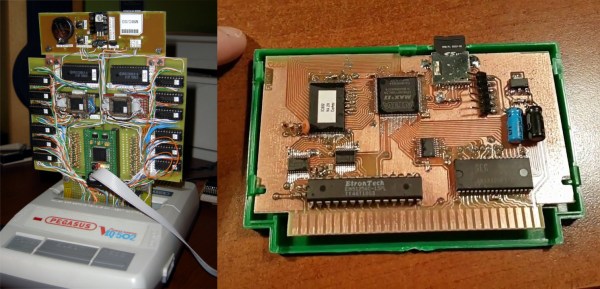
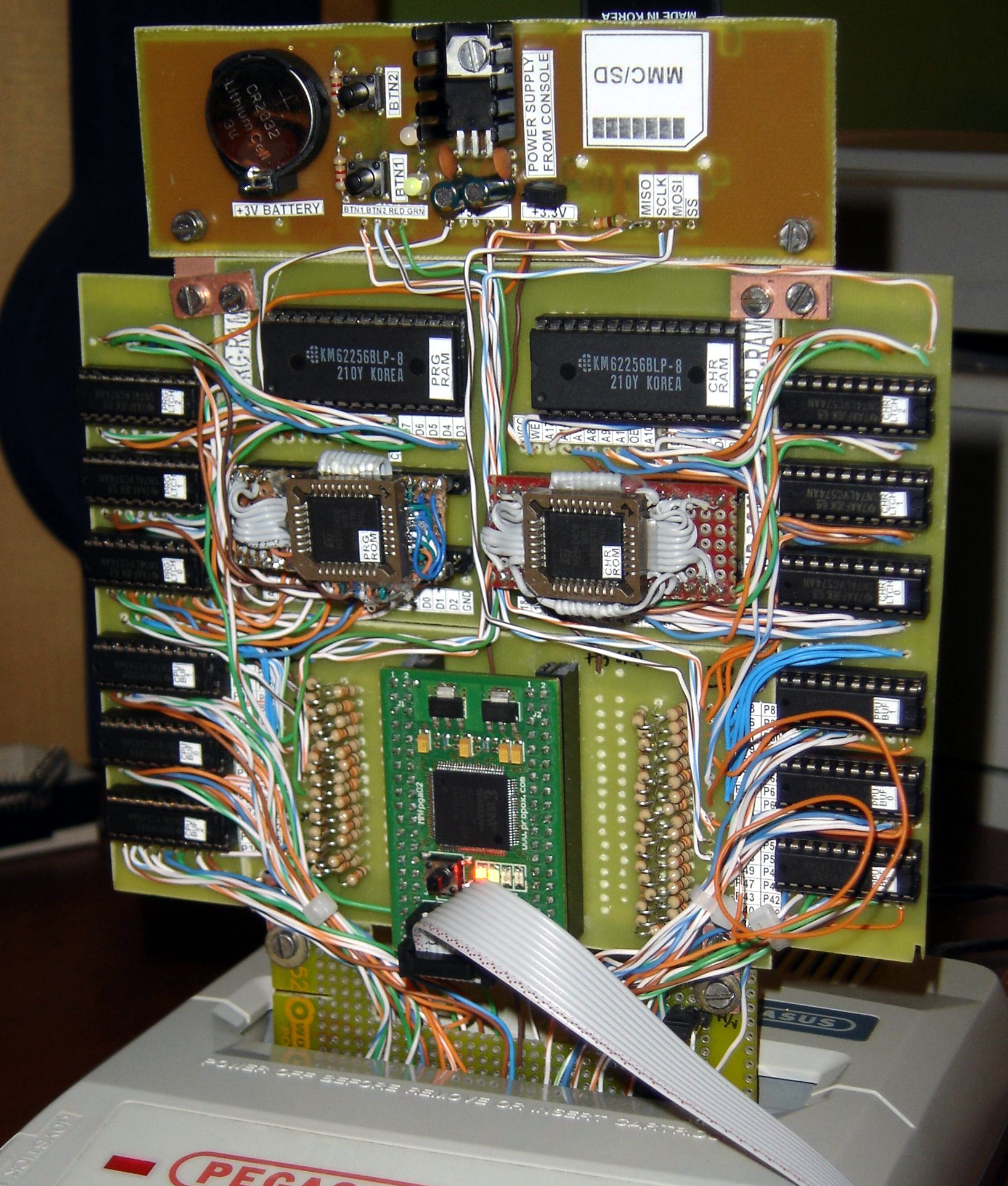
[phanick]’s project is a cartridge that is able to run games on the Polish Famicon clone called the Pegasus. The games are stored on an SD card but rather than run in an emulator, an FPGA loads the ROMs and presents the data through the normal edge-connector in the cartridge slot of the console. The game is played from the retro hardware itself. It takes a few seconds to load in each ROM, but after that the Pegasus can’t tell any difference between this and an original cartridge.

The original prototype shown here was built back in 2012. Since then it’s been through a few iterations that have reduced the size. PCBs were designed and built in-house, and the latest revision also includes a 3D-printed case that is closer to the size of the original Famicon cartridges.

Even if you don’t have an interest in classic video games or emulation, the video below is worth checking out. (Be sure to turn on the subtitles if you don’t speak Polish.) [phanick] has put in a huge amount of time getting all of the details exactly right, and the level of polish shows in the final product. In fact, we’ve featured him before for building his own Famicom clone.

Continue reading “FPGA Emulates NES Cart; Prototype So Cyberpunk”

Printing Nintendo Portables With SLA

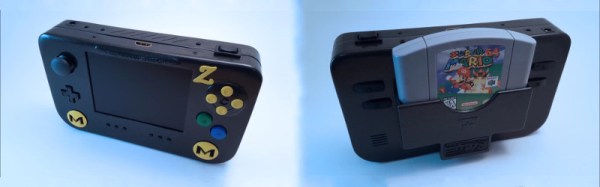
Downing] is no stranger to building portable consoles, employing all manner of techniques in the process. However, when it came time to start on this commission, [Downing] decided to take a different tack – employing a Form 2 SLA printer in this Nintendo 64 portable build.

Modifying home consoles to become portables often involves tricks like Frankencasing – hacking together original factory parts such as controllers, cases, and accessories, and using body filler and a lot of sanding to create a template for vacuum moulding, which then results in a seamless final product. It’s possible to get some really impressive results, but it does limit the builder to relying on existing parts.

By using the Form 2, [Downing] was able to take advantage of the SLA printer’s ability to create parts with good surface finish that would normally require a lot of post-print finishing when 3D printed with more common FDM technology. This was particularly useful as it allowed the creation of custom buttons and small parts that “just fit” – normally such parts are made from stock pieces that are then modified.

The build also features a few other cool features – there’s a breakout box which allows the connection of extra controllers, as well as hosting AV out for hooking up to a television. The breakout box connects to the portable over an HDMI cable. It’s a tidy choice – it’s a standard cable that has an abundance of conductors available so you don’t have to be particularly tricky to get 3 controllers and a few analog signals talking over it.

In the end, [Downing] wouldn’t use SLA printing again for the case itself – the process was too slow and expensive. In this respect, FDM may require more work after printing but it still comes out ahead in terms of time and money. But for small custom parts like buttons and structural brackets, the Form 2 is the machine for the job.

Video after the break.

Continue reading “Printing Nintendo Portables With SLA”

There’s A Mew Underneath The Truck Next To The SS Anne

Before we dig into this, I need to spend a paragraph or two conveying the knowledge of a twelve-year-old in 1996. Of course, most Hackaday readers were twelve at least once, but we’re just going to do this anyway. The payoff? This is an arbitrary-code-execution virus for Pokemon, and maybe the most amazing Game Boy hack of all time.

In the first generation of Pokemon games, there is a spectacularly rare Pokemon. Mew, the 151st Pokemon, could learn every move in the game. It was a psychic type, which was overpowered in the first gen. You could not acquire a Mew except by taking your Game Boy to a special event (or to Toys R Us that one time). If someone on the playground had a Mew, they really only had a GameShark.

There was a mythos surrounding Mew. Legend said if you went to the SS Anne and used Strength to move a truck sprite that appeared nowhere else in the game, a Mew would appear. Due to the storyline of the game, you didn’t have the ability to get to this truck the first time you passed it. However, if you started a new game – thus losing all your progress and your entire roster of Pokemon – you could test this theory out. Don’t worry, you can just trade me all your good Pokemon. I’ll give them back once you have a Mew. Screw you, Dylan. Screw you.

Now the Mew truck trick is real. You can do it on a copy of Red or Blue on an original Game Boy. If this hack existed in 1998, kids would have lost their god damned minds.

The basis for this hack comes from [MrCheeze], who created a ‘virus’ of sorts for the first generation of Pokemon games. Basically, given the ability to manually edit a save file, it is possible to replicate this save file over a Game Link cable. The result is a glitchy mess, but each Pokemon game has the same save file when it’s done.

Combine this virus with arbitrary code execution, and you have something remarkable. [MrCheeze] created a save file that allows you to move the truck next to the SS Anne. When the truck is moved, a Mew appears. It’s exactly what everyone was talking about over the sound of their sister’s Backstreet Boys marathon.

The new ‘Mew Truck virus’ is not as glitchy as the first attempt at a self-replicating save file. In fact, except for the music glitching for a few seconds, nothing appears abnormal about this Pokemon virus. It’s only when the Mew truck trick is attempted does something seem weird, and it’s only weird because we know it shouldn’t happen. Combine the self-replicating nature of this virus, and you have something that would have drawn the attention of Big N. This is a masterpiece of Pokemon-based arbitrary code execution and a hack that may never be equaled.

You can check out the video below.

Continue reading “There’s A Mew Underneath The Truck Next To The SS Anne”