Taking Pokémon On A Walk

Emulating old computers or video game systems isn’t always about recreating childhood nostalgia or playing classics on hardware that doesn’t exist anymore. A lot of the time it can be an excellent way to learn about the mechanics of programming a video game. Plenty of older titles have available source code that anyone can pour over and modify, and one of those is Pokémon Emerald. This was the first Pokémon game that [Inkbox] played, and he added a few modern features to it with this custom ROM file.

The first thing to add to this game was the ability to have one’s Pokémon follow their character around in the overworld map. This is common in later games, but wasn’t yet a feature when Emerald and Ruby first came out. [Inkbox] needed to import sprites from later games into the Emerald game file, convert their color palettes to match the game’s palette, and then get to work on the mechanics. After everything was finished, the Pokémon not only follow the player around the map but are animated, enter and exit their Pokéballs, and even jump off ledges in a believable, 32-bit way.

One of the great things about older games like these is that they’ve been around long enough to have source code or decompiled code available, they often have plenty of documentation, and the platforms they operate on are well-known by now as well. Pokémon Emerald is not alone in this regard; in fact, there is a huge Game Boy Advance homebrew scene that is not too difficult to get involved in.

Continue reading “Taking Pokémon On A Walk”

Building A Poketch Powered By An Apple Watch

In Pokemon Diamond and Pearl and the ensuing modern re-releases, the player is given a computer called a Poketch to assist on their journey. [DistressedOwl] decided to build one for real.

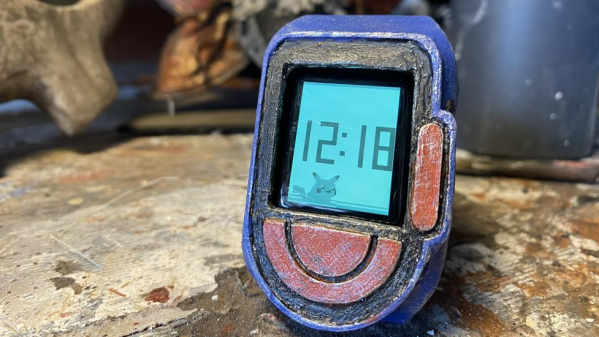
The build starts with an Apple Watch, which provides a capable smartwatch platform and a quality display. It’s then given a snap-on case that’s 3D printed in PLA. [DistressedOwl] decided to use model painting techniques to give the build a worn-in, distressed look, which feels fitting for a watch belonging to a rough-and-tumble Pokemon trainer.

The Apple Watch runs a custom app via Test Flight which mimics the appearance of the in-game Poketch. It includes various screens like a basic map and Pikachu looking melancholy next to a digital watch. Sadly, the dowsing app in the Poketch won’t help you find hidden items on the ground.

It’s a build that reminds us of some great Pip-Boy builds over the years. It would make the perfect addition to a Pokemon cosplay, too. Just don’t forget to take some Pokeballs along too!

A Pokemon Silver Cartridge Made Of Pure Silver

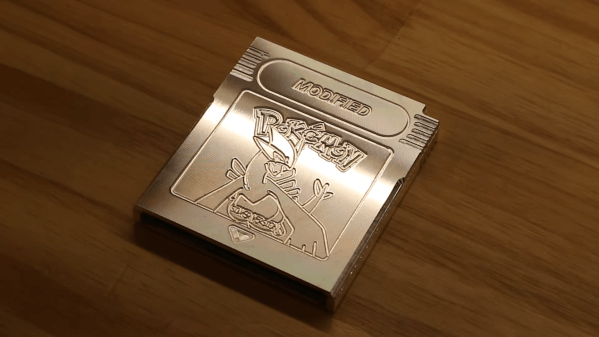
The big problem with Pokemon Silver is that it came in a cartridge made of only-slightly-sparkly grey plastic. [Modified] decided to fix all that, making an all-silver cartridge instead.

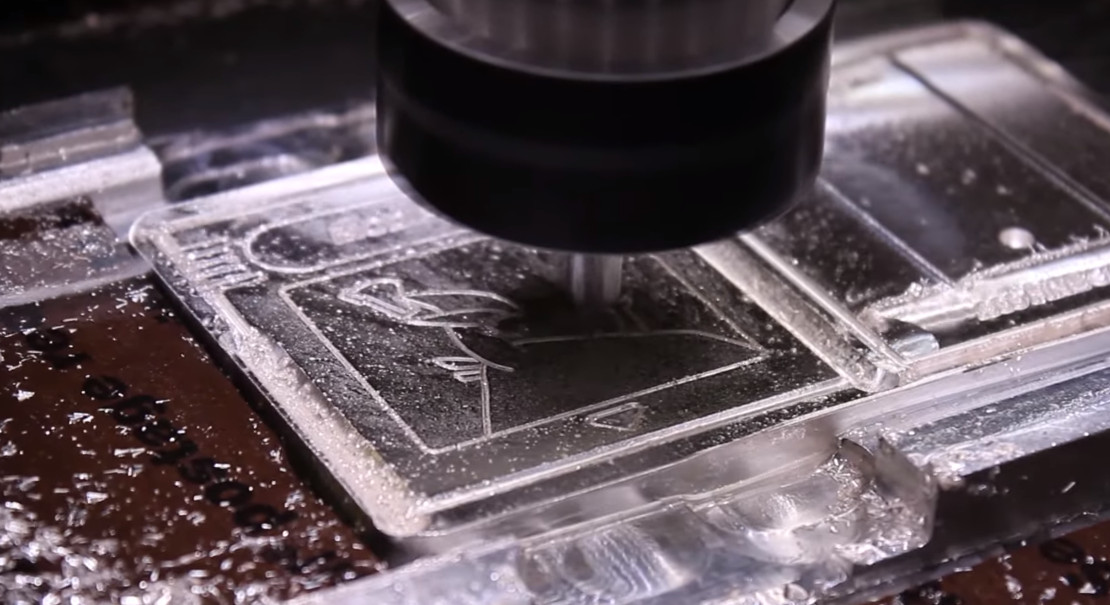
The cartridge was first modeled to match the original as closely as possible, and 3D printed for a fit check. From there, a test cartridge was machined out of a block of aluminium to verify everything was correct. It’s a wise step, given the build relies on a 1-kilogram bar of silver worth roughly $750.

With everything checked and double-checked, machining the silver could go ahead. Every scrap of silver that could be saved from the CNC machining was captured in a box so that it could be recycled. Approximately 28 grams of silver was lost during the process. WD40 was used as a coolant during the machining process, as without it, the silver didn’t machine cleanly. The final cart weighed 164 grams.

It’s not a particularly hard project for an experienced CNC operator, but it is an expensive one. Primary expenses are the cost of the silver bar and the Pokemon cart itself, which can be had for around $50 on the usual auction sites.

However, the “heft and shine” of the finished product is unarguably glorious. Imagine handing that over to a friend to plug into their Game Boy! Just don’t forget to ask for it back. If you’re rich enough to do the same thing with Pokemon Gold or Platinum, don’t hesitate to drop us a line. 

We love a good casemod, and this one reminds us of a brilliant crystal PlayStation 2 from years past.

Continue reading “A Pokemon Silver Cartridge Made Of Pure Silver”

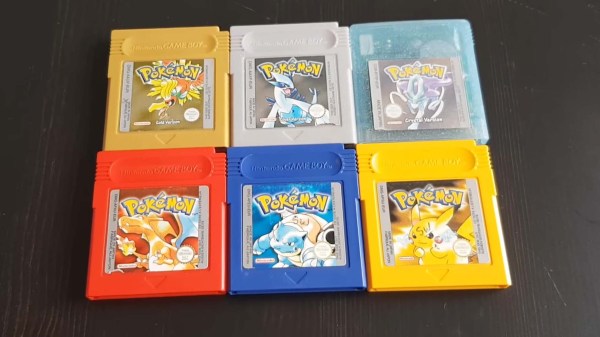
Six GameBoy Pokemon games

Bridging Game Worlds With The ‘Impossible’ Pokémon Trade

Transferring hard-earned Pokémon out of the second generation GameBoy game worlds into the ‘Advance Era’ cartridges (and vice versa) has never been officially supported by Nintendo, however [Goppier] has made these illicit trades slightly easier for budding Pokémon trainers by way of a custom PCB and a healthy dose of reverse engineering.

Changes to the data structure between Generation II on the original GameBoy (Pokémon Gold, Silver and Crystal) and Generation III on the GameBoy Advance (Pokémon Ruby, Sapphire, FireRed, LeafGreen and Emerald) meant that trades between these cartridges was never a possibility – at least not through any legitimate means. In contrast, Pokémon trades are possible between the first and second generation games, as well as from Generation III and beyond, leaving the leap from Gen II to Gen III as an obvious missing link.

Modern players have already overcome this limitation by dumping the cartridge save files onto a PC, at which point any Pokémon could be added or subtracted from the save. Thus, this method relies on self-control as well as the right hardware. [Goppier]’s solution is arguably far more elegant, and requires very little extra hardware. A simple PCB with ports for older and newer GameBoy Game Link Cables is the physical bridge between the generations. An ARM Cortex microcontroller sits between these connections and translates the game data between the old and the new.

The microcontroller is required to translate the data structure between the generations, and seems fit for purpose. Not only does the Pokémon data require conversion, but a few other hacks are needed before the two generations will talk nicely to each other. Pokémon on the GameBoy Advance brought in new features such as representing player movement in the trading rooms (i.e. you can see the other player moving on your screen), which also had to be addressed.

The concern over the legitimacy of trades within the Pokémon community is a curious, yet understandable, byproduct of the multiplayer experience. As an example, modern players have to be wary of ‘hacked’ Pokémon, which can often introduce glitches into their game world following a trade. Apart from these issues, some Pokémon players simply desire genuine Pokémon as part of fostering a fair and enjoyable gaming experience.

This literal bridge between Gen II and Gen III game worlds brings the community tantalizingly close to a ‘legitimate’ means of transferring their Pokémon out of ancient cartridges and into modern games. Could Nintendo one day officially sanction Gen II to Gen III trades with a similar device? Crazier things have happened.

We love our GameBoy hacks here on Hackaday, so why not check out this project that replaces the battery-backed SRAM in your GameBoy games with FRAM?

Continue reading “Bridging Game Worlds With The ‘Impossible’ Pokémon Trade”

Jigglypuff Sensor Breathes CO2 So You Don’t Have To

We’ve seen a lot of environmental monitoring projects here at Hackaday. Seriously, a lot. They usually take the form of a microcontroller, a couple sensors, and maybe a 3D printed case to keep it all protected. They’re pretty similar functionally as well, with the only variation usually coming in the protocol used to communicate their bits of collected data.

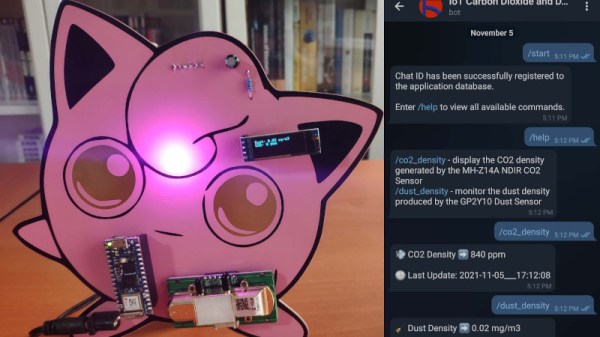
But even when compared with such an extensive body of previous work, this Jigglypuff IoT environmental monitor created by [Kutluhan Aktar] is pretty unusual. Sure, the highlights are familiar. Its MH-Z14A NDIR CO2 sensor and GP2Y1010AU0F optical dust detector are read by a WiFi-enabled microcontroller, this time the Arduino Nano RP2040 Connect, which ultimately reports its findings to the user via Telegram bot. There’s even a common SSD1306 OLED display on the unit to show the data locally. All things we’ve seen in some form or another in the past.

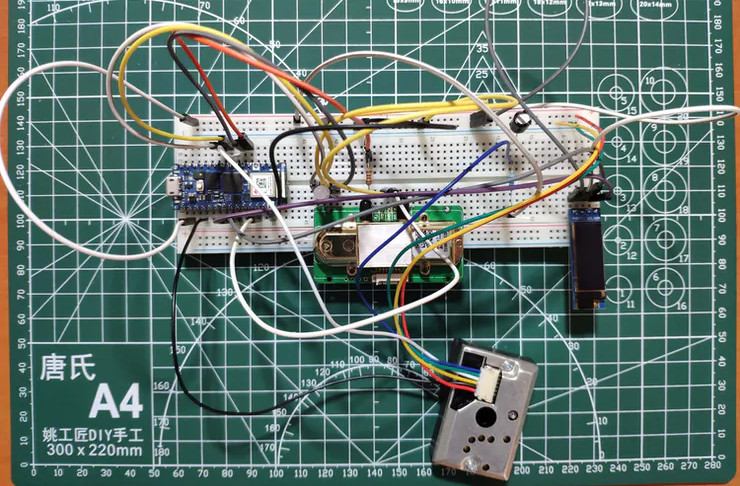
Testing the electronics on a bread board.

So what’s different? Well, it’s all been mounted to a huge Pokémon PCB, obviously. Even if you aren’t a fan of the pocket monsters, you’ve got to appreciate that bright pink solder mask. Honestly, the whole presentation is a great example of the sort of PCB artwork we rarely see outside of the BadgeLife scene.

Admittedly, there’s a lot easier ways to get notified about the air quality inside your house. We’re also not saying that haphazardly mounting your electronics onto a PCB designed to look like a character from a nearly 20+ year old Game Boy game is necessarily a great idea from a reliability standpoint. But if you were going to do something like that, then this project is certainly the one to beat.

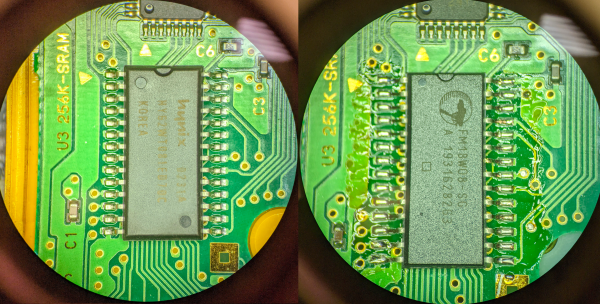
the conversion from hynix SRAM to FRAM on a Pokemon Yellow PCB

Pokemon Time Capsule

The precious Pokemon we spent hours capturing in the early nineties remain trapped, not just by pokeballs, but within a cartridge ravaged by time. Generally, Pokemon games before the GameBoy Advance era had SRAM and a small coin cell to save state as NVRAM (Non-volatile random access memory) was more expensive. These coin cells last 10-15 years, and many of the Pokemon games came out 20 years ago. [9943246367] decided to ditch the battery and swap the SRAM for a proper NVRAM on a Pokemon Yellow cartridge, 23 years later.

The magic that makes it work is a FRAM (ferroelectric random access memory) made by Cypress that is pin-compatible with the 256K SRAM (made by SK Hynix) on the original game cartridge PCB. While FRAM data will only last 10 years, it is a write-after-read process so as long as you load your save file every 10 years, you can keep your Pokemon going for decades. For stability, [9943246367] added a 10k pull-up on the inverted CE (chip enable) pin to make sure the FRAM is disabled when not in use. A quick test shows it works beautifully. Overall, a clever and easy to have to preserve your Pokemon properly.

Since you’re replacing the chip, you will lose the data if you haven’t already. Perhaps you can use [Selim’s] Pokemon Transporter to transport your pokemon safely from the SRAM to the FRAM.

A conventiongoer plays Pokemon on a working Color Game Boy costume.

Convention Plays Pokemon On Giant Color Game Boy Costume

Standard cosplay is fun and all, but what is there for admirers to do but look you up and down and nitpick the details? Interactive cosplay, now that’s where it’s at. [Jaryd Giesen] knows this, and managed to pull together a working color Game Boy costume in a few days.

The original plan was to use a small projector on an arm, like one of those worm lights that helped you see the screen, but [Jaryd] ended up getting a secondhand monitor and strapping it to his chest. Then he took the rest of the build from there. Things are pretty simple underneath all that cardboard: there’s a Raspberry Pi running the RetroPie emulator, a Pico to handle the inputs, and two batteries — one beefy 12,000 mAH battery for the monitor, and a regular power pack for the Pi and the Pico.

As you’ll see in the build and demo video after the break, nearly 100 people stopped to push [Jaryd]’s buttons. They didn’t get very far in the game, but it sure looks like they had fun trying.

Since we’re still in a pandemic, you may want to consider incorporating a mask into your Halloween costume this year. Just a thought.

Continue reading “Convention Plays Pokemon On Giant Color Game Boy Costume”