Slimming The Raspberry Pi Pico With A Hacksaw

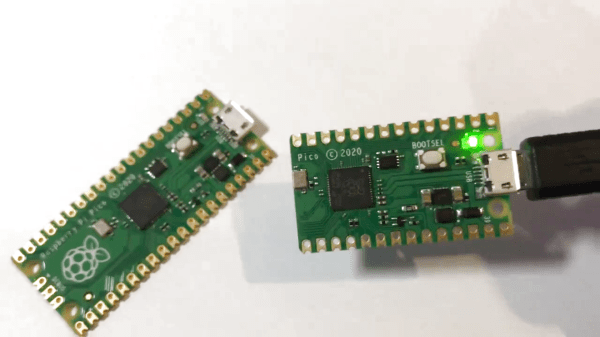
The Raspberry Pi Pico is the hot new star of the microcontroller scene, with its fancy IO hardware and serious name recognition. Based on the RP2040 “Raspberry Silicon” chip, it’s introducing fans of the single-board computer line to a lower level of embedded development. The Pico isn’t big, as its name suggests, but miniaturization is a never ending quest for improvement – so [That Dragon Guy] decided to see if the devboard could be smallified further at a minimum of cost.

While other smaller RP2040 boards are reaching the marketplace, they all cost a lot more than the $4 of the Pico. Thus, [That Dragon Guy] got creative. Having realised that the bottom section of the board was only full of passive traces and pads, he simply hacked it off with a scroll saw and sander. This gives a 30% reduction in footprint, at the cost of some mounting holes, GPIO pins and the debug interface.

In testing, the rest of the board continued to function perfectly well, so we’re calling this a win. It builds on amusing experiments [That Dragon Guy] had done before with the Raspberry Pi B+ which gave us a good chuckle. The Raspberry Pi has always been a minimalist darling, with the Pi Zero of 2015 being a bit of a gamechanger, and much beloved by this writer. Video after the break.

Continue reading “Slimming The Raspberry Pi Pico With A Hacksaw”

The Raspberry Pi Pico As An SDR Receiver

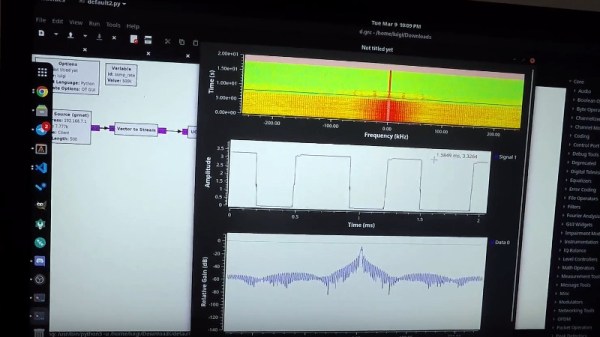
With the profusion of cheap RTL-SDR devices and the ever-reducing prices of more capable SDRs there might seem to be little place left for the low-bandwidth devices we’d have been happy with a decade or more ago, but there’s still plenty to be learned from something so simple. It’s something [Luigi Cruz] shows us with a simple SDR using the analogue-to-digital capabilities of the Raspberry Pi Pico, and since it works with GNU Radio we think it’s rather a neat project. CNX Software have the full story, and and quickly reveal that with its 500k samples per second bandwidth it’s not a machine that will set the SDR world on fire even when pushing Nyquist’s Law to the limit.

So with the exception of time signals and a few Long Wave broadcast stations if you live somewhere that still has them, you’ll need a fliter and receive converter to pull in anything of much use radio-wise with this SDR. But a baseband SDR with a couple of hundred kHz useful bandwidth and easy hackability through GNU Radio for the trifling cost of a Raspberry Pi Pico has to be worth a second look. You can see it in action in the video below the break, and if you’re at a loss for what to do with it take a look at Michael Ossmann and Kate Temkin’s 2019 Superconference talk.

Continue reading “The Raspberry Pi Pico As An SDR Receiver”

High-Altitude Balloon Tracker Does Landing Prediction With Pi Pico

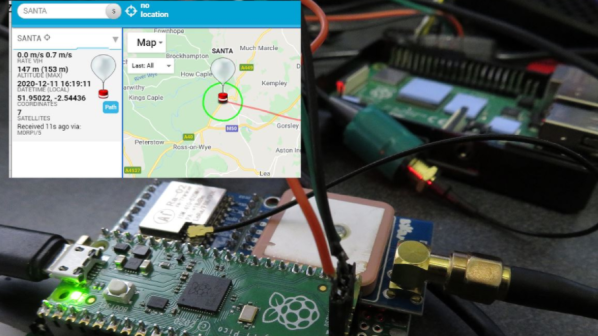
[Dave Akerman]’s ongoing high altitude balloon (HAB) work is outstanding, and we’re all enriched by the fact that he documents his work like he does. Recently, [Dave] wrote about his balloon tracker based on the Raspberry Pi Pico, whose capabilities brought a couple interesting features to the table.

In a way, HAB trackers have a fairly simple job: read sensors such as GPS and constantly relay that data to someone on the ground so that the balloon’s location can be tracked, and the hardware recovered when it ultimately returns to Earth. There are a lot of different ways to do this tracking, and one thing [Dave] enjoys is getting his hands on a new board and making a HAB tracker out of it. That’s exactly what he has done with the Raspberry Pi Pico.

Nothing builds familiarity like actually using a part, and the Pico had some useful things to contribute to a HAB tracker application. For one thing, the Pico has an onboard buck-boost converter that allows it to be powered from a relatively wide voltage range (~1.8 V to 5.5 V), so running it directly from batteries is both possible and desirable from a tracker perspective. But a really useful feature was possible thanks to the large amount of memory on the Pico: dynamic landing prediction.

[Dave] does landing prediction prior to launch based on environmental conditions, but it’s always better if the HAB tracker can also calculate its own prediction based on actual observed events and conditions. A typical microcontroller board like an Arduino doesn’t have enough memory to store the required data upon which to do such calculations, but the Pico does so easily. [Dave]’s new board transmits an updated landing site prediction along with all the rest of the telemetry, making the retrieval process much more reliable.

Want to see a completely different approach to HAB recovery? Check out a payload guided by steerable parachutes.

Lighted Raspberry Pico Stream Deck Is Easy As Pi

Whether it’s for work, school, fun, or profit, nearly everyone is a content-creating video producer these days. And while OBS has made it easier to run the show, commanding OBS itself takes some hotkey finesse. Fortunately, it just keeps getting easier to build macro keyboards that make presenting a breeze. That includes the newest player to the microcontroller game — the Raspberry Pi Pico, which [pete_codes] used to whip up a nice looking OBS stream deck.

Sometimes you just need something that works without a lot of fuss — you can always save the fuss for version two. [pete_codes]’ Pico Producer takes advantage of all those I/O pins on the Pico and doesn’t use a matrix, though that is subject to change in the future. [pete_codes] likes the simplicity of this design and we do, too. You can see it in action after the break.

In reply to the Twitter thread, someone mentions re-legendable keycaps instead of the current 3D-printed-with-stickers keycaps, but laments the lack of them online. All we can offer is that re-legendable Cherry MX-compatible keycaps are definitely out there. Maybe not in white, but they’re out there.

If [pete_codes] wants to go wild in version two and make this macro keeb control much more than just OBS, he may want to leave the labeling to something dynamic, like an e-ink screen.

Continue reading “Lighted Raspberry Pico Stream Deck Is Easy As Pi”

The Raspberry Pi Pico Can’t Run Linux. But It Can Run Fuzix.

The great divide in terms of single board computers lies between those that can run some form of Linux-based distribution, and those that can not. For example the Raspberry Pi Zero is a Linux board, while the Raspberry Pi Pico’s RP2040 processor lacks the required hardware to run everybody’s favourite UNIX-like operating system. That’s not to say the new board from Cambridge can’t run any UNIX-like operating system though, as [David Given] shows us with his Fuzix port.

Fuzix is a UNIX-like operating system for less capable processors, more in the spirit of those original UNIXes than of a modern Linux-based distribution. It’s the work of the respected former Linux kernel developer and maintainer [Alan Cox], and consists of a kernel, a C compiler, and a set of core UNIX-like applications.

The RP2040 port maybe needs a little more work to be considered stable. For now, the multitasking support isn’t quite there and NAND flash support is broken, but it does have SD card support for a proper UNIX filesystem and the full set of core tools. Perhaps most interestingly, it only occupies a single core of the dual-core chip, leaving the possibility of the other core and those PIOs to be used for other purposes.

Fuzix has made the occasional appearance here over the years, but perhaps not as often as it should. If you’d like to learn a little more about the genesis of UNIX, we took a look in 2019.

Header: Michiel Henzler (CC BY-SA 4.0).

Arduino Announces Board Based On Raspberry Silicon

The Raspberry Pi Pico burst onto the microcontroller scene last month with much fanfare, and is already popping up in projects left, right and center. Notable for its high clock speed and exciting IO features, it’s a breath of fresh air in a market slowly weaning itself onto ARM architectures and away from 8-bit staples. Not one to miss out on a slice of the action, Arduino have announced their own upcoming board based on the Pico’s RP2040 chip.

The board is named the Arduino Nano RP2040 Connect, a moniker that’s not just a mouthful but likely to be confused with existing Arduino Nano products. It sports several differences to the Raspberry Pi Pico, namely packing WiFi, Bluetooth, and an IMU on board which should make developing motion-sensitive and IoT projects easier, particularly in cases where the Pico’s flexible IO could be useful.

Naturally, Arduino IDE integration will be a major plus point that gets many makers on board, and we can imagine there will be swift development of libraries leveraging the RP2040’s PIO subsystem. If you still haven’t gotten the low down on the Raspberry Pi Pico yet, though, never fear – our own [Elliot Williams] can tell you everything you need to know!

[Thanks to Darrell Flenniken for the tip, via Tom’s Hardware]

Arducam Now Working With The RPi Pico

The Raspberry Pi Pico came out of absolutely nowhere, and has taken the maker world by storm. At the low, low cost of $4, packing some seriously grunty original silicon, and even available free on the cover of magazines, it’s already got a legion of fans. As with any new popular platform, there’s a scramble to get everything under the sun running on the hardware. Already, ArduCAM is up and running on the Raspberry Pi Pico!

Based on the OV2640 image sensor, the ArduCAM is useful for microcontroller applications thanks to its onboard JPEG encoder. This limits the amount of RAM needed onboard the microcontroller to deal with the images fed from the camera. With the Pico now on the market, the team behind ArduCAM set about writing a library to get everything playing nicely with the SPI camera. It’s available on Github, complete with an example program so you can check everything is functional right out of the box. The easiest way to get up and running is from a Raspberry Pi environment, but the Pico acts as a USB Mass Storage device so can be programmed from virtually anywhere.

We’ll likely see the whole cavalcade of microcontroller bits and pieces ported to the Pico in the coming months, along with plenty of interesting uses of the special IO features. Video after the break.

Continue reading “Arducam Now Working With The RPi Pico”