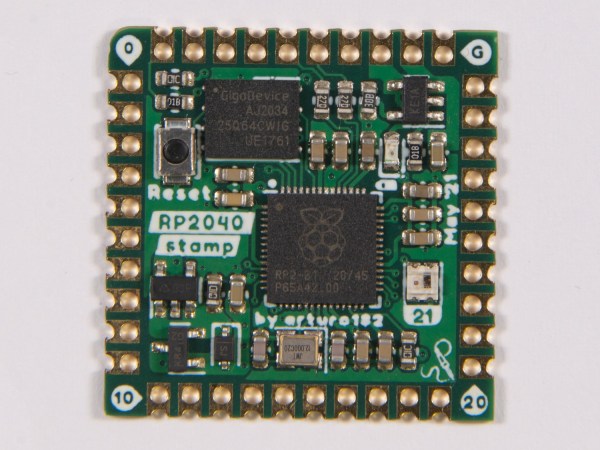
the RP2040 stamp

Putting The RP2040 On A Stamp

In the electronics world, a little one-inch square board with castellated edges allows a lot of circuitry to be easily added in a small surface area. You can grab a prepopulated module, throw it onto your PCB of choice, and save yourself a lot of time routing and soldering. This tiny Raspberry Pi 2040 module from [SolderParty] ticks all those boxes.

With all 30 GPIO broken out, 8MB of onboard flash, and a NeoPixel onboard, you have plenty to play with on top of the already impressive specs of the RPi2040. Gone are the days of in-circuit programmers, and it uses a UF2 bootloader to make it easy B to transfer new images over USB. Rust, MicroPython, Arduino, and the PicoSDK are all development options for code. All the KiCad files, BOM, schematics, and firmware are up on GitHub under a CERN license for your perusal pleasure. They’ve helpfully included footprints as well as a reference carrier board design.

It is a handy little project that might be good to keep in mind or just use as a reference design for your efforts. We have a good overview of the RPi2040 from an STM perspective. If you’re curious about what you could even use this little stamp for, why not driving an HDMI signal?

Hackaday Links Column Banner

Hackaday Links: January 23, 2022

When Tonga’s Hunga-Tonga Hunga-Ha’apai volcano erupted on January 15, one hacker in the UK knew just what to do. Sandy Macdonald from York quickly cobbled together a Raspberry Pi and a pressure/humidity sensor board and added a little code to create a recording barometer. The idea was to see if the shock wave from the eruption would be detectable over 16,000 km away — and surprise, surprise, it was! It took more than 14 hours to reach Sandy’s impromptu recording station, but the data clearly show a rapid pulse of increasing pressure as the shockwave approached, and a decreased pressure as it passed. What’s more, the shock wave that traveled the “other way” around the planet was detectable too, about seven hours after the first event. In fact, data gathered through the 19th clearly show three full passes of the shockwaves. We just find this fascinating, and applaud Sandy for the presence of mind to throw this together when news of the eruption came out.

Good news for professional astronomers and others with eyes turned skyward — it seems like the ever-expanding Starlink satellite constellation isn’t going to kill ground-based observation. At least that’s the conclusion of a team using the Zwicky Transient Facility (ZTF) at the Palomar Observatory outside San Diego. ZTF is designed to catalog anything that blinks, flashes, or explodes in the night sky, making it perfect to detect the streaks from the 1,800-odd Starlink satellites currently in orbit. They analyzed the number of satellite transients captured in ZTF images, and found that fully 20 percent of images show streaks now, as opposed to 0.5 percent back in 2019 when the constellation was much smaller. They conclude that at the 10,000 satellite full build-out, essentially every ZTF image will have a streak in it, but since the artifacts are tiny and well-characterized, they really won’t hinder the science to any appreciable degree.

Speaking of space, we finally have a bit of insight into the causes of space anemia. The 10% to 12% decrease in red blood cells in astronauts during their first ten days in space has been well known since the dawn of the Space Age, but the causes had never really been clear. It was assumed that the anemia was a result of the shifting of fluids in microgravity, but nobody really knew for sure until doing a six-month study on fourteen ISS astronauts. They used exhaled carbon monoxide as a proxy for the destruction of red blood cells (RBCs) — one molecule of CO is liberated for each hemoglobin molecule that’s destroyed — and found that the destruction of RBCs is a primary effect of being in space. Luckily, there appears to be a limit to how many RBCs are lost in space, so the astronauts didn’t suffer from complications of severe anemia while in space. Once they came back to gravity, the anemia reversed, albeit slowly and with up to a year of measurable changes to their blood.

From the “Better Late Than Never” department, we see that this week that Wired finally featured Hackaday Superfriend Sam Zeloof and his homemade integrated circuits. We’re glad to see Sam get coverage — the story was also picked up by Ars Technica — but it’s clear that nobody at either outfit reads Hackaday, since we’ve been featuring Sam since we first heard about his garage fab in 2017. That was back when Sam was still “just” making transistors; since then, we’ve featured some of his lab upgrades, watched him delve into electron beam lithography, and broke the story on his first legit integrated circuit. Along the way, we managed to coax him out to Supercon in 2019 where he gave both a talk and an interview.

And finally, if you’re in the mood for a contest, why not check out WIZNet’s Ethernet HAT contest? The idea is to explore what a Raspberry Pi Pico with Ethernet attached is good for. WIZNet has two flavors of board: one is an Ethernet HAT for the Pico, while the other is as RP2040 with built-in Ethernet. The good news is, if you submit an idea, they’ll send you a board for free. We love it when someone from the Hackaday community wins a contest, so if you enter, be sure to let us know. And hurry — submissions close January 31.

New Part News: Raspberry Pi Cuts Out The Middleman

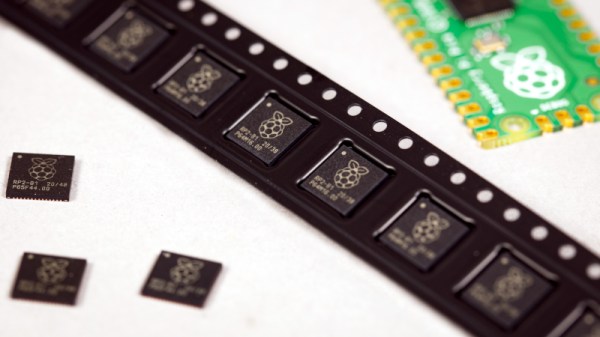
Raspberry Pi has just announced that they’ll be selling their RP2040 microcontroller chips by the reel, directly to you, at a decent discount.

About a year ago, Raspberry Pi released its first piece of custom silicon, the RP2040 microcontroller. They’ve have been selling these chips in bulk to selected customers directly, but have decided to open up the same deals to the general public. If you’re looking for 500 chips or more, you can cut out the middleman and save some serious dough.

Because the RP2040 was a clean-slate design, it uses a relatively modern production process that yields many more processors per silicon wafer, and it has been essentially spared from the chip crisis of 2020-2021. According to CEO Eben Upton, they’ve sold 1.5 million in a year, and have wafers in stock for 20 million more. You do the math, but unless you’re predicting the chip shortage to last in excess of 12 years, they’re looking good.

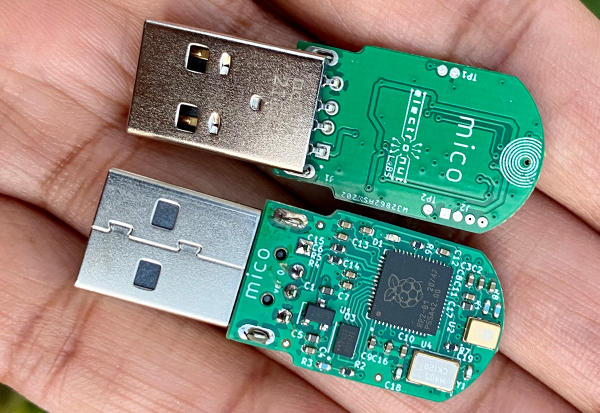
A pair of RP2040-based USB microphones

Mico Is A USB Microphone Based On A Pi Pico

When [Mahesh Venkitachalam] was experimenting with machine learning for audio applications on a Raspberry Pi, he found himself looking for a simple USB microphone. A cheap one was easy to find, but the sound quality and directionality left much to be desired. A large, studio-quality mic would be overkill, so [Mahesh] decided to simply build exactly what was needed: a compact, yet high-quality USB microphone that he called Mico.

The sensing device is a MEMS microphone that outputs a pulse density modulated (PDM) signal. There are chips available to directly interface such a microphone to a USB port, but [Mahesh] found them difficult to work with and therefore settled on something he knew already: the Raspberry Pi Pico platform. Luckily, someone had already figured out how to read out a microphone and present a USB device to a PC, so all that was needed was to put all the bits together into a convenient form factor.

The great thing about the Pico platform is that its main controller chip, the RP2040, is available as a separate component. [Mahesh] designed a sleek little PCB that holds the RP2040 along with the MEMS microphone and a USB connector. The end result looks tidy enough that it might have come out of a mass-produced gizmo. Those don’t usually come with full schematics and source code, but the Mico does: everything is available on its GitHub page for anyone to re-use and improve.

You can judge the sound quality for yourself in the video embedded below. If you like DIY USB microphones, you’re in luck: we’ve featured one based on an STM32 as well as a beautiful recreation of a studio-quality mic.

Continue reading “Mico Is A USB Microphone Based On A Pi Pico”

A Trackball So Good You Can’t Buy It

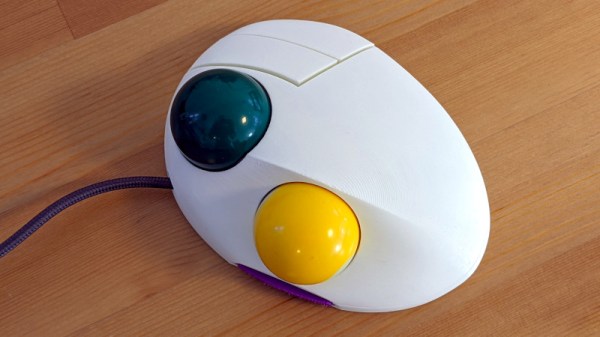
The projects we feature on Hackaday are built to all standards, and we’d have to admit that things have left our own benches as bundles of wire and tape. Sometimes we see projects built to such a high standard that we’re shocked that they aren’t a high-end manufactured product, such as [jfedor2]’s two-ball trackball project. It combines a pair of billiard balls and a couple of buttons with a beautifully-designed 3D-printed case that looks for all the world as though it came from a premium peripheral brand.

Inside are a pair of PMW3360 optical sensors on PCBs mounted with a view into the billiard ball sockets, and for which the brains come courtesy of an RP2040 microcontroller. There are five PCBs in all, each having a set of purpose-built stand-offs to hold it. The result appears to be about as good a trackball as you’d hope to buy, except of course that you can’t. All the files to make your own are in the GitHub repository though, so all is not lost.

Over the years we’ve brought you a variety of trackball designs, including at least one other build using a billiard ball.

Prepare For Wildfire Season With An Air Quality Monitor

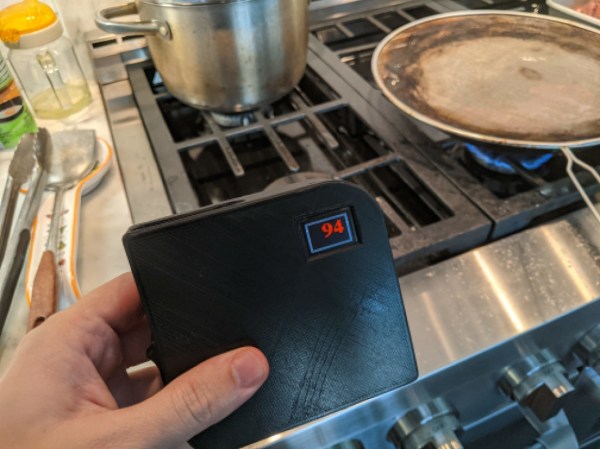
For some reason, wildfire seasons in Australia, North America, and other places around the world seem to happen more and more frequently and with greater and greater fervor. Living in these areas requires special precautions, even for those who live far away from the fires. If you’re not sure if the wildfires are impacting your area or not, one of the tools you can build on your own is an air quality meter like [Costas Vav] shows us in this latest build.

The air quality indicator is based around an Adafruit Feather RP2040 which is in turn based on the 32-bit Cortex M0+ dual core processor. This makes for a quite capable processor in a small package, and helps accomplish one of the design goals of a rapid startup time. Another design goal was to use off-the-shelf components so that anyone could easily build one for themselves, so while the Feather is easily obtained the PMS5003 PM2.5 air quality sensor needed to be as well. From there, all of the components are wrapped up in an easily-printed enclosure and given a small (and also readily-available) OLED screen.

[Costas Vav] has made all of the files needed to build one of these available, from the bill of materials to the software running on the Pi-compatible board to the case designs. It’s a valuable piece of technology to have around even if you don’t live in fire-prone areas. Not only can wildfire smoke travel across entire continents but simple household activities such as cooking (especially with natural gas or propane) can decimate indoor air quality. You can see that for yourself with an army of ESP32-based air quality sensors.

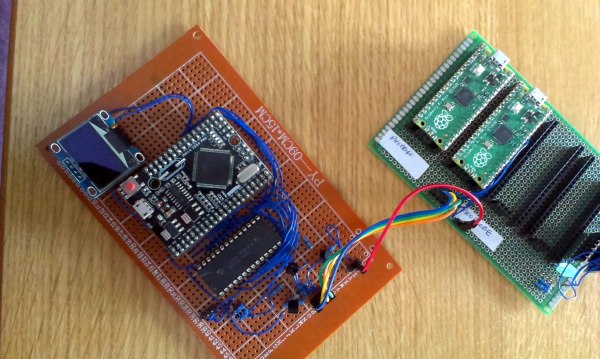
Raspberry Pi Pico Used As A Transputer

You can’t fake that feeling when a $4 microcontroller dev board can stand in as cutting-edge 1980s technology. Such is the case with the working transputer that [Amen] has built using a Raspberry Pi Pico.

For a thorough overview of the transputer you should check out [Jenny List’s] longer article on the topic but boiled down we’re talking about a chip architecture mostly forgotten in time. Targetting parallel computing, each transputer chip has four serial communication links for connecting to other transputers. [Amen] has wanted to play with the architecture since its inception. It was expensive back then and today, finding multiple transputers is both difficult and costly. However, the RP2040 chip found on the Raspberry Pi Pico struck him as the perfect way to emulate the transputer design.

The RP2040 chip on the Pico board has two programmable input/output blocks (PIOs), each with four state machines in them. That matches up perfectly with the four transputer links (each is bi-directional so you need eight state machines). Furthermore, the link speed is spec’d at 10 MHz which is well within the Pico’s capabilities, and since the RP2040 runs at 133 MHz, it’s conceivable that an emulated core can get close to the 20 MHz top speed of the original transputers.

Bringing up the hardware has been a success. To see what’s actually going on, [Amen] sourced some link adapter chips (IMSC011), interfacing them through an Arduino Mega to a computer to use the keyboard and display. The transputer architecture allows code to be loaded via a ROM, or through the links. The latter is what’s running now. Future plans are to figure out a better system to compile code, as right now the only way is by running the original INMOS compiler on DOS in a VM.

Listen to [Amen] explain the project in the first of a (so far) six video series. You can find the links to the rest of those videos on his YouTube channel.

Continue reading “Raspberry Pi Pico Used As A Transputer”