Hackerspaces Are Hard: Insurance

Do you dream of opening a hackerspace, makerspace, or co-working space? Maybe it’s in the works and you’re already scoping out locations, intoxicated by visions of all the projects that will emerge from it. Here’s a sobering thought: makerspaces are a great big pile of risk. If the doors of your ‘space are already open, perhaps you’ve come to realize that the initial insurance policy you signed doesn’t really fit the needs of your particular creative paradise. Even if it does, the protection you need will change as you acquire new toys.

So why should you even get insurance? For one thing, your landlord will probably require it. If you own the building, you should insure it to protect yourself and anyone who uses the space. Do it for the same reason you’d insure a car, your house, or your collection of vintage pinball machines: to mitigate risk. It takes a lot of hard work to open a makerspace, perform the day-to-day operations, and keep it growing and getting better. Whenever the unthinkable happens, insurance will protect your investment as well as the people who make it a great place to be.

In researching this article, I contacted several well-established makerspaces in the United States as well as most of the major insurance providers to get both sides of the story. My intent was not to make a how-to guide, but to simply explore the topic and provide a view of the process and the struggle.

Continue reading “Hackerspaces Are Hard: Insurance”

Never Gonna Give Up Free WiFi

Our conscience almost prevented us from posting this one. Almost.

What do people all around the world want most? Free WiFi. And what inevitable force do they want to avoid most, just after death and taxes? Rick Astley. As a getting-started project with the ESP8266, Hackaday.io user [jaime] built a “free WiFi portal” that takes advantage of people’s deepest desires. Instead of delivering sweet, high-bandwidth connectivity, once you click through the onerous terms and conditions, it delivers you a looped GIF with background music.

And all of this on $4 worth of hardware, with firmware assembled in the cloud and easily available to anyone. We live in a truly frivolous glorious age.

Digging through our archives, we found a number of Rickroll posts that we’d rather forget, but this steam-powered record player bears a second look.

Pokemon Go GPS Cheat (If You Don’t Fear Getting Banned)

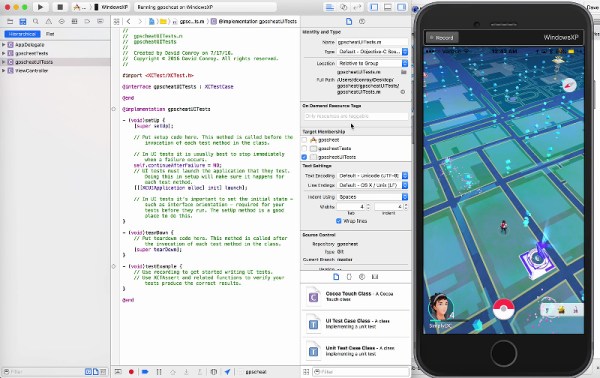
Pokemon Go inherits a certain vulnerability to GPS location spoofing from it’s predecessor Ingress, but also the progress that has been made in spoof detection. Since taking advantage of a game’s underlying mechanisms is part of the winner’s game, why not hook up your smartphone to Xcode and see if you can beat Niantic this time? [Dave Conroy] shows you how to play back waypoints and activate your Pokemon Go warp drive.

Continue reading “Pokemon Go GPS Cheat (If You Don’t Fear Getting Banned)”

Hackaday Prize Entry: What The Flux

Electromagnetism is the most difficult thing teach. Why is electromagnetism hard to teach? Well, when you’re asking a ‘why’ question (obligatory Richard Feynman video)

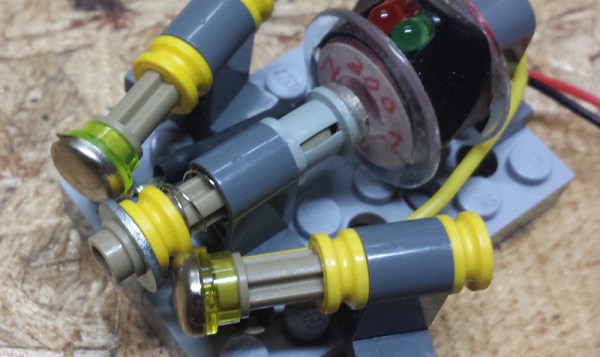
[Adam Smallcomb] might not be able to explain electromagnetism with perfect clarity, but he does have an idea to give students a hands-on feel for electrons and magnets. He’s building an Electromagnetic Teaching Aid that turns 30 gauge wire, springs, Lego, and bits of metal into a toolset for understanding magnets, solenoids, current, and magnetic fields.

The devices explained via [Adam]’s toolkit include a DC motor, stepper motor, speaker, solenoid, relay, transformer, microphone, and generator. That’s not to say [Adam] is building all these devices – a DC motor is just a generator in reverse, a relay is a solenoid with more electrical connections, and everything in this toolkit is basically just wire and magnets.

So far, [Adam] has a bunch of interesting applications for magnets, wire, and Lego including a DIY stepper motor and a nifty little tool that measures magnetic flux with a Hall effect sensor. Will it teach schoolkids electromagnetism? Very few things could, but at least this little toolkit will allow students to intuit electromagnetism a little better.

Soviet-Era Tank Gets The 3D Printed Treatment

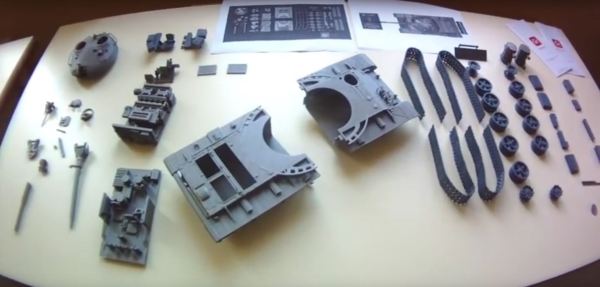
3D printers are celebrated for their capacity to replace missing or broken parts. How about an entire T-62 tank?

Now hold on a second — this is only a model replica. It is, however another expression of the myriad uses for 3D printers. Designed in Maya and requiring almost three weeks to print all 62 parts from about 70 meters of PLA filament.  The assembly is not terribly involved, made easier by printing a few large sections such as the crew section and hull while the parts don’t get much smaller than the turret hatches. Nonetheless, he final product is about as true to life as you can get when designing the parts from scratch.

Continue reading “Soviet-Era Tank Gets The 3D Printed Treatment”

[CNLohr]’s Glass PCB Fabrication Process

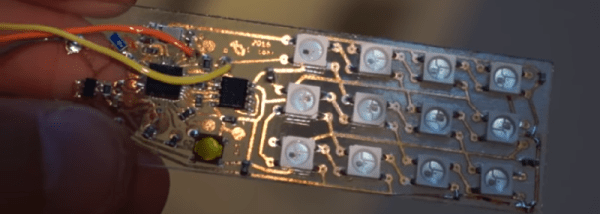
One of [CNLohr]’s bigger claims to fame is his process for making glass PCBs. They’re pretty much identical to regular, fiberglass-based PCBs, but [CNLohr] is building circuits on microscope slides. We’ve seen him build a glass PCB LED clock and a Linux Minecraft Ethernet thing, but until now, [CNLohr]’s process of building these glass PCBs hasn’t been covered in the depth required to duplicate these projects.

This last weekend, [CNLohr] put together a series of videos on how he turns tiny pieces of glass into functional circuits.

At the highest level of understanding, [CNLohr]’s glass PCBs really aren’t any different from traditional homebrew PCBs made on copper clad board. There’s a substrate, and a film of copper that is etched away to produce traces and circuits. The devil is in the details, and there are a lot of details for this build. Let’s dig deeper.

Continue reading “[CNLohr]’s Glass PCB Fabrication Process”

ArduCAM Introduces A Third Party Raspberry Pi

There are hundreds of ARM-based Linux development boards out there, with new ones appearing every week. The bulk of these ARM boards are mostly unsupported, and in the worst case they don’t work at all. There’s a reason the Raspberry Pi is the best-selling tiny ARM computer, and it isn’t because it’s the fastest or most capable. The Raspberry Pi got to where it is today because of a huge amount of work from devs around the globe.

Try as they might, the newcomer fabricators of these other ARM boards can’t easily glom onto the popularity of the Pi. Doing so would require a Broadcom chipset. Now that the Broadcom BCM2835-based ODROID-W has gone out of production because Broadcom refused to sell the chips, the Raspberry Pi ecosystem has been completely closed.

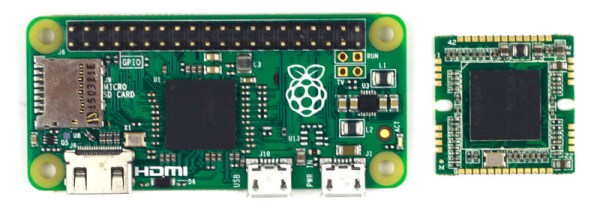
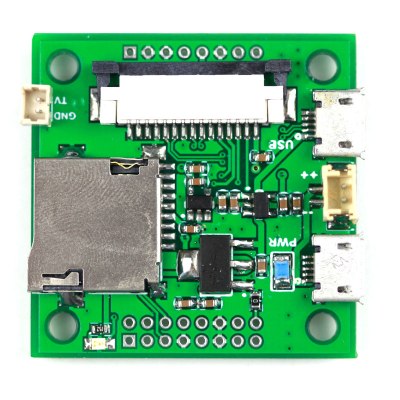
Things may be changing. ArduCAM has introduced a tiny Raspberry Pi compatible module based on Broadcom’s BCM2835 chipset, the same chip found in the original Raspberry Pis A, B, B+ and Zero. This module is tiny – just under an inch square – and compatible with all of the supported software that makes the Raspberry Pi so irresistible.

nano-rpi-cmio-backAlthough this Raspberry Pi-compatible board is not finalized, the specs are what you would expect from what is essentially a Raspberry Pi Zero cut down to a square inch board. The CPU is listed as, “Broadcom BCM2835 ARM11 Processor @ 700 MHz (or 1GHz?)” – yes, even the spec sheet doesn’t know how fast the CPU is running – and RAM is either 256 or 512MB of LPDDR2.



There isn’t space on the board for a 2×20 pin header, but a sufficient number of GPIOs are broken out to make this board useful. You will fin a micro-SD card slot, twin micro-USB ports, connectors for power and composite video, as well as the Pi Camera connector. This board is basically the same size as the Pi Camera board, making the idea of a very tiny Linux-backed imaging systems tantalizingly close to being a reality.

It must be noted that this board is not for sale yet, and if Broadcom takes offense to the project, it may never be. That’s exactly what happened with the ODROID-W, and if ArduCAM can’t secure a supply of chips from Broadcom, this project will never see the light of day.