Reverse Engineering Apple’s Lightning Connector

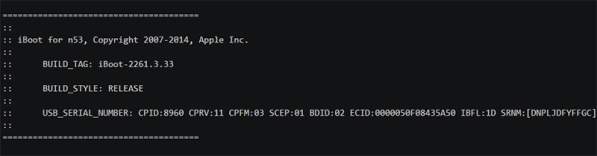
Introduced with the iPhone 5 nearly two and a half years ago, Apple’s Lightning connector has stymied the incredible homebrew electronics scene that was previously accustomed to the larger, older, better documented, and more open 30-pin connector. Now, finally, the protocols inside the Apple Lightning connector have been broken. We’re still a ways off from a Lightning breakout board, but this is the first proof that a serial console can be obtained through a Lightning connector. That’s the first step to totally owning an iDevice, and this is how all those exploits will start.

[Ramtin Amin] began the teardown of the Lightning connector began as most reverse engineering tasks should – looking at the patents, finding a source for the connectors, and any other products that use similar hardware. [Ramtin] found a Lightning to Serial converter powered by an STM32 microcontroller. Disassembling the firmware and looking at the output on a logic analyzer, [Ramtin] figured out part of the protocol, most of the wiring, and after some research, schematics for how an until-now unidentified chip in Lightning-enabled iProducts was wired.

The chip in question is colloquially known as the Tristar, and more accurately as a CBTL1608A1. During the teardown craze of the iPhone 5 launch, this chip was frequently identified as a DisplayPort Multiplexer. It is a mux, but not for DisplayPort – it’s only to connect the accessory (Lightning) UART, debug UART, baseband, SoC, and JTAG. This is the key to the castle, and being able to get through this chip means we can now own our iDevices.

The chip is an incredibly small BGA affair that [Ramtin] desoldered, reflowed onto a breakout board, and connected to an STM32 Discovery board. Using the techniques he used with other Lightning-enabled hardware, [Ramtin] was able to connect his iPhone and ever so slightly peek his head into the inner workings of his device.

It’s not complete control of an iDevice yet, but this is how all those future exploits will start. [Ramtin] uploaded a short video as a proof of concept, you can check that out below.

Continue reading “Reverse Engineering Apple’s Lightning Connector”

Bill’s Arduino

Pokemon is a great game by itself, but when you realize that not all of the ‘mon are available in one game, trading is required for completion, and some pokemon aren’t available without either hacking or going to a Toys ‘R Us in 1997, you start to see how insidious this game can be. Figuring he could finally complete the game with an Arduino, [Pepijn] decided to build a pokemon storage system.

This build was inspired by an earlier post that also spoofed trades. Instead of building this project around a high-power micro, [Pepijn] decided to use an Arduino. The protocol Game Boys use to communicate with each other is extremely well documented, although that’s only half the battle. Each game using the link cable used specialized data structures for transfer, and after grepping through a disassembled Pokemon ROM,  [Pepijn] figured out how everything worked.

The completed hardware keeps one Pokemon in the EEPROM of an Arduino. It’s not very fast if you want to catch all 151 Pokemon in the Gen 1 games, but any way you look at it, you’re going to be catching a lot of Magikarp anyway.

An Adventure Into Android Makes The VIC-20 Speak

History and [Bil Herd] teaches us that Commodore begged, borrowed, or stole the engineers responsible for the Speak & Spell to add voice synthesis to a few of the computers that came after the C64. This didn’t quite work out in practice, but speech synthesis was something that was part of the Commodore scene for a long time. The Votrax Type ‘n Talk was a stand-alone speech synthesizer that plugged into the expansion port of the VIC-20. It was expensive, rare, but a few games supported it. [Jan] realized the state of speech synthesis has improved tremendously over the last 30 years, and decided to give his VIC a voice with the help of a cheap Android phone.

A few VIC-20 games, including [Scott Adams] adventure games, worked with the Votrax speech synthesizer by sending phonemes as text over the expansion port. From there, the Votrax would take care of assembling everything into something intelligible, requiring no overhead on the VIC-20. [Jan] realized since the VIC is just spitting out characters for each phoneme, he could redirect those words to a better, more modern voice synthesizer.

A small Bluetooth module was wired up to the user port on the VIC, and this module was paired with a cheap Android smartphone. The smartphone receives the serial stream from an adventure game, and speaks the descriptions of all the scenes in these classic adventure games.

It’s a unique experience judging from the video, but the same hardware and software can also be added to any program that will run on the VIC-20, C64, and C128. Video below.

Continue reading “An Adventure Into Android Makes The VIC-20 Speak”

Teletext On A Raspi With Zero Additional Parts

Way back in the 70s, the UK and BBC rolled out teletext – an information retrieval service that’s much closer to the ‘television screens connected to computers the size of a room’ popularized by 1960s futurists than the Internet and world wide web. For about 30 years, teletext was one of the most reliable means of information distribution until it was quietly shelved with the rollout of digital television.

Playing with dead protocols is fun, though, and since the Raspberry Pi has an analog video out, [Alistair] thought it would be fun to turn his Pi into a teletext generator and display.

This isn’t [Alistair]’s first teletext rodeo; earlier he built an add-on board for the Raspi that uses an AVR and an LM1881 video sync separator to mux the video output of a Raspi with teletext signals. The new build does away with this completely, allowing any Raspberry Pi to generate and display information from a teletext service. Right now there are two demos, a Raspi status display that shows the CPU frequency, usage, memory, and temperature. There’s also a ‘clock cracker’ with a picture of Tux that should help diagnose reception issues.

All the code is available on the project’s github, although [Alistair] hasn’t released the scripts to output teletext pages captured from broadcast signals years ago.

Continue reading “Teletext On A Raspi With Zero Additional Parts”

A Haptic Bracelet For Physical Computing

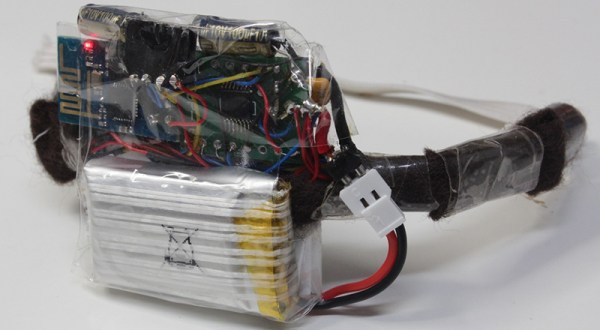
[Tinkermax] has been reading about the Internet of Things and wearable computing and decided it was time for him to have a go at building a device that turned computing physical. The result is a vibrating wristband that connects his sense of touch to the Internet.

The electronics for this haptic wristband are a mix of old and new technology. The radio and microcontroller come from an ESP-8266 module that was programmed with [Mikhail Grigorev]’s unofficial SDK. The mechanics for the wrist-mounted computer consist of six pager motors mounted around the wrist. These are driven somewhat ingeniously by a TLC5917 LED driver chip. This meant the ESP would only need to use two of its GPIOs to control six motors.

Right now the software is simple enough; just a web page, a few buttons, and the ability to buzz any of the pager motors on the wrist band over the Internet. Now it’s just a question of making this wearable useful, but connecting each pager motor to different notifications – a new email, a new SMS, or some emergency on the Internet – should be pretty easy.

Video below.

Continue reading “A Haptic Bracelet For Physical Computing”

The Modular Bench Power Supply To Rule Them All

Right now, [The Big One] is using an ATX power supply as a bench power supply for all his electronics projects. It works, but it’s not ideal. The next step up from a power supply from an old computer is, in order, one of those Chinese deals on Amazon, a used HP supply, or for the very cool people among us, building your own. [The Big One] is very, very cool and he’s building the modular bench supply to rule them all.

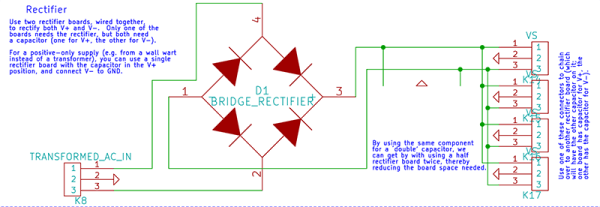
This is not your $100 china special power supply that [The Big One] would have to buy again in a few months. Inside this massive power supply is a massive transformer and rectifier that fans out to multiple power supply modules. The modules themselves will be based on an OPA548 that will be able to supply up to 3A with current limiting.

Each of these channels will be controlled by an ATMega32u4, with all the fancy stuff you’d expect from the ultimate supply; USB for setting voltage, current, and logging data, a nice LCD character display, and it’s surprisingly cheap; just about $100 for the transformer, and about $50 for each module.

It’s shaping up to be a great build, and with all the features, a power supply that would also make a great kit. If you have any input you’d like [The Big One] to hear, let him know on the project page.

Tindie, The Etsy And Yelp For Electronics

For one reason or another, Tindie has become known as the Etsy for DIY electronics, tinkering, and all things that are regularly featured on Hackaday. Now [Emile] over at Tindie is tackling another problem faced by homebrew electronic wizards: finding good middlemen, board houses, places that do assembly, and machinists. The answer to that is Tindie Biz, something that [Emile] is calling the ‘Yelp for electronics.’

[Emile], the owner and creator of Tindie used to work for Yelp, something that got him more than a few “boo”s at last week’s Hackaday Omnibus Launch Party. Despite the community’s inexplicable hatred of Yelp, [Emile] actually learned a lot; verification is the ultimate problem of user-submitted reviews, and his solution to that problem is to put proof of a transaction in with the review, lest Tindie Biz fall into a disarray of spam and astroturfing.

Already there are over 1,400 manufacturers on Tindie Biz, but [Emile] said right now, his new manufacturer review site needs input from DIYers; the real value is in getting people who have done business with manufacturers around the globe to submit reviews. It needs reviewers, and that’s where you come in. It’s all free, and like most good ideas, something that makes you say, ‘I should have thought of that first.’