Handheld Console Build-off

gc

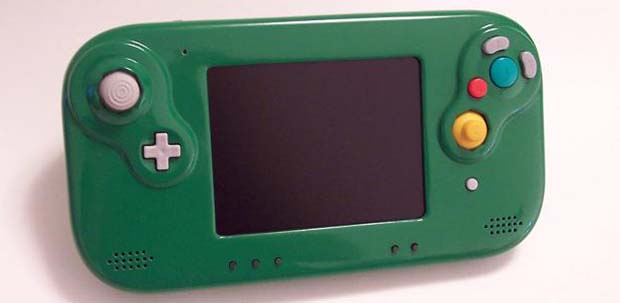
The above pic isn’t a new Wii U controller from Nintendo – it’s the product of the 2013 Portable Build-Off Challenge over at the Made By Bacteria forums. Every year the Bacman forums hold a contest to build the best portabalized console, and like every year this year’s entries are top-notch.

One of the more interesting projects this year is a handheld PlayStation 2 put together by [Gman]. It uses a PS2 Slim motherboard and a dualshock 2 controller along with a 4-inch screen to stuff an entire PS2 into a convenient handheld gaming device. [Gman] ditched the CD drive and opted to play games off the USB drive, a clever substitution that really reduces the size and power consumption.

In our humble opinion, the best looking console mod is the one shown above by [Bungle]. It’s a portable GameCube stuffed inside a handmade case with a WiiKey Fusion that allows games to be played off an SD card. It’s an amazing build, and we can only hope [Bungle] will make a few molds of his case.

The entire contest has an incredible display of console modding expertise, and is well worth a look.
Have A Router? Build A Skeeball Machine

skee

There are a lot of hackerspaces and maker labs all around the world that have amazing capabilities for manufacturing. Mills, lathes, drill presses, laser cutters, and CNC routers are no stranger to the any maker’s arsenal of tools. Do you know what isn’t? A DIY Skeeball machine.

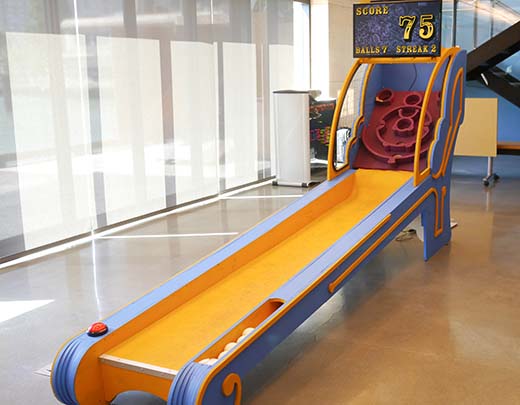
This, ‘should be a project for every hackerspace’ project is the brainchild of [fungus amungus] over on Instructables. Despite what you might think about the complexities of building a Skeeball machine, [fungus’] build is actually rather simple, and also easily transportable.

The main material used in the build is seven sheets of 3/4″ plywood. These sheets were cut out on a ShopBot CNC router, and held together with screws in a tab-and-slot construction scheme. The playfield is covered with cork for what we assume is a proper Skeeball experience, and all the electronics controlled by an Arduino and Laptop.

The electronics for this build are very simple – just a few IR distance sensors mounted under the holes. The laptop is running a Processing sketch to display the score on a TV above the cage, allowing for some improvements in the gameplay and scoring system of the original Skeeball machines.

It’s a really fantastic project, and something that we’re sure will be the center of attention wherever [fungus] brings it.

Continue reading “Have A Router? Build A Skeeball Machine”

A DIY Solution For Controlling Robots And Quadcopters

RC

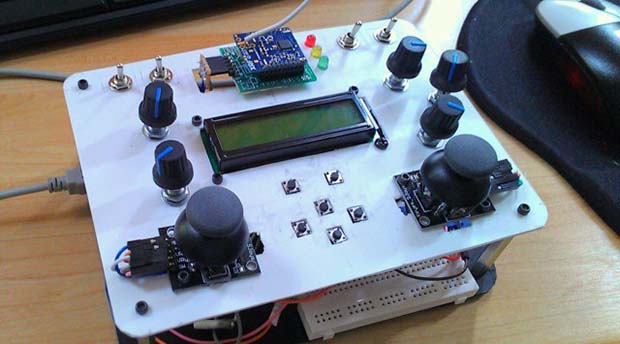
RC transmitters used for controlling robots, quadcopters, airplanes, and cars really aren’t that complex. There are a few switches, pots, a screen and a radio transmitter. The maker toolbox already has all these components, so it only makes sense someone would try to build their own RC transmitter.

[Oscar]’s project started by gathering a bunch of toggle switches, 2-axis joysticks, pots, tact switches, an Arduino, LCD, and a Ciseco XRF wireless module. These were attached to a front panel made of polystyrene and work on the communications protocol began.

It should be noted that microcontroller-powered RC transmitters with XBees is nothing new. There was a Kickstarter for one last year, but the final product turned out to be bit janky and full of fail wiring, We’re really glad to see [Oscar]’s attempt at a DIY RC transmitter, and hopefully we’ll see this project taken up and improved by others.

Continue reading “A DIY Solution For Controlling Robots And Quadcopters”

Tre: When Arduino Meets Beagle Bone

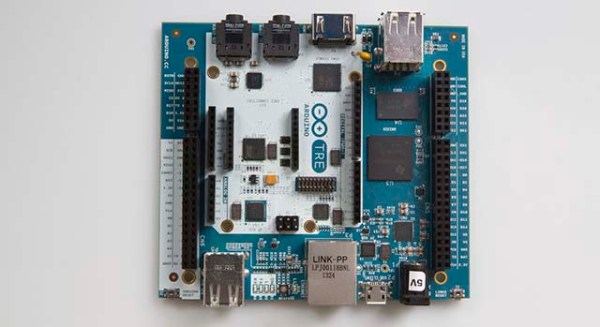
Although yesterday saw the announcement of an x86-based Arduino powered by an Intel chip. This may have not been the big story to come from [Massimo] at Maker Faire Rome. Announced along with the x86 Arduino Galileo was the Arduino TRE, a collaboration between Arduino and the BeagleBoard foundation.

The TRE is really two Arduinos in one: in the center is basically an Arduino Leonardo with the standard Arduino headers and an ATmega32u4. Elsewhere on the board is a TI Sitara ARM Cortex A-8 processor running at 1GHz with 512 MB of RAM, 10/100 Ethernet, HDMI out, USB host and device ports, and a bunch of connectors intended for an LCD and a ZigBee.

There is, of course, the obvious comparison between the TRE and Raspberry Pi. Hardware-wise, the TRE is very close to the BeagleBone Black, a bit more powerful than the Raspberry Pi, and able to do some very cool stuff (i.e. OpenCV) the Pi just can’t handle.

There is – I think – no official price for the Arduino TRE quite yet. It will be available in spring, 2014, though. You can check out all the press release photos in the gallery below.

Continue reading “Tre: When Arduino Meets Beagle Bone”

The Intel-powered Arduino

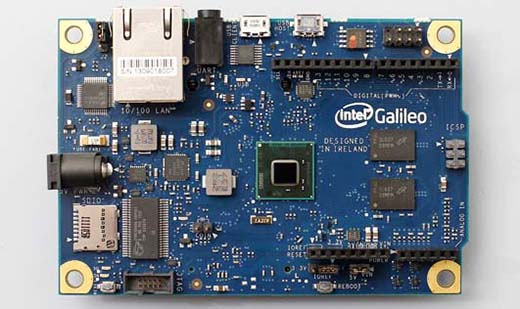
Dev boards based on microcontrollers and ARM System on Chips are everywhere, but finding a small pocketable computer based on an Intel processor has been difficult to find. [Massimo] of Arduino just unveiled a new Intel architecture Arduino-compatible board at the Rome Maker Faire. It’s called the Galileo, and it has everything you’d expect from a juiced-up Arduino running x86.

The main chip is an Intel Quark SoC running at 400MHz with 256 MB of DRAM. On board is a Mini-PCIe slot, 100Mb Ethernet port, Micro SD slot, RS-232, and USB host and client ports. Here’s the datasheet for the Galileo with all the applicable information.

The Galileo can be programmed with the standard Arduino IDE, but from the getting started guide, it looks like this board is running Yocto, a stripped down Linux for embedded environments.

Realistically, what we have here is a board with about the same processing power as a Raspberry Pi, but with Arduino compatibility, and a Mini PCIe port for some really fun stuff. It will be interesting to see what can be made with this board, but if you have any ideas on what to do with a Galileo before it’s released in two months, drop a note in the comments.

PocketQubes: Even Smaller Than A CubeSat

Qube

Over one hundred CubeSats have been launched by hundreds of organizations and universities from around the globe. These have proven very useful in technology demonstration, Earth imaging, and other applications. There is, however, one large downside to the CubeSat platform. Even though it is designed to hitch a ride on launches of larger satellites, they’re still very expensive to develop and launch – somewhere between $60,000 and $125,000.

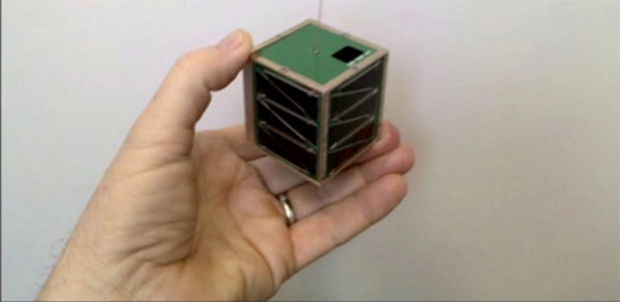
PocketQubes are a new design of satellite that bring the cost of personal satellites down to what Universities and amateur radio enthusiasts can actually afford. Instead of spending $125k on a 10cm cube CubeSat, the PocketQube, a 5cm cube, can be launched to a 700 km orbit for about $20,000.

Already, four PocketQubes are scheduled for launch in November to a 700km solar synchronous orbit, including $50SAT, a small radio transceiver put together by some ham guys, and The WREN a very impressive PocketQube with 3-axis reaction wheels and plasma thrusters.

Right now, the PocketQube kickstarter is only for aluminum structures that will become the skeleton of a small, 5cm cube satellite. There’s also the PocketQube Shop that provides a little more background on the project.

A Retro, Not Steampunk, Media Center

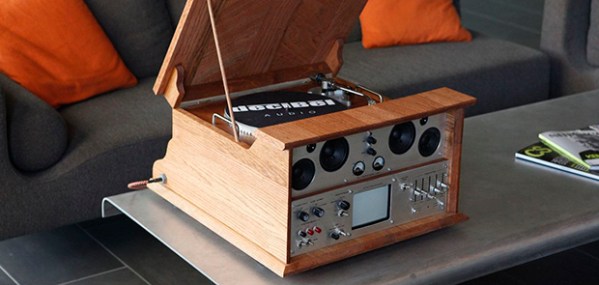
[toddfx] wanted to put his Raspberry Pi to work and set about creating one of the best stereos we’ve ever seen: It’s called the Audio Infuser 4700, and turns a conglomeration of old disused stereo equipment into a functional piece of art.

[toddfx] used a Raspberry Pi to stream music over WiFi, but also wanted to play some classic vinyl. He took apart an old Yamaha YP-D4 turntable. stripped it to the bone, and created a fantastic oak enclosure around it. To this, he added a seven-band graphic EQ, aux jacks (both in and out), and a tiny 5″ CRT from an old portable TV.

Where this build really gets great is the fabrication. The front panels have all their graphics and lettering engraved via a toner-transfer like method using copper sulphate and salt. [todd] got the idea from this thread and we have to say the results are unbelievable.

Even though this awesome device only used for music, [toddfx] used the tiny color CRT to its fullest. Flick one switch, and it’s an oscilloscope-like display. Flick another switch, and it’s the output of the Raspberry Pi loaded up with a few MAME games including Pacman, Asteroids, and Space Invaders.

[toddfx] put up a build page for his Audio Infuser and an awesome video for his project, available below.

Continue reading “A Retro, Not Steampunk, Media Center”