Computer Speed Gains Erased By Modern Software

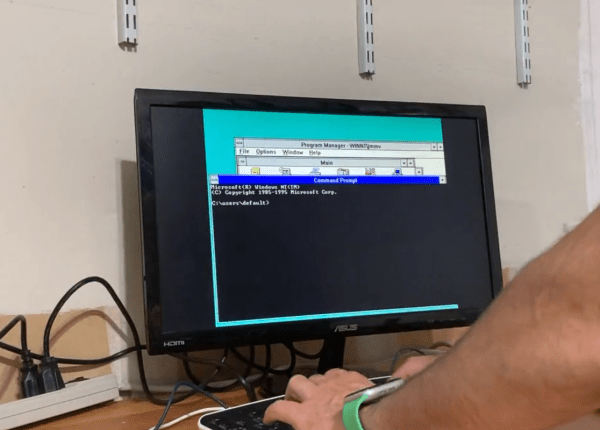
[Julio] has an older computer sitting on a desk, and recorded a quick video with it showing how fast this computer can do seemingly simple things, like open default Windows applications including the command prompt and Notepad. Compared to his modern laptop, which seems to struggle with even these basic tasks despite its impressive modern hardware, the antique machine seems like a speed demon. His videos set off a huge debate about why it seems that modern personal computers often appear slower than machines of the past.

After going through plenty of plausible scenarios for what is causing the slowdown, [Julio] seems to settle on a nuanced point regarding abstraction. Plenty of application developers are attempting to minimize the amount of development time for their programs while maximizing the number of platforms they run on, which often involves using a compatibility layer, which abstracts the software away from the hardware and increases the overhead needed to run programs. Things like this are possible thanks to the amount of computing power of modern machines, but not without a slight cost of higher latency. For applications developed natively, the response times would be expected to be quite good, but fewer applications are developed natively now including things that might seem like they otherwise would be.  Notepad, for example, is now based on UWP.

While there are plenty of plausible reasons for these slowdowns in apparent speed, it’s likely a combination of many things; death by a thousand cuts. Desktop applications built with a browser compatibility layer, software companies who are reducing their own costs by perhaps not abiding by best programming practices or simply taking advantage of modern computing power to reduce their costs, and of course the fact that modern software often needs more hardware resources to run safely and securely than equivalents from the past.

MeArm 3.0: The Pocket-Sized Robot Arm

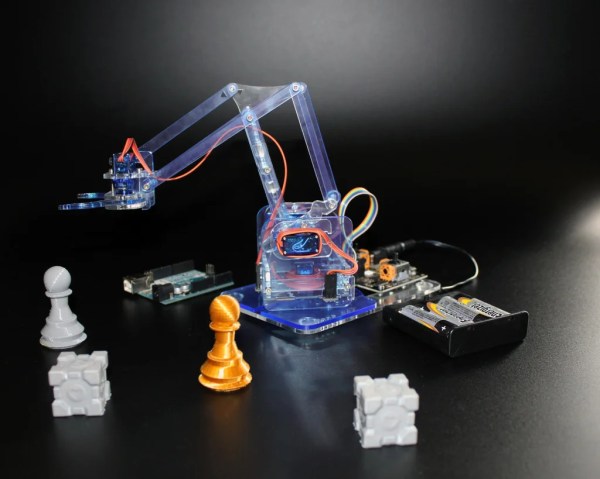
We all might dream of having an industrial robot arm at our disposal, complete with working controller that doesn’t need constant maintenance and replacement parts, and which is able to help us with other projects with only a minimum of coding or instruction. That’s a pipe dream for most of us, as without a large space, sufficient funding, or unlimited amounts of troubleshooting time we’ll almost always have to look for something smaller and simpler. Perhaps something even as small as this pocket-sized robotic arm.

This isn’t actually the first time we’ve seen the MeArm; the small robot has been around since 2014 and has undergone a number of revisions and upgrades. Even this revision has been out for a little while now but this latest in the series is now available with a number of improvements over the older models. The assembly time required has been reduced from two hours to about 30 minutes and the hardware has even been fully open-sourced as well which allows virtually anyone with the prerequisite tools to build this tiny robot for whatever they happen to need it for, due to its very permissive licensing.

The linked Instructable goes into every detail needed for building the robot as well as documenting all of the parts needed, although you will need access to some specialty tools to make a lot of them. We also featured a Friday Hack Chat about these robots back in 2018 that has some interesting details about these robots in it, and although this is a relatively small robot in the grand scheme of things it’s always possible to upgrade to something larger in the future.

Continue reading “MeArm 3.0: The Pocket-Sized Robot Arm”

Formation Flying Does More Than Look Good

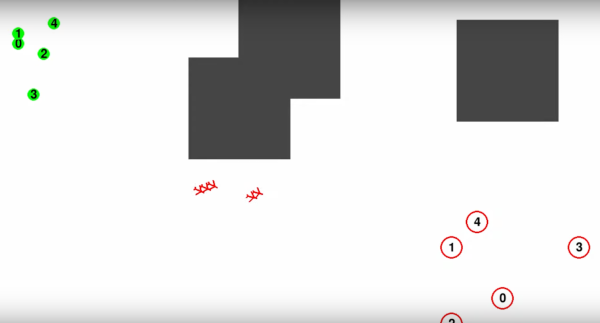
Seeing airplanes fly in formation is an exciting experience at something like an air show, where demonstrations of a pilot’s skill and aircraft technology are on full display. But there are other reasons for aircraft to fly in formation as well. [Peter] has been exploring the idea that formation flight can also improve efficiency, and has been looking specifically at things like formation flight of UAVs or drones with this flight planning algorithm.

Aircraft flying in formation create vortices around the wing tips, which cause drag. However, another aircraft flying through those vortices will experience less drag and more efficient flight. This is the reason birds instinctively fly in formation as well. By planning paths for drones which will leave from different locations, meet up at some point to fly in a more efficient formation, and then split up close to their destinations, a significant amount of energy can potentially be saved. Continue reading “Formation Flying Does More Than Look Good”

Networking With Balloons

Starlink has been making tremendous progress towards providing world-wide access to broadband Internet access, but there are a number of downsides to satellite-based internet such as the cluttering of low-Earth orbit, high expense, and moodiness of CEO. There are some alternatives if standard Internet access isn’t available, and one of the more ambitious is providing Internet access by balloon. Project Loon is perhaps the most famous of these (although now defunct), but it’s also possible to skip the middleman and build your own high-altitude balloon capable of connection speeds of 500 Kbps.

[Stephen] has been working on this project for a few months and while it doesn’t support a full Internet connection, the downlink on the high altitude balloon is fast enough to send high-resolution images in near-real-time. This is thanks to a Raspberry Pi Zero on board the balloon that is paired with an STM32 board which handles the radio communication on a RF4463 transceiver module. The STM32 acts as an intermediary or buffer to ensure reliable information is sent out on the radio, rather than using the Pi directly. [Stephen] also wrote a large chunk of the software responsible for handling all of these interactions, optimized for balloon flight specifically.

The blog post for this project was written a few weeks ago with a reported first launch date for the system already passed, so we will eagerly anticipate the results and the images he was able to gather using this system. Eventually [Stephen] hopes the downlink will be fast enough for video as well.Balloons are an underappreciated tool as well, and this isn’t the only way that they can be used to help send radio signals from place to place.

A More Conspicuous Computer Assistant

Back in the last century, especially in the ’40s to the ’60s, one of the major home decor trends was to install various home appliances, like the television or stereo, into its own piece of furniture. These were usually bulky, awkward, and incredibly heavy. And, since real life inspires art, most of the futuristic sci-fi technology we saw in movies and TV of the time was similarly conspicuous and physical. Not so with modern technology, though, where the trend now is to hide it out of the way and forget it exists. But [dermbrian] wanted some of his modern technology to have some of the mid-century visibility aesthetic so he made some modifications to his Amazon Echo.

The Echo itself remains largely unmodified, other than placing it inside a much larger cookie tin with some supporting electronics. For that, [dermbrian] found a relay board with a built-in microphone which switches the relay off when it detects sound so that when the Echo is activated, the sound from its speaker activates the module. From there it drives a series of blinkenlights which mimic the 60s computer aesthetic. Some custom fabrication and light diffusion methods were needed to get it to look just right, and a switch on the outside can disable the mechanism if it is getting triggered by background noise like music from his stereo.

While the appeal of this style may be lost on anyone who wasn’t a fan of the original Lost in Space, Star Trek, or Jetsons, it certainly holds a special significance for those who grew up in that era. It’s certainly not the first project we’ve seen to take a look back at the aesthetics of bygone eras, either. Take a look at this project which adds lenses to modern displays to give them the impression of antiquated CRT displays.

Continue reading “A More Conspicuous Computer Assistant”

Watch Hides Gesture Controls In Wristband

Over the last five to ten years, smart watches have become fairly ubiquitous, with the Apple Watch being among the most prominent of them. Not everyone wants or needs all of the capabilities of these devices, though; plenty are still opting for simpler devices which only have a few functions built into them. [Josh] has been working on one of these devices but takes a major design cue from their smart counterparts with the addition of gesture controls for the watch built into the wristband instead of relying on a more traditional button interface.

The watch hosts most of the functionality of a non-smart digital watch, with a timer, alarms, and a stop watch built-in. To change the time or access any of these functions, a combination of resistive and capacitive touch sensors are built into the wristband near the watch face. The combination of sensors aims to use the benefits of either type of sensor, with the capacitive sensors being used for precision and gesture recognition and the resistive sensors being used for pressure sensitivity. Placing these sensors in the band instead of the watch face improves visibility as well, since the screen won’t be obscured by the user touching the screen.

[Josh] originally intended this type of watch to be used for those with prosthetics or other disabilities which would limit the ability to use standard watch buttons or interact with a touch screen on the watch face itself. The device is working quite well as can be seen in the video linked below, but is still in the prototyping phase and under active development. For finishing up the final versions, we’d recommend taking a look at the design of these open-source smart watches for their high quality fit and finish.

Continue reading “Watch Hides Gesture Controls In Wristband”

Exploring The Anatomy Of A Linux Kernel Exploit

A lot of talk and discussion happens anytime a hardware manufacturer releases a new line of faster, more powerful, or more efficient computers. It’s easy to see better and better specifications and assume that’s where all the progress is made. But without improved software and algorithms, often the full potential of the hardware can’t be realized. That’s the reason for the creation of io_uring, an improved system call interface in the Linux kernel. It’s also where [chompie] went to look for exploits.

The reason for looking here, in a part of the kernel [chompie] had only recently learned about, was twofold. First, because it’s a place where user space applications interact with the kernel, and second because it’s relatively new and that means more opportunities to find bugs. The exploit involves taking advantage of a complicated asynchronous buffer system, specifically at a location where the code confuses a memory location being used by the kernel with one which is supposed to be used for user space.

To actually get this to work as an exploit, though, a much more involved process is needed to make sure the manipulation of these memory addresses results in something actually useful, but it is eventually used to gain local privilege escalation. More about it can be found in this bug report as well. Thanks to the fact that Linux is open-source, this bug can quickly be fixed and the patch rolled out to prevent malicious attackers from exploiting it. Open-source software has plenty of other benefits besides being inherently more secure, though.