Make Your Code Slower With Multithreading

With the performance of modern CPU cores plateauing recently, the main performance gains are with multiple cores and multithreaded applications. Typically, a fast GPU is only so mind-bogglingly quick because thousands of cores operate in parallel on the same set of tasks. So, it would seem prudent for our applications to try to code in a multithreaded fashion to take advantage of this parallelism. Or so it would seem, but as [Marc Brooker] illustrates, it’s not as simple as one would assume, and it’s very easy to end up with far worse overall performance and no easy way to fix it.

[Marc] was rerunning an old experiment to calculate the expected number of birthdays in a shared group of people using brute force. The experiment was essentially a tight loop running a pseudorandom number generator, the standard libc rand() function. [Marc] profiled the code for single-thread and multithreaded versions and noted the runtime dramatically increased beyond two threads. Something fishy was going on. Running perf, [Marc] noted that there were significant L1 cache misses, but the real killer for performance was the increase in expensive context switches.  Perf indicated that for four threads, the was an overhead of nearly 50% servicing spin locks. There were no locks in the code, so after more perf magic, the syscalls taking all the time were identified.  Something in there was using a futex (or fast userspace mutex) a whole lot.

Continue reading “Make Your Code Slower With Multithreading”

Comparing X86 And 68000 In An FPGA

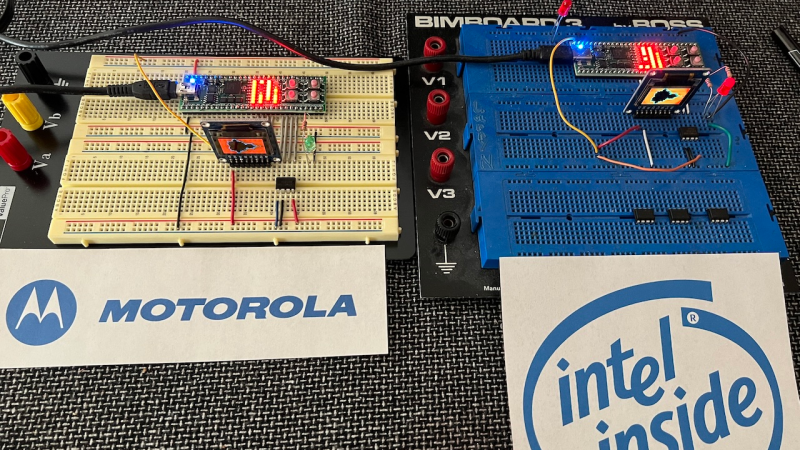
[Michael Kohn] started programming on the Motorola 68000 architecture and then, for work reasons, moved over to the Intel x86 and was not exactly pleased by the latter chip’s perceived shortcomings. In the ’80s, the 68000 was a very popular chip, powering everything from personal computers to arcade machines, and looking at its architecture and ease of programming, you can see why this was.

Fast-forward a few years, and [Michael] decided to implement both cores in an FPGA to compare real applications, you know, for science. As an extra bonus, he also compares the performance of a minimal RISC-V implementation on the same hardware, taken from an earlier RISC-V project (which you should also check out !)

Utilizing their ‘Java Grinder’ application (also pretty awesome, especially the retro console support), a simple Mandelbrot fractal generator was used as a non-trivial workload to produce binaries for each architecture, and the result was timed. Unsurprisingly, for CISC architectures, the 68000 and x86 code sizes were practically identical and significantly smaller than the equivalent RISC-V. Still, looking at the execution times, the 68000 beat the x86 hands down, with the newer RISC-V speeding along to take pole position. [Michael] admits that these implementations are minimal, with no pipelining, so they could be sped up a little.

Also, it’s not a totally fair race. As you’ll note from the RISC-V implementation, there was a custom RISC-V instruction implemented to perform the Mandelbrot generator’s iterator. This computes the complex operation Z = Z2 + C, which, as fellow fractal nerds will know, is where a Mandelbrot generator spends nearly all the compute time. We suspect that’s the real reason RISC-V came out on top.

If actual hardware is more your cup of tea, you could build a minimal 68k system pretty easily, provided you can find the chips. The current ubiquitous x86 architecture, as odd as it started out, is here to stay for the foreseeable future, so you’d just better get comfortable with it!

Continue reading “Comparing X86 And 68000 In An FPGA”

A3 Audio: The Open Source 3D Audio Control System

Sometimes, startups fail due to technical problems or a lack of interest from potential investors and fail to gain development traction. This latter case appears to be the issue befalling A3 Audio. So, the developers have done the next best thing, made the project open source, and are actively looking for more people to pitch in. So what is it? The project is centered around the idea of spatial audio or 3D audio. The system allows ‘audio motion’ to be captured, mixed and replayed, all the while synchronized to the music. At least that’s as much as we can figure out from the documentation!

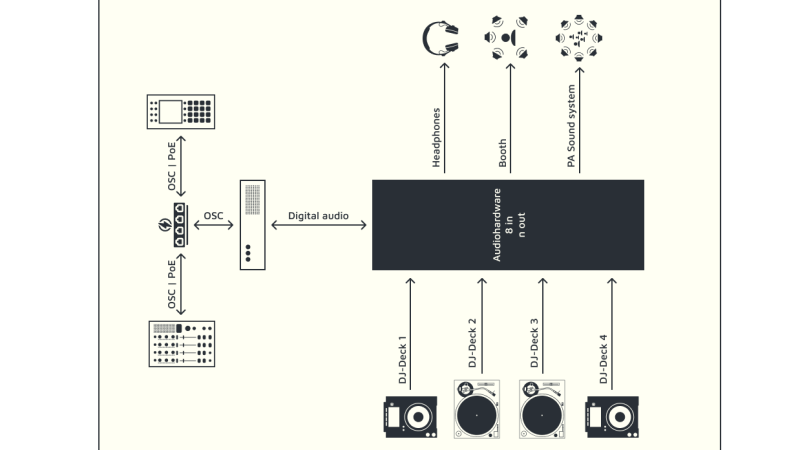
The system is made up of three main pieces of hardware. The first part is the core (or server), which is essentially a Linux PC running an OSC (Open Sound Control) server. The second part is a ‘motion sampler’, which inputs motion into the server. Lastly, there is a Mixer, which communicates using the OSC protocol (over Ethernet) to allow pre-mixing of spatial samples and deployment of samples onto the audio outputs. In addition to its core duties, the ‘core’ also manages effects and speaker handling.

The motion module is based around a Raspberry Pi 4 and a Teensy microcontroller, with a 7-inch touchscreen display for user input and oodles of NeoPixels for blinky feedback on the button matrix. The mixer module seems simpler, using just a Teensy for interfacing the UI components.

We don’t see many 3D audio projects, but this neat implementation of a beam-forming microphone phased array sure looks interesting.

Using Kick Assembler And VS Code To Write C64 Assembler

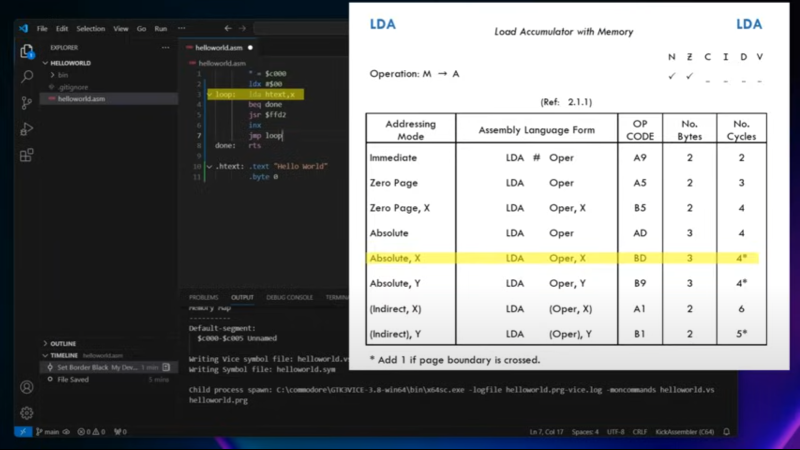
YouTuber [My Developer Thoughts], a self-confessed middle-aged Software Developer, clearly has a real soft spot for the 6502-based 8-bit era machines such as the Commodore 64 and the VIC-20, for which he has created several video tutorials while travelling through retro-computing. This latest instalment concerns bringing up the toolchain for using the Kick Assembler with VS Code to target the C64, initially via the VICE emulator.

The video offers a comprehensive tutorial on setting up the toolchain on Windows from scratch with minimal knowledge. While some may consider this level of guidance unnecessary, it is extremely helpful for those who wish to get started with a few examples quickly and don’t have the time to go through multiple manuals and Wikis. In that regard, the video does an excellent job.

VS Code is a great tool with a large user base, so it’s not surprising that there’s a plugin for using the Kick Assembler directly from the IDE. You can also easily launch the application onto the emulator with just a push of a button, allowing you to focus on learning and working on your application. Once it runs under emulation, there’s a learning curve for running it on native hardware, but there are plenty of tutorials available for that. While you could code directly on the C64 itself, it’s much more pleasant to use modern tools, revision control, and all the conveniences and not have to endure the challenges.

Once you’ve mastered assembly, it may be time to move on to C or even C++. The Oscar64 compiler is a good choice for that. Next, you may want to show off your new skills on the retro demo scene. Here’s a neat C64 demo with a twist. There is no C64.

Continue reading “Using Kick Assembler And VS Code To Write C64 Assembler”

Why Is My 470uF Electrolytic Cap More Like 20uF?

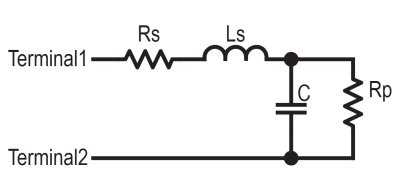
The simple capacitor equivalent circuit taught in school

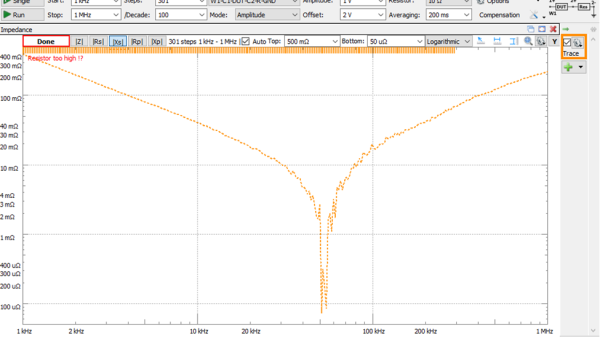
Inductors are more like a resistor in series with an ideal inductor, resistors can be inductors as well, and well, capacitors aren’t just simply a capacitance in a package. Little with electronics is as plain and simple in reality as basic theory would have you believe. [Tahmid Mahbub] was measuring an electrolytic capacitor with an LCR and noticed it measuring 19 uF despite the device being rated at 470 uF. This was because such parts are usually specified at low frequencies, and at a mere 100 kHz, it was measuring way out of the specification they were expecting. [Tahmid] goes into a fair bit of detail regarding how to model the equivalent circuit of a typical electrolytic capacitor and how to determine with a bit more accuracy what to expect.

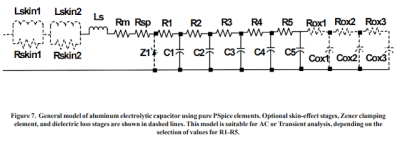
An aluminium electrolytic capacitor is more like this

The basic equivalent circuit for a capacitor has a series resistance and inductance, which covers the connecting leads and any internal tabs on the plates. A large-valued parallel resistor models the leakage through the dielectric in series with the ideal capacitance, which is responsible for the capacitor’s self-discharge property. However, this model is still too simple for some use cases. A more interesting model, shown to the left, comprises a ladder of distributed capacitances and associated resistances that result in a progressively longer time-constant component as you move from C1 to C5. This resembles more closely the linear structure of the capacitor, with its rolled-up construction. This model is hard to use in any practical sense due to the need to determine values for the components from a physical part. Still, it is useful to understand why such capacitors perform far worse than you would expect from just a simple equivalent model that looks at the connecting leads and little else.

Continue reading “Why Is My 470uF Electrolytic Cap More Like 20uF?”

A Single Transistor Solid State Tesla Coil

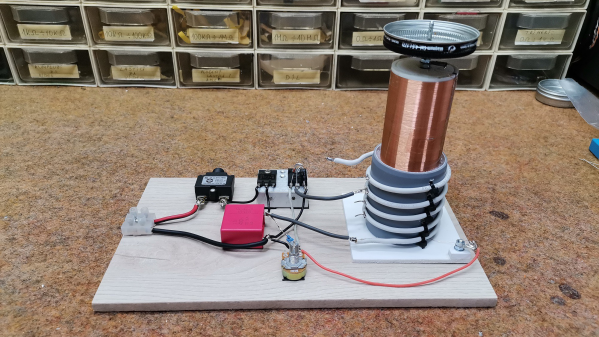
Tesla coils are one of those builds that capture the interest of almost anybody passing by. For the naïve constructor, they look simple enough, but they can be finicky beasts—beasts that can bite if not treated with respect. [Mirko Pavleski] has some experience with them and shares it with us over on Hackaday.io. One of the first big improvements of this build style is the shift from the originally used spark gap commutator to that of a direct AC drive via a MOSFET oscillator. This improves the primary drive power for its size and eliminates that noisy spark gap. That’s one less source of broadband RF noise and the audible racket these produce.

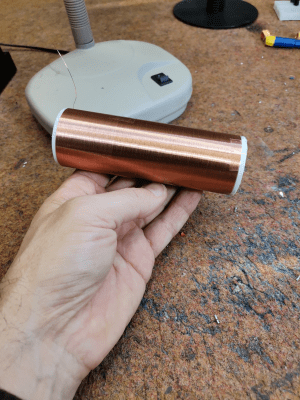
A hand holding a secondary coil for a Tesla coil build
You can buy ready-wound secondary coils from the usual CN suppliers

The primary side of a Tesla coil is usually a handful of turns of thick wire to handle the current without melting. This build runs at two or three amps, giving a primary power of around 150 Watts. However, this is quite a small unit; with larger ones, the power is much higher, and the resulting discharge sparks much longer. On the secondary side, the air-coupled coil is formed from 520 turns of much thinner wire since it doesn’t need to convey so much current. That’s the thing with transformers with large turns ratios — the secondary voltage will be much higher, and the current will be correspondingly much lower. The idea with Tesla coils is that the secondary circuit forms a resonant circuit with the ‘top load’, usually some hollow metal can. This forms an LC circuit with a corresponding resonant frequency dependent on the secondary inductance values, the object’s capacitance and anything else connected. The primary circuit is designed to resonate at this same frequency to give maximum power coupling across the air gap. Changing either circuit can spoil this balance unless there is a feedback circuit to keep it in check. This could be with a sense coil, a local antenna or something more direct, like in this case.

To ensure the primary circuit doesn’t melt, it needs to be able to drive a reasonable current at this frequency, often in the low MHz range. This leads to a common difficulty: ensuring the switching transistor and rectifying diode are fast enough at the required current level with enough margin. [Mirko] points out several components that can achieve the operating frequency of around 1.7 MHz, which his top load configuration indicates.

For a bit more info on building these fascinating devices, you could check out our earlier coverage, like this useful guide. Of course, simple can be best. How about a design with just three components?

Continue reading “A Single Transistor Solid State Tesla Coil”

2024 Home Sweet Home Automation: [HEX]POD – Climate Tracker And Digital Nose

[eBender] was travelling India with friends, when one got sick. Unable to find a thermometer anywhere during COVID, they finally ended up in a hospital. After being evacuated back home, [eBender] hatched an idea to create a portable gadget featuring a few travel essentials: the ability to measure body temperature and heart rate, a power bank and an illumination source. The scope evolved quite a lot, with the concept being to create a learning platform for environmental multi-sensor fusion. The current cut-down development kit hosts just the air quality measurement components, but expansion from this base shouldn’t be too hard.

ML for Hackers: Fiddle with that Tensor Flow

This project’s execution is excellent, with a hexagon-shaped enclosure and PCBs stacked within. As everyone knows, hexagons are the bestagons. The platform currently hosts SCD41 and SGP41 sensors for air quality, a BME688 for gas detection, LTR-308 for ambient light and motion, and many temperature sensors.

On top sits a 1.69-inch IPS LCD, with an OLED display on the side for always-on visualization. The user interface is completed with a joystick and a couple of buttons. An internal blower fan is ducted around the sensor array to pull not-so-fresh air from outside for evaluation. Control is courtesy of an ESP32 module, with the gory details buried deep in the extensive project logs, which show sensors and other parts being swapped in and out.

On the software side, some preliminary work is being done on training TensorFlow to learn the sensor fusion inputs. This is no simple task. Finally, we would have a complete package if [eBender] could source a hexagonal LCD to showcase that hexagon-orientated GUI. However, we doubt such a thing exists, which is a shame.

There are many air quality sensors on the market now, so we see a few hacks based on them, like this simple AQ sensor hub. Let’s not forget the importance of environmental CO2 detection; here’s something to get you started.