2024 Home Sweet Home Automation: [HEX]POD – Climate Tracker And Digital Nose

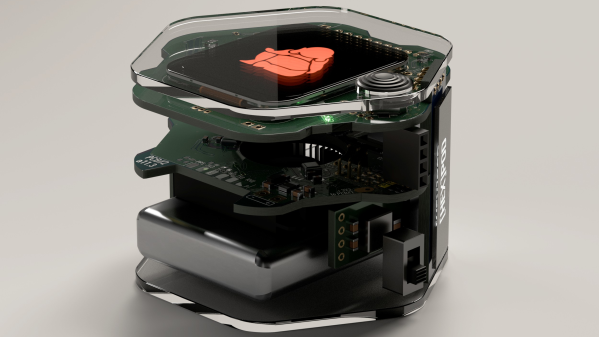
[eBender] was travelling India with friends, when one got sick. Unable to find a thermometer anywhere during COVID, they finally ended up in a hospital. After being evacuated back home, [eBender] hatched an idea to create a portable gadget featuring a few travel essentials: the ability to measure body temperature and heart rate, a power bank and an illumination source. The scope evolved quite a lot, with the concept being to create a learning platform for environmental multi-sensor fusion. The current cut-down development kit hosts just the air quality measurement components, but expansion from this base shouldn’t be too hard.
ML for Hackers: Fiddle with that Tensor Flow

This project’s execution is excellent, with a hexagon-shaped enclosure and PCBs stacked within. As everyone knows, hexagons are the bestagons. The platform currently hosts SCD41 and SGP41 sensors for air quality, a BME688 for gas detection, LTR-308 for ambient light and motion, and many temperature sensors.

On top sits a 1.69-inch IPS LCD, with an OLED display on the side for always-on visualization. The user interface is completed with a joystick and a couple of buttons. An internal blower fan is ducted around the sensor array to pull not-so-fresh air from outside for evaluation. Control is courtesy of an ESP32 module, with the gory details buried deep in the extensive project logs, which show sensors and other parts being swapped in and out.

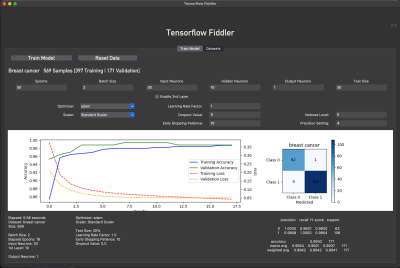
On the software side, some preliminary work is being done on training TensorFlow to learn the sensor fusion inputs. This is no simple task. Finally, we would have a complete package if [eBender] could source a hexagonal LCD to showcase that hexagon-orientated GUI. However, we doubt such a thing exists, which is a shame.

There are many air quality sensors on the market now, so we see a few hacks based on them, like this simple AQ sensor hub. Let’s not forget the importance of environmental CO2 detection; here’s something to get you started.

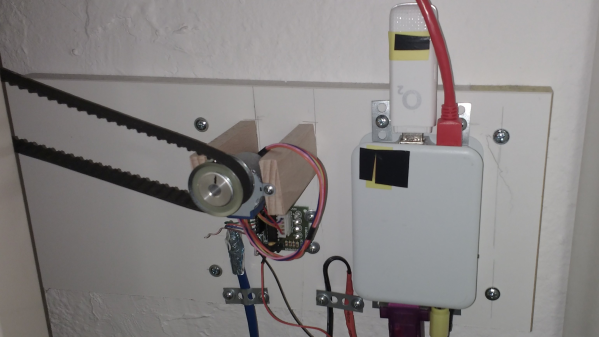
A Raspberry Pi in an enclosure, connected to a stepper motor controller and a UMTS stick

2024 Home Sweet Home Automation: SMS Controlled Heating

Hackaday.io user [mabe42] works during the week away from their home city and rents a small apartment locally to make this life practical. However, the heating system, a night-storage system, is not so practical. They needed a way to remotely control the unit so that the place was habitable after a long winter commute; lacking internet connectivity, they devised a sensible solution to create an SMS-controlled remote heating controller.

The controller runs atop an old Raspberry Pi B inside a 3D-printed case. Seeing such an old board given a real job to do is nice. Connectivity is via a USB UMTS stick which handles the SMS over the cellular network. The controller knob for the heater thermostat (not shown) is attached via a toothed belt to a pully and a 28BYJ-48 5V geared stepper motor. Temperature measurement is via the ubiquitous DS1820 module, which hooks straight up to the GPIO on the Pi and works out of the box with many one-wire drivers.

The software is built on top of Gammu, which handles the interface to the UMTS device. Daily and historical temperature ranges are sent via SMS so [mabe42] can decide how to configure the heating before their arrival. The rest of the software stack is in Python, as per this (German-language) GitHub project.

While we were thinking about storage heating systems (and how much of a pain they are), we came across this demonstration of how to build one yourself.

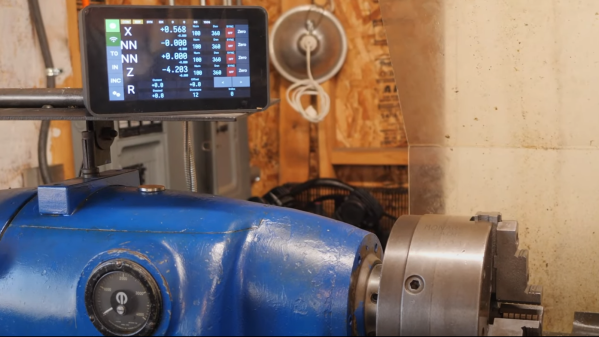
A raspberry pi-based digital readout above an old lathe

Roll Your Own DRO With An Added Twist

When using a manual machine tool such as a lathe or milling machine, there can be a lot of pressure to read the position and feed the axes at the correct rate. That’s why modern machines typically have some form of digital read-out (DRO). [Stefano Bertelli] has created a simple Raspberry Pi based DRO with an additional twist, that of a linked motor drive output.

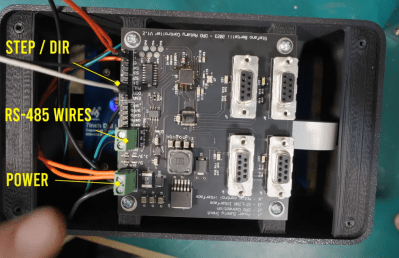
A view of the custom RS485 interfaced DRO readout and motor controller
Realtime encoder position reading and motor control are best done with a dedicated microcontroller, ideally with a proper RTOS.

The axes that need to be monitored should be mechanically attached to a position sensor like a linear encoder or a rotary type. Using a linear sensor with a linear axis instead of a rotary encoder on the downstream dial is better. For the readout unit, [Stefano] used a WaveShare 7-inch touchscreen module with a Raspberry Pi 3 for the UI of the readout unit. The Pi has a custom-designed HAT, that performs power conditioning and provides a robust RS485 interface. Connected via that RS485 link is another custom PCB based on an STM32F411 with a few supporting power supplies and interfacing components. The job of this board is to interface to the position encoders, reading positioning pulses using interrupts. There is an additional stepper motor drive courtesy of a ULN2003 Darlington driver to allow the control of a single motorised axis. An additional motor driver module is required, which should be no surprise since driving a milling machine axis will require a fairly beefy motor. This GitHub repo contains the FreeRTOS-based firmware for this board. This motor drive has the ability to be connected to a measuring axis in a programmable way, enabling one axis to be adjusted to follow or jump in controlled steps with another. This feature can significantly simplify certain types of machining operations, as [Stefano] elaborates in the video.

Lastly, the Raspberry Pi runs a simple Python application with Kivy for the GUI. As [Stefano] explains in the video below, this makes debugging and modification quite simple.

Adding DROs to an older machine is an obvious but valuable hack. Here’s another way to do it. If that’s too much work, then you could just hack a digital readout calliper in there.

Continue reading “Roll Your Own DRO With An Added Twist”

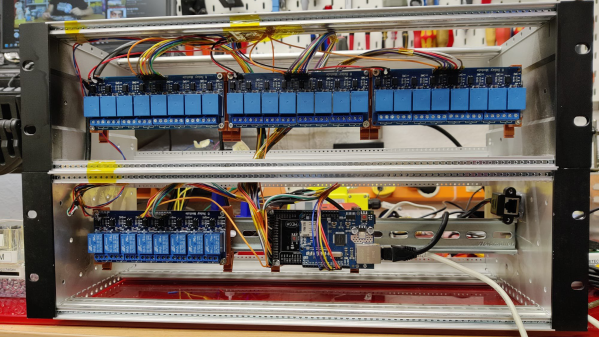
A DIY DIN rail mounted rack of PLC components for home automation

2024 Home Sweet Home Automation: A DIY SCADA Smart Home

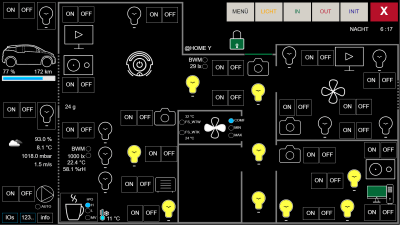
A SCADA-style display of icons and control buttons
Touch-screen control and monitoring

Supervisory control and data acquisition, or SCADA, systems sit in the background in industrial settings, performing all kinds of important jobs but in an ad-hoc setup, depending on the precise requirements of the installation. When we think about home automation systems, they’re pretty much the same deal: ad-hoc systems put together from off-the-shelf components and a few custom bits thrown in. [Stefan Schnitzer] clearly has significant knowledge of SCADA in an industrial setting and has carried this over into their home for their entry into the Hackaday 2024 Home Sweet Home Automation Contest. Continue reading “2024 Home Sweet Home Automation: A DIY SCADA Smart Home”

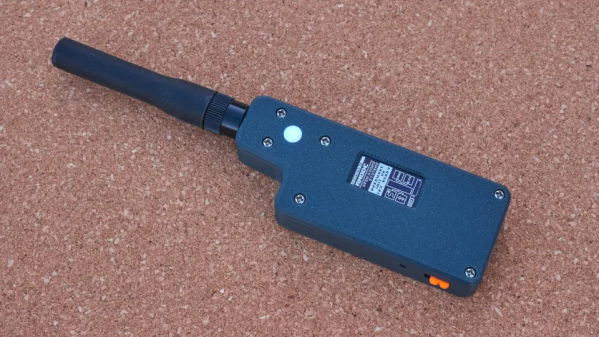
A portable digital radio transceiver in a 3d printed case

RNODE: A Portable Unrestricted Digital Radio

RNode is an open source, unrestricted digital radio transceiver based on — but not limited to — the Reticulum cryptographic networking stack. It is another interesting project in what we might call the “Federated application” space in that it is intended to be used with no central controlling body. It can be used in a LAN or WAN context with the Reticulum network when operating in network adaptor mode, but it also has other use cases.

Essentially, RNode is a software project running on a LilyGO LoRa32 board wrapped up in a snazzy-looking 3D-printed case. Just make sure to grab a version of the board with an u.FL connector in place or somewhere to solder one. If it comes with an SMA connector, you will want to remove that. The device can be standalone, perhaps attached to a mobile device via Wi-Fi, but it needs to be hooked up to a laptop for the really interesting applications. When set to TNC mode, it can act as an APRS gateway, which allows you to access packet radio BBSs and all that fun stuff.

Continue reading “RNODE: A Portable Unrestricted Digital Radio”

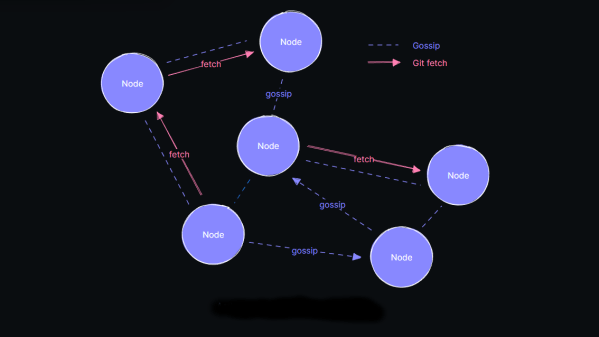
diagram of the radicle node-to-node connectivity

Radicle: An Open-Source, Peer-to-Peer, GitHub Alternative

The actions of certain large social networks have recently highlighted how a small number of people possess significant power over the masses and how this power is sometimes misused. Consequently, there has been a surge in the development of federated (or decentralized) services, such as Mastodon and Matrix.  But what about development? While GitHub and similar services are less likely to be used for political manipulation, they are still centralized services with a common failure point. Radicle is an open-source, peer-to-peer collaboration stack built on top of Git but backed with public key cryptography as a standard and a gossip protocol to ensure widespread data sharing across the network and, thus, some fault tolerance.

Essentially, code and associated documentation are secured cryptographically with an identity. The Git protocol is used for actual data transfer from peer-to-peer, which means that updates are only sent as deltas, not complete copies, maximizing channel bandwidth efficiency. A custom gossip protocol is used for metadata transfer around the network of peers. The projects had a local-first ideology, with users running a full-stack node on their hardware and all features available, even offline, which is great for laptop users who move around locations with sporadic access to the internet.

Judging from their Zulipchat instance, this is a highly active space, so perhaps it is worth diving in and seeing if it floats your boat. Fancy getting onto the Fediverse, but only have a spare MS-DOS machine to try it on? We’ve got it covered. Want to use Git but not online? You need a private Git server. Finally, too much Git? How about Gitless?

Thanks [Anonymous] for the tip! No, that wasn’t lost on us :D

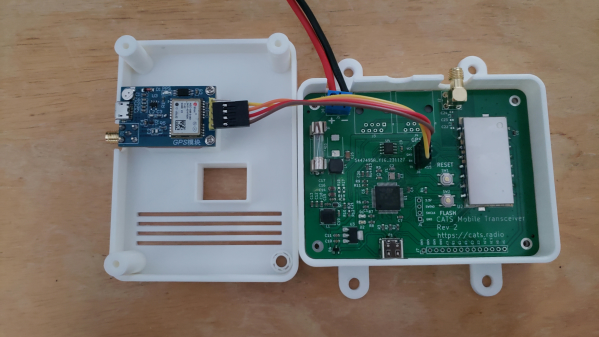
CATS mobile transceiver in a 3d-printed case

CATS: A New Communication And Telemetry System

CATS is a new communication and telemetry standard intended to surpass the current Automatic Packet Reporting System (APRS) standard by leveraging modern, super-cheap Frequency Shift Keying (FSK) transceivers rather than standard FM units. The project is in the early stages, but as of this writing, there is a full open source software stack and reference hardware for both Raspberry Pi-based gateway devices and an STM32-based mobile device.

CATS packets are called ‘whiskers!’

From a radio perspective, CATS uses raw FSK rather than the inefficient AFSK used by APRS. A real killer for channel utilization is the PTT time; this is the dead time around a packet APRS requires for ‘keying up’ and ‘keying down.’ The CATS standard is aggressive with PTT timing, enabling the channel to get going on sending the data sooner.

Additionally, compared to APRS, the packet baud rate increases from 1200 baud to 9600 baud. Other key points are using LDPC encoding for forward error correction and data whitening (a useful PDF guide from Ti) to smooth over any burst errors.

One of the neat concepts of APRS is the APRS-IS (APRS Internet service). This enables amateur radio services to be connected over the Internet, vastly improving range. The CATS equivalent is called FELINET (if you’re not spotting all the ‘cat’ references by now, go and get another coffee). Together with the I-gate hardware, FELINET bridges the CATS radio side with the current APRS network. As FELINET expands to more than the current few dozen nodes, APRS services will no longer be required, and FELINET may well replace it. Interestingly, all software for FELINET, the APRS relay, and the I-Gate firmware are written in Rust. We told you learning Rust was going to be worth the effort!

On the reference hardware side of things, the CATS project has delivered a Raspberry Pi hat, which uses a 1 watt RF4463 transceiver and supporting passives. The design is about as simple as it can be. A mobile transceiver version uses an STM32 micro to drive the same RF4463 but with supporting power supplies intended to run from a typical automotive outlet. Both designs are complete KiCAD projects. Finally, once you’ve got some hardware in place and the software installed, you will want to be able to debug it. CATS has you covered with an RTL-SDR I-Gate module, giving you an independent packet log.

APRS is quite mature, and we’ve seen many hacks on these pages. Here’s an earlier APRS IGate build using a Raspberry Pi. Need to hook up your PC to a cheap Chinese transceiver? You need the all-in-one cable. As with many things amateur-radio-oriented, you can get playing cheaply.