Vintage Calculator Design Shows Just How Much We Take For Granted Today

[Amen]’s Rockwell 920 calculator from the 70s was a very impressive piece of hardware for its time. It sported a 16-digit display, a printer, and it could run programs. It even had a magnetic card reader/writer that could be used to store programs and data externally. Seen through today’s eyes, it was less like a calculator and more like what we would call a single-board computer. They are also a window into another era, a time when many of the electrical design assumptions we take for granted hadn’t happened yet. When the time came to dig into what made the calculator tick, [Amen] had a lot of work to do just to get basic tools running.

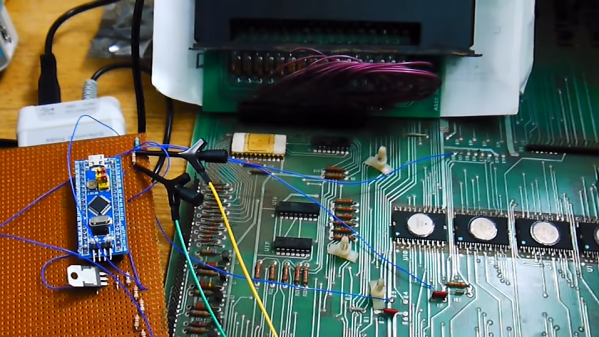
For example, [amen]’s Blue Pill (an open-source, multipurpose test and measurement tool) is, on one hand, the perfect tool to snoop on the inner workings. However, those inner workings happen to use negative logic at -17 Volts, which means a logical zero is -17 V and a one is 0 V. Oh, and it uses an oddball clock rate, to boot. Since the Blue Pill doesn’t support -17 V negative logic (does anything?) a bit of custom work was needed to craft an interface. Once that was working, the Blue Pill was off to the races.

The unfamiliar elements didn’t end there. The pins on each IC, for example, are in a staggered layout quite unlike the DIP pattern most of us (and our tools, breadboards, and IC clips) are familiar with. As for the processor itself, [amen] has access to low-level documentation on Rockwell processors and instruction sets, but the timing diagrams are puzzling until one realizes the processor has two clock inputs at two different frequencies, resulting in what [amen] describes as four separate “clock phases”.

These design decisions were certainly made for good reasons at the time, and they even have a certain internal harmony to them, but it’s still a window into an era when the elements underpinning much of what we now have and work with had not yet happened.

Check out the video embedded below to see [amen] explain what it took to hook the Blue Pill up to a Rockwell 920. Also, if you’d like to see one of these vintage machines demonstrated in all its functioning glory, here’s a video of one being put through its paces.

Continue reading “Vintage Calculator Design Shows Just How Much We Take For Granted Today”

Software Challenge’s Solution Shows Reverse Engineering In Action

[0xricksanchez] participated in a software reverse-engineering challenge and recently wrote up the solution, and in so doing also documented the process used to discover it. The challenge was called Devil’s Swapper, and consisted of a small binary blob that output a short message when executed. The goal of the challenge? Discover the secret key and the secret message within. [0xricksanchez]’s writeup, originally intended just as a personal record, ended up doing an excellent job of showing how a lot of reverse engineering tools and processes get applied to software in a practical way.

What’s also great about [0xricksanchez]’s writeup is that it uses standard tools and plenty of screenshots to show what is being done, while also explaining why those actions are being chosen and what is being learned. It’s easy to follow the thought process as things progress from gathering information, to chasing leads, and finally leveraging what’s been learned. It’s a fascinating look into the process of applying the reverse engineering mindset to software, and a good demonstration of the tools. Give it a read, and see how far you can follow along before learning something new. Want more? Make sure you have checked out the Hackaday 2020 Remoticon videos on reverse engineering firmware, and doing the same for PCBs.

Using MIDI To Solve A Keyboard Shortcut Problem

[Pete] admits that his MIDI-based slide advance alert system is definitely a niche solution to a niche problem, but it is a wonderful example of using available tools to serve a specific need. The issue was this: [Pete] is involved in numerous presentations streamed over video, and needed a simple and effective way for the Presenter to notify the Producer (the one responsible for the video streaming and camera switching) to discreetly advance slides on cue.

To most of us, this is a simple problem to solve. Provide the presenter with a USB macro keyboard to trigger the keyboard shortcuts for slide advancement, and the job’s done. But that didn’t quite cut it for [Pete]. In their situation, the Producer is managing more than just the slides as they switch between cameras, watch the chat window, and manage the video streaming itself. Triggering slide advancement via keyboard shortcuts only works if the presentation software is in focus when the buttons are pressed, which isn’t guaranteed.

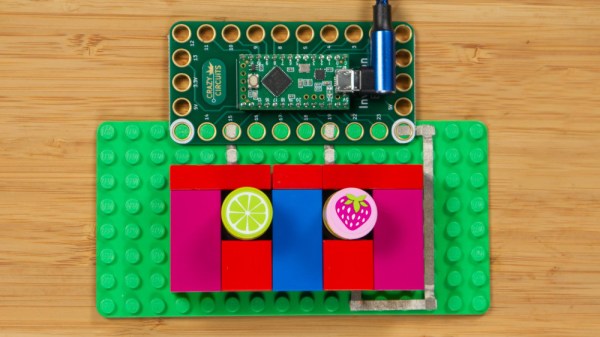
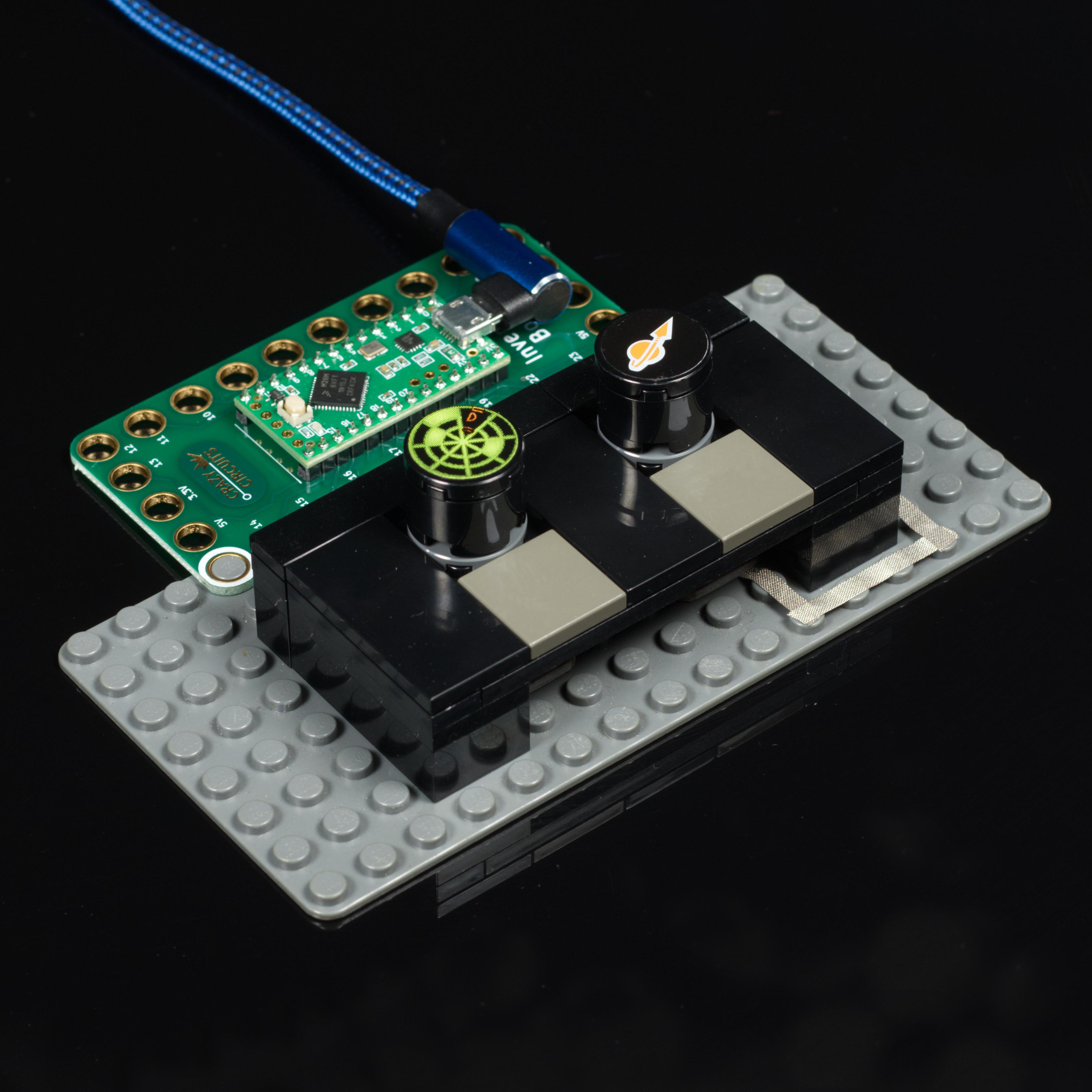
[Pete’s] solution was to make a small two-button device (one button for next slide, one for previous slide) that uses MIDI to communicate with a small custom application on the producer’s machine, and doesn’t care about application focus. Pressing the slide advance button plays a distinct tone into the producer’s headphones, plus the custom application displays “Forward”, “Back”, or “Waiting” in a window, depending on the state of the Presenter’s buttons. The design is available on Instructables for anyone wanting a closer look.

[Pete] reports that it works and it’s far more discreet than saying “next slide, please” twenty or more times per presentation. You may notice from the photo that LEGO bricks play a prominent part in the device, and if you’d like to see more of that sort of thing, make sure to check out these other brick-mountable PCB designs.

Legacy Digital Photos, With A Side Of Murphy’s Law

[Dave Madison] came across some old digital photos, and in his quest to access them, he ran into quite a few challenges. The saga brings to mind both Murphy’s Law, and while [Dave] prevailed in the end, it required quite a few more steps than one might expect.

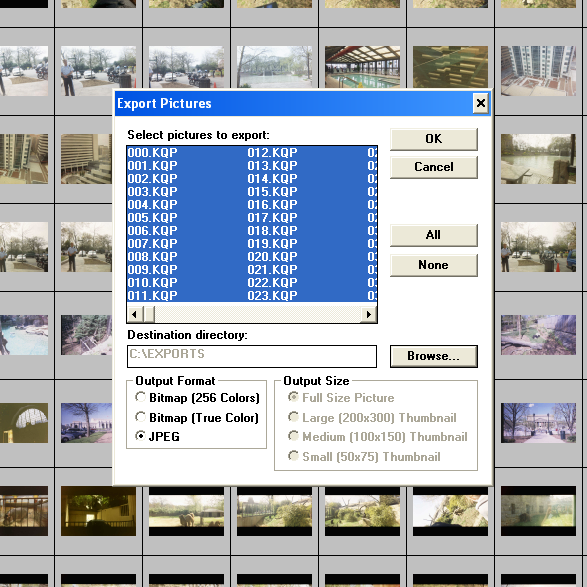
The one smooth part of the process was that Konica’s proprietary software had a handy JPEG export feature.

Here’s the scene: in the late 90s, Konica partnered with photo shops to provide a photo scanning service, delivering digital scans of film photos on 3.5″ floppy disks, and that’s exactly what [Dave] had to work with. The disks were in good condition, and since modern desktop computers still support floppy drives and the FAT filesystem, in theory all one needs to do is stick disks into the reader one at a time in order to access the photos.

Sadly, problems started early. A floppy drive is revoltingly slow compared to any modern storage device, so [Dave]’s first step was to copy all of the files to his machine’s local storage before working on them. This took a bit of wrangling to deal with 8.3 format file names and avoid naming collisions across disks while still preserving some metadata such as original creation date. It was nothing a quick python script couldn’t handle, but that soon led to the next hurdle.

The photos in question were in an obsolete and proprietary Konica .KQP format. [Dave] went through a number of photo viewing programs that claimed to support .KQP, but none of them actually recognized the images.

Fortunately, each disk contained a copy of Konica’s proprietary “PC PictureShow” viewer, but despite having a variety of versions dated between 1997 and 2001 (making them from the Windows 98 and Windows ME eras) [Dave] could not get any version of the program to run in Windows 10, even with compatibility mode for legacy programs enabled. The solution was to set up a Windows XP virtual machine using Oracle’s Virtualbox, and use that to ultimately run PC PictureShow and finally access the photos. After all that work, [Dave] finally had a stroke of luck: Konica’s software had a handy feature to export images in JPEG format, and it worked like a charm.

In the end, [Dave] was able to save 479 out of the 483 images on the old floppy disks, with a reminder that proprietary formats are a pain. The disks and images may have been over twenty years old, but the roots of digital imaging go considerably further back than that. Take a few minutes out your day to read a bit about Russell Kirsch and the first digitized image, that of his three-month old son in 1957.

Some Tips For Monetizing Work In Open Source

Free and open-source software (FOSS) doesn’t have to be entirely separate from the concept of bringing in money, but the path to monetizing is maybe less clear than it could be. To help address this, [Drew DeVault] has shared some concise thoughts on different ways to monetize FOSS work and projects. [Drew] observes that monetizing one’s own projects is one approach, but that it is entirely possible, and less difficult, to make money by participating in open source work in a more general sense.

There are companies and organizations out there who may make their money otherwise, but are nevertheless involved in or reliant upon open source software for running their business. Such companies are a good starting point for anyone looking to work in FOSS, and [Drew] shares a clever tip for finding them: use git to clone the software repositories of large projects that are of interest to you, then run this command:

git log -n100000 --format="%ae" | cut -d@ -f2 | sort | uniq -c | sort -nr | less

This will extract the domain names from the last 100,000 commits to the repository in question; a good set of leads to companies and organizations that are invested enough in FOSS to contribute, and who may be willing to pay for such work.

There is also the option of monetizing one’s own projects, which [Drew] says is the more difficult approach. He shares tips on monetization options, but cautions that fundamentally one is building a business when going this route. One should therefore be prepared to face the attendant non-software-related problems in the process.

[Drew] runs SourceHut and works entirely in FOSS, but still makes time for fun hacks like using this old line printer to emulate the experience of working on a teletype, which is how it was done when terminal output went to paper, instead of a CRT monitor.

Art of 3D printer in the middle of printing a Hackaday Jolly Wrencher logo

3D Printering: Why Aren’t Enclosures Easier?

For 3D printers that aren’t already enclosed, why is easily adding a cheap and effective enclosure still not a completely solved problem? The reason is simple: unless one’s needs are very basic, enclosures are more than just boxes.

Different people need different features, printers come in different shapes and sizes, and creating something that can be both manufactured and shipped cheaply is a challenge in itself. In this article I’ll explain how those things make boxing up your printer a tougher nut to crack then may seem at first glance.

Enclosures Have Different Jobs

People have different expectations of what an enclosure’s job should be, and that determines which features are important to them and which are not. Here is a list of meaningful features for 3D printer enclosures; not everything on this list is important to everyone, but everything on this list is important to someone. Continue reading “3D Printering: Why Aren’t Enclosures Easier?”

OpenCV And Depth Camera Spots Weeds

Using vision technology to identify weeds in agriculture is an area of active development, and a team of researchers recently shared their method of using a combination of machine vision plus depth information to identify and map weeds with the help of OpenCV, the open-source computer vision library. Agriculture is how people get fed, and improving weed management is one of its most important challenges.

Many current efforts at weed detection and classification use fancy (and expensive) multispectral cameras, but PhenoCV-WeedCam relies primarily on an OAK-D stereo depth camera. The system is still being developed, but is somewhat further along than a proof of concept. The portable setups use a Raspberry Pi, stereo camera unit, power banks, an Android tablet for interfacing, and currently require an obedient human to move and point them.

It’s an interesting peek at the kind of hands-on work that goes into data gathering for development. Armed with loads of field data from many different environments, the system can use the data to identify grasses, broad leaf plants, and soil in every image. This alone is useful, but depth information also allows the system to estimate overall plant density as well as try to determine the growth center of any particular plant. Knowing that a weed is present is one thing, but to eliminate it with precision — for example with a laser or mini weed whacker on a robot arm — knowing where the weed is actually growing from is an important detail.

PhenoCV-WeedCam (GitHub repository) is not yet capable of real-time analysis, but the results are promising and that’s the next step. The system currently must be carried by people, but could ultimately be attached to a robotic platform made specifically to traverse fields.