This Camera Captures Piezo Inkjet Micro-Drops For DIY Microfluidics

In microfluidics, there are “drop on demand” instruments to precisely deposit extremely small volumes (pico- or nano-liters) of fluid. These devices are prohibitively expensive, so [Kyle] set out to design a system using hobbyist-level parts for under $1000. As part of this, he has a fascinating use case for a specialized camera: capturing the formation and shape of a micro-drop as it is made.

There are so many different parts to this effort that it’s all worth a read, but the two big design elements come down to:

  1. Making the microdrop using a piezo element
  2. Ensuring the drop is made correctly, and visually troubleshooting
Working prototype. The piezo tube is inside the blue piece at the top. The camera is to the right, and the LED strobe is on the left.

It’s one thing to make an inkjet element in a printer work, but it’s quite another to make a piezoelectric element dispense arbitrary liquids in a controlled, repeatable, and predictable way. Because piezoelectric elements force liquid out with a mechanical motion, different liquids require different drive signals and that kind of experimentation requires a way to see what is going on, hence the need for a drop observation camera.

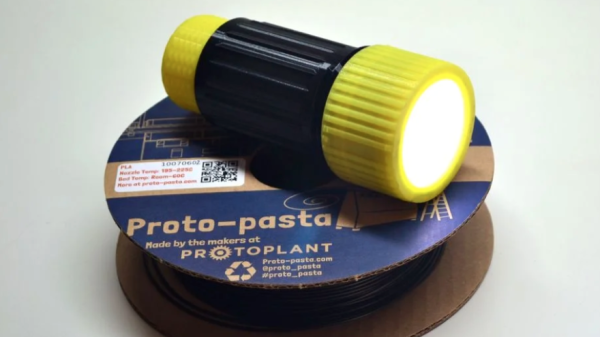
[Kyle] ended up taking the lens assembly from a cheap USB microscope and mating it to his Korukesu C1 USB Camera with a 3D printed assembly. Another 3D printed enclosure doubles as a lightbox, holding the piezo tube in the center with the LED strobe and camera on opposite sides. The whole assembly had a few false starts, but in the end [Kyle] seems pretty happy with his results. The device is briefly described at a high level here. There are some rough edges, but it’s a working system.

Inkjet technology has been around for a long time (you can see a thirty-plus year old inkjet printer in action here) but it’s worth mentioning that not all inkjet heads are alike. Most inkjet printer heads operate thermally, which means a flash of heat vaporizes some ink to expel a micro-drop. These heads aren’t very suitable for microfluidics because not only do they rely on vaporizing the liquid, but they also don’t work well with anything other than the ink they’re designed for. Piezoelectric print heads are less common, but are more suited to the kind of work [Kyle] is doing.

Teardown Of Oddball Night Vision Shows Off Retro-futuristic Vibe

Night vision aficionado [Nicholas C] shared an interesting teardown of a Norwegian SIMRAD GN1 night vision device, and posted plenty of pictures, along with all kinds of background information about their construction, use, and mounting. [Nicholas] had been looking for a night vision device of this design for some time, and his delight in finding one is matched only by the number of pictures and detail he goes into when opening it up.

The GN1 rocks an irresistible retro-futuristic look.

What makes the SIMRAD GN1 an oddball is the fact that it doesn’t look very much like other, better known American night vision devices. Those tend to have more in common with binoculars than with the GN1’s “handheld camera” form factor. The GN1 has two eyepieces in the back and a single objective lens on the front, which is off-center and high up. The result is a seriously retrofuturistic look, which [Nicholas] can’t help but play to when showing off some photos.

[Nicholas] talks a lot about the build and tears it completely down to show off the internal optical layout necessary to pipe incoming light through the image intensifier and bend it around to both eyes. As is typical for military hardware like this, it has rugged design and every part has its function. (A tip: [Nicholas] sometimes refers to “blems”. A blem is short for blemish and refers to minor spots on optics that lead to visual imperfections without affecting function. Blemished optics and intensifier tubes are cheaper to obtain and more common on the secondary market.)

In wrapping up, [Nicholas] talks a bit about how a device like this is compatible with using sights on a firearm. In short, it’s difficult at best because there’s a clunky thing in between one’s eyeballs and the firearm’s sights, but it’s made somewhat easier by the fact that the GN1 can be mounted upside down without affecting how it works.

Night vision in general is pretty cool stuff and of course DIY projects abound, like the OpenScope project which leverages digital cameras and 3D printing, as well as doing it the high-voltage image intensifier tube way.

Art of 3D printer in the middle of printing a Hackaday Jolly Wrencher logo

The Real Lessons About 3D Printed Face Shields: Effective Engineering Response In Times Of Crisis

3D printed face shields and other health equipment is big news right now. Not long ago, Prusa Research rapidly designed and manufactured 3D printed face shields and donated them to the Czech Ministry of Health. Their effort is ongoing, and 3D printers cranking out health equipment like the NIH approved design has been peppering headlines ever since.

The Important Part Isn’t 3D Printers

The implied takeaway from all the coverage is that 3D printers are a solution to critical equipment shortages, but the fact that 3D printers are involved isn’t really the important part. We all know printers can make plastic parts, so what should be the real takeaway? The biggest lessons we can learn about Prusa’s ongoing effort are related to how they’ve gone about it.

Continue reading “The Real Lessons About 3D Printed Face Shields: Effective Engineering Response In Times Of Crisis”

Art of 3D printer in the middle of printing a Hackaday Jolly Wrencher logo

3D Printering: When Resin Printing Gets Smelly

Nowadays, resin printers are highly accessible and can do some great stuff. But between isopropyl alcohol for part rinsing and the fact that some resins have a definite smell to them, ventilation can get important fast. The manufacturers don’t talk much about this part of the resin printing experience, but it’s there nevertheless. So what can be done when smells become a problem?

I recently had to deal with this when I printed several liters of resin worth of parts. That’s a lot of resin, and a lot of alcohol for part washing. Smells — which had never been much of a problem in my work area — suddenly became an issue.

Where Odors Come From

Smells come from two sources: the resin itself, and the isopropyl alcohol used for cleanup and part washing. Continue reading “3D Printering: When Resin Printing Gets Smelly”

Flexible Build Platforms Work For FDM, How About SLA?

Flexible steel sheets as the foundation for build platforms are used to great advantage in FDM 3D printers. These coated sheets are held flat by magnets during printing, and after printing is done the sheet (with print attached) can be removed and flexed to pop the prints free. This got [Jan Mrázek] thinking. He was pretty sure the concept could extend to the build platform on his Elegoo Mars resin printer. With a flexible build platform, troublesome prints could be more easily removed, so he non-destructively modified his printer to have a similar system. [Jan] is clear that this is only a proof of concept, but the test results were good! He printed several jobs that were known to be trouble, and they were all a piece of cake to remove.

[Jan]’s mod consists of a 3D printed, two-piece unit that encapsulates the normal build platform and contains a few strong magnets. A thin sheet of steel sticks flat to this new piece, held in place by the magnets within, and becomes the new build platform. After a print is done, the sheet is removed and [Jan] reports that its flexibility is a big help in removing otherwise troublesome prints, such as the 3D printed solder stencil we covered recently.

[Jan] provides his CAD model but doesn’t really recommend using it for anything other than development work. Results were promising, but there are a number of drawbacks to the prototype. For one thing, it makes the build platform thicker and the Z-axis limit switch needs to be physically lowered in order to zero the unit. Also, the thicker build platform means the volume of resin the build tank can hold is reduced. Still, the idea clearly has merit and shows there absolutely is value in hardware having a hackable design.

The CLUE Tracker Points You To A Target, Using CircuitPython

The main components are an Adafruit CLUE, Stemma GPS, and a lithium-polymer battery. No soldering required.

[Jay Doscher] shares a quick GPS project he designed and completed over a weekend. The device is called the CLUE Tracker and has simple goals: it shows a user their current location, but also provides a compass heading and distance to a target point. The idea is a little like geocaching, in that a user is pointed to a destination but must find their own way there. There’s a 3D printed enclosure, and as a bonus, there is no soldering required.

The CLUE Tracker uses the Adafruit CLUE board (which is the same size as the BBC micro:bit) and Stemma GPS sensor, with the only other active component being a lithium polymer battery. The software side of the CLUE Tracker uses CircuitPython, and [Jay] has the code and enclosure design available on GitHub.

[Jay] did a nice job of commenting and documenting the code, so this could make a great introductory CircuitPython project. No soldering is required, which makes it a little easier to re-use the parts in other projects later. This helps to offset costs for hackers on a budget.

The fact that a device like this can be an afternoon or weekend project is a testament to the fact that times have never been better for hobbyists when it comes to hardware. CircuitPython is also a fast-growing tool, and projects like this can help make it easy and fun to get started.

Handheld 3D Scanning, Using Raspberry Pi 4 And Intel RealSense Camera

Raspberry Pi 4 (with USB 3.0) and Intel RealSense D415 depth sensing camera.

When the Raspberry Pi 4 came out, [Frank Zhao] saw the potential to make a realtime 3D scanner that was completely handheld and self-contained. The device has an Intel RealSense D415 depth-sensing camera as the main sensor, which uses two IR cameras and an RGB camera along with the Raspberry Pi 4. The Pi uses a piece of software called RTAB-Map — intended for robotic applications — to take care of using the data from the camera to map the environment in 3D and localize itself within that 3D space. Everything gets recorded in realtime.

This handheld device can act as a 3D scanner because the data gathered by RTAB-Map consists of a point cloud of an area as well as depth information. When combined with the origin of the sensing unit (i.e. the location of the camera within that area) it can export a point cloud into a mesh and even apply a texture derived from the camera footage. An example is shown below the break.
Continue reading “Handheld 3D Scanning, Using Raspberry Pi 4 And Intel RealSense Camera”