EEPROM Hack To Fix Autodetection Issues

Autodetection of hardware was a major part of making computers more usable for the average user. The Amiga had AutoConfig on its Zorro bus, Microsoft developed Plug And Play, and Apple used NuBus, developed by MIT. It’s something we’ve come to take for granted in the modern age, but it doesn’t always work correctly. [Evan] ran into just this problem with a video capture card that wouldn’t autodetect properly under Linux.

The video capture card consisted of four PCI capture cards with four inputs each, wired through a PCI to PCI-E bus chip for a total of sixteen inputs. Finding the cause of the problem wasn’t too difficult – the driver was detecting the card as a different model with eight inputs, instead of the sixteen inputs actually present on the card. The driver detects the device plugged in by a unique identifier reported by the card. The code on the card was identical to the code for a different model of card with different hardware, causing the issue.

As a quick test, [Evan] tried fudging the driver selection, forcing the use of a driver for a sixteen-input model. This was successful – all sixteen inputs could now be used. But it wasn’t a portable solution, and [Evan] would have to remember this hack every time the card needed to be reinstalled or moved to a different computer.

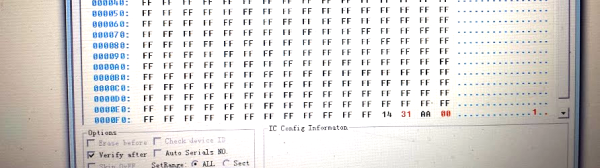
Looking further at the hardware, [Evan] discovered the card had four 24c02 EEPROM chips on board – one for each PCI card on board. Dumping the contents, they recognised the unique identifier the driver was using to determine the card’s model. It was then a simple job to change this value to one that corresponded with a sixteen-input card to enable functional autodetection by burning a new value to the EEPROM. [Evan] then published the findings to the LinuxTVWiki page. Continue reading “EEPROM Hack To Fix Autodetection Issues”

Talking Arduino Tells GoPro What To Do

It’s 2017 and even GoPro cameras now come with voice activation. Budding videographers, rest assured, nothing will look more professional than repeatedly yelling at your camera on a big shoot. Hackaday alumnus [Jeremy Cook] heard about this and instead of seeing an annoying gimmick, saw possibilities. Could they automate their GoPro using Arduino-spoken voice commands?

It’s an original way to do automation, for sure. In many ways, it makes sense – rather than mucking around with trying to make your own version of the GoPro mobile app (software written by surfers; horribly buggy) or official WiFi remote, stick with what you know. [Jeremy] decided to pair an Arduino Nano with the ISD1820 voice playback module. This was then combined with a servo-based panning fixture – [Jeremy] wants the GoPro to pan, take a photo, and repeat. The Arduino sets the servo position, then commands the ISD1820 to playback the voice command to take a picture, before rotating again.

[Jeremy] reports that it’s just a prototype at this stage, and works only inconsistently. This could perhaps be an issue of intelligibility of the recorded speech, or perhaps a volume issue. It’s hard to argue that a voice control system will ever be as robust as remote controlling a camera over WiFi, but it just goes to show – there’s never just one way to get the job done. We’ve seen people go deeper into GoPro hacking though – check out this comprehensive guide on how to pwn your GoPro.

Bluetooth Automation Remote Hangs Around

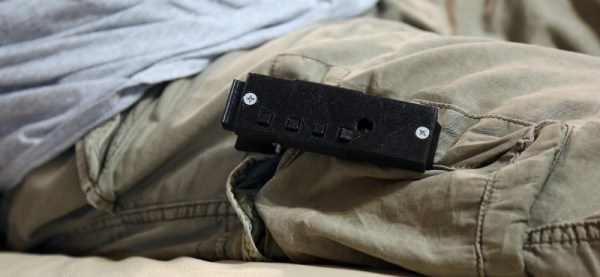
Using your smartphone to control your home automation system gives you a lot of flexibility. But for something as simple as turning the lights on and off, it can be a pain to go through the whole process of unlocking your phone, choosing the right browser page or app, and then finally hitting the button you need. It’d be much simpler if it could all be done at the touch of a single, physical button – but phones don’t have many of those anymore. [falldeaf] brings the solution – a four-button Bluetooth remote for your smartphone that’s wearable, to boot.

The project is built around the RFDuino, an Arduino platform used for quickly and easily building Bluetooth compatible projects. So far, so simple – four buttons wired into a microcontroller with wireless capability onboard. The real trick is the 3D-printed clothespin style case which allows you to clip the four-button remote onto your clothes. [falldeaf]’s first attempt was a palm-mounted setup that they found got in the way of regular tasks; we agree that the wearable version offers a serious upgrade in utility.

The smartphone side of things is handled with a custom app [falldeaf] coded using PhoneGap. This is where actions for the buttons can be customized, including using the buttons to navigate a menu system to enable the user to select more than just one function per button. It adds a high level of flexibility, so you can create all kinds of macros to control your whole home automation system from your button clip.

It’s really great to see a project that considers ergonomics and usability above and beyond just creating the baseline functionality. Follow this train of thought and you’ll find yourself enjoying your projects in the use phase well beyond the initial build. Another great example is this self-charging electrically heated jacket. Video after the break.

Continue reading “Bluetooth Automation Remote Hangs Around”

Solar Controller Reverse Engineered In Both Directions

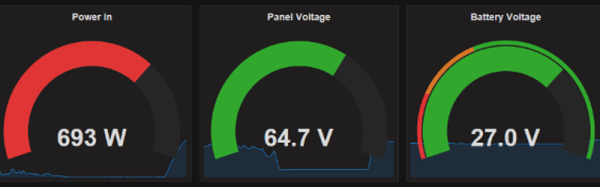
[Jared Sanson] has a solar power setup on his beach house, consisting of 6 panels and a 24V battery bank, supplied by Outback Inc. Their chargers and inverters pair over a seemingly proprietary connection with a controller known as the MATE. The MATE has a standard serial output which gives some details about the operation, but [Jared] wasn’t getting the detailed information they could get from the controller’s screen. This meant it was time to reverse engineer the proprietary connection instead, which [Jared] calls MateNET.

The controller interfaces with the chargers over a Cat5 cable. [Jared] initially suspected RS-485, but it turned out to be regular serial at 0-24V logic levels, at 9600 baud, 9n1. To figure out the pinout, [Jared] went through the MATE circuitry with a fine-toothed comb, discovering an ATMEGA32. Since both the MATE’s user output & its connection to the other equipment are both serial, a logic mux is used to split the ATMEGA32’s single UART between the two serial connections. With the physical layer sorted, it was time to figure out how the protocol worked.

Continue reading “Solar Controller Reverse Engineered In Both Directions”

How To Sharpen Your Woodworking Tools On A Budget

Wood may seem like a soft, weak material if you’re used to working with steel, but to do good work, you’ll quickly learn you need your tools sharp. Buying and maintaining a good set of tools can be expensive for the home gamer, so [shopbuilt] put together an Instructable on how to sharpen your woodworking tools on a budget.

The trick is to use sandpaper. It’s a good quality abrasive material and is readily available. You’ll want a selection of different grits – low grits to get started, higher grits when finishing. The reason this is cheaper is that you can get a selection of 5-10 different sandpapers for under $20. Getting even a couple of decent sharpening stones wouldn’t be possible at that price. In the long run, they’ll last longer but this is a budget option we’re talking about.

Obviously you can’t just sharpen something with sandpaper – [shopbuilt] suggests mounting the paper to the flattest surface you can find. The use of a tempered glass panel from a fridge shelf is, in our mind, an inspired choice here. 3D printer enthusiasts have been using similar techniques for heated beds for the best part of a decade now.

We love woodworking here at Hackaday, so get your feet wet with these woodworking basics for the hardware hacker.

Stuff An Android In Your Xbox Controller’s Memory Slot

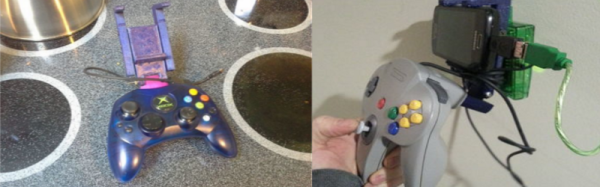
What is this, 2009? Let’s face facts though – smartphones are computing powerhouses now, but gaming on them is still generally awful. It doesn’t matter if you’ve got the horsepower to emulate any system from the last millennium when your control scheme involves awkwardly pawing away at glass when what you need is real buttons. You need a real controller, and [silver] has the answer – a 3D printed phone mount for the original Xbox Controller.

It’s more useful than it initially sounds. The original Xbox used USB 1.1 for its controllers. With a simple OTG cable, the controllers can be used with a modern smartphone for gaming. The simple 3D printed clamp means you can have a mobile gaming setup for pennies – old controllers are going cheap and it’s only a couple of dollars worth of filament. The trick is using the controller’s hilariously oversized memory card slots – for some reason, Microsoft thought it’d be fun to repackage a 64MB flash drive into the biggest possible form factor they could get away with. The slots also acted as a port for online chat headsets, and finally in 2017, we’ve got another use for the form factor.

For the real die-hard purists, [silver] also shares a photo of a similar setup with a Nintendo 64 controller – including a big fat USB controller adapter for it, hanging off the back. Not quite as tidy, that one.

It’s a neat little project – we love to see useful stuff built with 3D printers. If you’ve been looking for something functional to print, this is it. Or perhaps you’d like to try these servo-automated 3D printed light switches?

Servo-Controlled IoT Light Switches

The Internet of Things is fun to play with; there’s all manner of devices to automate and control remotely. It can be sketchy, though — make a mistake when coding your automatic plant watering system and you could flood your house. Make a mistake with a space heater and you could burn it down. Combine these risks with the fact that many people live in rental properties, and it can be a difficult proposition to bring the Internet of Things to your home.

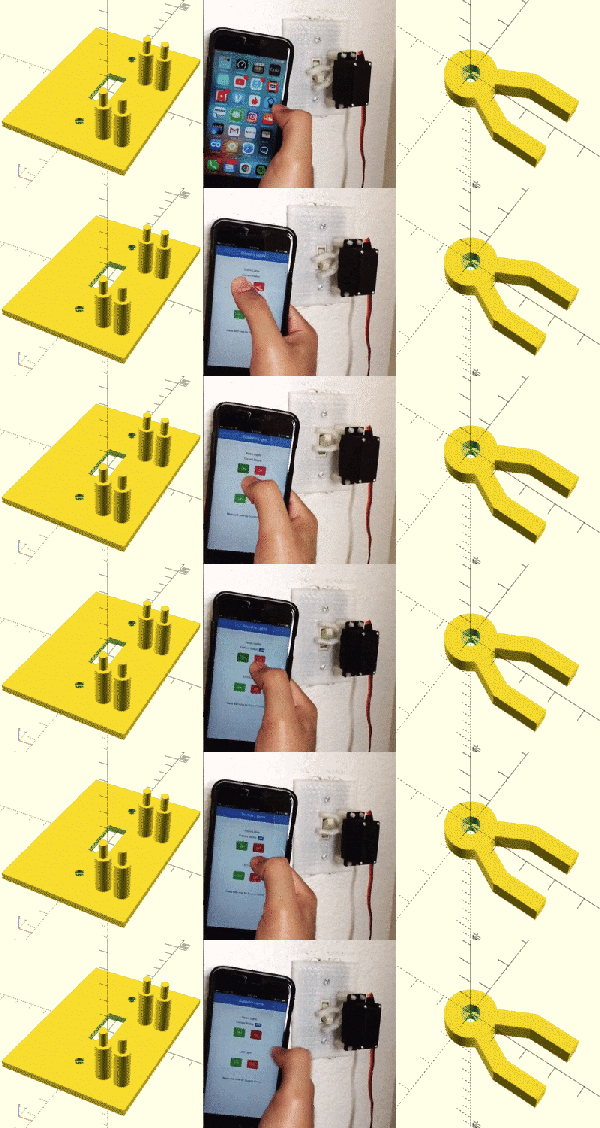
[Suyash] came up with a way around this by building 3D printed light switch covers that add servo control. It’s a great solution that it doesn’t require the modification of any mains wiring, and interfaces with the standard switches in the normal way. It makes it a lot safer this way — there are municipal wiring codes for a reason. This is a great example of what you can do with a 3D printer, above and beyond printing out Yoda heads and keychains.

The backend of things is handled by the venerable ESP8266, with [Suyash]’s custom IoT library known as conduit doing the heavy lifting. The library is a way to quickly build IoT devices with web interfaces, and [Suyash] claims it’s possible to be blinking an LED from the cloud within 5 minutes using the tool.

For another take on an IoT light switch, check out this Hackaday Prize entry from 2016.