Machine Learning Lets Micro Decode Your Handwriting

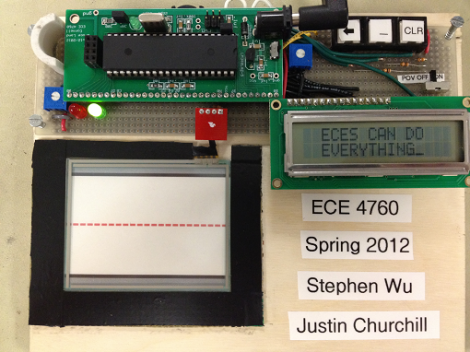
This rig will take the letters you write on the touchpad using a stylus and turn them into digital characters. The system is very fast and displays near-perfect recognition. This is all thanks to a large data set that was gathered through machine learning.

The ATmega644 that powers the system just doesn’t have the speed and horsepower necessary to reliably recognize handwriting on its own. But provide it with a dataset to compare against and you’re in business. [Justin] and [Stephen] designed a neural network algorithm that took a large volume of character handwriting samples, and boiled them down into a set of correlations that can be referenced when encountering a new entry. This set is about 88 kilobytes, too much to store in the microprocessor, but easy to reference from an external flash memory device.

There’s plenty of gritty details in the write up linked above, but you may want to start with the video overview found after the break.

Continue reading “Machine Learning Lets Micro Decode Your Handwriting”
TI Launchpad As AVR ISP Programmer

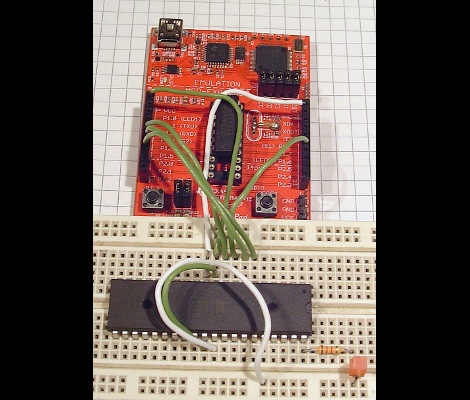
[Minifloat] is using his TI Launchpad development board as an In-System Programmer for AVR chips (translated). There are a ton of homebrew AVR programmers out there, and using an Arduino for ISP is quite popular. But recently we searched for a way to use the Launchpad as a programmer and didn’t find one. We’d venture to say this is the first.

There is one hardware modification that must be made. An external clock crystal (32.768 kHz) must be populated on the board. But since it was designed with the feature in mind that’s a pretty quick process. [Minifloat] followed Atmel’s ISP app note, and extended some of the code written for a different programmer to get things up and running. At first the device wouldn’t communicate with AVRdude, but that turns out to be a problem with the initialization conversation. AVRdude polls the connected programmer to see if it supports block mode, and the firmware on the MSP430G2211 wasn’t expecting this query. The problem was fixed and it now works.

It sounds like there are a couple of bugs left in the system. The first time AVRdude accesses the programmer after it has been plugged into the USB port it will fail. Subsequent attempts will succeed until the MSP430 chip is reset, or the USB connection is replugged. But if you’re just getting into the AVR line, this will let you figure out if you want to invest in a proper programmer.

BASIC For Some Beefy AVR chips

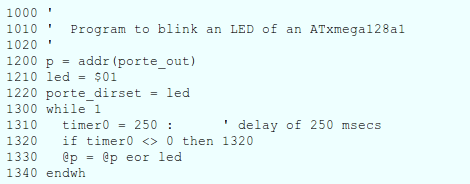
klBASIC is a BASIC interpreter written in C for AVR microcontrollers. [Karl Lunt] developed the project based on an assembly language BASIC interpreter for 68HC11 chips written by [Gordon Doughman]. The transition from assembly to C bulked up the code, so you’ll need a beefy AVR chip in order to store all of it.

The idea is that one AVR chip can run BASIC with just a serial monitor. But like this Arduino BASIC interpreter build, it would be a snap to run this with a keyboard and small LCD screen. We see binaries available for several different AVR devices including ATmega128, ATmega1284, and Xmega128. They range from 1.5k to 16k of program memory. We didn’t find a link to the source code (just these precompiled files) so we inquired with [Karl] to see if that is available. He’s reluctant to release the code because it’s “pretty much a mess” and doesn’t live up to his normal standards. If he codes for a living we can see how that may be embarrassing. If you’d like to lend a hand cleaning up the code, let him know by leaving a comment here and maybe he’ll release it for that purpose.

We find this interesting, but it’s tough to get excited about building one of our own. If this has inspired you, we’d love to hear some of your plans in the comments after the break. Perhaps we’d be prodded into another programming adventure based on your enthusiasm.

Arduino Can Program PIC Too!

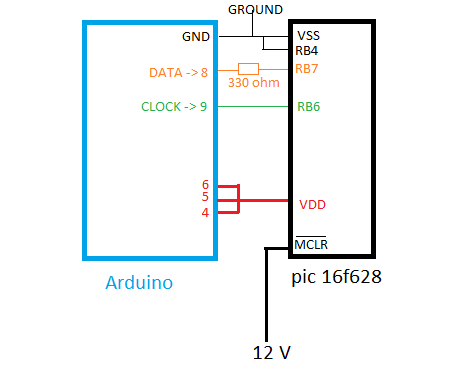
This is a wiring diagram that [Soranne] put together when developing a method of programming PIC microcontrollers using an Arduino board. You can see that he takes care of the 12V issue by connecting the Master Clear (MCLR) pin to an external source. This comes with one warning that the Arduino should always be reset just before making that connection.

He’s tested this with a 16F628 and is happy to report that he can successfully flash the program memory, but hasn’t implemented a way to write to the EEPROM as of yet. This should work for any of the 16F family of chips, but we’d bet this will be extended if some knowledgeable folks decide to lend a hand.

On the PC side of things [Soraane] has been working on a program to push code to the Arduino via the USB connection. He’s developing it in C# and even has a GUI worked up for the project. You can get your hands on the software in the second post of the thread linked above but you’ll have to be logged into the Arduino forum to see the download link.

We think the 12V issue is why we don’t see more roll-your-own programmers for PIC. But there are a few solutions out there like this ATmega8 version.

Sun-powered Stirling Engine With Automatic Tracking

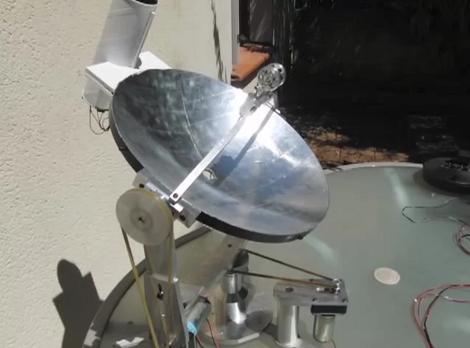
Check out this solar-powered Stirling engine (translated). The build is part of a high school class and they packed in some really nice features. The first is the parabolic mirror which focuses the sun’s rays on the chamber of the engine. The heat is what makes it go, and the video after the breaks shows it doing just that.

But the concept behind the mirror makes for an interesting challenge. The light energy is focused at a narrow point. When the sun moves in the sky that point will no longer be at an efficient position to power the engine. This issue is solved by a pair of stepper motors which can reposition the dish. It’s done automatically by an Arduino Uno which makes readings from four LDR (photoresistors) in that cardboard tube mounted at the top of the dish. If the light intensity is the same for all four, then the tube is pointed at the sun. If not, the motors are tweaked to get the best angle possible.

Continue reading “Sun-powered Stirling Engine With Automatic Tracking”

Surround Sound System Controller Replacement Includes Home Automation

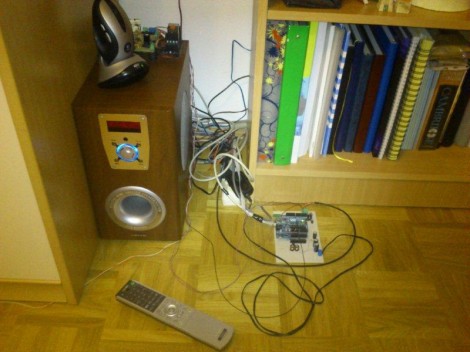
[Neoxy] always wanted surround sound for his computer, and one day he managed to get a hold of a dead 5.1 system. Why buy one when you can repair someone’s rubbish, right? That turned out to be easier said than done, but after several false-starts he managed to resurrect the audio system by replacing the microcontroller.

We find his trouble-shooting technique interesting. The amp would power up without a hitch but no sound would come out of it. So he took a headphone cable and used the L and R conductors as probes. That cable was fed from an MP3 player, and by touching the probes to the audio inputs for the pre-amp and amplifier circuits he could get great sound out of the speakers. Reasonably certain that those boards were working fine he narrowed down the troubles to three chips that mix, select inputs, and control the system.

A lot of prototyping with an ATmega328 and an Arduino led him to the functionality you see in the video after the break. Not only did he get the system working, but he’s using the Arduino to add Internet control for the device.

Continue reading “Surround Sound System Controller Replacement Includes Home Automation”

Simple Trick For Replacing Game Boy Cart Batteries While Retaining Game Saves

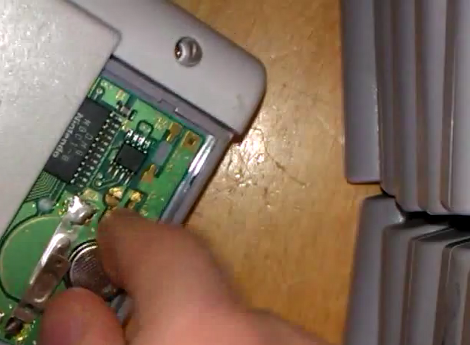
[Adr990] wants to make sure his Game Boy game saves aren’t lost to aging batteries. They’re stored in SRAM with a small coin cell inside the cartridge to keep the memory energized when the game is not being played. But if you pull out the battery in order to replace it the data will be lost in the process. It turns out that you can hot-swap the battery without too much effort. As shown in the video after the break, he disassembled the case of the cartridge, then replaced the battery while the Game Boy is switched on. The edge connector feeds power which will keep the SRAM active while the backup battery is removed. We’re sure this could be done with a bench supply as well, but you’ll need to do your own testing before risking those prized game saves.

The other option is to backup your SRAM before replacing the batteries. We’ve seen an AVR-based cartridge dumper, and also one that uses an Arduino. Both should be able to read and write SRAM data. Continue reading “Simple Trick For Replacing Game Boy Cart Batteries While Retaining Game Saves”