3D Whiteboard Without The Whiteboard

This one is so simple, and works so well, we’d call it a hoax if April 1st hadn’t already passed us by. But we’re confident that what [William Myers] and [Guo Jie Chin] came up with exists, and we want one of our own. The project is a method of drawing in 3 dimensions using ultrasonic sensors.

They call it 3D Paint, and that’s fitting since the software interface is much like the original MS Paint. It can show you the movements of the stylus in three axes, but it can also assemble an anaglyph — the kind of 3D that uses those red and blue filter glasses — so that the artists can see the 3D rendering as it is being drawn.

The hardware depends on a trio of sensors and a stylus that are all controlled by an ATmega644. That’s it for hardware (to be fair, there are a few trivial amplifier circuits too), making this an incredibly affordable setup. The real work, and the reason the input is so smooth and accurate, comes in the MATLAB code which does the trilateration. If you like to get elbow deep in the math the article linked above has plenty to interest you. If you’re more of a visual learner just skip down after the break for the demo video.

Continue reading “3D Whiteboard Without The Whiteboard”

Dexterity Enhancing Guitar

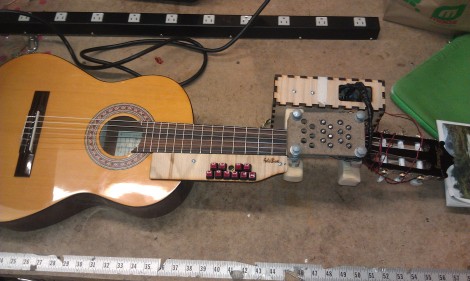
[Justin Lange’s] dad loves playing guitar, but an accident left him with nerve damage that makes it pretty much impossible these days. He just doesn’t have the dexterity needed to form the cords using his left hand. But his son’s hacking skills are helping him get back into it. [Justin] built a button-based add-on that forms the cords for him.

The build has two parts. A frame mounts over the finger board with slots for eighteen solenoids which push the strings down between the frets. These are controlled by the replacement finger board which is mounted below the neck. It has a double-row of buttons that let the player select the desired chord. One button chooses the key, with a second button acting as a modifier to switch to a seventh cord, or minor cord.

The project, which [Justin] has named folkBox, relies on a microcontroller. We spy an Arduino Mega in one of the build photographs but it will be interesting to see if the final project moves to a standalone chip. He’s set a goal for a more robust version of the build some time this summer.

[via Make]

Climbing The Mountain Of Quadcopter Design

What a sweet thing it is to see the first outdoor flight of a quadcopter. [Botched] has done a wonderful job of documenting the entire build process. Take a look at all that he has done, then jump after the break to see the extremely stable test flight footage.

Earlier iterations used feedback electronics that he designed, etched, and soldered himself. We think they looked pretty good, but he was not happy with the performance. He spent a bunch of time redesigning the IMU board, but after he printed out the PCB artwork he decided his soldering was not up to the QFN challenge and he went with a pre-assembled breakout board.

His post about PID tuning is quite interesting. He removed two of the motors and mounted those opposite ends of the chassis to a hinged stand. This let him tweak the feedback loop until the two remaining propellers were able to maintain balance even when he nudged the unit.

His test flight footage is accompanied by an on-board camera shot. He simply taped a smart phone to the battery and let it roll. Make sure you turn off your speakers before watching this one or the motor noise will let the boss know you’re reading Hackaday again instead of working.

Continue reading “Climbing The Mountain Of Quadcopter Design”

CoolBot Keeps Your Laser Cutter From Overheating

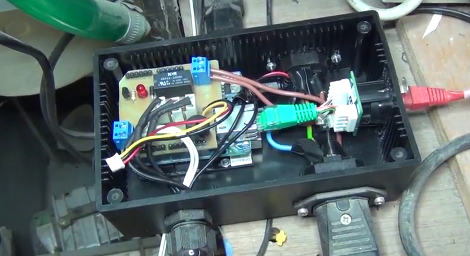
[Charles] wrote in to share the project he just built for the London Hackerspace. He calls it CoolBot, and as the name indicates it’s responsible for keeping the laser cutter from overheating.

At its heart the system is a water pump. It uses a plastic storage container as a reservoir, with an outfeed from the laser tube coming in the top of the lid. [Charles] mounted a temperature sensor using a 3D printed part to anchor it in the center of the return stream. An Arduino clone uses this sensor, as well as ambient room temperature and laser tube temperature sensors to decide when to switch on the cooling pump. As with any hackerspace add-on, this wouldn’t be complete without Internet connectivity so he included an Ethernet shield in the project box. Speaking of, that box uses panel-mount connectors to keep dust and water away from the electronics. But the lid of the controller box also includes a character LCD for quick reference.

Don’t miss [Charles’] explanation of the system in the video after the break.

Continue reading “CoolBot Keeps Your Laser Cutter From Overheating”

Pong, An Engine, And Bond Theme (oh My!)

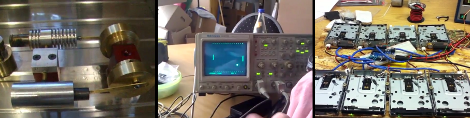
Hopefully you’re not on a network that blocks YouTube, because we’re sharing videos that show off three different projects. Alas, they don’t give any details about the development process, but we think you’ll like seeing the end results just the same.

First up is a Stirling engine. This one is pretty serious business, with machined parts making up the alcohol-lamp powered engine [Thanks Pete]. This is much more elegant than the tuna can version from last month.

Bust out your Arduino and give theoriginal video game a go. This game of Pong is played on an oscilloscope using two micro-trimpots. To make it happen a pair of MCP4901 DAC chips are feeding the probes.

While you’ve got that friendly blue breakout board out, might as well grab a set of old foppy drives. Here is an eight-channel version of the James Bond theme [via Technabob]. Unlike the sampler from the other week, this one uses the stepper motor noise to create sweet music.

Monitoring A Solar Array Output

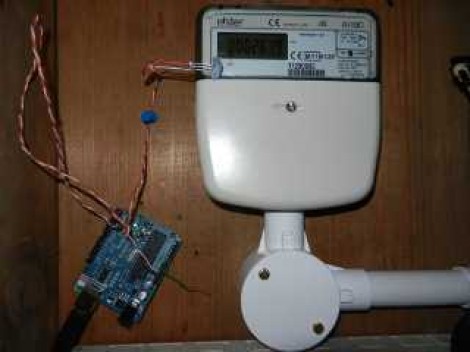
After years of hoping and wishing [Dave] finally took the plunge and installed solar panels on the roof of his house. He’s got twelve panels that are each rated at 240 Watts! But just having them sitting there and pumping power back to the grid isn’t enough. Understandably, he decided to add his own solar array monitor so that he could see just what those babies are bringing to the party.

The solar array has an inverter which takes the DC from the cells and converts it to mains voltage AC for use on the grid. The system includes a panel meter which you’d normally find on the supply to the house. All he needed to do is find a way to grab the data from that device. It’s an Elster meter, and offers two types of feedback: a blinking LED that corresponds to each Watt-hour passing through the meter, and an IrDA port which provides a more error-proof method of reading data. Monitoring the 1 Wh pulse is quite a popular method for keeping track of your electric meter, but if your hardware misses a pulse the data will be off. [Dave] chose to use a light sensor to monitor the IrDA output, which is encoded data. As long as you can read the protocol, which has been published by Elster, a transmission can be missed now and again without disturbing the overall power consumption data.

8-bit Logic Chip Computer Build

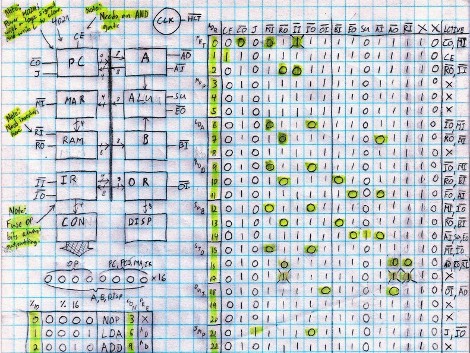
[Kyle] has been hard at working building an 8-bit computer from the ground up. He’s using a set of logic IC’s for the various components, and some NVRAM chips to store the control words. What you see above is the roadmap for his instruction set. He’s just started writing them to the chips, making the job easier by building an Arduino-based programmer.

We’ve enjoyed watching [Quinn Dunki’s] progress with her Z80  6502-based PC build which started on a breadboard in much the same way but has come a long way since those humble beginnings. Recently we also looked in on a 4-bit computer that is using discrete components. But [Kyle’s] take on the challenge falls somewhere in between the two.

The gist of his design can be found in one of his earlier post. He’s got a ring counter which starts by clearing the address register. It then loads the NVRAM address of the next instruction which is then executed on the subsequent count. It seems the build still has some way to go so make sure to keep your eye out for updates.

[via Reddit]