Teardown: Wonder Bible

Even the most secular among us can understand why somebody would want to have a digital version of the Bible. If you’re the sort of person who takes solace in reading from the “Good Book”, you’d probably like the ability to do so wherever and whenever possible. But as it so happens, a large number of people who would be interested in a more conveniently transportable version of the Bible may not have the technological wherewithal to operate a Kindle and download a copy.

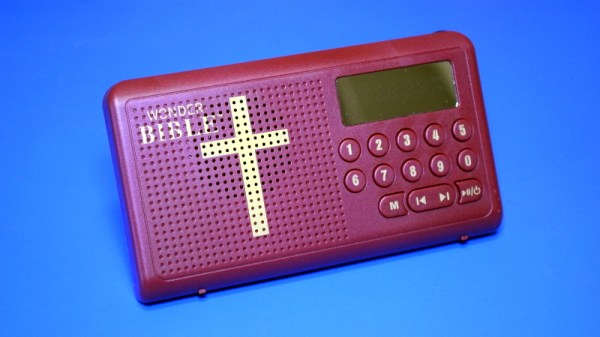
Which is precisely the idea behind the Wonder Bible, a pocket-sized electronic device that allows the user to listen to the Bible read aloud at the press of a button. Its conservative design, high-contrast LED display, and large buttons makes it easy to operate even by users with limited eyesight or dexterity.

The commercial for the Wonder Bible shows people all of all ages using the device, but it’s not very difficult to read between the lines and see who the gadget is really aimed for. We catch a glimpse of a young businessman tucking a Wonder Bible into the center console of his expensive sports car, but in reality, the scenes of a retiree sitting pensively in her living room are far closer to the mark.

In truth, the functionality of the Wonder Bible could easily be replicated with a smartphone application. It would arguably even be an improvement by most standards. But not everyone is willing or able to go that route, which creates a market for an affordable stand-alone device. Is that market large enough to put a lot of expense and engineering time into the product? Let’s crack open one of these holy rolling personal companions and find out.
Continue reading “Teardown: Wonder Bible”

Custom Portable N64 Embraces Modern Making

In the beginning, there was hot glue. Plus some tape, and a not inconsiderable amount of Bondo. In general, building custom portable game consoles a decade or so in the past was just a bit…messier than it is today. But with all the incredible tools and techniques the individual hardware hacker now has at their disposal, modern examples are pushing the boundaries of DIY.

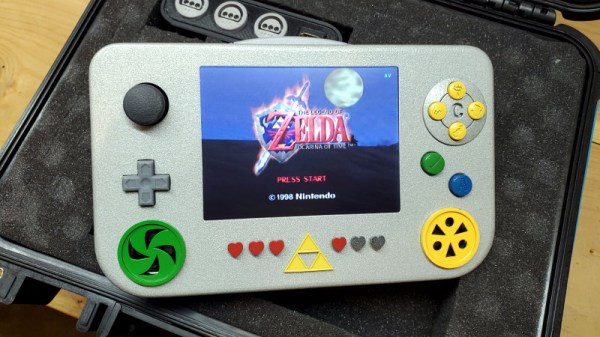
This Zelda: Ocarina of Time themed portable N64 by [Chris Downing] is a perfect example. While the device is using a legitimate N64 motherboard, nearly every other component has been designed and manufactured specifically for this application. The case has been FDM 3D printed on a Prusa i3, the highly-detailed buttons were printed in resin on a Form 3, and several support PCBs and interface components made the leap from digital designs to physical objects thanks to the services of OSH Park.

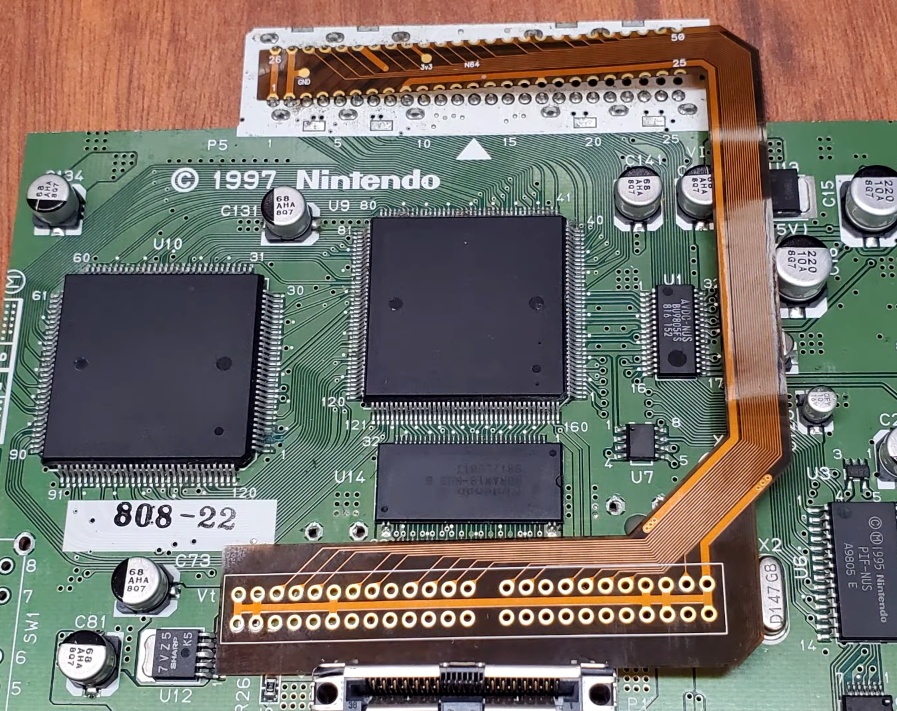
A custom made FFC to relocate the cartridge port.

Today, those details are becoming increasingly commonplace in the projects we see. But that’s sort of the point. In the video after the break, [Chris] breaks down the evolution of his portable consoles from hacked and glued together monstrosities (we mean that in the nicest way possible) to the sleek and professional examples like his latest N64 commission. But this isn’t a story of one maker’s personal journey through the ranks, it’s about the sort of techniques that have become available to the individual over the last decade.

Case in point, custom flexible flat cables (FFC). As [Chris] explains, when you wanted to relocate the cartridge slot on a portable console in the past, it usually involved tedious point-to-point wiring. Now, with the low-volume production capabilities offered by companies like OSH Park, you can have your own flexible cables made that are neater, faster to install, and far more reliable.

Projects like this one, along with other incredible creations from leaders in the community such as [GMan] are changing our perceptions of what a dedicated individual is capable of. There’s no way to be sure what the state-of-the-art will look like in another 5 or 10 years, but we’re certainly excited to find out.

Continue reading “Custom Portable N64 Embraces Modern Making”

WiFi Networks Turned Targets In This Pocket Game

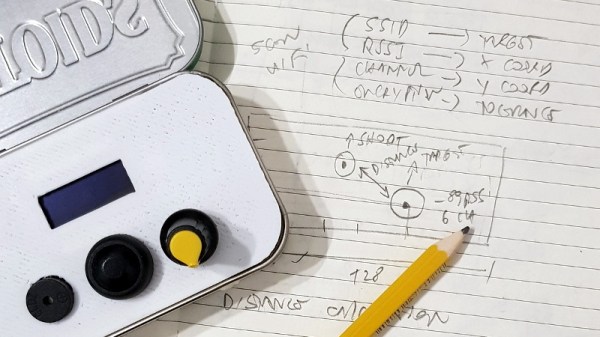
Looking for a way to make his warwalking sessions a bit more interactive, [Roni Bandini] has come up with an interesting way to gamify the discovery of new WiFi networks. Using a Heltec WiFi Kit 8, which integrates an OLED screen and ESP8266, this pocket-sized device picks up wireless networks and uses their signal strength and encryption type as elements of the game.

After selecting which network they want to play against, a target is placed on the screen. The distance between the target and the player is determined by signal strength, and how much damage the target can take correlates to how strong its encryption is. As you can see in the video after the break, gameplay is a bit reminiscent of Scorched Earth, where the player needs to adjust the angle of their artillery to hit distant targets.

The Heltec board is attached to a 3D printed front panel, which fits neatly into an Altoids tin. The controls consist of a button and a potentiometer, and with the addition of a battery pack salvaged from an old cell phone, this little device is ready to do battle wherever you roam.

While this is just a fun diversion for the time being, [Roni] says it wouldn’t take much to actual log networks to a file and generate some statistics about their strength and encryption type. If the idea of a portable WiFi scanning companion seems interesting, you should definitely check out the Pwnagotchi project.

Continue reading “WiFi Networks Turned Targets In This Pocket Game”

Vintage Keyboard Gets The QMK Treatment

While nobody could deny that computing technology has some a long way in the last few decades, there are many out there who believe peak keyboard was sometime before the turn of the new millennium. They prefer the look, feel, and especially the sounds, of those classic keyboards to what passes for an input device these days. So much so that it’s not uncommon to see one of these old mammoths get freshened up and pushed into service with a modern computer.

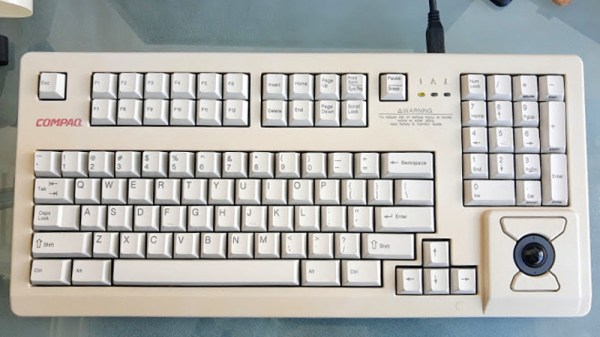
Which is exactly what [Juan Pablo Kutianski] has done with his Compaq MX-11800. This keyboard, which is actually a branded version of the Cherry G80-11800, really stands out in a crowd. With an integrated trackball and a two-row arrangement for the function keys, it’s not hard to see why he’d want to show it off. But while the hardware itself was solid, the features and capabilities of this old school keyboard left something to be desired.

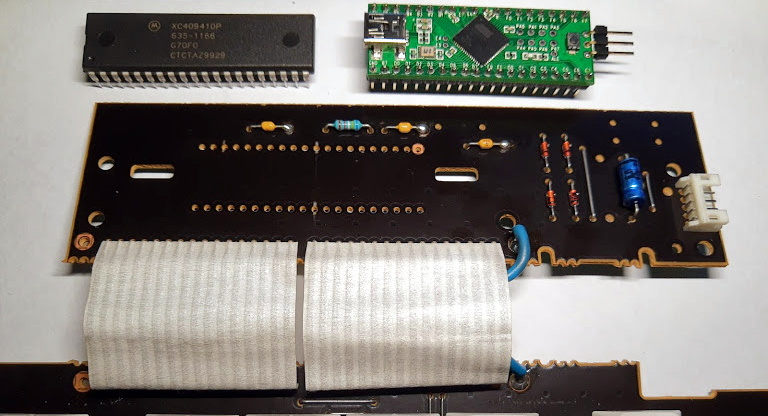
The solution was to replace the keyboard’s original electronics with a Teensy++2.0 running the popular QMK firmware. This not only made the keyboard USB, but allowed [Juan] to tweak things such as the trackball sensitivity and add in support for layers and macros. All of which can be managed through VIA, a graphical configuration tool for QMK.

As we’ve seen in so many projects, the combination of QMK running on the Teensy is a powerful tool for getting the most out of your keyboard. Whether breathing new life into a vintage piece of hardware or creating something truly custom like our very own [Kristina Panos] recently did, it’s definitely something to keep in mind if you’re considering any keyboard hacking.

Toddler-Friendly MP3 Player Navigates With Light

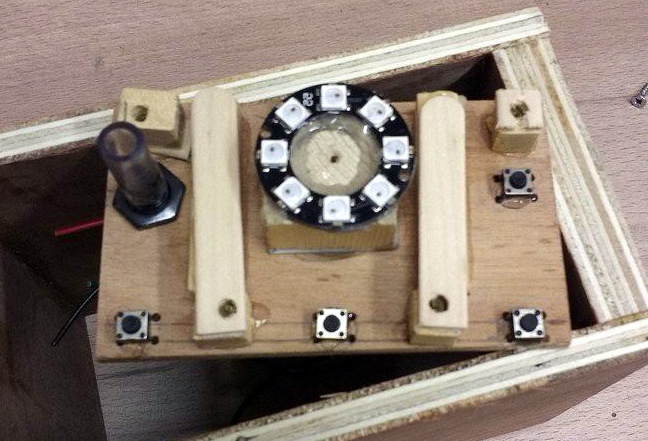
When designing this custom MP3 player for his grandson, [Luc Brun] ran into a unique problem. He wanted the boy to be able to operate the player on his own, but being only 2½ years old, the user interface would have to be exceedingly straightforward. Too many buttons would just be a distraction, and a display with text would be meaningless at his age.

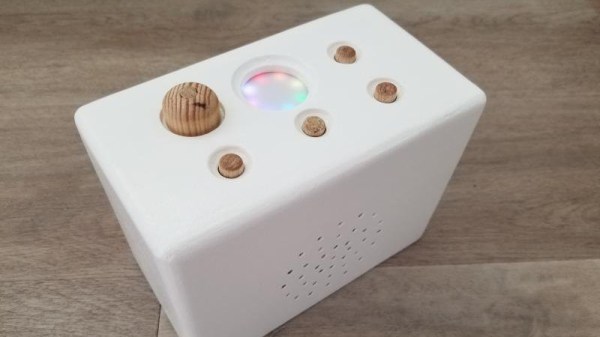
In the end, [Luc] came up with a very interesting way of navigating through directories full of MP3 files using a few push buttons and a ring of WS2812 LEDs. The color of the LEDs indicate which directory or category is currently being selected: spoken nursery rhymes are red, music is orange, nature sounds are yellow, and so on. The number of LEDs lit indicate which file is selected, so in other words, three orange LEDs will indicate the third music track.

At his grandson’s age, we imagine at least a little bit of him navigating through this system is just luck. But as he gets older, he’ll start to form more solid connections between what he’s hearing and the color and number of the LEDs. So not only is this interface a way to help him operate the device himself, but it may serve as a valuable learning tool in these formative years.

On the other hand, if your goal is just to distract a youngster for as long as possible, an overwhelming number of LEDs, buttons, and switches might be exactly what you want.

School’s In Session With HackadayU

The global COVID-19 pandemic has kept many of us socially isolated from friends, family, and colleagues for several months at this point. But thanks to modern technology, the separation has only been in the physical sense. From job interviews to grade school book reports, many of the things we’d previously done in person are now happening online. The social distancing campaign has also shown that virtual meetups can be a viable alternative to traditional events, with several notable hacker conventions already making the leap into cyberspace.

With this in mind, we’re proud to announce HackadayU. With weekly online videos and live office hours, these online classes will help you make the most of your time in isolation by learning new skills or diving deeper into subjects with experienced instructors from all over the world. Whether you’re just curious about a topic or want to use these classes to help put yourself on a new career path, we’re here to help.

In a community like ours, where so many people already rely on self-study and tutorial videos, these four week classes are perfect for professional engineers and hobbyists alike. To make sure HackadayU is inclusive as possible, classes will be offered on a pay-as-you-wish basis: we’ll pick up the tab for the instructor’s time, and you kick in whatever you think is fair. All money collected will be donated to charities that help feed, house, and educate others. We know these are tough times, and the hope is that HackadayU can not only benefit the members of our core community, but pass on some goodwill to those who are struggling.

Classes will be rolling out through the rest of 2020, but here’s a look at some of what we’ve got planned: Continue reading “School’s In Session With HackadayU”

Bluetooth Development Board Goes The Distance

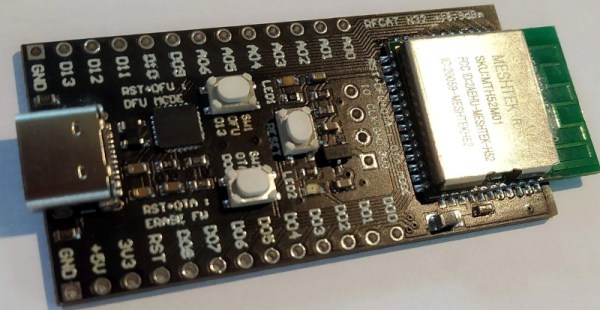
Have you ever come across an interesting chip or component that you wanted to experiment with, only to find that there doesn’t seem to be a development board for it? Spinning up your own board is a lot easier today than it has been in the past, but it’s still a bit of a hassle to do it just for your own personal use. This is why [Nikolaj Andersson Nielsen] has decided to release RFCat, his custom long-range Bluetooth development board, onto the community.

The board is based around a module from MeshTek that’s essentially an amplified version of the Nordic nRF52832. According to [Nikolaj], this gives the module 30 times the transmit power of the base model chip.

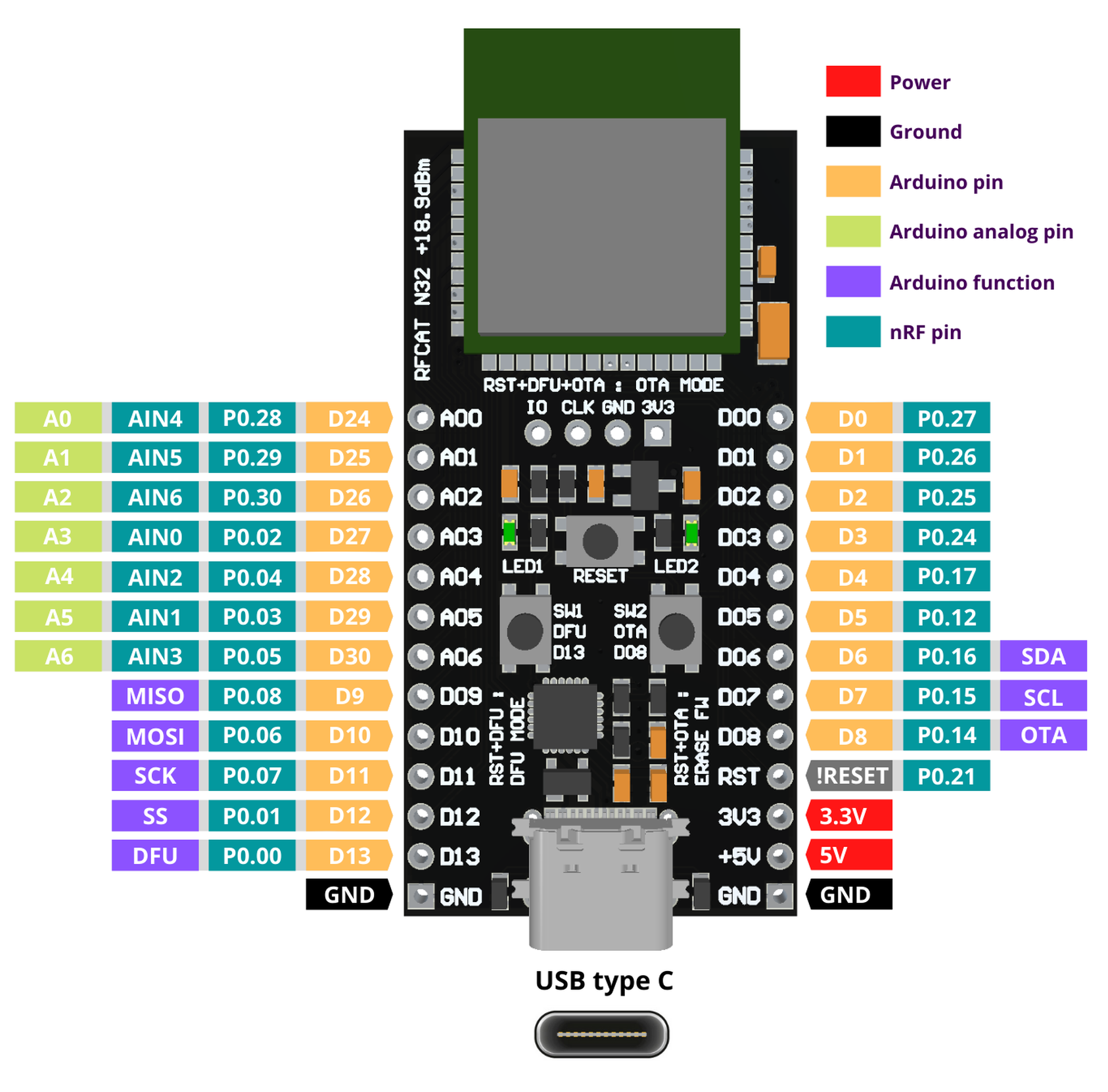
RFCat is compatible with the Arduino IDE and uses the Adafruit nRF52 bootloader, making it easy to write your own code to take advantage of all this new-found power. Primarily you’d be programming the board over USB-C, but it also supports Serial Wire Debug (SWD) and over-the-air updates that can be triggered with a physical push button on the device.

If you want to get an RFCat of your own, it’s available on Tindie now. The amplified modules were originally intended for building Bluetooth mesh networks, but we’re sure there are other interesting applications out there just waiting to be discovered.

Continue reading “Bluetooth Development Board Goes The Distance”