Bit Of OpenSCAD Code Caps Off Wiremold

Wiremold is great stuff — it’s relatively cheap, easy to work with, and offers all sorts of adapters and angle pieces which take the hassle out of running (and hiding) wires. But [Dr. Gerg] found a shortcoming of this otherwise very flexible product: since each run is intended to start and end in a surface mounted box, he couldn’t find an end cap that would let him close off a section.

The solution? A desktop 3D printer and a chunk of OpenSCAD code telling it what to extrude. When you break it down, the Wiremold profile is fairly straightforward, and can be easily described with geometric primitives. A handful of cylinders, a cube or two, tie it all together with the hull() function, and you’re there.

We’d say this would be a fantastic project to cut your OpenSCAD teeth on, but since [Dr. Gerg] was kind enough to share the source code, you don’t have to figure it out on your own. Though there’s still benefit in reading over it if you’re looking for some practical examples of how the “Programmers Solid 3D CAD Modeller” gets things done.

So why would you want a Wiremold endcap? In the case of [Dr. Gerg], it sounds like he was trying to cover up a short run of wire that was running vertically. But we could imagine other applications for this basic design now that it’s out in the wild. For example, a short length of Wiremold outfitted with a pair of printed caps could make for a nice little enclosure if you’ve got a small project that needs protecting.

Taking A Look Underneath The Battleship New Jersey

By the time you read this the Iowa-class battleship USS New Jersey (BB-62) should be making its way along the Delaware River, heading back to its permanent mooring on the Camden waterfront after undergoing a twelve week maintenance and repair period at the nearby Philadelphia Navy Yard.

The 888 foot (270 meter) long ship won’t be running under its own power, but even under tow, it’s not often that you get to see one of the world’s last remaining battleships on the move. The New Jersey’s return home will be a day of celebration, with onlookers lining the banks of the Delaware, news helicopters in the air, and dignitaries and veterans waiting eagerly to greet her as she slides up to the pier.

But when I got the opportunity to tour the New Jersey a couple weeks ago and get a first-hand look at the incredible preservation work being done on this historic ship, it was a very different scene. There was plenty of activity within the cavernous Dry Dock #3 at the Navy Yard, the very same slip where the ship’s construction was completed back in 1942, but little fanfare. Staff from North Atlantic Ship Repair, the company that now operates the facility, were laboring feverishly over the weekend to get the ship ready.

While by no means an exhaustive account of the work that was done on the ship during its time in Dry Dock #3, this article will highlight some of the more interesting projects that were undertaken while it was out of the water. After seeing the thought and effort put into every aspect of the ship’s preservation by curator Ryan Szimanski and his team, there’s no doubt that not only is the USS New Jersey in exceptionally capable hands, but that it will continue to proudly serve as a museum and memorial for decades to come.

Continue reading “Taking A Look Underneath The Battleship New Jersey“ →

PostmarketOS Now Boots On Over 250 Devices

Every year, as consumers gobble up the latest Android devices, more old, but perfectly serviceable, units end up collecting dust in drawers. Or worse, they end up getting tossed in the trash. One of the most promising tools we have to help keep these older devices useful is postmarketOS, a full-fledged Linux distribution that provides a flexible and up-to-date software environment on devices that might otherwise be stuck with some old and unsupported version of Google’s mobile operating system.

As of the latest update on the postmarketOS blog, the team has announced an exciting milestone: over 250 devices can now boot the stable release of the OS.

Now to be clear, not all devices will be fully functional. In fact, the blog post clarifies that some of them only barely boot. But it’s progress, and now that these semi-supported devices aren’t hidden behind a development version of the OS, it means more folks will be able to put them to use.

For example, if you want to turn your old smartphone into a low-energy headless webserver, it doesn’t really matter if its display, touchscreen, or speakers are supported. You just need it to boot into Linux and fire up an SSH server so you can get in and start working.

But support for new devices is just one of the additions in this new v24.06 release. The blog post also points out several notable software upgrades, including the move to the 6.x branch of KDE Plasma Mobile. This brings with it a long list of improvements and changes, including a rewritten homescreen with enhanced customization options. If you prefer a more minimal GUI, don’t worry. This new release also updates Sxmo, which provides a menu-driven interface for both touch screens and hardware controls.

Among the newly supported devices is a generic x86_64 image that should work on a wide array of PCs. While obviously there’s no shortage of Linux distros you could run on your old computer, being able to install postmarketOS on it is definitely helpful for development purposes. There’s also a new Tegra ARMv7 target which brings a number of new devices into the fold, such as the Google Nexus 7, and Microsoft Surface RT.

Looking to run postmarketOS on your own hardware? The best way to start is to check the Devices page and see how many of those old gadgets you’ve got collecting dust in a drawer are compatible.

Preview Markdown In The Terminal With Bash

Markdown has become an extremely popular way to document source code and other projects, thanks in no small part to how well web-based services like GitHub render it. Just sprinkle a few extra characters into a regular text file, and all of a sudden it looks like you know what you’re doing. Unfortunately, there are some places where markdown won’t actually render, and you’ll be stuck looking at those extra characters.

But thanks to MarCLIdown, the terminal doesn’t have to be one of those places. Written by [NihaAlGhul], this simple tool takes a given markdown file and spits out a fairly impressive rendering — and you don’t even need to have one of those fancy new GPU-accelerated terminals. Most impressively, the whole thing is implemented as a single Bash script.

Continue reading “Preview Markdown In The Terminal With Bash” →

3D Printing A Bottle Labeling Assembly Line

We’re not completely sure why [Fraens] needs to label so many glass bottles at home. Perhaps he’s brewing his own beer, or making jams. Whatever the reason is, it was justification enough to build an absolutely incredible labeling machine that you could mistake for a piece of industrial gear…if it wasn’t for the fact that majority of the device is constructed out of orange 3D printed plastic.

As we’ve come to expect, [Fraens] has documented the build with a detailed write-up on his site — but in this case, you’ve really got to watch the video below to truly appreciate how intricate the operation of this machine is. Watching it reminded us of an episode of How It’s Made, with the added bonus that you not only get to see how the machine functions, but how it was built in the first place.

Nearly every part of the machine, outside the fasteners, smooth rods, a couple of acrylic panels, and a few sections of aluminum extrusion, were 3D printed. You might think this would result in a wobbly machine with sloppy tolerances, but [Fraens] is truly a master of knowing when and where you can get away with using printed parts. So for example, while the glue rollers could be done in printed plastic, they still needed metal rods run through the middle for strength and proper bearings to rotate on.

Looking at the totality of this build, it’s hard to imagine how it could have been accomplished via traditional methods. Sure you could have sourced the rollers and gears from a supplier to save some plastic (at an added expense, no doubt), but there’s so many unique components that simply needed to be fabricated. For example, all the guides that keep the label heading in the right direction through the mechanism, or the interchangeable collars which let you select the pattern of glue which is to be applied. Maybe if you had a whole machine shop at your disposal, but that’s a lot more expensive and complex a proposition than the pair of desktop 3D printers [Fraens] used to crank out this masterpiece.

If the name (and penchant for orange plastic) seems familiar, it’s because we’ve featured several builds from [Fraens] in the past. This one may be the most technically impressive so far, but that doesn’t diminish the brilliance of his vibratory rock tumbler or cigarette stuffing machine.

Continue reading “3D Printing A Bottle Labeling Assembly Line” →

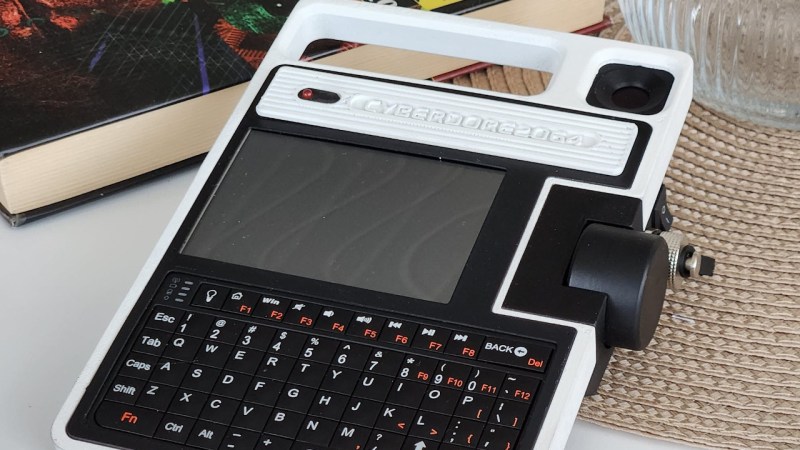
ESP32 Powers Single-PCB ZX Spectrum Emulator

When word first got out that the Chinese board houses were experimenting with full color silkscreens, many in our community thought it would be a boon for PCB art. Others believed it would be akin to cheating by removing the inherent limitations of the medium. That’s not a debate that will be solved today, but here we have an example of a project that’s not only making practical application of the technology, but one that arguably couldn’t exist in its current form without it: a single-PCB ZX Spectrum emulator developed by [atomic14].

There basics here are, well, they’re pretty basic. You’ve got an ESP32-S3, a TFT display, a micro SD slot, and the handful of passives necessary to tie them all together. What makes this project stand out is the keyboard, which has been integrated directly into the PCB thanks to the fourteen pins on the ESP32-S3 that can be used as touch sensor input channels. There are issues with detecting simultaneous keypresses, but overall it seems to work pretty well.

Continue reading “ESP32 Powers Single-PCB ZX Spectrum Emulator” →

Hackaday Podcast Episode 275: Mud Pulse Telemetry, 3D Printed Gears In Detail, And Display Hacking In Our Future

Join Hackaday Editors Elliot Williams and Tom Nardi for a review of the best stories to grace the front page of Hackaday this week. Things kick off with the news about Raspberry Pi going public, and what that might mean for everyone’s favorite single-board computer. From there they’ll cover the technology behind communicating through mud, DIY pressure vessels, pushing the 1983 TRS-80 Model 100 to its limits, and the reality of 3D printing how that the hype has subsided. You’ll also hear about modifying Nissan’s electric vehicles, bringing new life to one of the GameCube’s oddest peripherals, and an unusually intelligent kayak.

The episode wraps up with some interesting (or depressing) numbers that put into perspective just how much copper is hiding in our increasingly unused telephone network, and a look at how hardware hackers can bend the display technology that’s used in almost all modern consumer electronics to our advantage.

Check out the links below if you want to follow along, and as always, tell us what you think about this episode in the comments!

Grab the Collector’s Edition MP3 of this week’s episode right here. Certificate of authenticity not included.

Continue reading “Hackaday Podcast Episode 275: Mud Pulse Telemetry, 3D Printed Gears In Detail, And Display Hacking In Our Future” →