Three Way LED Bulb Gives Up Its Secrets

You’ve probably seen three-way bulbs. You know, the ones that can go dim or bright with each turn of a switch. [Brian Dipert] wondered how the LED version of these works, and now that he tore one apart, you can find out, too. The old light bulbs were easy to figure out. They had two filaments, one brighter than the other. Switching on the first filament provided some light, and the second gave off more light. The final position lit both filaments at once for an even brighter light.

LED or filament, three-way bulbs have a special base. While a normal Edison-base bulb has the threaded part as the neutral and a center contact for the live wire, a three-way bulb has an extra hot contact ring between the threaded part and the center contact. Obviously, a compatible LED bulb will need this same interface, but will work differently inside.

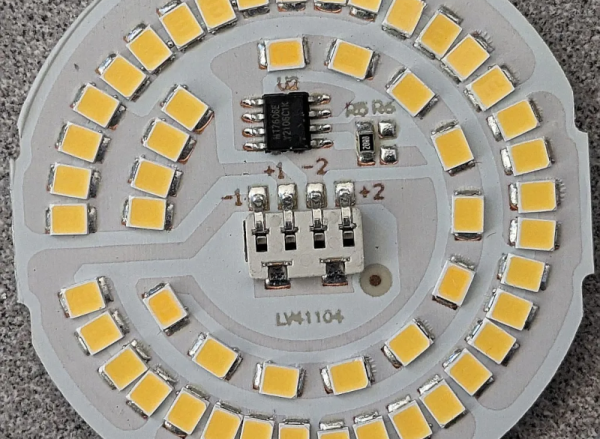
Inside the LED, [Brian] found two rings of LEDs that took the place of the filaments. He was able to identify all the ICs and devices on the board except one, an MT7712S. If you can read Mandarin, we think this is the datasheet for it.

We weren’t sure what [Brian] would find inside. After all, you could just sense which contacts had voltage and dim the LEDs using PWM. It probably wouldn’t take any less circuitry. LED lighting is everywhere these days, and maybe they don’t all work the same, but you have to admit, using two strings of LEDs is reasonably faithful to the old-fashioned bulbs.

Sometimes LED bulbs are different depending on where you buy them. We were promised LED bulbs would never burn out. Of course, they do, but you can usually scrounge some LEDs from them.

The Nixie Clock From Outer Space

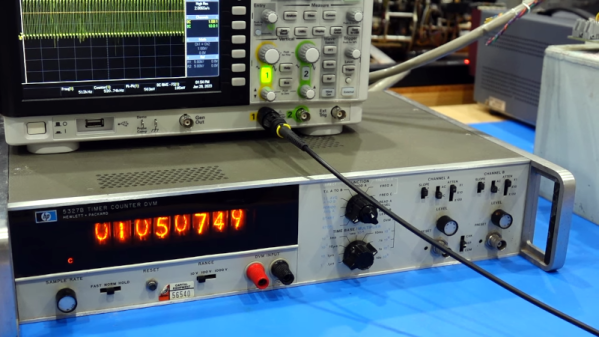
Nixie clocks are nothing new. But [CuriousMarc] has one with a unique pedigree: the Apollo Program. While restoring the Apollo’s Central Timing Equipment box, [Marc] decided to throw together a nixie-based clock. The avionics unit in question sent timing pulses and a mission elapsed time signal to the rest of the spacecraft. Oddly enough, while it had an internal oscillator, it was only used during failures. It normally synched to the guidance computer’s onboard clock.

There is a detailed explanation of the unit, along with some of the ancillary equipment and panels. Much of what the output from the unit is driving counters to display timers, although some of the clocks drive other pieces of equipment, like the telemetry commutator, which time stamps each telemetry frame.

Continue reading “The Nixie Clock From Outer Space”

Enzymes Make Electricity From Thin Air

There’s an old magic trick known as the miser’s dream, where the magician appears to pull coins from thin air. Australian scientists say they can now generate electricity out of thin air with the help of some enzymes. The enzyme reacts to hydrogen in the atmosphere to generate a current.

They learned the trick from bacteria which are known to use hydrogen for fuel in inhospitable environments like Antarctica or in volcanic craters. Scientists knew hydrogen was involved but didn’t know how it worked until now.

The enzyme is very efficient and can even work on trace amounts of hydrogen. The enzyme can survive freezing and temperature up to 80 °C (176 °F). The paper seems more intent on the physical mechanisms involved, but you can tell the current generated is minuscule. We don’t expect to see air-powered cell phones anytime soon. Then again, you have to start somewhere, and who knows where this could lead?

Microbial fuel cells aren’t new, of course. If you just want lights, you can skip the electricity altogether.

A Love Letter To The Sphere Computer

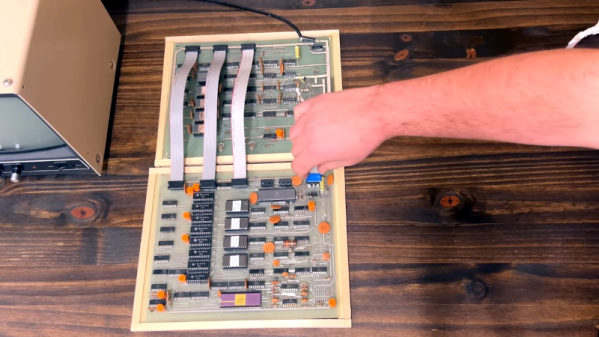
[Ben Z] loves the Sphere computer, a very early entry in the personal computer boom of the mid 1970s. The 6800 CPU was unique in its day that it was a full system — at least in theory. If you could afford the whole system, you got a nice case with a keyboard and a memory-mapped display board. You can see a great video tour of the system below the break.

The Sphere suffered from a few problems, none of which were easily foreseeable by its designer. First, the 6800 didn’t get the traction that the 8080-derived CPUs did. Second, the S-100 bus would prove to be popular but that nearly always meant an 8080-type processor in practice. Third, while an all-in-one system was the right idea, it was pricey at the time, and many people would opt for something less expensive even if it had less capability. People also wanted to leverage hardware they may have already had. It was easier to imagine hooking up a surplus TeleType, for example, to a more conventional computer than to a Sphere that expected its own display hardware and keyboard.

Continue reading “A Love Letter To The Sphere Computer”

The USB Protocol, Explained

If you can explain what a USB PID, a J state, a K state, and an SOF are, you can probably stop reading now. But if you don’t know or you want a refresher, you can spend 15 minutes watching [Sine Lab’s] straightforward explanation of the USB protocol details. You can find the video below.

The motivation for this is he wants to add USB to his projects using an ATMega with a hardware USB implementation. Honestly, most of the time, you’ll just consume some premade library and get it working that way. However, understanding the terminology can help you, especially if things don’t go as planned.

Continue reading “The USB Protocol, Explained”

That Cheap USB Charger Could Be Costly

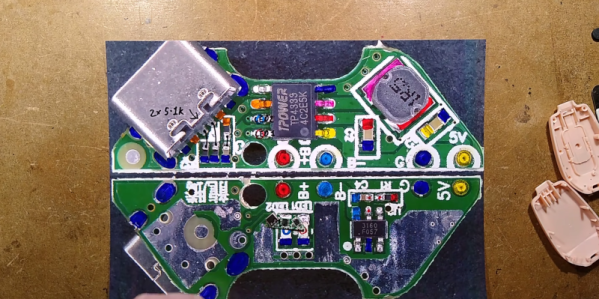
[Big Clive] picked up a keychain battery to charge his phone and found out that it was no bargain. Due to a wiring mistake, the unit was wired backward, delivering -5 V instead of 5 V. The good news is that it gave him an excuse to tear the thing open and see what was inside. You can see the video of the teardown below.

The PCB had the correct terminals marked G and 5 V, it’s just that the red wire for the USB connector was attached to G, and the black wire was connected to 5 V. Somewhat surprisingly, the overall circuit and PCB design was pretty good. It was simply a mistake in manufacturing and, of course, shows a complete lack of quality assurance testing.

The circuit was essentially right out of the data sheet, but it was faithfully reproduced. We should probably test anything like this before plugging it into a device, but we typically don’t. Does our phone protect against reverse polarity? Don’t know, and we don’t want to find out. [Clive] also noted that the battery capacity was overstated as well, but frankly, we’ve come to expect that with cheap gadgets like this.

This isn’t, of course, the first phone charger teardown we’ve seen. This probably isn’t as deadly as the USB killer, but we still wouldn’t want to risk it.

Continue reading “That Cheap USB Charger Could Be Costly”

Videos Teach Bare Metal RP2040

When we write about retrocomputers, we realize that back in the day, people knew all the details of their computer. You had to, really, if you wanted to get anything done. These days, we more often pick peripherals and just assume our C or other high level code will fit and run on the CPU.

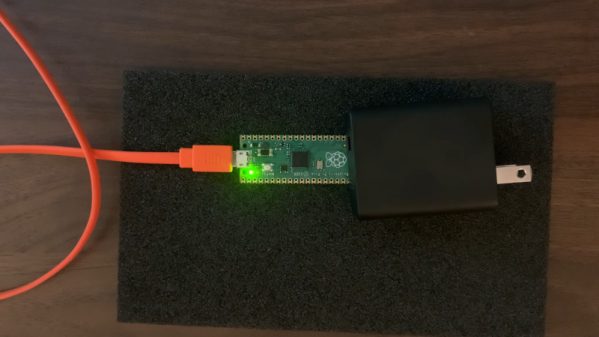
But sometimes you need to get down to the bare metal and if your desire is to use bare metal on the RP2040, [Will Thomas] has a YouTube channel to help you. The first video explains why you might want to do this followed by some simple examples. Then you’ll find over a dozen other videos that give you details.

Any video that starts, “Alright, Monday night. I have no friends. It is officially bare metal hours,” deserves your viewing. Of course, you have to start with the traditional blinking LED. But subsequent videos talk about the second core, GPIO, clocks, SRAM, spinlocks, the UART, and plenty more.

As you might expect, the code is all in assembly. But even if you want to program using C without the SDK, the examples will be invaluable. We like assembly — it is like working an intricate puzzle and getting anything to work is satisfying. We get it. But commercially, it rarely makes sense to use assembly anymore. On the other hand, when you need it, you really need it. Besides, we all do things for fun that don’t make sense commercially.

We like assembly, especially on platforms where most people don’t use it. Tackling it on a modern CPU is daunting, but if you want to have a go, we know someone who can help.

Continue reading “Videos Teach Bare Metal RP2040”