Linux And C In The Browser

There was a time when trying to learn to write low-level driver or kernel code was hard. You really needed two machines: one to work with, and one to screw up over and over again until you got it right. These days you can just spin up a virtual machine and roll it back every time you totally screw up. Much easier! We don’t think it is all that practical, but [nsommer] has an interesting post about loading up a C compiler and compiling Linux for a virtual machine. What’s different? Oh, the virtual machine is in your browser.

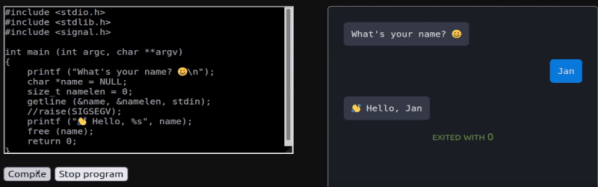
The v86 CPU emulator runs in the browser and looks like a Pentium III computer with the usual hardware. You might think it is slow and it certainly isn’t going to be fast as a rocket, but it does translate machine code into WebAssembly, so performance isn’t as bad as you might think.

The post goes into detail about how to build and create a simple machine web page that hosts v86. Once you cross-compile the kernel you can boot the machine up virtually. The other interesting part is the addition of tcc which is a pretty capable C compiler and much smaller and faster than the very traditional gcc.

The tcc build is tricky because the normal build process compiles the compiler and then uses the same compiler to build the default libraries. When cross-compiling, this doesn’t work well because the library you want for the host compile is different from the library you want to target for the second pass. You’ll see how to work around that in the post. The post continues to show how to do remote debugging and even gets QEMU into the mix. Debugging inside v86 doesn’t seem to work so far. There are more posts on this topic promised.

Honestly, this is one of those things like teaching a chicken to play checkers. It can be done, there’s little practical value, but it is still something to see. On the other hand, if you spend the weekend working through this, your next Linux porting project ought to seem easy by comparison.

Amazing what you can pull off with WebAssembly. If you need a quick introduction, check this one out from [Ben James].

Wireless Power: Here? Now?

Outside of very small applications, Nikola Tesla’s ideas about transmitting serious power without wires have not been very practical. Sure, we can draw microwatts from radio signals in the air, and if you’re willing to get your phone in just the right spot, you can charge it. But having power sent to your laptop anywhere in your home is still a pipe dream. Sending power from a generating station to a dozen homes without wire is even more fantastic. Or is it? [Paul Jaffe] of the Naval Research Laboratory thinks it isn’t fantastic at all and he explains why in a post on IEEE Spectrum.

Historically, there have been attempts to move lots of power around wirelessly. In 1975, researchers sent power across a lab using microwaves at 50% efficiency. They were actually making the case for beaming energy down from solar power satellites. According to [Jaffe], the secret is to go beyond even microwaves. A 2019 demonstration by the Navy conveyed 400 watts over 300 meters using a laser. Using a tightly confined beam on a single coherent wavelength allows for very efficient photovoltaic cells that can far outstrip the kind we are used to that accept a mix of solar lighting.

Wait. The Navy. High-powered laser beams. Uh oh, right? According to [Jaffe], it is all a factor of how dense the energy in the beam is, along with the actual wavelengths involved. The 400-watt beam, for example, was in a virtual enclosure that could sense any object approaching the main beam and cut power.

Keep in mind that 400 watts isn’t enough to power a hair dryer. Besides, point-to-point transmission with a laser is fine for sending power to a far-flung community but not great for keeping your laptop charged no matter where you leave it.

Still, this sounds like exciting work. While it might not be Tesla’s exact vision, laser transmission might be closer than it seemed just a few years ago. We’ve seen similar systems that employ safety sensors, but they are all relatively low-power. We still want to know what’s going on in Milford, Texas, though.

Geothermal System Is A Real Gold Mine

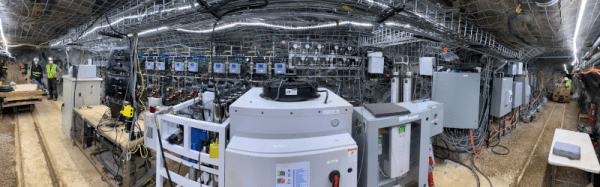
What do you get when Pacific Northwest National Laboratories takes over what was once the largest and deepest gold mine in North America? The answer might be enough energy to power 10,000,000 homes. The enhanced geothermal systems project includes the lab and several partners from academia and industry and aims to test sending fluids down boreholes so the Earth can heat them up. Hot fluids, of course, can easily create electricity.

At 4,100 feet underground, the old mine is not very convenient to get to. However, modern technology means that the equipment is largely automated so workers can carry out experiments from home using a computer or even a phone. The system itself is 7 feet long by 7 feet wide and 30 feet long. It was assembled above ground, tested, and then split into 4×4 sections for transportation deep below the surface.

Continue reading “Geothermal System Is A Real Gold Mine”

SWO: An ARM Printf By Any Other Name

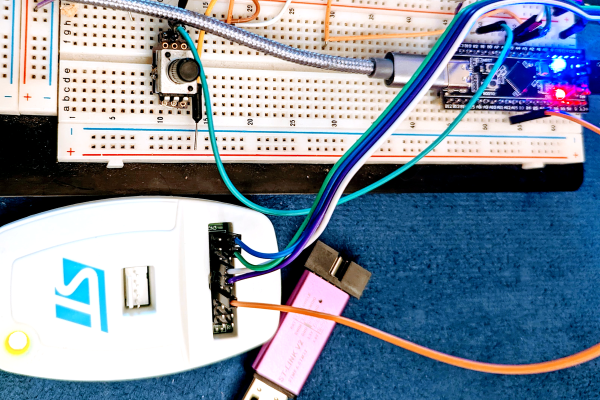
I’ll confess. Although printf-style debugging has a bad rep, I find myself turning to it on occasion. Sure, printf is expensive and brings in a lot of code, but if you have the space and time to use it while debugging you can always remove it before you are finished. However, what if you don’t have an output device or you are using it for something else? If you are using most modern ARM chips, you have another option — a dedicated output channel that is used for several things, including debugging output. I decided I wanted to try that on the Blackpill running mbed, and found out it isn’t as easy as you might think. But it is possible, and when you are done reading, you’ll be able to do it, too.

I’m writing this using the STM32-specific ST-LINK hardware. If you use other JTAG devices like the BlackMagic probe, you probably already have this set up for you.

What You Get

I’ll start backward with the end result, then talk about the software, so you’ll be good and motivated by the time you get to the hardware requirements. Spoiler alert: your existing hardware might need a quick hack to make it work, although you can buy something off the shelf if you prefer.

Here is a very simple test program:


SWO_Channel debugport;  // requires #include "SWO.h"
int main() 
  {
  unsigned count=0;
  debugport.printf("\r\nHello World from SWO\r\n");
  debugport.printf("CPU SystemCoreClock is %d Hz\r\n", SystemCoreClock);

  while (1) 
    {
    led = !led; // flip LED if output is true
    ThisThread::sleep_for(rate); // sleepy time
    if (count % 10) debugport.putc('*'); else debugport.printf("%d\r\n",count); 
    count++;
    }
}

Continue reading “SWO: An ARM Printf By Any Other Name”

Graphyne Finally Created

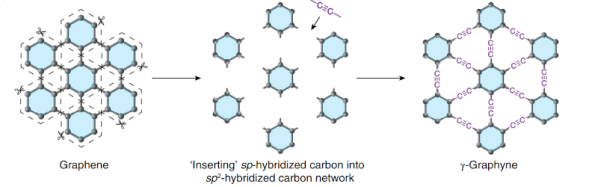
Before you jump down to the comments to chastise us for misspelling graphene, note that graphyne is similar to graphene but not the same. Like graphene, it is a two-dimensional structure of carbon. Unlike graphene, it contains double and triple bonds and does not always form hexagons. Scientists have postulated its existence for decades, but researchers at the University of Colorado Boulder have finally managed to pull it off. You can also download the paper if you want to wade through the details.

Carbon forms like fullerene and graphene are well-known and have many novel uses. Other allotropes of carbon include graphite and diamonds — certainly two things with wildly varying properties. Graphyne has conductivity similar to graphene but may also have other benefits.

Continue reading “Graphyne Finally Created”

Put Another Dime In The Jukebox

We don’t always acknowledge it, but most people have an innate need for music. Think of all the technology that brings us music. For decades, most of the consumer radio spectrum carried music. We went from records, to tape in various forms, to CDs, to pure digital. There are entire satellites that carry — mostly — music. Piracy aside, people are willing to pay for music, too. While it isn’t very common to see “jukeboxes” these days, there was a time when they were staples at any bar or restaurant or even laundrymat you happened to be in. For the cost of a dime, you can hear the music and share it with everyone around you.

Even before we could record music, there was something like a jukebox. Coin-operated machines, as you’ll recall, are actually very old. Prior to the 1890s, you might find coin-op player pianos or music boxes. These machines actually played the music they were set up to play using a paper roll with holes in it or metal disks or cylinders.

Early Days

That changed in 1890 when a pair of inventors connected a coin acceptor to an Edison phonograph. Patrons of San Francisco’s Palais Royale Saloon could put a hard-earned nickel in the slot and sound came out of four different tubes. Keep in mind there were no electronic amplifiers as we know them in 1890. Reportedly, the box earned $1,000 in six months.

Continue reading “Put Another Dime In The Jukebox”

Lotus 123 For Linux Is Like A Digital Treasure Hunt

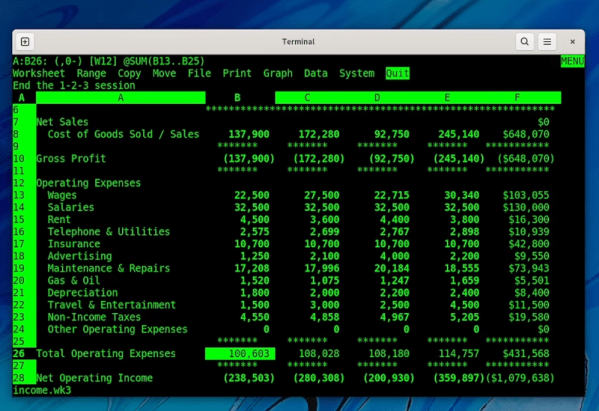
Ever hear of Lotus 123? It is an old spreadsheet program that dominated the early PC market, taking the crown from incumbent Visicalc. [Tavis Ormandy] has managed to get the old software running natively under Linux — quite a feat for software that is around 40 years old and was meant for a different operating system. You can see the results in glorious green text on a black screen in the video below.

If you are a recent convert to Linux, you might not remember what a pain it was “in the old days” to install software. But in this case, it is even worse since the software isn’t even for Linux. The whole adventure started with [Tavis] wanting to find the API kit used to add plugins to Lotus. In theory, you could use it to add modern features to the venerable spreadsheet program.

The $395 software development kit wasn’t very common and there was also a Unix version of Lotus 123, but no one seemed to have a copy of that. [Tavis] eventually found someone who ran a circa-1990 BBS and had the data on tape. Turned out there was a hot copy of the SDK that he was able to use. But he noticed something else in the BBS’s list of files: the long-lost Unix version of Lotus!

An investigation found the installer used TD0 files which took some research. Luckily, a utility exists that can convert these to raw disk images. Inside was a very large object file. Apparently, in the days without dynamic loading, that object would be linked with plug in modules to install them.

The object file had all of its debugging information intact which shed a lot of light on the program’s internal operations. The old executables used COFF format but it is possible to relink it to an ELF file. Of course, it isn’t just that easy. [Tavis] wrote a small program to remove the old-style Unix system calls so they could be rerouted to Linux system calls. Some calls just pass through, but others need some translation due to differences in things like structure layout, sizes, and alignment.

In the end, it all worked but didn’t have a valid license. However, [Tavis] felt like since he did have a license and the software is abandoned, he was within his rights to crack the license check.

We are well-known abusers of spreadsheets around here. Of course, we aren’t the only ones.

Continue reading Lotus 123 For Linux Is Like A Digital Treasure Hunt”