The Dynamotor Simplified

[Robert Murray-Smith] doesn’t like the price of inverters to convert DC to AC. That led him to build a dynamotor, or what is sometimes called a motor-generator set. These devices are just DC motors driving a generator. Of course, motors can also be used as generators and [Robert] had a stack of brushless motors in the form of PC fans. A two-fan dynamotor was born.

The brushless motors are attractive because, traditionally, the brushes are what usually fail on a dynamotor. The fan that will act as a generator needs some surgery, but it is simple. He scraped off all the control electronics and connected wires to the coils to form a three-phase generator. There’s no need for the fan blades in that configuration, either. If you were using ordinary motors and a generator, getting shafts concentric would be an important task. With the fans, it is simple to just line up the mounting holes and you get perfect alignment for free.

How does it work? [Robert] has a second video showing the output on a scope. You can see both videos below. The dynamotor makes a good-looking sine wave, probably much better than most reasonable-priced solid state inverters. He didn’t mention how much current he could successfully draw, but it probably isn’t much. You’d also need a transformer to replace a commercial inverter that would put out line voltage, so that would be some more loos in the system. On the other hand, if you wanted AC at a lower voltage, you might just replace all the transformers, if you were building a piece of gear yourself.

We’ve looked at how these things work in some detail. There were common in old tube radios, particularly military ones.
Continue reading “The Dynamotor Simplified”

Camera Zero Looks Cool, Runs Cool

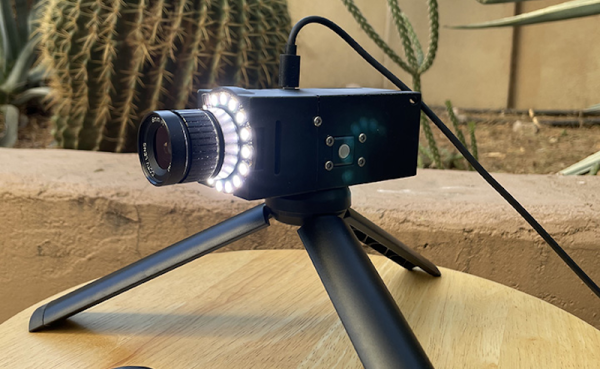
Security cameras are a commodity item these days, but that doesn’t mean [edgett’s] design using a Pi Zero, an Arducam, an LED ring, and active cooling isn’t worth a look. This is a great example of how integrating some off-the-shelf modules and 3D printing can create very professional-looking results. There’s also a trackball interface so you can control the camera. The software, written in Python, is available on GitHub.

The trackball doesn’t move the camera, but it does manage a menu system that lets you capture a photo or video, set the optical parameters like exposure, shutter, and ISO, and launch Camera Remote to offer a Web-based interface instead of the trackball.

If you add infrared illumination, you can swap out the camera for an IR version and have a nice-looking night vision camera, too. The camera is reasonably compact. Not including the lens and the tripod, the camera measures 100 by 44 by 44 mm. So under two inches square and about 4 inches long.

We worried a little about gluing the LED ring down, but then again our phones are all glued together these days, so maybe we should stop fretting. One thing we didn’t see on either site, though, was a picture taken with the camera itself. However, the 12-megapixel camera and quality lens should do a great job. We’ve even seen that particular camera module work with a much smaller computer recently.

Engineering The Less Boring Way

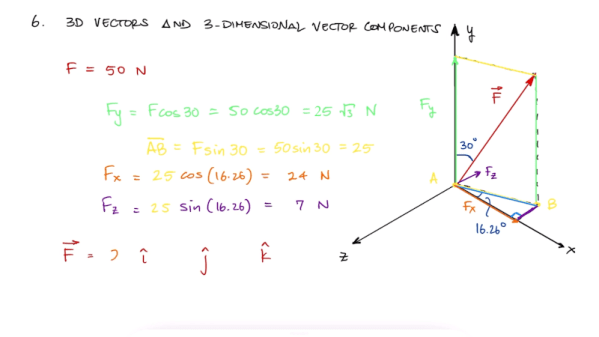
We have to admire a YouTube channel with the name [Less Boring Lectures]. After all, he isn’t promising they won’t be boring, just less boring. Actually though, we found quite a few of the videos pretty interesting and not boring at all. The channel features videos about mechanical engineering and related subjects like statics and math. While your typical electronics project doesn’t always need that kind of knowledge, some of them do and the mental exercise is good for you regardless. A case in point: spend seven minutes and learn about 2D and 3D vectors in two short videos (see below). Or spend 11 minutes and do the whole vector video in one gulp.

These reminded us of Kahn Academy videos, although the topics are pretty hardcore. For example, if you want to know about axial loading, shear strain, or free body diagrams, this is a good place to look.

Continue reading “Engineering The Less Boring Way”

Linux Fu: Shell Script File Embedding

You need to package up a bunch of files, send them somewhere, and do something with them at the destination. It isn’t an uncommon scenario. The obvious answer is to create an archive — a zip or tar file, maybe — and include a shell script that you have to tell the user to run after unpacking.

That may be obvious, but it assumes a lot on the part of the remote user. They need to know how to unpack the file and they also need to know to run your magic script of commands after the unpack. However, you can easily create a shell script that contains a file — even an archive of many files — and then retrieve the file and act on it at run time. This is much simpler from the remote user’s point of view. You get one file, you execute it, and you are done.

In theory, this isn’t that hard to do, but there are a lot of details. Shell scripts are not compiled — at least, not typically — so the shell only reads what it needs to do the work. That means if your script is careful to exit, you can add as much “garbage” to the end of it as you like. The shell will never look at it, so it’s possible to store the payload there.

Continue reading “Linux Fu: Shell Script File Embedding”

Hacking The Classroom

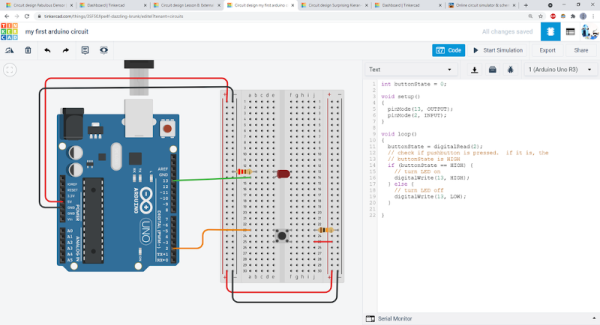
With so many students attending class virtually these days, how can you give kids — or adults — some hands on experience with electronics projects? [Ben Finio] says you can by moving your lab to the virtual world using — of all things — Tinkercad. [Ben] should know something about a classroom since he is a lecturer at Cornell.

Of course, you could do this trick with any online simulator, but Tinkercad is nice because it is easy to use, looks real, and doesn’t cost the students a dime. [Ben] mentions there are some scenarios where it is especially useful like large classes or online classes. There are probably some cases where it doesn’t make sense, like teaching RF design, for example. Even then, maybe you just need a different tool.

Continue reading “Hacking The Classroom”

CNC Chainsaw

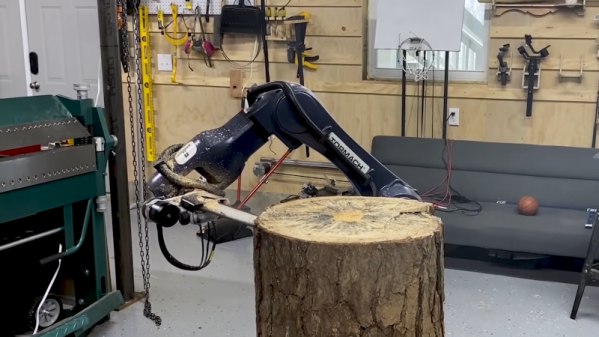
You can spend a lot of time trying to think of a clever title for a post about a CNC chainsaw. But you’ll finally realize, what else can you say but “CNC Chainsaw?” [Stuff Made Here] actually built such a beast, and you can watch it go in the video embedded below. A custom chainsaw on a Tormach robotic arm. So it is more like a robot using a chainsaw than a conventional CNC machine.

Instead of an XY motion, the machine uses what the video calls an “apple peeler” method and uses the Minkowski algorithm to adjust for the size of the chainsaw. The video is an odd juxtaposition of advanced topics like the Minkowski and basic things like G code.

Continue reading “CNC Chainsaw”

Electric Vehicle 1900’s Style: New Leases On Old Tech

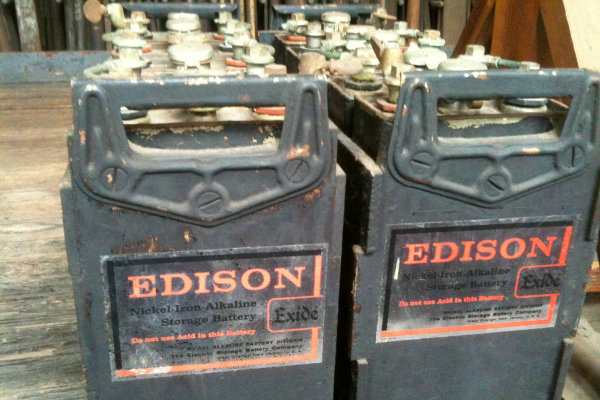
Excited about your new electric vehicle? Thomas Edison would be, too. He tried to produce electric vehicles for Ford around 1900. Petroleum-based vehicles dashed his dreams of the electric car, and the battery he wanted to use languished as a technological dead end. The batteries were long-lasting, sure, but they were expensive and had other problems, not the least of which was producing hydrogen gas. But that battery technology is receiving renewed interest today, because some of the things that made it a bad car battery make it good for alternate energy projects.

You wouldn’t think a century-old battery technology that was never very popular would make a comeback. But then again, who thought we’d see the return of bell-bottom pants or vinyl records? Continue reading “Electric Vehicle 1900’s Style: New Leases On Old Tech”