Modular Music Synthesis On The Web

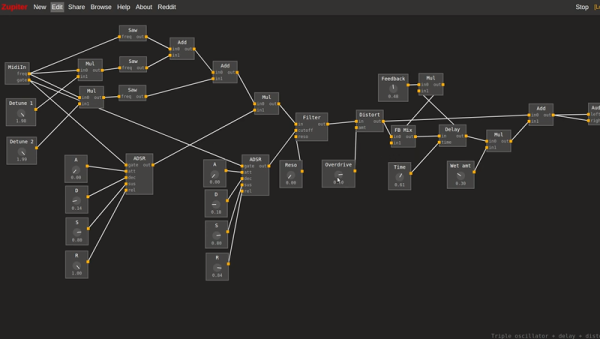
It is hard to imagine how the electronics hobby survived without the Internet. You found like-minded people and projects in magazines. And it is even harder to imagine what projects were in the magazines before the widespread availability of CPU chips. Think about it, there are only so many things you can build with a handful of tubes, transistors, and small ICs. But before the computer revolution took over the hobby, there were always a lot of articles about music synthesis. Coming full circle, you can now build a virtual synthesizer on the web using Zupiter, a modular synthesizer that runs in your browser.

That link is actually about Zupiter, but you can go straight to it if you just want to play. However, we had to do a little reading and try some of the examples, too. You can see a video about the synthesizer, below.

Continue reading “Modular Music Synthesis On The Web”

Raspberry Pi Ham Radio Remote Reviewed

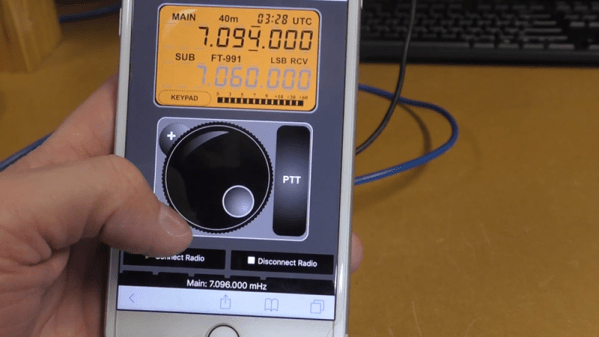
One problem with ham radio these days is that most hams live where you can’t put a big old antenna up due to city laws and homeowner covenants. If you’re just working local stations on VHF or UHF, that might not be a big problem. But for HF usage, using a low profile antenna is a big deal. However, most modern radios can operate remotely. Well-known ham radio company MFJ now has the RigPi Station Server and [Ham Radio DX] has an early version and did a review.

As the name implies, the box contains a Raspberry Pi. There’s also an audio interface. The idea is to consolidate rig control along with other station control (such as rotators) along with feeding audio back and forth to the radio. It also sends Morse code keying to the radio. The idea is that this box will put your radio on the network so that you operate it using a web browser on a PC or a mobile device.

According to MFJ, you can operate voice, Morse code, or digital modes easily and remotely. The box uses open source software that can control over 200 different radios and 30 rotors. Of course, you could build all this yourself and use the same open source software, but it is nicely packaged. [Ham Radio DX] says you don’t need to know much about the Pi or Linux to use the box, although clearly you can get into Linux and use the normal applications if you’re so inclined.

Even if you don’t want to transmit, we could see a set up like this being used for remote monitoring. We’d like to see a companion box for the remote end that had the audio hardware, a keyer, and perhaps a knob to act as a remote control of sorts. Of course, you could probably figure out how to do that yourself. We wonder if some ham clubs might start offering a remote radio via an interface like this — we’ve seen it done before, but not well.

Your $50 radio probably isn’t going to work with this, and if you use FT8, you could argue you don’t need to be there anyway.

Continue reading “Raspberry Pi Ham Radio Remote Reviewed”

DIY Clapper Lets You Pick Your Components

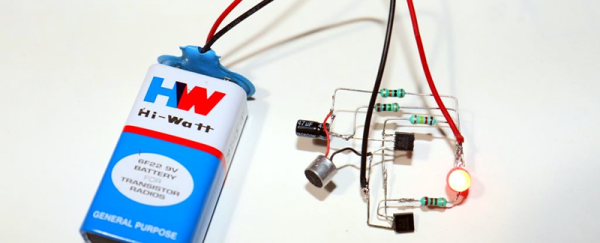
One thing that always means the end of the year is close is the reappearance of TV ads for “The Clapper.” After all, who needs home automation when you can clap on and clap off? While we’re partial to our usual home automation solutions, [Utsource123] shows us that building a clapper can be a fun and easy project using several similar circuits. One with a few transistors and another one with a 555 because, after all, what can’t a 555 do?

Of course, these circuits usually have a microphone. We were trying to think of how you could make a sound-sensitive element out of common parts. After all, you don’t care about the fidelity of the microphone pickup, just that it hears a loud noise. The circuits are about what you’d expect. The transistor version uses one to amplify the microphone and another to switch on the LED. You’d need a bit more to trigger a relay. The 555 uses an even simpler preamp transistor as a trigger.

While we aren’t bowled over with the idea of a clapper, we imagine these circuits aren’t far removed from the ones you buy in stores. For about $16 you also get enough switching to handle a simple AC load, though. Maybe Alexa and Google should allow making clapping a wake up word?

This is sure simpler than the last clapper clone we saw. Then there’s the deluxe DIY version.

E3D Tool Changer Partially Reviewed

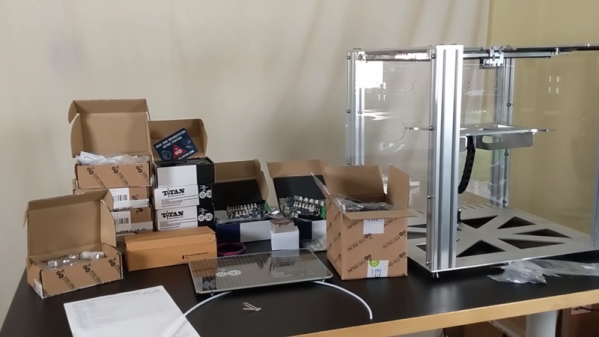
[Design Prototype Test] got a box in the mail. Inside? An E3D “tool changer and motion system.” Superficially, it looks like a 3D printer, but it is touted as a machine that can mount several different kinds of tools, including a 3D print head. In the video below, you can see the assembly of the heavy-looking machine.

In a world in which a cheap 3D printer costs way under $200, this machine is much sturdier and costs about $3,000 with all the pieces. [Design Prototype Test] is a bit put out by the price, but you have to wonder if they aren’t trying to allow for an eventual CNC head for which the extra-sturdy build could be an advantage. However, the use of motion belts makes that seem like a long shot.

Continue reading “E3D Tool Changer Partially Reviewed”

DSP Spreadsheet: FIR Filtering

There’s an old saying: Tell me and I forget, teach me and I may remember, involve me and I learn. I’m guilty of this in a big way — I was never much on classroom learning. But if I build something or write some code, I’m more likely to understand how it works and why.

Circuit simulation and software workbooks like Matlab and Jupyter are great for being able to build things without a lot of overhead. But these all have some learning curve and often use clever tricks, abstractions, or library calls to obscure what’s really happening. Sometimes it is easier to build something in a spreadsheet. In fact, I often do little circuit design spreadsheets or even digital design because it forces me to create a mathematical model which, in turn, helps me understand what’s really going on.

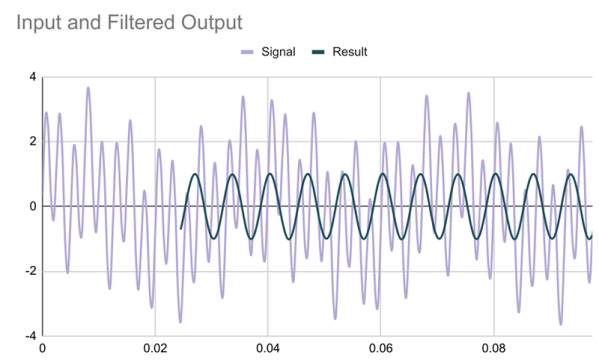
In this article I’m going to use Google Sheets — although you could do the same tricks in just about any spreadsheet — to generate some data and apply a finite impulse response (FIR) filter to it. Of course, if you had a spreadsheet of data from an instrument, this same technique would work, too.

Continue reading “DSP Spreadsheet: FIR Filtering”

Bent Electric Field Explains Antenna Radiation

We all use antennas for radios, cell phones, and WiFi. Understanding how they work, though, can take a lifetime of study. If you are rusty on the basic physics of why an antenna radiates, have a look at the very nice animations from [Learn Engineering] below.

The video starts with a little history. Then it talks about charges and the field around them. If the charge moves at a constant speed, it also has a constant electric field around it. However, if the charge accelerates or decelerates, the field has to change. But the field doesn’t change everywhere simultaneously.

Continue reading “Bent Electric Field Explains Antenna Radiation”

How Do Those Component Testers Work?

Most people have at least seen those cheap component testers you can buy on the Chinese websites for $10 or so. If you haven’t seen them before, they usually have some kind of multi pin socket. You put a component in the socket and it will identify — with a push of a button — what the part is, which pin is which, and the value of the part. For example, you can insert a resistor, a capacitor, an inductor, a diode, or a transistor and get a readout of which pin is which. It seems like magic, but [Andreas Spiess] did the research on how it all works and summed up his findings in a recent video.

[Andreas] even quotes our earlier post on the topic and, as we did, dug into the original developers of the device which has been cloned over and over by Chinese sellers. Although there have been some divergence with all the different versions, the basic idea is the same. An AVR CPU uses some analog and digital trickery to make a lot of different measurements.

Continue reading “How Do Those Component Testers Work?”