Brain Hacking With Entrainment

Can you electronically enhance your brain? I’m not talking about surgically turning into a Borg. But are there electronic methods that can improve various functions of your brain? Fans of brainwave entrainment say yes.

There was an old recruiting ad for electrical engineers that started with the headline: The best electronic brains are still human. While it is true that even a toddler can do things our best computers struggle with, it is easy to feel a little inadequate compared to some of our modern electronic brains. Then again, your brain is an electronic device of sorts. While we don’t understand everything about how it works, there are definitely electric signals going between neurons. And where there are electric signals there are ways to measure them.

The tool for measuring electric signals in the brain is an EEG (electroencephalograph). While you can’t use an EEG to read your mind, exactly, it can tell you some pretty interesting information, such as when you are relaxed or concentrating. At its most basic we’ve seen toys and simple hobby projects that purport to be “mind controlled” but only at an incredibly rudimentary level.

Brainwave entrainment is a hypothesis that sending low frequency waves to your brain can give your mind a nudge and sync up brain activity with the equipment measuring it. The ability to synchronize with the brain could yield much better measurements for a meaningful interface between modern electronics and electric storm of thought happening in your head.

Continue reading “Brain Hacking With Entrainment”

DIY Air Conditioner Built From Weird Donor Appliance

There are some parts of the world where living without air conditioning borders on unthinkable. But in more moderate climates, it isn’t all that unusual. [Josh’s] apartment doesn’t have central air conditioning — the kind that connects to a forced-air heating/cooling system. It does, though, have a water circuit for air conditioning, so he decided to hack a few experimental air conditioners.

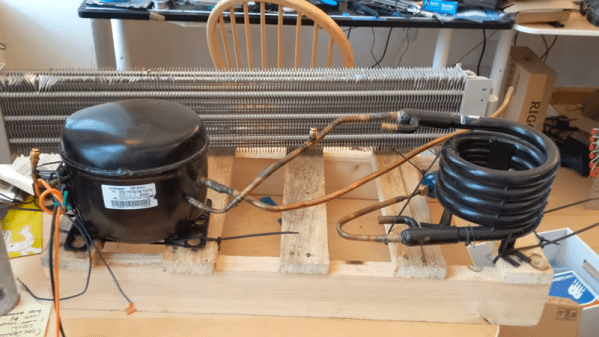
He’s not starting completely from scratch. The two attempts he made at building his AC came from donor parts. The successful one started out as a hot water heater. The very first attempt didn’t quite work as well, using a refrigerator compressor and an evaporator from a baseboard heater. The flow control through the heat exchanger turns out to be very tricky, so [Josh] claims he mostly got ice right at the inlet and minimal cooling through the evaporator.

The more successful one works better but still has a problem with the evaporator freezing that he’s trying to solve. He’s looking for suggestions on how to make it work better. As much as we like a good hack, our advice is to move to a different apartment building.

We’ve seen other homemade coolers, but they are more like swamp coolers. If you just need to cool your desk, you might just get some ice in a metal can.

Continue reading “DIY Air Conditioner Built From Weird Donor Appliance”

Hacking 16GB Into An Old PC That Doesn’t Want That Much

From the title, you might think this post is going to be some lame story about someone plugging in some RAM and maybe updating a BIOS. That’s where you’d be wrong. [Downtown Doug Brown] has a much more interesting and instructive story.

[Doug] found his motherboard was rated for 8 GB maximum and decided he’d make 16 GB of RAM work despite the limitation. He updated the BIOS and it worked — in Linux. He was able to see all the memory and it tested good. If that was it, you wouldn’t be reading about it here. The story gets interesting when he tried to boot Windows 10 and it refused, showing its kinder and gentler blue screen of death. For many people, that would be the end of the story, especially since Windows 10 doesn’t give you much information about why it crashed.

Like so many problems, this one had to be peeled back like an onion. The first thing to do was to change the Windows registry to allow the blue screen to output some technical information that was present in older versions of Windows. The error code indicated that the issue had to do with the BIOS reporting overlapping memory regions.

With some investigating in Linux, whose log files get a lot more BIOS information, [Doug] realized the E820 interface was returning a memory region that conflicted with ACPI’s information. It seems as though the motherboard was reserving space at the top of the 8 GB range for PCI operations which was punching a hole in the system’s (now larger) memory. Turning off a setting in the BIOS fixed the problem, but only because it makes Linux and Windows both see only 4GB of memory. That also wouldn’t be a very interesting story. [Doug] theorized that if he could move the mapping area to the top of the 16 GB range, things would work.

What follows is a great exposition of the Linux tools for reading and changing system information. Did he get it to work? Read the post and find out. But we will tell you that he did manage to have grub patch his system information.

Most of the motherboard hacks we’ve seen relate to hardware, not software. Of course, you could just buy a new motherboard. If you need ideas for what to do with the old one, here you go.

The Three Faces Of The 555

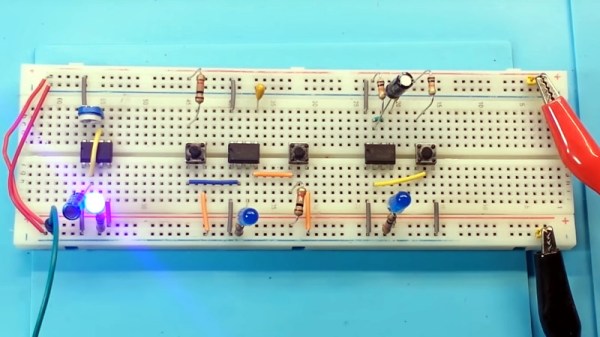
In these days of cheap microcontrollers, it is hard to remember there was a time when timing things took real circuitry. Even today, for some applications it is hard to beat the ubiquitous 555 timer IC. It is cheap, plentiful, and reliable. What’s interesting about the 555 is it isn’t so much a dedicated chip as a bunch of building blocks on a chip. You can wire those building blocks up in different ways to get different effects, and [learnelectronics] has a video showing the three major modes you typically see with the 555: astable, bistable, and monostable.

The 555 is really only a few comparators, a voltage divider, one or two transistors, a flip flop and an inverter. The idea is you use a capacitor to charge and the comparators can set or reset the flip flop in different ways. A reset input or the flip flop can turn on the transistor to discharge the capacitor.

Continue reading “The Three Faces Of The 555”

Quantum Computing With QISKit

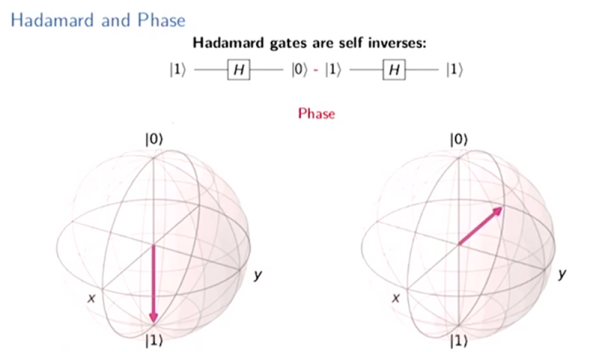
We all know that quantum computing is coming, but it is hard to know how to get started with it. [Mtreinish] suggests Qiskit — an Apache Licensed SDK for developing quantum applications. He has a presentation he gave in Singapore that you can see below, and a notebook you can go through on GitHub. If you are impatient, you can even run the notebook online through Google.

The tools can work against several backends including a simulator or the real hardware available from IBM. The official site has a different notebook you can use as a tutorial. Interestingly, the foundation of all Qiskit programs is “Terra” (the Earth) and permeating all Qiskit elements is Aer or air. There are also fire and water elements. At the bottom of the official notebook, you’ll find a lot of community notebooks that go deeper into specific topics.

Continue reading “Quantum Computing With QISKit”

Make A Non-Contact Voltage Probe

You’ve probably seen probes that detect live wires in, for example, home wiring, without having to actually probe the wire. These are sometimes used to test strings of Christmas lights, too. We’ve even seen the sensors built into a voltmeter. [Crazy Couple] has a few do-it-yourself versions that can do the job. You can see the circuits in the video below.

A contactless probe picks up the changing magnetic field around an unshielded wire with an AC voltage on it. Current doesn’t have to be flowing since it picks up the voltage (for example, you can detect voltage on a switch that is turned off or a Christmas tree light that is burned out. There are several different circuits using chips ranging from a CMOS IC to a 555. There’s also a version with three bipolar transistors.

Continue reading “Make A Non-Contact Voltage Probe”

One Pin To Rule Them All

When Maxim acquired Dallas Semiconductor, they took over the popular 1-Wire product line. These are sensors that get power and bidirectional data over the same pin. However, we never liked the name 1-Wire as you really need two wires: one for the power and data and, of course, a ground wire. A new startup company, Cyclopia, has announced their latest line of truly one pin CPUs, and we’re impressed. The low power system on chip devices multiplex data, power, clock, and ground on one wire.

A company spokesperson, [Star Lipfir], noted, “Our patent-pending technology uses two well-known effects. First, a FET gate doesn’t actually draw current but works on an electric charge. Second, capacitors store charge.”

Continue reading “One Pin To Rule Them All”