Interactive ESP8266 Development With PunyForth

Forth is one of those interesting languages that has a cult-like following. If you’ve never looked into it, its strength is that it is dead simple to put on most CPUs, yet it is very powerful and productive. There are two main principles that make this possible. First, parsing is easy because any sequence of non-space characters makes up a legitimate Forth word. So while words like “double” and “solve” are legal Forth words, so is “#$#” if that’s what you want to define.

The other thing that makes Forth both simple and powerful is that it is stack-based. If you are used to a slide rule or an HP calculator, it is very natural to think of “5+2*3” as “5 2 3 * +” but it is also very simple for the computer to interpret.

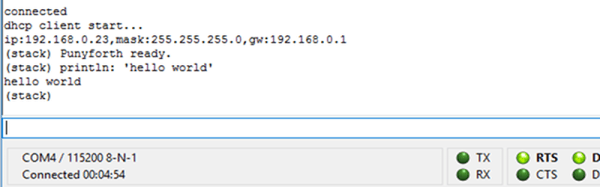
[Zeroflag] created PunyForth–a Forth-like language for the ESP8266. You can also run PunyForth for cross development purposes on Linux (including the Raspberry Pi). The system isn’t quite proper Forth, but it is close enough that if you know Forth, you’ll have no trouble.

Continue reading “Interactive ESP8266 Development With PunyForth”
B Battery Takes A 9V Cell

Old American radios (and we mean really old ones) took several kinds of batteries. The A battery powered the filaments (generally 1.5V at a high current draw). The B battery powered the plate (much lower current, but a higher voltage–typically 90V). In Britain these were the LT (low tension) and HT (high tension) batteries. If you want to rebuild and operate old radios, you have to come up with a way to generate that B voltage.

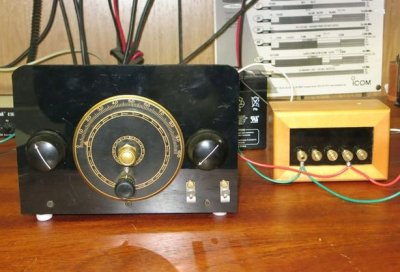
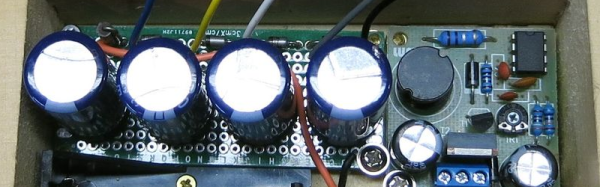
Most people opt to use an AC supply. You can daisy-chain a bunch of 9V batteries, but that really ruins the asthetics of the radio. [VA3NGC] had a better idea: he built a reproduction B battery from a wooden box, some brass hardware, a nixie tube power supply, and a 9V battery (which remains hidden). There’s also a handful of zener diodes, resistors, and capacitors to allow different taps depending on the voltage required.

b-battery-in-useThe project looks great. The wooden box apparently was a recycle item and the brass hardware makes it look like it belongs with the old radios it powers. This is a good example of how there’s more to vintage restoration than just the electronics. Sure, the function is important, but to really enjoy the old gear, the presentation is important, too.
Not all tube radios took 90V B+, but since this battery has taps, that isn’t a problem. The old Radio Shack P-Box kit took 22.5V. Of course, if you are going to build your own battery, maybe you ought to build your own triodes, too.

Disassembly Required

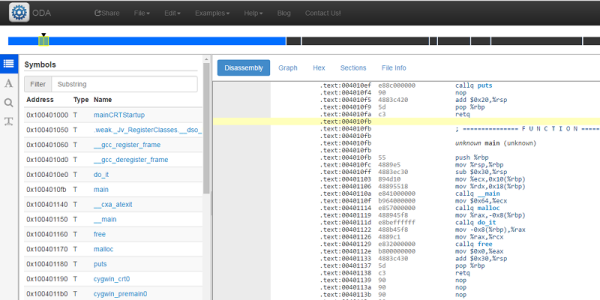
If you really want to hack software, you are going to face a time when you have to take apart someone’s machine code. If you aren’t very organized, it might even be your own — source code does get lost. If you want to impress everyone, you’ll just read through the hex code (well, the really tough old birds will read it in binary). That was hard to do even when CPUs only had a handful of instructions.

A more practical approach is to use a tool called a disassembler. This is nothing more than a program that converts numeric machine code into symbolic instructions. The devil, of course, is in the details. Real programs are messy. The disassembler can’t always figure out the difference between code and data, for example. The transition points between data and code can also be tricky.

When Not to Use

If you are coding your own program in assembly,  a disassembler isn’t usually necessary. The disassembly can’t recover things like variable names, some function names, and — of course — comments. If you use a high-level language and you want to check your compiler output, you can easily have the compiler provide assembly language output (see below).

The real value of a disassembler is when you don’t have the source code. But it isn’t easy, especially for anything nontrivial. Be prepared to do a lot of detective work in most cases.

Continue reading “Disassembly Required”

Practical Deep Learning

Deep Learning — the use of neural networks with modern techniques to tackle problems ranging from computer vision to speech recognition and synthesis — is certainly a current buzzword. However, at the core is a set of powerful methods for organizing self-learning systems. Multi-layer neural networks aren’t new, but there is a resurgence of interest primarily due to the availability of massively parallel computation platforms disguised as video cards.

The problem is getting started in something like this. There are plenty of scholarly papers that can be hard to wade through. Or you can grab some code from GitHub and try to puzzle it out.

A better idea would be to take a free class entitled: Practical Deep Learning for Coders, Part 1. The course is free unless you count your investment in time. They warn you to expect to commit about ten hours a week for seven weeks to complete the course. You can see the first installment in the video, below. Continue reading “Practical Deep Learning”

Jump Into Pogo

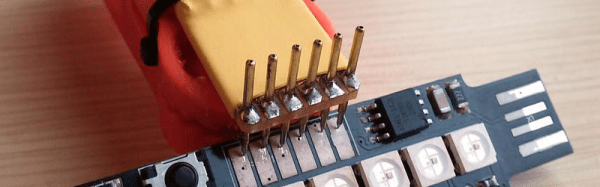
A lot of modern PCBs have small pads with no components attached. They are often used as test points, JTAG ports, or programmer connections. There’s no connector on the board, just pads. To use those, test equipment and programmers utilize pogo pins. These are small pins with a spring inside, reminiscent of a tiny pogo stick.

To use pogo pins effectively, you need a way to hold them in the right position and something to put pressure on them while they are in use. [Joshua Brooks] used a strip board to hold them in place and clothes pin to keep the pressure on them.

Continue reading “Jump Into Pogo”

Pi Keeps Cool At 1.5 GHz

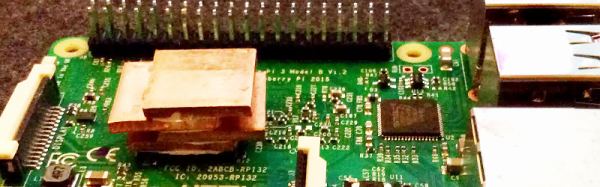
Hackers have a long history of overclocking CPUs ranging from desktop computers to Arduinos. [Jacken] wanted a little more oomph for his Pi Zero-Raspberry Pi-based media center, so he naturally wanted to boost the clock frequency. Like most overclocking though, the biggest limit is how much heat you can dump off the chip.

[Jacken] removed the normal heat sink and built a new one out of inexpensive copper shim, thermal compound, and super glue. The result isn’t very pretty, but it does let him run the Zero Pi at 1.5 GHz reliably. The heat sink is very low profile and doesn’t interfere with plugging other things into the board. Naturally, your results may vary on clock frequency and stability.

Continue reading “Pi Keeps Cool At 1.5 GHz”

80-PIC32 Cluster Does Fractals

One way to get around limitations in computing resources is to throw more computers at the problem. That’s why even cheap consumer-grade computers and phones have multiple cores in them. In supercomputing, it is common to have lots of processors with sophisticated sharing mechanisms.

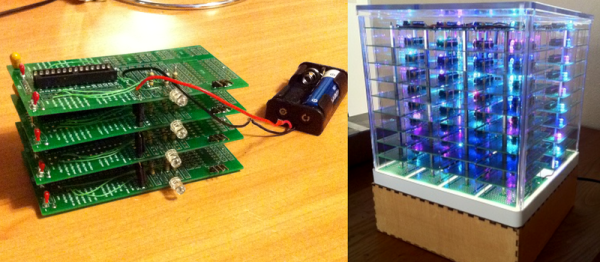
[Henk Verbeek] decided to take 80 inexpensive PIC32 chips and build his own cluster programmed in — of all things — BASIC. The devices talk to each other via I2C. His example application plots fractals on another PIC32-based computer that has a VGA output. You can see a video of the device in action, below.

Continue reading “80-PIC32 Cluster Does Fractals”