Virtual Physical Rehab With Kinect

Web sites have figured out that “gamifying” things increases participation. For example, you’ve probably boosted your postings on a forum just to get a senior contributor badge (that isn’t even really a badge, but a picture of one). Now [Yash Soni] has brought the same idea to physical therapy.

[Yash]’s father had to go through boring physical therapy to treat a slipped disk, and it prompted him into developing KinectoTherapy which aims to make therapy more like a video game. They claim it can be used to help many types of patients ranging from stroke victims to those with cerebral palsy.

Patients can see their onscreen avatar duplicate their motions and can provide audio and visual feedback when the player makes a move correctly or incorrectly. Statistical data is also available to the patient’s health care professionals.

Continue reading “Virtual Physical Rehab With Kinect”

3D Printing With 2D Inkscape Projections

If you had a formal drafting class, you probably learned about making orthographic projections–engineering drawings with multiple views (for example, top, front, and right). Even if you didn’t take the class, you’ve probably seen drawings like this where you view a 3D object as a series of 2D views from different angles.

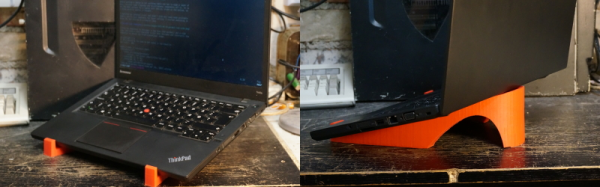
These days, you are more likely to create a 3D model of an object, especially if you are going to 3D print it. After all, the 3D printer software is going to expect a model. When [Nightshade] wanted a laptop stand for his workbench, he started trying to do a 3D model. His final product though, was made by creating two views in Inkscape. They aren’t exactly orthographic projections of the final product, but the idea is similar.

Inkscape is a vector graphics program and generally creates SVG files, although it can also save EPS files. [Nightshade] used pstoedit to convert the EPS output to DXF format. DXF files are still two dimensional, but OpenSCAD can extrude DXF files into 3D shapes.

Just having a 3D shape of one view isn’t sufficient, though. The OpenSCAD script rotates the objects to the correct orientation and intersects them to form the final object. This is different from the usual cases of using Inkscape to trace a scan or generate simple text.

Continue reading “3D Printing With 2D Inkscape Projections”

Homemade High Voltage Caps

Do you happen to have any 15,000 volt capacitors sitting around? [Ludic Science] didn’t so he did the next best thing. He built some.

If you understand the physics behind a capacitor (two parallel conductors separated by a dielectric) you won’t find the build process very surprising. [Ludic] uses transparency film as an insulator and aluminum foil for the conductive plates. Then he wraps them into a tube. He did throw in a few interesting tips about keeping the sheets smooth and how to attach the wires to the foil. The brown paper wrapper reminded us of old caps you might find in an antique radio.

The best part by far, though, was the demonstration of drawing an arc from a high voltage power supply with and without the capacitor in the circuit. As you might expect, playing with a few thousand volts charged into a capacitor requires a certain amount of caution, so be careful!

[Ludic] measured the capacitance value with a standard meter, but it wasn’t clear where the 15,000 volt rating came from. Maybe it was the power supply he used in the video and the capacitor could actually go higher.

Continue reading “Homemade High Voltage Caps”

I Am A Battery: Harvesting Heat Energy

If you get tired of charging batteries, you might be interested in [Hackarobot’s] energy harvesting demo. He uses a peltier device (although he’s really using it as a thermocouple which it is). A 1 farad super capacitor stores energy and an LTC3108 ultra low voltage converter with a 1:100 ratio transformer handles the conversion to a useful voltage.

The truth is, the amount of energy harvested is probably pretty small–he didn’t really characterize it other than to light an LED. In addition, we wondered if a proper thermocouple would work better (some old Russian radios used thermocouples either in fireplaces or kerosene lamps to avoid requiring batteries). Although a Peltier device and a thermocouple both use the Seebeck effect, they are optimized for different purposes. Thermocouples generate voltage from a temperature differential and Peltier modules generate temperature differentials from voltage.

However, as [Hackarobot] points out, the same technique might be useful with other alternate power sources like solar cells or other small generators. The module used has selectable output voltages ranging from 2.35V to 5V.

Continue reading “I Am A Battery: Harvesting Heat Energy”

Teach Yourself Verilog With This Tiny CPU Design

You probably couldn’t write a decent novel if you’d never read a novel. Learning to do something often involves studying what other people did before you. One problem with trying to learn new technology is finding something simple enough to start your studies.

[InfiniteNOP] wanted to get his feet wet writing CPUs and developed a simple 8-bit architecture that would be a good start for a classroom or self-study. It is a work in progress, so there may be a few bugs in it still to squash, but squashing bugs might be educational too. You can read the documentation in the HACKING file for details on the architecture. Briefly, the instruction’s top four bits encode the operation, while the last four bits select the register operands (there are four registers).

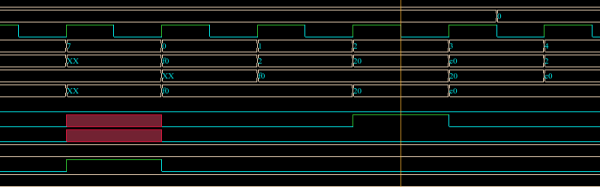
[InfiniteNOP] used the Xilinx tools to simulate and synthesize the CPU, but we thought it might be a good excuse to play with EDAPlayground. You can find a testbench that works with EDAPlayground, although you’ll probably want to update the CPU files to match the latest version.

Continue reading “Teach Yourself Verilog With This Tiny CPU Design”

Build Your Own CPU? That’s The Easy Part!

You want to build your own CPU? That’s great fun, but you might find it isn’t as hard as you think. I’ve done several CPUs over the years, and there’s no shortage of other custom CPUs out there ranging from pretty serious attempts to computers made out of discrete chips to computers made with relays. Not to trivialize the attempt, but the real problem isn’t the CPU. It is the infrastructure.

What Kind of Infrastructure?

I suppose the holy grail would be to bootstrap your custom CPU into a full-blown Linux system. That’s a big enough job that I haven’t done it. Although you might be more productive than I am, you probably need a certain amount of sleep, and so you may want to consider if you can really get it all done in a reasonable time. Many custom CPUs, for example, don’t run interactive operating systems (or any operating system, for that matter). In extreme cases, custom CPUs don’t have any infrastructure and you program them in straight machine code.

Machine code is error prone so, you really need an assembler. If you are working on a big machine, you might even want a linker. Assembly language coding gets tedious after a while, so maybe you want a C compiler (or some other language). A debugger? What about an operating system?

Each one of those things is a pretty serious project all by itself (on top of the project of making a fairly capable CPU). Unless you have a lot of free time on your hands or a big team, you are going to have to consider how to hack some shortcuts.

Continue reading “Build Your Own CPU? That’s The Easy Part!”

Open Source FPGA Toolchain Builds CPU

When you develop software, you need some kind of toolchain. For example, to develop for an ARM processor, you need a suitable C compiler, a linker, a library, and a programmer. FPGAs use a similar set of tools. However, instead of converting source code to machine language, these tools map the intent of your source code into configuration of FPGA elements and the connections between them.

There’s some variation, but the basic flow in an FPGA build is to use a synthesizer to convert Verilog or VHDL to a physical design. Then a mapper maps that design to the physical elements available on a particular FPGA. Finally, a place and route step determines how to put those elements in a way that they can be interconnected. The final step is to generate a bitstream the chip understands and somehow loading it to the chip (usually via JTAG or by programming a chip or an external EEPROM).

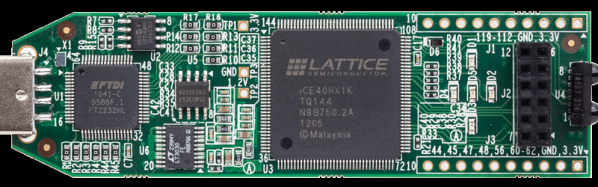
One problem with making your own tools is that the manufacturers typically hold the bitstream format and other essential details close to their chest. Of course, anything can be reverse engineered (with difficulty) and [James Bowman] was able to build a minimal CPU using  an open source Lattice toolchain. The project relies on several open source projects, including  IceStorm, which provides configuration tools for Lattice iCE40 FPGAs (there is a very inexpensive development platform available for this device).

We’ve covered IceStorm before. The IceStorm project provides three tools: one to produce the chip’s binary format from an ASCII representation (and the reverse conversion), a programmer for the iCEstick and HX8K development boards, and database that tells other open source tools about the device.

Those tools blend with other open source tools to form a complete toolchain–a great example of open source collaboration. Yosys does the synthesis (one of the tools available on the EDAPlayground site). The place and route is done by Arachne. The combined tools are now sufficient to build the J1A CPU and can even run a simple version of Forth. If you’ve ever wanted to play with an FPGA-based CPU design, you now have a $22 hardware option and free tools.

Continue reading “Open Source FPGA Toolchain Builds CPU”