A Hackvent calendar made of LEDs!

Hackvent Calendar Will Open The Door And Get Your Kids Soldering

Who says it’s too early to get in the holiday spirit? We say it’s not. After all, people need time to get in the spirit before it comes and goes. And what better way to count down the days until Christmas than an electronic Advent calendar?

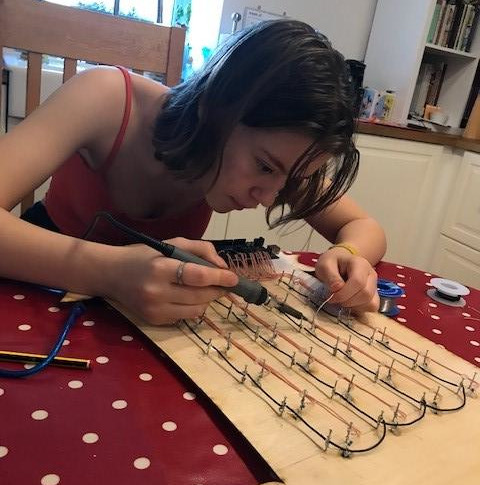
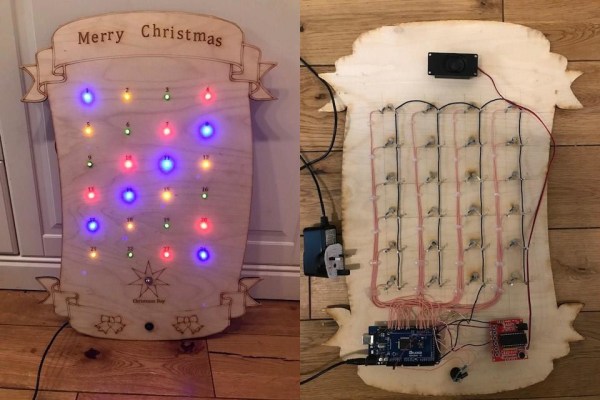
Soldering up a bunch of LEDs to nails, old school style.[Tom Goff]’s kids had some pretty cool ideas for building a decoration, like a musical, lighted sleigh complete with robotic Santa Claus. While that’s a little much to pull off for this year, they did salvage the music and lights part for their Hackvent calendar.

There are 24 small LEDs for December 1st through the 24th, and a big white star for December 25th. Each day, the kids just push the button and the day’s LED lights up. On the big day, all the small lights cascade off and the white one lights up, then it plays Jingle Bells through a sound playback module.

Each LED is connected directly to an input on an Arduino Mega. While there are several ways of lighting up 25 LEDs, this one is pretty kid-friendly. We think the coolest part of this build is that [Tom] and the kids did it old school, with nails hammered into the laser-cut plywood and used as connection terminals. Be sure to check it out in action after the break.

The more time you have, the more you can put into your Advent calendar build. Like chocolates, for instance.

Continue reading “Hackvent Calendar Will Open The Door And Get Your Kids Soldering”

Get Down To Some African Tunes With This HomeBrew Synth

South African [Afrorack] claims to have built the first home-built modular synthesiser in Africa. Whilst we can’t be sure of this (and to be frank, it doesn’t actually matter) what we can be sure of is that the latest additions to this rig sound pretty rad. (video, embedded below) There really isn’t much doubt that the African nations are the kings of rhythm, and that living in the less well-to-do areas you need to have a certain resourcefulness to use the materials around you. It’s not like you can just pop down to the local electronics store for a missing part, even if you had the funds for it.

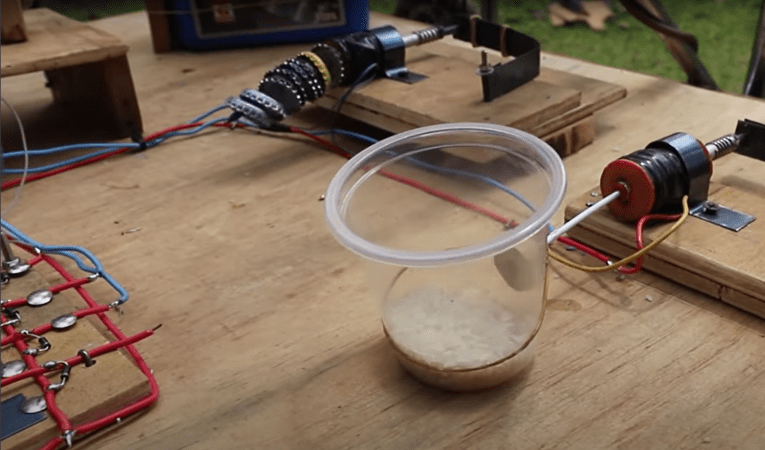
The modular synth looks pretty nice, rough and ready like a real homebrew, and the use of an oil can as a bass drum and rice in a plastic skiff as an instrument might look crude, but sound pretty good. All three additions to the rig are simple spring-loaded solenoid affairs, but since off the shelf stuff is an expensive luxury, hand wound coils were in order. With a bobbin formed with a metal rod and two suitably trimmed fanta bottle lids, a wire spool holder sitting on what looks like a cake stand, a drill powered coil winder was constructed. We did smirk a little when in an early shot, wire was guided by hand, which was rapidly followed by an adjustment to guiding with a rag. Darn friction burns! We’re watching this with interest to see what the next additions will be, but for now, just sit back and nerd out to some sick African techno tunes!

Want to see a mess-o-wires turn into something meaningful? Got some Game Boys lying around needing something to do? How about a chiptune synth?

Continue reading “Get Down To Some African Tunes With This HomeBrew Synth”

Keep The Sparks Away With A Plasma Cutting Table

For one-off projects or prototypes it’s not uncommon for us to make do with whatever workspace we have on hand. Using a deck railing as an impromptu sawhorse, for example, is one that might be familiar to anyone who owns a circular saw, but [Daniel] has a slightly different situation. He had been setting up metal workpieces on random chunks of brick in order to use his plasma cutter, but just like the home handyman who gets tired of nicking their deck with a saw, he decided to come up with a more permanent solution and built a custom plasma cutting table.

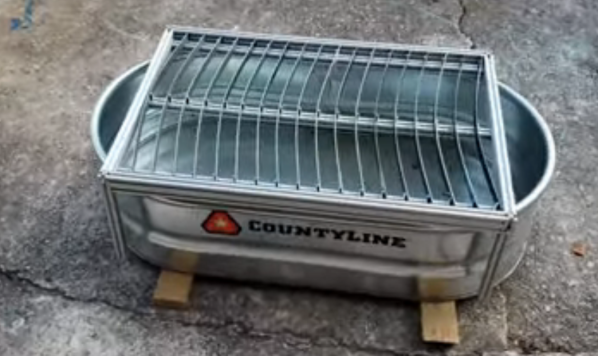
Plasma cutting has a tendency to throw up a lot of sparks, so most commercial offerings for plasma cutting tables include a water bath to catch all of the debris from the cutting process. [Daniel] builds his table over a metal tub to hold some water for this purpose. The table itself is built out of aluminum and designed to be built without welding even though most people with plasma cutters probably have welders as well. The frame is designed to be exceptionally strong and includes curved slats which add to the strength of the table. The table is also designed to be portable, so the curved slats stay in place when the table is moved.

While this might seem like an average metal table at first glance, the table is actually being designed with a homemade CNC machine in mind which [Daniel] is working on. The CNC plasma cutter needs a sturdy, flat surface and can’t be set up on bricks in the driveway, so this table suits both [Daniel]’s immediate needs to not shower himself in sparks every time he cuts something and also his future CNC machine’s need for a sturdy, flat workspace. We look forward to seeing that build being completed but in the meantime take a look at this motorized plasma cutter which has the beginnings of a CNC machine if in one direction only.

Continue reading “Keep The Sparks Away With A Plasma Cutting Table”

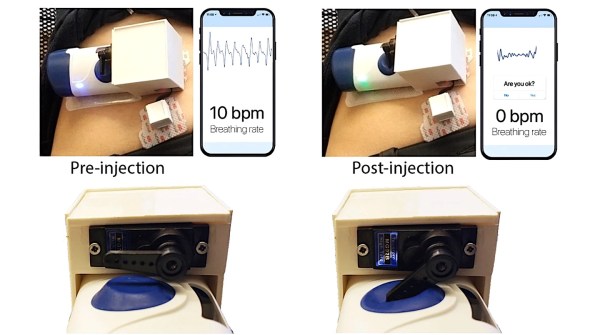
Respiratory rate measuring device attached to volunteer's abdomen along with automated antidote injection system

Researchers Use Wearable To Detect And Reverse Opioid Overdoses In Real-Time

Opioid overdose-related deaths have unfortunately been increasing over the last few decades, with the COVID-19 pandemic exacerbating this public health crisis even further. As a result, many scientists, healthcare professionals, and government officials have been working tirelessly to end this deadly epidemic. Researchers at the University of Washington are one such group and have recently unveiled a wearable to both detect opioid overdose and deliver an antidote, in real-time, restoring normal bodily function.

As the researchers describe in their paper, opioid overdose causes respiratory rate depression which will lead to hypoxia (insufficient oxygen in the blood) and ultimately death. Fortunately, opioid overdose can be readily reversed using naloxone, a compound that binds to receptors in the brain, outcompeting the opiates themselves, and restoring normal breathing. Unfortunately, if someone is overdosing, they are unable to self-administer the antidote and with many opioid overdoses occurring when the victim is alone (51.8%), it is necessary to develop an automated system to deliver the antidote when an overdose is detected.

The researchers begin by describing their process for measuring respiration, of which there are several options. You could use photoplethysmography in much of the same way we measure heart rate. Or you could measure the changing impedance of the chest cavity during breathing or even use an intraoral sensor that measures airflow in the mouth. Instead, the researchers opt to measure respiration by attaching accelerometers to the patient’s abdomen and measuring the movement of the abdominal cavity during breathing. They admit their technique becomes problematic when the patient is not stationary, but argue that in the case of a drug overdose, the patient is likely to be immobilized and the device would be able to measure respiration with ease. They tested their device across dozens of healthy, human volunteers, and even some opiate users themselves, and showed their technique had good agreement with a reference respiratory belt placed around the volunteers’ chests.

The cool part about this paper is that they demonstrated a “closed-loop” feedback system in which their device measured respiration, detected cessation in breathing (indicating an overdose), and delivered the antidote. To deliver naloxone, they leveraged an existing, commercially-available drug delivery system that requires a user to manually activate the device by pressing a button. They hacked the device a bit such that the trigger could be actuated using a servo motor properly positioned to depress the button when an opioid overdose is detected. They simulated an overdose by asking the healthy, human volunteers to hold their breath for a period greater than 15 seconds. They were able to successfully deliver the antidote to 100% of their volunteer group, indicating the device could potentially work in real-world settings.

Now, the form factor of the device undoubtedly needs to improve in order to deploy this device into the field, but we imagine those are improvements are underway and patients have shown willingness to wear such devices already. Also, there’s still a bit of a question of whether or not accelerometer-based breathing detection is optimal since some drug overdoses cause seizures. Nevertheless, this is an important step in combating the alarming rise in opioid overdose-related deaths and we hope to see many more advances in patient monitoring technologies in this field.

Google Sheet showing wins and losses of sports team. Data automated by IFTTT, Alexa, and Particle

An Overly Complicated Method Of Tracking Your Favorite Sports Team

Much of the world appears to revolve around sports, and sports tracking is a pretty big business. So how do people keep up with their favorite team? Well, [Jackson] and [Mourad] decided to devise a custom IoT solution.

Their system is a bit convoluted, so bear with us. First, they tell Alexa whether or not the team won or lost that week. Alexa then sends that information to IFTTT where two different Particle Argon boards are constantly polling the results to decide how to respond next. One Particle responds by lighting up an LED, green for a win and red for a loss. Another Particle board displays the results on an LCD screen. But this is where things get tricky. One of the more confusing aspects of their design is one of the Particle boards then signals back to IFTTT, telling it to tally the number of wins and losses. This seems a bit roundabout since the system started with IFTTT in the first place. Regardless, they seemed to be happy with the result and I’m sure they learned something in the process.

This project might not fulfill any functional need given that Alexa knows everything about all our lives already and you could just ask her how your favorite team is doing whenever you want to. But hey, we’re all about learning by doing here at Hackaday and we’re all guilty of building useless projects here and there just because we can. In any case, their project could serve as a good intro to integrating your Particle with IFTTT or Alexa since there appears to be quite a bit of probably unnecessary handshaking going on here.

Continue reading “An Overly Complicated Method Of Tracking Your Favorite Sports Team”

Shady Air Umbrella Given New Lease On Life

Many infamous Kickstarter projects have ultimately flopped or failed, leaving backers frustrated and angry. Often pitched with a splashy convincing video that happens to have critical components conveniently offscreen. [Allen Pan] was reminiscing about one such project, the air umbrella, and decide to redeem the project by making his own.

The basic idea of the air umbrella was a device that could create a cone of fast-moving air over your head to deflect air. Going off of the specs listed on the original Kickstarter page, [Allen] made a simple prototype that did nothing. Suspicions confirmed, he decided to keep going by buying a powerful electric leaf blower. A nozzle was 3d printed that could direct the air into the needed disc. Early testing with the mist function on a garden hose seemed promising, and they worked their way up to progressively larger raindrops.

Finally, the clouds of California smiled upon them, and it rained. [Allen] was ecstatic that his umbrella worked. He couldn’t hear much out of one ear as he was holding a leaf blower next to it for a few minutes, but it’s a small price to pay to stay dry with the Air Umbrella.

If you’re curious about more false Kickstarter claims, why not read up on this tiny Arduino compatible board making some dubious claims.

[Header image courtesy of Air Umbrella Kickstarter page]

Continue reading “Shady Air Umbrella Given New Lease On Life”

iPhone pictured with a lock

Make Your Own BLE-Enabled IOS App From Scratch

Even those readers who are most skeptical of Apple products will like this Bluetooth Low Energy (BLE)-enabled iOS app tutorial from [Akio].

With everything being “connected” these days smartphone applications are of course a ubiquitous part of our existence. We’ve seen plenty of examples connecting your Bluetooth-enabled projects to an Android device, but comparatively fewer tutorials for connecting to iOS devices. This mostly has to do with Android’s much larger market share and also Android’s more open-source friendly business model. Nevertheless, if you do much IoT development either as a hobby or professionally, then you probably find yourself interacting with Apple devices more than you like to admit.

[Akio’s] app is essentially updating a chart, in real-time, with data read from an Adafruit nRF52832 Feather board. He then walks you through all the basics of creating a user interface (UI) using Apple’s Storyboard interface, a simple drag-and-drop scheme similar to something you’ve probably used in many other contexts. [Akio] shows readers how to add buttons for allowing users to interact with the app, labels for displaying data to the user, as well as walks you through Apple’s odd methodology of connecting UI elements to code using IBAction and IBOutlets. The highlight of his tutorial is showing readers how to add charts to their iOS apps which seems to take a few more steps than you might imagine.

[Akio] does a really good job detailing all the relevant functions so that readers will hopefully understand what each piece of the code is doing. And we really enjoyed him adding individual video tutorials for some of the trickier programming steps. He also readily admits that some folks may opt to develop their UI exclusively in code as opposed to the Storyboard but he argues that the Storyboard is still important for beginners and is really handy when the UI is fairly simple.

Of course, in true open-source fashion, [Akio] provides all his code on his GitHub repository so you can clone the repo and run the code yourself as well as credit some of the resources he used while making his app. Two things we really love to see. Hopefully, [Akio’s] tutorial will make connecting to iOS devices seem much less onerous than it once was.