Amidst the recent news about the Hubble Space Telescope’s troubles (and triumphant resurrection), it is sometimes easy to forget that although Hubble is a pretty unique telescope, it is just one of many space-based observatories that are currently zipping overhead right now or perched in a heliocentric orbit. So what is it that makes these observatories less known than the iconic Hubble telescope?
Hubble is one of the longest-lived space telescopes so far, and it is also the only space telescope that was both launched and serviced by the Space Shuttle. None of the other telescopes have this legacy, the high-profile, or troubled history of Hubble’s intended successor: the James Web Space Telescope (JWST).
Even so, the mission profiles of these myriad other observatories are no less interesting, least of the many firsts accomplished recently such as a long-term moon-based telescope (Chang’e 3’s LUT) and those of the many upcoming and proposed missions. Let’s take a look at the space observatories many of us have never heard of.
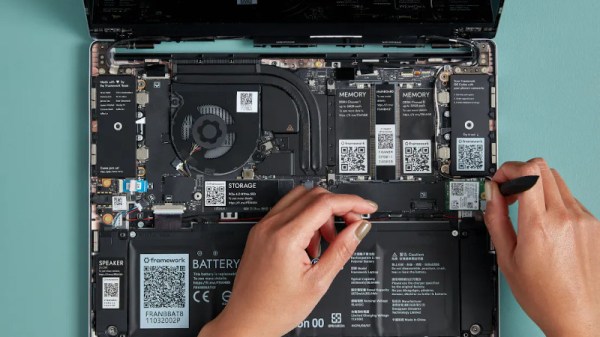
An essential tool that nearly all of us will have is our laptop. For hardware and software people alike it’s our workplace, entertainment device, window on the world, and so much more. The relationship between hacker and laptop is one that lasts through thick and thin, so choosing a new one is an important task. Will it be a dependable second-hand ThinkPad, the latest object of desire from Apple, or whatever cast-off could be scrounged and given a GNU/Linux distro? On paper all laptops deliver substantially the same mix of performance and portability, but in reality there are so many variables that separate a star from a complete dog. Into this mix comes a newcomer that we’ve had an eye on for a while, the Framework. It’s a laptop that looks just like so many others on the market and comes with all the specs at a price you’d expect from any decent laptop, but it has a few tricks up its sleeve that make it worth a glance.
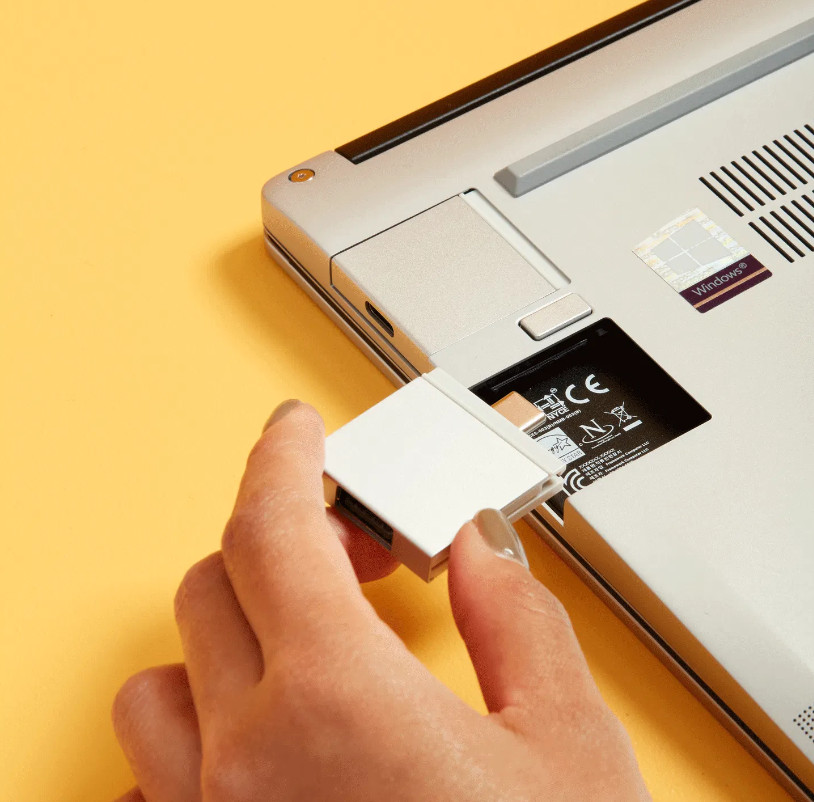
These USB-C based modules are a neat idea.
Probably the most obvious among them is that as well as the off-the-shelf models, it can be bought as a customised kit for self-assembly. Bring your own networking, memory, or storage, and configure your new laptop in a much more personal way than the norm from the big manufacturers. We like that all the parts are QR coded with a URL that delivers full information on them, but we’re surprised that for a laptop with this as its USP there’s no preinstalled open source OS as an option. Few readers will find installing a GNU/Linux distro a problem, but it’s an obvious hole in the line-up.
On the rear is the laptop’s other party trick, a system of expansion cards that are dockable modules with a USB-C interface. So far they provide USB, display, and storage interfaces with more to come including an Arduino module, and we like this idea a lot.
It’s all very well to exclaim at a few features and party tricks, but the qualities that define a hacker’s laptop are only earned through use. Does it have a keyboard that will last forever, can it survive being dropped, and will its electronics prove to be fragile, are all questions that can be answered only by word-of-mouth from users. It’s easy for a manufacturer to get those wrong — the temperamental and fragile Dell this is being typed on is a case in point — but if they survive the trials presented by their early adopters and match up to the competition they could be on to a winner.
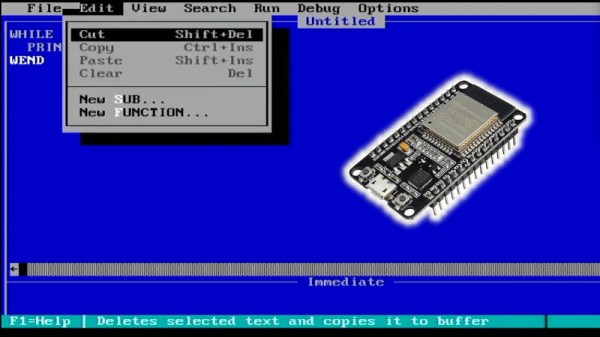
The IBM PC spawned the basic architecture that grew into the dominant Wintel platform we know today. Once heavy, cumbersome and power thirsty, it’s a machine that you can now emulate on a single board with a cheap commodity microcontroller. That’s thanks to work from [Fabrizio Di Vittorio], who has shared a how-to on Youtube.
The full playlist is quite something to watch, showing off a huge number of old-school PC applications and games running on the platform. There’s QBASIC, FreeDOS, Windows 3.0, and yes, of course, Flight Simulator. The latter game was actually considered somewhat of a de facto standard for PC compatibility in the 1980s, so the fact that the ESP32 can run it with [Fabrizio’s] code suggests he’s done well.
It’s amazingly complete, with the ESP32 handling everything from audio and video to sound output and keyboard and mouse inputs. It’s a testament to the capability of modern microcontrollers that this is such a simple feat in 2021.
The Atari VCS 800 is a modern product, a hybrid of a PC and a games console. Fundamentally, its a bunch of modern chips in a box running Linux that will let you browse the web or emulate some old games. Now, thanks to [ArcadeHustle], you can have persistent root access to the VCS 800 at your leisure.
The trick is simple, and begins by interrupting the systemd startup scripts on boot. One can then merge files into the /etc directory to achieve root access, either by the tty terminal or over TCP. It’s all wrapped up in the script available at the Github link above.
You can actually run a variety of OSs on the hardware, as it’s powered by an AMD Ryzen R1606G CPU and runs straightforward PC architecture. However, if you want to customize the existing OS to do your bidding, this hack is the way to go.
Hacking to get root access is key if you want to get anywhere with a system. We’ve seen it done on thin clients as well as car infotainment systems to give the owner full control over the hardware they own. If you’ve got your own root exploit you’d like to share, do drop us a line, won’t you?
[John Floren] found a nice old black & white TV in a thrift store, and as so many of us would, he decided to take it home. He was surprised upon getting it there that it had, in addition to the VHF and UHF antenna inputs, a mysterious extra connector on the back. Naturally, he set about investigating.
On the rear was an obviously hacked-in F-type connector, paired with a toggle switch, both unlabelled. Running the output of an RF modulator to the connector didn’t net an image on the screen, even though the same method worked when hooked up to the antenna inputs. Undeterred, [John] dug deeper.
Inside, a little PCB bearing the mark “TVM.04” was inside, bearing a handful of components. The device turned out to be a Pickes and Trout TVM-04 adapter, designed in the 1970s for hooking a computer up to a television for use as a monitor. The adapter board allows the Hitachi TV to accept a composite video input. [John] was able to test the TV with a NES clone outputting composite video and voila, it worked! [John] then went further, adding an audio input and installing standard RCA jacks to make it easier to use the input with more modern electronics.
A few days ago, the US Federal Trade Commission (FTC) came out with a 5-0 unanimous vote on its position on right to repair. (PDF) It’s great news, in that they basically agree with us all:
Restricting consumers and businesses from choosing how they repair products can substantially increase the total cost of repairs, generate harmful electronic waste, and unnecessarily increase wait times for repairs. In contrast, providing more choice in repairs can lead to lower costs, reduce e-waste by extending the useful lifespan of products, enable more timely repairs, and provide economic opportunities for entrepreneurs and local businesses.
The long version of the “Nixing the Fix” report goes on to list ways that the FTC found firms were impeding repair: ranging from poor initial design, through restrictive firmware and digital rights management (DRM), all the way down to “disparagement of non-OEM parts and independent repair services”.
While the FTC isn’t making any new laws here, they’re conveying a willingness to use the consumer-protection laws that are already on the books: the Magnuson-Moss Warranty Act and Section 5 of the FTC Act, which prohibits unfair competitive practices.
Only time will tell if this dog really has teeth, but it’s a good sign that it’s barking. And given that the European Union is heading in a similar direction, we’d be betting that repairability increases in the future.
Felling a tree properly is a skill that takes some practice to master, especially without causing any injuries or property damage. Getting the tree cut down though is sometimes only half of the battle, as the stump and roots need to be addressed as well. Unless you have a few years to wait for them to naturally decompose you might want to employ a stump grinder, and unless you want to spend a chunk of money on a stump grinding service or buy your own, you might want to do what [Workshop from Scratch] did and build your own.
This stump grinder isn’t anything to scoff at, either, and might even fool some into thinking it’s a consumer grade tool from a big box store. Far from it though, as almost everything down to the frame is custom machined specifically for this build. The only thing that isn’t built from scratch, including the cutting wheel, is the beefy 15 horsepower motor. Once it gets going it is able to carve stumps down to the ground in no time thanks especially to some gear reductions in the drive line from the motor to the cutting head.
Before anyone mentions safety, it looks like [Workshop from Scratch] has made some upgrades since his last project which was a gas-powered metal cutting chainsaw. Since then it looks like he has upgraded the sheet metal to something a little thicker, even though a stump grinder has arguably lower risk due to the slower speed of the cutting wheel and also to the fact that the cutting medium is wood and not metal. There are also brakes and an emergency shutoff switch. It sure seems like a fine addition to his collection of completely custom tools.