Robot Arm Adds Freedom To 3D Printer

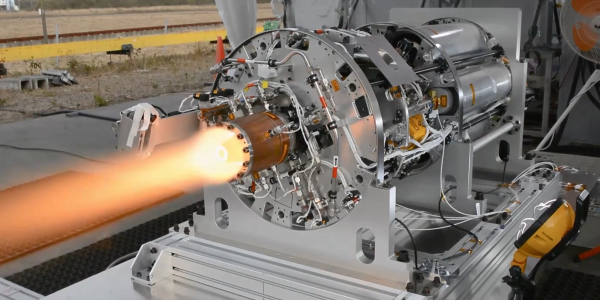
3D printers are an excellent tool to have on hand, largely because they can print other tools and parts rapidly without needing to have them machined or custom-ordered. 3D printers have dropped in price as well, so it’s possible to have a fairly capable machine in your own home for only a few hundred dollars. With that being said, there are some limitations to their function but some of them can be mitigated by placing the printer head on a robot arm rather than on a traditional fixed frame.

The experimental 3D printer at the University of Nottingham adds a six-axis robotic arm to their printer head, which allows for a few interesting enhancements. Since the printer head can print in any direction, it allows material to be laid down in ways which enhance the strength of the material by ensuring the printed surface is always correctly positioned with respect to new material from the printer head. Compared to traditional 3D printers which can only print on a single plane, this method also allows for carbon fiber-reinforced prints since the printer head can follow non-planar paths.

Of course, the control of this printer is much more complicated than a traditional three-axis printer, but it is still within the realm of possibility with readily-available robotics and microcontrollers. And this is a hot topic right now: we’ve seen five-axis 3D printers, four-axis 3D printers, and even some clever slicer hacks that do much the same thing. Things are finally heating up in non-planar 3D printing!

Thanks to [Feinfinger] for the tip!

Continue reading “Robot Arm Adds Freedom To 3D Printer”

Getting Started With Aluminum Extrusions

T-slot extrusions used to be somewhat mysterious, but today they are quite common thanks to their use in many 3D printers. However, it is one thing to assemble a kit with some extrusions and another thing to design your own creations with the material. If you ever had a Play-Doh Fun Factory as a kid, then you know about extrusions. You push some material out through a die to make a shape. Of course, aluminum extrusions aren’t made from modeling clay, but usually 6105-T5 aluminum. Oddly, there doesn’t seem to be an official standard, but it is so common that there’s usually not much variation between different vendors.

We use extrusions to create frames for 3D printers, laser cutters, and CNC machines. But you can use it anywhere you need a sturdy and versatile frame. There seems to be a lot of people using them, for example, to build custom fixtures inside vans. If you need a custom workbench, a light fixture, or even a picture frame, you can build anything you like using extrusions. Continue reading “Getting Started With Aluminum Extrusions”

Custom Music Box Cylinder Puts A Spin On Romance

Music boxes are awesome little mechanical devices. These days, they even make some with slightly more modern tunes, like the Zelda and Star Wars themes.  But they don’t have everything, of course — certainly not that one song from that TV series that [RandomPrototypes]’ girlfriend absolutely adores.

But it’s 2021, and there are options for making your own music box. [RandomPrototypes] could have printed the whole thing, but those don’t sound as good with their plastic combs. Then there’s those paper punch ones, but you have to sit there and crank the thing continuously to hear the song. In the end, [RandomPrototypes] mixed methods and made a custom cylinder that’s playable with a standard music box mechanism.

[RandomPrototypes] started by taking the music box apart to measure the cylinder, and then created a software representation of a cylinder that’s designed to pluck the eighteen notes from low to high rather than play a song. Then he used a Python script to turn it in a 3D model. The slicing preview showed a lot of stops and starts and weak points, so [RandomPrototypes] generated the Gcode directly so that it would print in one continuous spiral and be much stronger.

In order to generate a cylinder with the song his girlfriend likes so much, [RandomPrototypes] printed this scale cylinder and used it to record the notes as a single mp3 and make note of the start times of each note. Finally, he built the new score based on the available notes built into the music box comb. If you want to do this yourself, the code is freely available. The hard part will be choosing a music box mechanism, because they tend to come with a single comb that’s designed to play a specific song. You’ll have to figure out which tune has most or all of the notes you need.

If you don’t mind doing the cranking to listen to the tune, then the paper-punched type of music box is going to be much easier. But why do all that punching yourself, when you could build a machine?

Continue reading “Custom Music Box Cylinder Puts A Spin On Romance”

Technical Audacity And The Phone Book

I often think we — or maybe the people who control our money — lack the audacity to take on really big projects. It is hard to imagine laying the transatlantic cable for the first time today, for example. When I want a good example of this effect, I usually say something like: “Can you imagine going to a boardroom of a major company today and saying, ‘We plan to run wire to every house and business in the world and connect them all together.'” Yet that’s what the phone company did. But it turns out, running copper wire everywhere was only one major challenge for the phone company. The other was printing phone directories. In today’s world, it is easy to imagine a computer system that keeps track of all the phone numbers that can spit out a printed version for duplication. But that’s a relatively recent innovation. How did big city phonebooks work before the advent of the computer?

Turns out, the Saturday Evening Post talked about how it all worked in a 1954 article. We aren’t sure there weren’t some computerized records by 1954, but the whole process was still largely manual. By that year, an estimated 60,000,000 directories went out each year in the United States alone. Some of these were small, but the Chicago directory — not including suburban directories — had over 2,100 pages. In New York City, the solution was to print a separate book for each borough. Even then. the Manhattan book was three inches thick and projected to grow to five inches by 1975.

Continue reading “Technical Audacity And The Phone Book”

RAM Fiddling Turns VGA Converter Into Video Synth

If you’re interested in circuit bent video but not sure where to start, the excellent guide [LoFi Future] has come up with for modifying the cheap and readily available GBS-8100 VGA to composite converter would be a great first step. While we wouldn’t call it an easy modification, the circuit documentation and demonstration video below go a long way to making it as accessible as possible to new players.

Some soldering will be required…

While other video converters have all-in-one chipsets that are much harder to work with, [LoFi Future] explains that the separate EM636165TS DRAM chip on the GBS-8100 provides an ideal spot to tap in and wreak some technicolor havoc. By mapping out the pins and studying how the video output is corrupted by grounding them out or connecting them to each other, he’s been able to come up with fairly repeatable “recipes” for different effects.

In the most basic form, once you’ve soldered the pins of the DRAM chip up to the plug board interface, you’d technically be done. But [LoFi Future] takes it a step further and pairs the GBS-8100 with a separate composite to VGA converter. This provides some additional effects in the form of feedback loops and hue adjustment, but more practically, allows the device to handle composite on both the input and output. It’s a lot of hardware to cram into the enclosure, but thanks to little touches like the printed panel graphics, the final product does looks very professional.

Aside from the occasional modified NES Zapper, most of the circuit bent hardware we see is of the audio variety. But with projects like this one and the MIDI controlled SNES we covered last year as inspiration, we might see a balancing of the scales. Continue reading “RAM Fiddling Turns VGA Converter Into Video Synth”

Simple MicroPython Game Is A 30 Minute Game Dev Course

Sometimes, it’s really useful to watch a project’s parts come together one piece at a time in order to get a complete understanding and mental picture of the whole, and we found that to be the case with this simple, retro-inspired sample game from [ezContents]. (Video, embedded below.) The code is on GitHub but if you’re at all interested in what goes on behind the scenes in a game like that, don’t miss the video.

In the video, each game element and function is illustrated, showing exactly what gets done and why. This part is collision detection (click to enlarge.)

These sprite-based games are mostly about moving a small graphical object (a sprite) around a screen in response to user input, and managing what happens when collisions are detected between the player’s sprite and other sprites like enemies, projectiles, and so forth. The development process is wonderfully documented and demonstrated in a video, as each separate part of functionality gets built and explained one piece at a time.

The simple game is made using ArduPy (which is MicroPython combined with Arduino APIs) using Seeed Studios’ Wio Terminal, a small microcontroller development board with integrated screen, sensors, and button inputs including a little directional clicker that [ezContents] uses as a joystick.

The video of the whole process is embedded below; give it a watch and you’ll maybe come away with inspiration, but you’ll definitely have a much better understanding of how these types of games are developed, even if you’re not using the same hardware or development environment.

Continue reading “Simple MicroPython Game Is A 30 Minute Game Dev Course”

Running Modern Linux From A Single Floppy Disk

There was a time when booting Linux from a floppy disk was the norm, but of course, those days are long gone. Even if you still had a working 3.5 inch drive, surely the size of the modern kernel alone would far exceed the 1.44 MB capacity of the disks, to say nothing of all the support software required to create a usable operating system. Well that’s what we thought, anyway.

But then [Krzysztof Krystian Jankowski] dropped Floppinux, a live Linux OS that boots from just a single floppy. There’s even a few hundred KB left over on the disk, allowing the user to tuck a few of their own programs and scripts onboard before booting it up. But most impressively, the project doesn’t rely on ancient software releases like so many other embedded systems do. Every component of Floppinux is pulled directly from the cutting edge, including version 5.13.0-rc2 of the Linux kernel which is literally just a few days old.

Floppinux running on the Asus Eee PC

Of course some concessions had to made in order cram the latest Linux kernel and build of BusyBox into slightly north of 1 MB, so Floppinux certainly isn’t what anyone would call a daily driver. The kernel is stripped down the absolute minimum, and is targeted for the decidedly poky i486. [Krzysztof] had to be very selective about which programs actually made the cut as well, so once the system is booted, there’s not a whole lot you can do with it outside of writing some shell scripts. But then, that was sort of the goal to begin with.

If you’re wondering how [Krzysztof] pulled it off, you don’t have to. He walks you though the entire process, down to the commands he used to do everything from pull down and compile the source code to creating the final disk image. Even if you don’t own a floppy drive, it’s well worth following his guide and booting the image up in QEMU just to say you’ve officially built a Linux system from scratch. It’s good for more than just bragging rights; learning how all the components of a minimal install like this fits together will no doubt come in handy the next time you find yourself poking around inside an embedded Linux device.