MQTT And The Internet Of Conference Badges

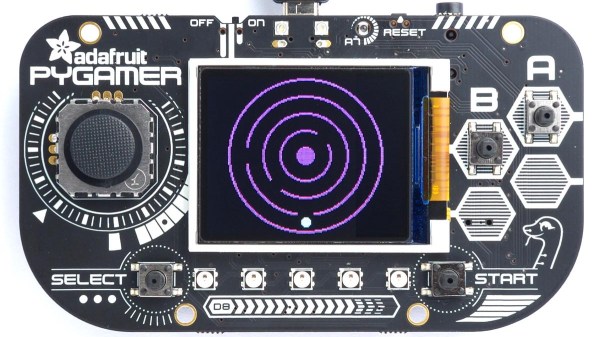
Today, nearly every modern consumer device wants to connect to the Internet for some reason. From your garage door opener to each individual smart bulb, the Internet of Things has arrived in full force. But the same can’t be said for most of our beloved conference badges. Wanting to explore the concept a bit, [Ayan Pahwa] set out to create his own MQTT-connected badge that he’s calling CloudBadge.

As this was more of a software experiment, all of the hardware is off-the-shelf. The badge itself is an Adafruit PyBadge, which doesn’t normally have any networking capabilities, but does feature a Feather-compatible header on the back. To that [Ayan] added a AirLift FeatherWing which allows him to use the ESP32 as a co-processor. He also added a strip of NeoPixel LEDs to the lanyard, though those could certainly be left off if you’re not looking to call quite so much attention to yourself.

The rest was just a matter of software. [Ayan] came up with some code that uses the combined hardware of the PyPadge and ESP32 to connect to Adafruit.io via MQTT. Once connected, the user is able to change the name that displays on the screen and the colors of the RGB LEDs through the cloud service. If you used something like this for an actual conference badge, the concept could easily be expanded to do things like flashing the badge’s LEDs when a talk the wearer wanted to see is about to start.

The modern conference badge has come a long way from simple blinking LEDs, offering challenges that you’ll likely still be working on long after the event wraps up. Concerns over security and the challenge of maintaining the necessary infrastructure during the event usually means they don’t include networking features, but projects like CloudBadge show the idea certainly has merit.

Continue reading “MQTT And The Internet Of Conference Badges”

Foxie Clock Works In Two Ways

Nixie tubes are a hacker favorite for their warm glow and elegant, mid-century numerals. They’re also a pain to drive, demand high voltages, and aren’t exactly cheap and easy to come by. Never mind, for there are other ways to go – as [Alex Fox] demonstrates with the Foxie Clock.

The Foxie clock gets its name from its creator, in a portmanteau with the famous Nixie tubes. Rather than going with gas-filled extravagances, instead, acrylic pieces are engraved with similar numerals to the old technology. These are edge-lit by what appear to be WS2812 addressable LEDs, or similar. This led [Alex] to realise that the clock could also be configured to display in an alternate mode, instead creating numerals using the individual RGB LEDs as segments behind a frosted acrylic panel.

It’s a versatile project that ended up working as a clock in two unique yet appealing ways. We’re a sucker for a quality retro typeface, so are firmly on Team Edge-Lit, but sound off in the comments which you think is best. Others have attempted similar builds, too. And remember, if you can’t get your hands on one part, it always pays to experiment!

The TMS1000: The First Commercially Available Microcontroller

We use a microcontroller without a second thought, in applications where once we might have resorted to a brace of 74 logic chips. But how many of us have spared a thought for how the microcontroller evolved? It’s time to go back a few decades to look at the first commercially available microcontroller, the Texas Instruments TMS1000.

Imagine A World Without Microcontrollers

The Texas Instruments Speak And Spell from 1978 was a typical use for the TMS1000.
The Texas Instruments Speak & Spell from 1978 was a typical use for the TMS1000. FozzTexx (CC-SA 4.0)

It’s fair to say that without microcontrollers, many of the projects we feature on Hackaday would never be made. Those of us who remember the days before widely available and easy-to-program microcontrollers will tell you that computer control of a small hardware project was certainly possible, but instead of dropping in a single chip it would have involved constructing an entire computer system. I remember Z80 systems on stripboard, with the Z80 itself alongside an EPROM, RAM chips, 74-series decoder logic, and peripheral chips such as the 6402 UART or the 8255 I/O port. Flashing an LED or keeping an eye on a microswitch or two became a major undertaking in both construction and cost, so we’d only go to those lengths if the application really demanded it. This changed for me in the early 1990s when the first affordable microcontrollers with on-board EEPROM came to market, but by then these chips had already been with us for a couple of decades.

It seems strange to modern ears, but for an engineer around 1970 a desktop calculator was a more exciting prospect than a desktop computer. Yet many of the first microcomputers were designed with calculators in mind, as was for example the Intel 4004. Calculator manufacturers each drove advances in processor silicon, and at Texas Instruments this led to the first all-in-one single-chip microcontrollers being developed in 1971 as pre-programmed CPUs designed to provide a calculator on a chip. It would take a few more years until 1974 before they produced the TMS1000, a single-chip microcontroller intended for general purpose use, and the first such part to go on sale. Continue reading “The TMS1000: The First Commercially Available Microcontroller”

Open-Source Neuroscience Hardware Hack Chat

Join us on Wednesday, February 19 at noon Pacific for the Open-Source Neuroscience Hardware Hack Chat with Dr. Alexxai Kravitz and Dr. Mark Laubach!

There was a time when our planet still held mysteries, and pith-helmeted or fur-wrapped explorers could sally forth and boldly explore strange places for what they were convinced was the first time. But with every mountain climbed, every depth plunged, and every desert crossed, fewer and fewer places remained to be explored, until today there’s really nothing left to discover.

Unless, of course, you look inward to the most wonderfully complex structure ever found: the brain. In humans, the 86 billion neurons contained within our skulls make trillions of connections with each other, weaving the unfathomably intricate pattern of electrochemical circuits that make you, you. Wonders abound there, and anyone seeing something new in the space between our ears really is laying eyes on it for the first time.

But the brain is a difficult place to explore, and specialized tools are needed to learn its secrets. Lex Kravitz, from Washington University, and Mark Laubach, from American University, are neuroscientists who’ve learned that sometimes you have to invent the tools of the trade on the fly. While exploring topics as wide-ranging as obesity, addiction, executive control, and decision making, they’ve come up with everything from simple jigs for brain sectioning to full feeding systems for rodent cages. They incorporate microcontrollers, IoT, and tons of 3D-printing to build what they need to get the job done, and they share these designs on OpenBehavior, a collaborative space for the open-source neuroscience community.

Join us for the Open-Source Neuroscience Hardware Hack Chat this week where we’ll discuss the exploration of the real final frontier, and find out what it takes to invent the tools before you get to use them.

join-hack-chatOur Hack Chats are live community events in the Hackaday.io Hack Chat group messaging. This week we’ll be sitting down on Wednesday, February 19 at 12:00 PM Pacific time. If time zones have got you down, we have a handy time zone converter.

Click that speech bubble to the right, and you’ll be taken directly to the Hack Chat group on Hackaday.io. You don’t have to wait until Wednesday; join whenever you want and you can see what the community is talking about. Continue reading “Open-Source Neuroscience Hardware Hack Chat”

Film Negative Viewer Has Many Positives

Not so long ago, taking pictures was a much more sacred thing. Film and processing were expensive compared to the digital way, and since you couldn’t just delete a picture off the camera and get your film back, people tended to be much more selective about the pictures they took. Even so, for every roll of film, there was usually at least one stinker. If you’ve made it your quest to digitize the past, you’ll quickly realize that they’re not all gems, and that some can be left to languish.

[Random_Canadian] recently found himself knee-deep in negatives, but wanted an easy way to weed out the mediocre memories. With this film negative viewer and converter, he can step through the pictures one by one on a big screen and decide which ones to keep.

The Pi uses the negative image effect to turn the negatives positive, and then outputs them to the TV. If [Random_Canadian] finds one worth bringing into the 21st century, he pushes the green button to take a picture with the Pi camera and save it to that awesome cryptex USB drive. When he’s tired of walking down memory lane, he pushes the red button to exit the program.

We especially like that [Random_Canadian] made his own light panel by edge-lighting a piece of 6 mm Lexan. Fresh out of flat-topped LEDs, he made his own by grinding down some regular ones on a belt sander.

Got some old 8mm film you want to digitize? Check out this beautiful automated film scanner.

DNA Now Stands For Data And Knowledge Accumulation

Technology frequently looks at nature to make improvements in efficiency, and we may be nearing a new breakthrough in copying how nature stores data. Maybe some day your thumb drive will be your actual thumb. The entire works of Shakespeare could be stored in an infinite number of monkeys. DNA could become a data storage mechanism! With all the sensationalism surrounding this frontier, it seems like a dose of reality is in order.

The Potential for Greatness

The human genome, with 3 billion base pairs can store up to 750MB of data. In reality every cell has two sets of chromosomes, so nearly every human cell has 1.5GB of data shoved inside. You could pack 165 billion cells into the volume of a microSD card, which equates to 165 exobytes, and that’s if you keep all the overhead of the rest of the cell and not just the DNA. That’s without any kind of optimizing for data storage, too.

This kind of data density is far beyond our current digital storage capabilities. Storing nearly infinite data onto extremely small cells could change everything. Beyond the volume, there’s also the promise of longevity and replication, maintaining a permanent record that can’t get lost and is easily transferred (like medical records), and even an element of subterfuge or data transportation, as well as the ability to design self-replicating machines whose purpose is to disseminate information broadly.

So, where is the state of the art in DNA data storage? There’s plenty of promise, but does it actually work?

Continue reading “DNA Now Stands For Data And Knowledge Accumulation”

How Many LEDs Can You Drive?

Driving more than a handful of LEDs from a microcontroller is often a feat that takes tedious wiring, tricking the processor, or a lot of extra external hardware. Charlieplexing is perhaps the most notorious of these methods, and checks two of those three boxes. This library for the Teensy 4.0 checks all three, but it can also drive a truly staggering 32,000 LEDs at one time.

The TriantaduoWS2811 library is able to drive 32 channels of LEDs from a Teensy 4.0 using only three pins and minimal processor resources. It uses the FlexIO and DMA subsystems of the i.MX RT1062, the particular ARM processor on the Teensy, to drive four external shift registers. Together, the system is able to achieve 30 frames per second on with 1,000 LEDs per channel, for a total of 32,000 LEDs. Whoah.

[Ward] aka [wramsdell] wondered what one would do with all of the horsepower of a Teensy microcontroller when he first saw its specifications, and was able to build this project to take advantage of its features. What’s surprising, though, is that it doesn’t use nearly everything the processor is capable of, so you can do other tasks at the same time as driving that giant LED display.