An Interesting Take On WEP Cracking

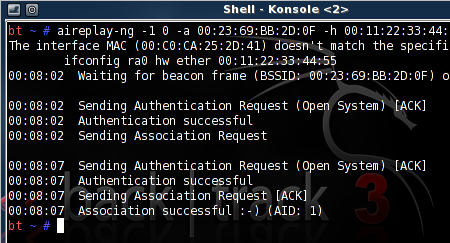
[Ben Kurtz] is doing a little WEP cracking but in a bit of a different way than we’re used to. WEP cracking makes us think of war driving; driving around with your laptop open, looking for WiFi access points, and stopping to run some software when you find them. [Ben’s] way is similar but different in one key way, he’s using an iPhone as the frontend.

This started as a way to find a use for some leftover equipment. He threw together a Linux box and loaded up Aircrack-ng, the software we often see used in penetration testing. To remove himself from shady-looking activities in public he coded a web interface using the Python package Turbogears. It uses screen, a program often used with SSH to run services concurrently in different terminals, with the option to disconnect without stopping the processes. Now it’s just a matter of parking the hardware near an AP, and doing the work in a browser on your mobile device. You can check out the script he wrote, as well as installation instructions, in his post linked above.

[Thanks Tech B.]

[Note: Banner image not directly related to this post]
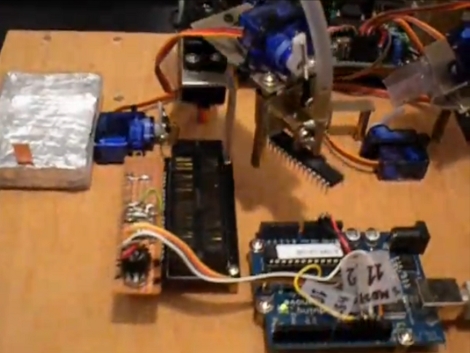
Automated Chip Burning

[Alexsoulis] needed to burn the Arduino bootloader to a slew of ATmega328 chips. Instead of sitting there and plugged the chips into a programmer one at a time, he build a robotic microcontroller programmer.

It starts with the DIP package microcontrollers in a tube, with a servo motor to dispense them one-by-one. An arm swings over and picks up the chip with a fish pump powered vacuum tweezers similar to the pick-and-place head we saw recently. From there the chip is dropped into a ZIF socket and programmed by an Arduino. Once the process is complete it is moved to the side and the process repeats.

We’ve reported on using an Arduino as an AVR programmer but we’ve never actually done it ourselves (we use an AVR Dragon programmer). Take a look at the video after the break and let us know if you think the actual programming seems incredibly slow.

Continue reading “Automated Chip Burning” →

BIOS Password Cracking

[Dogbert] took a look at the security that goes into BIOS passwords on many laptops. He starts off with a little background about how the systems work. People are bound to forget their passwords, so when you enter a wrong one three times in a row you get a message similar to the one above that locks you out until all power is removed from the system (then you get three more tries). But check out that five-digit number in the picture. That’s a checksum of the password. Some BIOS versions display it automatically, some require you to hold down a certain key during POST, but it’s the pivotal data needed to crack the password.

[Dogbert’s] post doesn’t go into verbose detail about the algorithms he uses to brute force the passwords. But he has posted the Python scripts he uses to do so. Learning how to generate the passwords based on the checksum is as simple as studying the code, which is often the best way to learn.

NYC Resistor Takes On The Machine

Here we are with Episodes two and three (aka, NYC Resistor part one and two) completing the Take on the Machine Hackerspace challenge we mentioned a while back. For the challenge NYC Resistor took an old style slot machine and converted it into a drink mixing deviant; even making the device post a Tweet for every drink. However, it seems to be lacking refrigeration of some kind, could this be the downfall of a potential winner for the challenge? Up next is the Hackerspace Pumping Station: One: do you think they can compete? Is there a particular Hackerspace you can’t wait to see? Let us know!

[Thanks Deven]

Upgrading The Freetronics Twentyten With A Real-time Clock

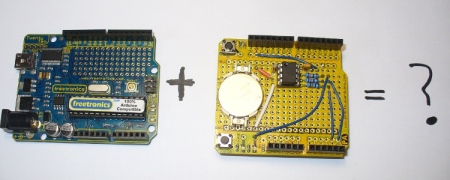
[John Boxall] finds himself doing a fair amount of projects that require a realtime clock. He does fast and frequent prototyping, usually using the Freetronics twentyten which is an Arduino alternative that boasts a few features like a nice prototyping area, edge visible LEDs, and Mini USB. What is lacking, however, is a real-time clock. Instead of making another shield type system, he just wanted to permanently add this feature to his board. He shares the whole process is photographed and explained quite well for anyone who would want to follow along.

Cheap Robotic Hand

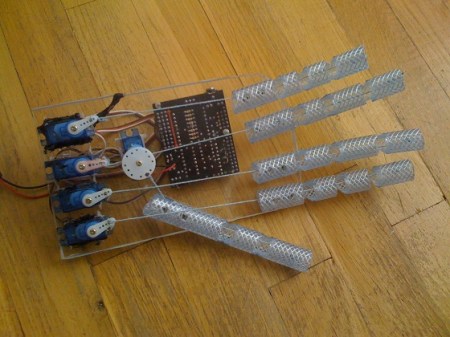
[Mazvydas] shares with us, his cheap robot hand. He was inspired by this project, where someone used an Arduino and a glove with some flex sensors to control a pre-made hand. He wanted to go a little more DIY though. He chose a picaxe microcontroller and constructed the hand himself out of twine, some plexi-glass, and some rubber hose. He does ultimately plan on adding glove control as well.

Unfortunately there’s no schematic or source code. Maybe if we ask really nicely he’ll share.


Continue reading “Cheap Robotic Hand” →

Arduino, RFID, And You

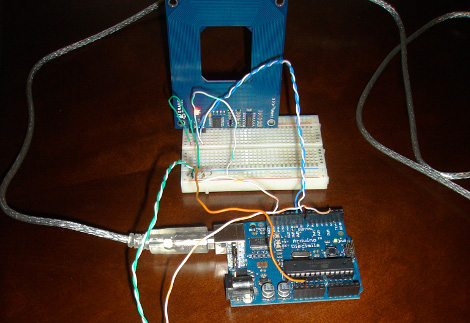
[Matt] has mixed up a batch of two RFID reading door lock systems. While the “door lock” part of the setup has yet to come into existence, the “RFID reading” section is up and running. By using the Parallax RFID readers (for cheap, remember?) and an Arduino, [Matt] is able to parse an RFID tag, look its number up in a database, and then have a computer announce “Access Denied” in a creamy “Douglas Adam’s sliding door of Hitchiker’s Guide” kind of way with Python.

Good books aside, catch a not as exciting as you’re thinking video after the jump.

Continue reading “Arduino, RFID, And You” →