Cramming More Pixels Into A Thinkpad

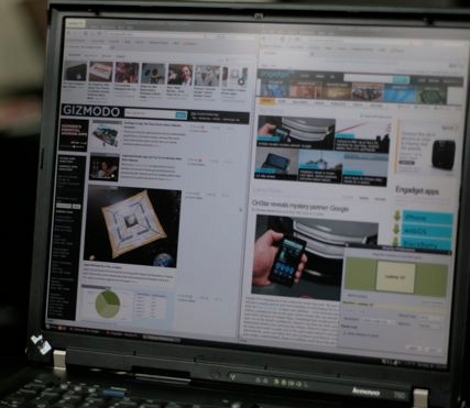
Not willing to settle for 1400×1050 on his Thinkpad, [Lawrence Sheed] set out to upgrade the LCD screen. He ordered a 15″ replacement screen that brought the eye candy up to an impressive 2048×1536 QXGA format. The replacement fits perfectly for a nice factory look. Other than some delicate disassembly you might need to flash the EDID but in [Lawrence’s] case it wasn’t necessary. If you’re going to haul around a full-blown laptop it might as well have some killer resolution and now you know how to make that happen.
Solder Station Hack Adds Temperature Control

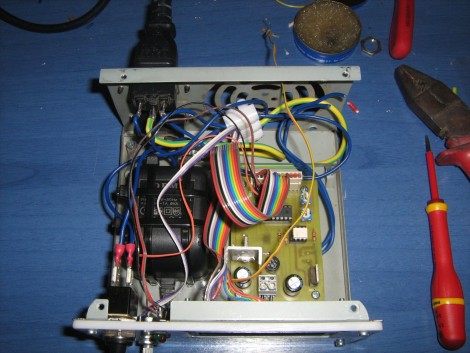
Take that cheap fire stick you call a soldering iron and turn it into a real tool. [Giorgos Lazaridis] turned his 30 watt soldering iron into a temperature controlled soldering station by adding a thermistor just above the tip to monitor how hot things are getting. A MAX6675 takes care of the thermocouple and shoots a digital temperature value off to the PIC 16F88 which controls the unit by taking user input from a potentiometer and displaying the settings on an HD44780 character display. His use of a dissected ‘wall wort’ inside of the ATX power supply carcass used as the case for the station is a clever hack. See it melt some metal in the clip after the break.

This makes a nice upgrade to our solder station guide, which had a temperature controlled iron but lacked the sensor and automation seen here. Continue reading “Solder Station Hack Adds Temperature Control” →

32 LED POV Globe

[youtube=http://www.youtube.com/watch?v=bt1UEGD3BDk]

Here’s a slick version of a POV globe(google translated). Created by [Riko], this globe has 32 LEDs and is powered by a rotating coil. The layout looks fairly solid in operation, with the POV effect showing up very nicely on camera.  You can get the schematics and source code from the project page.

We found this project, just like the previous fantastic LED globe on HackedGadgets.com. Apparently someone linked to this project in the comments. That is fantastic, that is what the comments should be for. Please help keep our comments polite and helpful as well, even if you are just linking to a project that you think is better.

Mister Gloves, Gesture Input

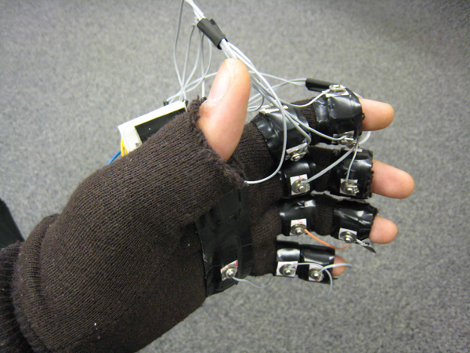
This two handed glove input setup, by [Sean Chen] and [Evan Levine], is one step closer to achieving that [Tony Stark] like workstation; IE, interacting with software in 3D with simple hand gestures. Dubbed the Mister Gloves, the system incorporates accelerometer, push button, and flex sensor data over RF where an MCU converts it to a standard USB device, meaning no drivers are needed and a windows PC can recognize it as a standard keyboard and mouse. Catch a video of Mister Gloves playing portal after the jump.

While amazing, we’re left wondering if gesture setups are really viable options considering one’s arm(s) surly would get tired? Continue reading “Mister Gloves, Gesture Input” →

Cathode Ray Tube Leads The Way On This Bot

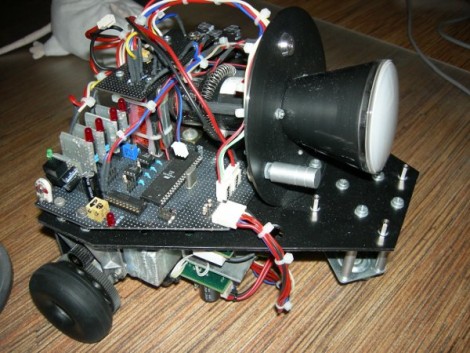
[Daqq’s] latest creation is this little robot with a CRT mounted on the front. Obviously ‘why?’ is the wrong question here, but we know this is right up his alley considering his propensity for the less common like this plasma ball Nixie tube. The solidly-built bot uses two stepper motor controlled wheels and an omni-wheel on the front to create a trike. An ATmega128 controls the system but the real story here is the CRT. It requires a hefty voltage regulator for the -600V to +200V the Tungsram DG7-123 tube needs. Trouble along the way ranged from dealing with stray magnetic fields from the power supply, to mounting the fragile tube itself. Take a look at his detailed writeup linked above and join us after the break for the demo videos.

Continue reading “Cathode Ray Tube Leads The Way On This Bot” →

Composing Music With The Force Trainer

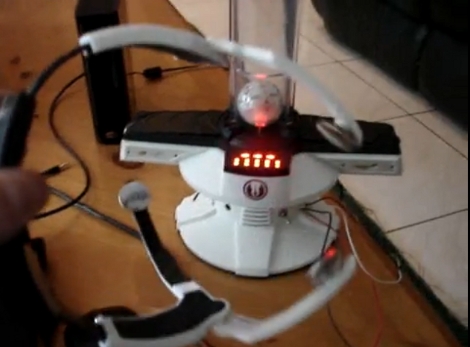
In the ongoing quest to make the Force Trainer useful [Hunter Scott] developed a music composition platform for your mind (channel Jack Black’s voice for the last half of that sentence). Using the Force Trainer’s serial port [Hunter] feeds the data stream into a computer via an FTDI cable and uses Processing to make the music. It’s good, and the demos on his site are worth the click, but we still can’t get enough of the shocking video from back in March. But we digress, let [Hunter] walk you through his setup in the video after the break. Continue reading “Composing Music With The Force Trainer” →

Command Line Video Processing Using FOSS

[youtube=http://www.youtube.com/watch?v=12fQM7JwwpA]

[Daniel Paluska] is getting away from the point-and-click by editing videos from the command line. Using the free open source software packages FFmpeg, Imagemagick, and Sox he produces new clips from multiple videos with effects like overlaying, slicing, and assigning each video to a different quadrant. The last option would be useful for displaying different angled shots of the same thing all at once but we’re sure you can find a way to use them all. He is using shell scripts to automate some of the process but the commands are still easy enough to understand if this is your first foray into these tools. After all, great video production will go a long way toward becoming an Internet sensation.