A Hydra Of A 3D Printer

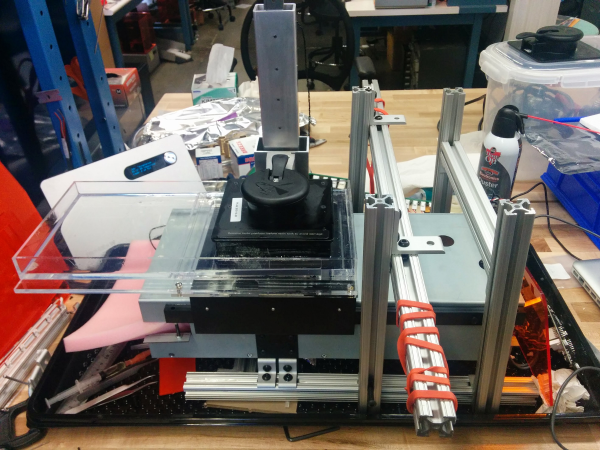
3D printers are great for producing one thing, but if you need multiple copies, the workflow quickly starts to go downhill. The solution? Build a 3D printer with multiple print heads, capable of printing four objects in the same amount of time it takes to print one.

This build is an experiment for [allted]’ Mostly Printed CNC / MultiTool. It’s a CNC machine that uses printed parts and 3/4″ electrical conduit for the frame and rails.  That last bit is the interesting part: electrical conduit is cheap, easy to acquire, available everywhere, and can be cut with a hacksaw. As far as desktop CNC machines go, it doesn’t get simpler or cheaper than this, and a few of these builds are milling wood with the same quality of a machine based on linear rails. It won the grand prize in the recent Boca Bearings contest, and is a great basis for a cheap and serviceable 2.5 or 3D CNC.

[allted] already has this cheap CNC mill cutting aluminum and engraving wood with a laser, showing off the capabilities of a remarkably cheap but highly expandable CNC machine. It’s a fantastic build, and we can’t wait to see more of these machines pop up in garages and workspaces.

Continue reading “A Hydra Of A 3D Printer”

3D Printed Zoetrope Sculpture Squashes 4 Dimensions Into 3

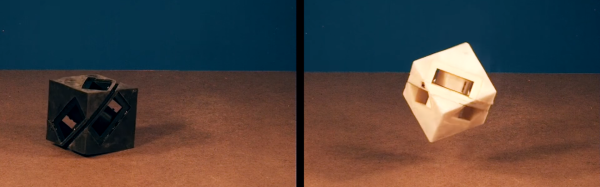
This fascinating project manages to be both something new and something old done in a new way. Artist [Akinori Goto] has used 3D printing to create a sort of frameless zoetrope. It consists of a short animation of a human figure, but the 3D movements of that figure through time are “smeared” across a circular zone – instead of the movements of the figure being captured as individual figures or frames, they are combined into a single object, in a way squashing 4 dimensions into 3.

zoetrope-1“Slices” of that object, when illuminated by a thin shaft of light, reveal the figure’s pose at a particular moment in time. When the object is spun while illuminated in this way, the figure appears to be animated in a manner very similar to a zoetrope.

There are two versions from [Akinori Goto] that we were able to find. The one shown above is a human figure walking, but there is a more recent and more ambitious version showing a dancer in motion, embedded below.

Since a thin ray of light is used to illuminate a single slice of the sculpture at a time, it’s also possible to use multiple points of illumination – or even move them – for different visual effects. Check out the videos below to see these in action.

Continue reading “3D Printed Zoetrope Sculpture Squashes 4 Dimensions Into 3”

One Man’s Journey To Build Portable Concrete 3D Printer Produces Its First Tiny House

[Alex Le Roux] want to 3D print houses.  Rather than all the trouble we go through now, the contractor would make a foundation, set-up the 3D printer, feed it concrete, and go to lunch.

It’s by no means the first concrete printer we’ve covered, but the progress he’s made is really interesting. It also doesn’t hurt that he’s claimed to make the first livable structure in the United States. We’re not qualified to verify that statement, maybe a reader can help out, but that’s pretty cool!

The printer is a very scaled gantry system. To avoid having an extremely heavy frame, the eventual design assumes that the concrete will be pumped up to the extruder; for now he is just shoveling it into a funnel as the printer needs it. The extruder appears to be auger based, pushing concrete out of a nozzle. The gantry contains the X and Z. It rides on rails pinned to the ground which function as the Y. This is a good solution that will jive well with most of the skills that construction workers already have.

Having a look inside the controls box we can see that it’s a RAMPS board with the step and direction outputs fed into larger stepper drivers, the laptop is even running pronterface. It seems like he is generating his STLs with Sketch-Up.

[Alex] is working on version three of his printer. He’s also looking for people who would like a small house printed. We assume it’s pretty hard to test the printer after you’ve filled your yard with tiny houses. If you’d like one get in touch with him via the email on his page. His next goal is to print a fully up to code house in Michigan. We’ll certainly be following [Alex]’s tumblr to see what kind of progress he makes next!

Automating 3D Printers With Robots

3D printers were never meant to be used for production. They’re not manufacturing machines, they’re prototyping machines. That doesn’t mean 3D printers can’t be used in a manufacturing context, it’s just very hard – you’d need someone manning a fleet of machines, or some sort of ‘automated build platform’ that won’t be invented for exactly fourteen years.

In the absence of someone paid to watch printers print, [Mark], [Robert], and [James] at tend.ai have created a way to manage a fleet of printers with a robot arm. It’s a robotic arm that automatically monitors the LCD on a rack full of 3D printers, plucks the finished prints off the bed, drops the parts in a box, and starts another print.

Tend.ai is in the business of cloud robotics, and have designed a system that takes any robotic arm, any webcam, and provides the backend for this robotic arm to – wait for it – tend to other machines. As a demo, it works well. Parts are picked up off of the machines, dropped into boxes, and another print run started.

As a tech demo for a cloud robotics platform, you can’t do much better than this. As a way to automate a fleet of 3D printers, I can only wonder how this robot arm system would work with large, flat printed parts. A robotic gripper could always be replaced with a spatula, I guess.

You can check out the demo and the ‘how they did it’ video below.

Continue reading “Automating 3D Printers With Robots”

Skateboard Hackers Trick On 3D Printed Wheels

The team over at [Braille Skateboarding] is willing to ride just about anything. This week they’re testing out 3D printed skateboard wheels. We’re not just talking rolling around here, the [Braille] team takes their experiments out to the skate park and gives them to the locals to test out. Tail whips, jumps, ollies, and grinds were on the agenda. The skaters were a bit apprehensive, as this is the third time they’ve tested 3D printed wheels.

The first set shattered upon landing a jump. That set appears to have been made from PLA with about 10% infill. The second set were made from NinjaFlex, which had no shattering problems, but was so squishy that the wheels simply flattened under the weight of the riders. The third set, printed by [Nick Lindenmuth] work great. They have a bit of give, but don’t shatter. We’re guessing this set is either ABS or one of the more exotic filaments. It’s pretty amazing that 3D printers are capable of spitting out wheels that not only handle the load of rider, but the shock load of coming down from jumps and tricks.

Check out the video after the break. If you want to see more skateboard projects, check out this skateboarding themed Hacklet!

Continue reading “Skateboard Hackers Trick On 3D Printed Wheels”

Mosaic Palette: Single Extruder Multi-Color And Multi-Material 3D Printing

Lots of solutions have been proposed and enacted for multi-color and multi-material 3D printing, from color mixing in the nozzle to scripts requiring manual filament change. A solution proposed fairly early on was to manually splice the filament together, making a custom spool. The printer would print as normal, but the filament would change color. This worked pretty well, but it was tedious and it wasn’t entirely possible to control where the color change happened on the model.

You’ll find some examples of the more successful manual splicing hacks in the pictures below. Scroll down a bit further to find our interview with Mosaic Manufacturing at Bay Area Maker Faire 2016. They have a new product that automates the filament splicing process with precision as the ultimate goal. It unlocks a single extruder printer to behave like a multi-extruder model without stopping and starting.

Mosaic pulled off a very difficult combination of two methods mentioned above. Their flagship product is a machine they’ve dubbed, “Palette”. It’s an automatic filament splicer. Up to four different filaments can feed into Palette, and it will splice them at determined intervals. This would be cool by itself, if only to save the tedium of splicing and winding a custom spool by hand.

The real killer app with Palette, however, is the software that runs alongside it. Palette can take the GCODE output of any properly prepared multi material file from any slicer, and then precisely combine and splice the filament. This can feed into any printer without modifying it, aside from sticking an encoder somewhere in the filament path. The results are indistinguishable from a dual, or quad extruder set-up.

Continue reading “Mosaic Palette: Single Extruder Multi-Color And Multi-Material 3D Printing”

Solvespace: A Parametric CAD Tool

3D printing seems like it takes forever when you’re waiting for a part to come out. But if you’re like us, the real time spent in making something new is in modelling and refining the piece. There are tons of CAD programs out there, and finding one that meets your needs is part functionality and part personal preference. Reader [Leibowitz] pointed us to Solvespace, and it looks like it fills the gap between something like OpenSCAD and something more feature-full (and complicated) like FreeCAD.

We’re wondering why we hadn’t heard of Solvespace before. It looks great. It has a lot of what we like about OpenSCAD — the ability to quickly and easily specify two 5 mm holes exactly 21 mm from each other, center-to-center and then change that distance easily. But it also has other features like constraint solvers for mechanisms and linkages. It looks like a great way to design your next Strandbeest. The tutorials seem like a good way to get started quickly.

As we said above, choosing a 3D modeller is partly based on your requirements, but also partly on your feelings. If you’re feeling limited by OpenSCAD, there’s also ImplicitCAD. Or try out Autodesk’s free (but not open) Fusion 360. And now there’s Solvespace. It’s great to have options.