Every industry has at least one. Automobiles had the Edsel. PC Hardware had the IBM PCJr and the Microchannel bus. In the software world, there’s Bob. If you don’t remember him, Bob was Microsoft’s 1995 answer to why computers were so darn hard to use. [LGR] gives us a nostalgic look back at Bob and concludes that we hardly knew him.
Bob altered your desktop to be a house instead of a desk. He also had helpers including the infamous talking paper clip that suffered slings and arrows inside Microsoft Office long after Bob had been put to rest.
Most of us are more bits-and-bytes than nuts-and-bolts, but we have the deepest appreciation for the combination of the two. So, apparently, does [rectorsquid]. Check out the design and flow of his rolling ball sculpture (YouTube, embedded below) to see what we mean. See how the arms hesitate just a bit as the ball is transferred? See how the upper arm gently places it on the ramp with a slight downward gesture? See how it’s done with one motor? There’s no way [rectorsquid] designed this on paper, right?
Of course he didn’t (YouTube). Instead, he wrote a simulator that lets him try out various custom linkages in real time. It’s a Windows-only application (sigh), but it’s free to use, while the video guides (more YouTube) look very comprehensive and give you a quick tour of the tool. Of special note is that [rectorsquid]’s software allows for sliding linkages, which he makes very good use of in the rolling ball sculpture shown here.
We’ve actually secretly featured [rectorsquid]’s Linkage software before, in this writeup of some amazing cosplay animatronic wings that used the program for their design. But we really don’t want you to miss out if you’re doing mechanical design and need something like this, or just want to play around.
Anyone know of an open-source linkage simulator that can also output STL files for 3D printing? Or in any format that could be easily transformed into OpenSCAD? Asking for a “friend”.
Twitter is kind of a crazy place. World leaders doing verbal battle, hashtags that rise and fall along with the social climate, and a never ending barrage of cat pictures all make for a tumultuous stream of consciousness that runs 24/7. What exactly we’re supposed to do with this information is still up to debate, as Twitter has yet to turn it into a profitable service after over a decade of operation. Still, it’s a grand experiment that offers a rare glimpse into the human hive-mind for anyone brave enough to dive in.
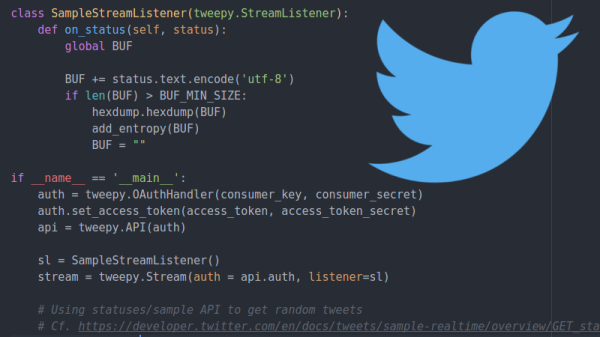
One such explorer is a security researcher who goes by the handle [x0rz]. He’s recently unveiled an experimental new piece of software that grabs Tweets and uses them as a “noise” to mix in with the Linux urandom entropy pool. The end result is a relatively unpredictable and difficult to influence source of random data. While he cautions his software is merely a proof of concept and not meant for high security applications, it’s certainly an interesting approach to introducing humanity-derived chaos into the normally orderly world of your computer’s operating system.
Noise sampling before and after being merged with urandom
This hack is made possible by the fact that Twitter offers a “sample” function in their API, which effectively throws a randomized collection of Tweets at anyone who requests it. There are some caveats here, such as the fact that if multiple clients request a sample at the same time they will both receive the same Tweets. It’s also worth mentioning that some characters are unusually likely to make an appearance due to the nature of Twitter (emoticons, octothorps pound signs, etc), but generally speaking it’s not a terrible way to get some chaotic data on demand.
On its own, [x0rz] found this data to be a good but not great source of entropy. After pulling a 500KB sample, he found it had an entropy of 6.5519 bits per byte (random would be 8). While the Tweets weren’t great on their own, combining the data with the kernel’s entropy pool at /dev/urandom provided something that looked a lot less predictable.
The greatest weakness of using Twitter as a source of entropy is, of course, the nature of Twitter itself. A sufficiently popular hashtag on the rise might be just enough to sink your entropy. It’s even possible (though admittedly unlikely) that enough Twitter spam bots could ruin the sample. But if you’re at the point where you think hinging your entropy pool on a digital fire hose of memes and cat pictures is sufficient, you’re probably not securing any national secrets anyway.
(Editor’s note: The way the Linux entropy pool mixes it together, additional sources can only help, assuming they can’t see the current state of your entropy pool, which Twitter cats most certainly can’t. See article below. Also, this is hilarious.)
As hackers, we occasionally forget that not everyone is enamored with the same nerdy minutia that we are. Configuring hardware by changing some lines in the code and compiling a new firmware doesn’t sound like that big of a deal to those of us who’ve been around the block a few times, but might as well be ancient Sanskrit to the average person. As long as your projects are for personal use this isn’t really a concern, but what if you plan on distributing the code for a project or perhaps even selling finished products? Shipping it out with hard-coded variables simply isn’t an option.
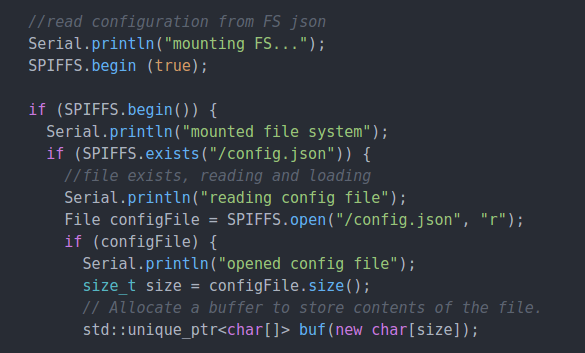
Code for loading configuration file from SPIFFS
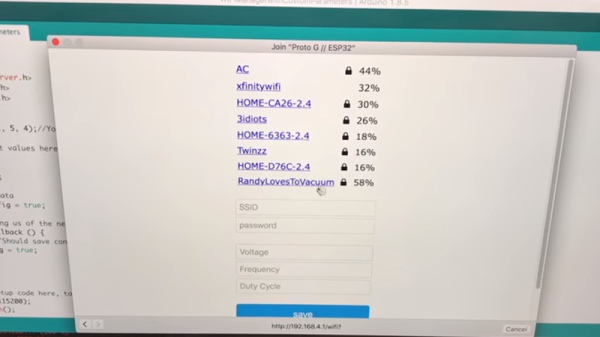
In a recent video, [Proto G] shows a clever way to use WiFiManager to make configuring your ESP32 project easier for end-users. Not only can you use the captive portal system to configure the ESP32’s WiFi against a nearby access point, but it can allow users to enter in configuration data which can be picked up in your code by using SPI Flash File System (SPIFSS).
With the setup demonstrated in the video below by [Proto G], you don’t need anything more exotic than a web browser to configure the device. The end user simply searches for the device’s WiFi network, connects to it, and is presented with an easy to understand dialog which has them select a WiFi network to configure against along with some fields to enter in custom variables. All this information is then stored to a file on the SPI flash. When the ESP32 reboots, it reads the configuration from the saved file and applies the requested settings.
This is very similar to how many consumer devices are now configured, and even the less technically-inclined recipients of such a device should be able to work through the setup with a bit of hand-holding. If you plan on handing one of your ESP32 projects to John Q. Public, this is the kind of configuration you should be aiming for.
There are certain kinds of programs that fascinate certain kinds of software hackers. Maybe you are into number crunching, chess programs, operating systems, or artificial intelligence. However, on any significant machine, most of the time those activities will require some sort of language. Sure, we all have some processor we can write hex code for in our head, but you really want at least an assembler if not something sturdier. Writing languages can be addictive, but jumping right into a big system like gcc and trying to make changes is daunting for anyone. If you want a gentle introduction, check out [mgechev’s] language that resides in 25 lines of Javascript.
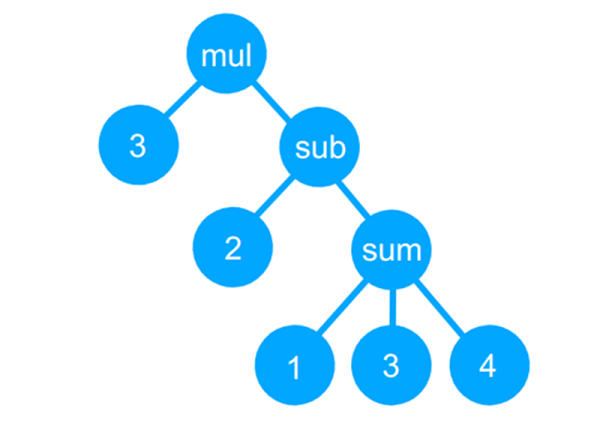
The GitHub page bills it as a tiny compiler, although that is a bit misleading and even the README says it is a transpiler. Actually, the code reads a simple language, uses recursive descent parsing to build a tree, and then uses a “compiler” to convert the tree to JavaScript (which can then be executed, of course). It can also just interpret the tree and produce a numerical answer.
One of the reasons why the Arduino became so popular was the ability to program it with ease. It meant the end of big parallel programmers that would cost an arm and a leg. The latest installment of CircuitPython from [Lady Ada] and the team over at Adafruit is a library for programming AVR microcontrollers without a dedicated PC.
For the uninitiated, in-system programming or ISP for AVR controllers employ the SPI bus to write the compiled binary to the flash memory of the controller. The discount on the number of pins used itself is a benefit though getting the timings right was a bit tricky in the good old days. Most dedicated ISPs handle this nicely, though they are normally slaves to a host PC where an ‘upload’ button initiates the process.
With CircuitPython (a derivative of MicroPython), programming microcontrollers does not require going through the code-compile-flash cycle. It can be run on a number of processors, however, AVRs are not among them so this neat little library offers the next best thing. Wire-up an Atmega328P or ATmega2560 to a board like the ESP8266 that does run CircuitPython, and you can write firmware on the fly.
There is a complete tutorial on the subject thanks to [Phillip Torrone] and [Lady Ada] which includes some demo files for testing out the functionality. This opens up a lot of possibilities where OTA firmware updates for an AVR co-processor. We expect to see some keychain AVR programmers in the near future taking a hint from the ESP8266 based Two-Factor Authentication featured previously.
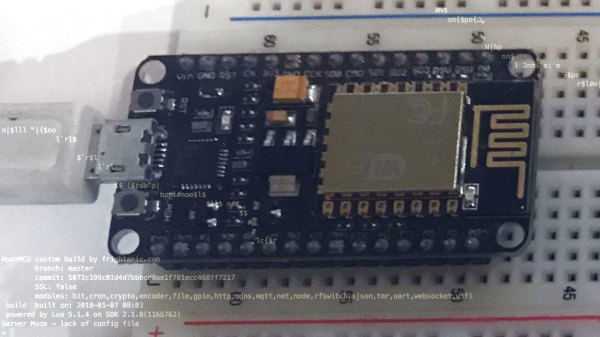
Nothing says friendship like a reverse engineering challenge on unknown terrain as a birthday present. When [Rikaard] turned 25 earlier this year, his friend [Veydh] put together a Capture the Flag challenge on an ESP8266 for him. As a software guy with no electronics background, [Rikaard] had no idea what he was presented with, but was eager to find out and to document his journey.
Left without guidance or instructions, [Rikaard] went on to learn more about the ESP8266, with the goal to dump its flash content, hoping to find some clues in it. Discovering the board is running NodeMCU and contains some compiled Lua files, he stepped foot in yet another unknown territory that led him down the Lua bytecode rabbit hole. After a detour describing his adjustments for the ESP’s eLua implementation to the decompiler he uses, his quest to capture the flag began for real.