Benchmarking Windows Against Itself, From Windows XP To Windows 11

Despite faster CPUs, RAM and storage, today’s Windows experience doesn’t feel noticeably different from back in the 2000s when XP and later Windows 7 ruled the roost. To quantify this feeling, [TrigrZolt] decided to run a series of benchmarks on a range of Windows versions.

Covering Windows XP, Vista, 7, 8.1, 10 and 11, the Pro version of each with the latest service packs and updates was installed on the same laptop: a Lenovo ThinkPad X220. It features an Intel i5 2520M CPU, 8 GB of RAM, built-in Intel HD Graphics 3000 and a 256 GB HDD.

For start-up, Windows 8.1 won the race, probably due to having the Fast Boot feature, while Windows 11 came in dead last as it showed the desktop, but struggled to show the task bar. Windows XP’s install size was the smallest and also had the lowest RAM usage with nothing loaded at 800 MB versus 3.3 GB for Windows 11 in last place.

Continue reading “Benchmarking Windows Against Itself, From Windows XP To Windows 11”

3D Printed PC Case Focuses On Ease Of Access

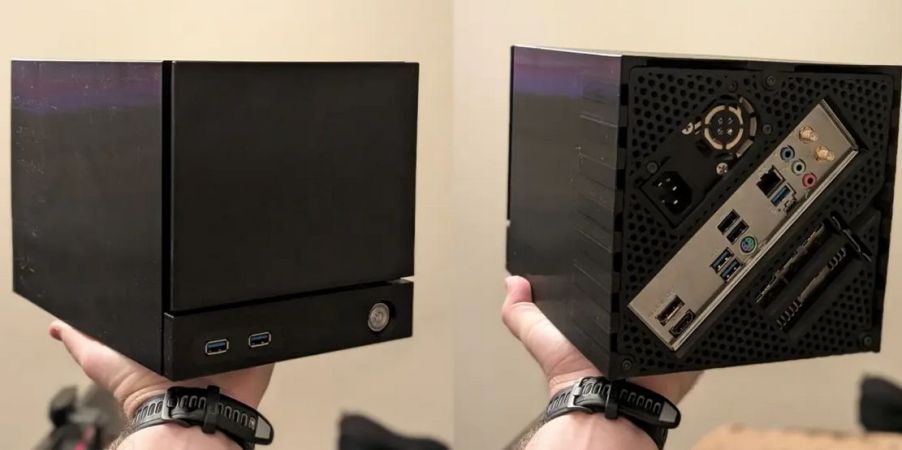
There are all kinds of fun, glowing PC cases on the market these days. However, if you want something that focuses on serviceability over flash while still looking stylish, you might like the Makeyo MK01. It’s a PC case that you can print yourself, and [Marst_art] has published a video on what it’s like to whip one up at home.

The MK01 is assembled from lots of smaller parts, so the components can be made on any 3D printer that has a print area of 210 x 210 mm or more. All the outer panels are affixed to the main chassis with magnets, which makes servicing easy. You can just pop off panels when you need to get inside without undoing any fasteners or clips.

Plus, the cool thing about the MK01 is that since you’re printing it yourself, you can easily make whatever mods you like prior to printing it out. [Marst_art] notes that he threw in a USB-C port to the front panel for easy access, and a few internal mounts for 2.5″ SSDs. He also made some mods to the power switch assembly. It also bears noting—you get to choose your own color scheme when you make one of these. This level of customization is something you simply don’t get when you buy off the shelf!

[Marst_art]’s video is a useful guide if you’re planning to undertake such a build yourself. It outlines what it’s like to actually print one of these things on a consumer printer, and how the settings will influence the final look and feel. It’s worth noting that you’ll probably want to print this in ABS or another filament that can handle high heat, unless you’re building a very cool running machine.

It’s not just a great looking case, it’s a highly functional one, too. Files are available on Printables if you’d like to make your own. We’ve featured other printed cases before, too.

Continue reading “3D Printed PC Case Focuses On Ease Of Access”

PC Watercooling Uses Everything But CNC Machining

Names and labels are difficult. Take this “3D Printed” water-cooling loop by [Visual Thinker] on YouTube. It undeniably uses 3D printing — but it also uses silicone casting and laser-cut acrylic, too. All of these are essential parts, yet only 3D printing gets top billing in his thumbnail. At least the version we saw, anyway; the A/B testing game YouTubers play means that may change.

Perhaps that’s simply due to the contrast with [Visual Thinker]’s last build, where the “distro plate” that acts to plumb most of the coolant was made of layers of CNC-routed acrylic, held water-tight with O-rings. Not wanting to wait for his next build to be fabricated, and not wanting to take up CNC machining himself, [Visual Thinker] fell back on tools many of us have and know: the 3D printer and laser cutter.

In this project, the end plates of the cooling loop are still clear acrylic, but he’s using a laser cutter to shape them. That means he cannot route out gaps for o-rings like in the last project, so that part gets 3D printed. Sort of. Not trusting the seal a 3D printed gasket would be able to give him, [Visual Thinker] opts to use his 3D printer to create a mold to cast a seal in silicone. Or perhaps “injection-mold” would be a better word than cast; he’s using a large syringe to force the degassed silicone into the mold. The end part is three pieces: a 3D printed spacer holding two acrylic plates, with the cast-silicone gasket keeping the whole thing water-tight to at least 50 psi, 10x the operating pressure of his PC.

After that success, he tries replacing the printed spacer with acrylic for a more transparent look. In that version only temporary shims that are used to form the mold are 3D printed at all, and the rest is acrylic. Even if you’re not building a water-cooled art PC, it’s still a great technique to keep in your back pocket for fluid channeling.

In some ways, this technique is the exact opposite of the copper-pipe steampunk builds we’ve featured previously. Those were all about pretty plumbing, while with a distro plate you hardly need pipes at all. Like any water-cooled project, it’ll need a radiator, which could be a hack in and of itself.

Continue reading “PC Watercooling Uses Everything But CNC Machining”

Automatically Remove AI Features From Windows 11

It seems like a fair assessment to state that the many ‘AI’ features that Microsoft added to Windows 11 are at least somewhat controversial. Unsurprisingly, this has led many to wonder about disabling or outright removing these features, with [zoicware]’s ‘Remove Windows AI’ project on GitHub trying to automate this process as much as reasonably possible.

All you need to use it is your Windows 11-afflicted system running at least 25H2 and the PowerShell script. The script is naturally run with Administrator privileges as it has to do some manipulating of the Windows Registry and prevent Windows Update from undoing many of the changes. There is also a GUI for those who prefer to just flick a few switches in a UI instead of running console commands.

Among the things that can be disabled automatically are the disabling of Copilot, Recall, AI Actions, and other integrations in applications like Edge, Paint, etc. The reinstallation of removed packages is inhibited by a custom package. For the ‘features’ that cannot be disabled automatically, there is a list of where to toggle those to ‘off’.

Naturally, since Windows 11 is a moving target, it can be rough to keep a script like this up to date, but it seems to be a good start at least for anyone who finds themselves stuck on Windows 11 with no love for Microsoft’s ‘AI’ adventures. For the other features, there are also Winaero Tweaker and Open-Shell, with the latter in particular bringing back the much more usable Windows 2000-style start menu, free of ads and other nonsense.

Jenny’s Daily Drivers: Haiku R1/beta5

Back in the mid 1990s, the release of Microsoft’s Windows 95 operating system cemented the Redmond software company’s dominance over most of the desktop operating system space. Apple were still in their period in the doldrums waiting for Steve Jobs to return with his NeXT, while other would-be challengers such as IBM’s OS/2 or Commodore’s Amiga were sinking into obscurity.

Into this unpromising marketplace came Be inc, with their BeBox computer and its very nice BeOS operating system. To try it out as we did at a trade show some time in the late ’90s was to step into a very polished multitasking multimedia OS, but sadly one which failed to gather sufficient traction to survive. The story ended in the early 2000s as Be were swallowed by Palm, and a dedicated band of BeOS enthusiasts set about implementing a free successor OS. This has become Haiku, and while it’s not BeOS it retains API compatibility with and certainly feels a lot like its inspiration. It’s been on my list for a Daily Drivers article for a while now, so it’s time to download the ISO and give it a go. I’m using the AMD64 version.

Continue reading “Jenny’s Daily Drivers: Haiku R1/beta5”

Moving From Windows To FreeBSD As The Linux Chaos Alternative

Back in the innocent days of Windows 98 SE, I nearly switched to Linux on account of how satisfied I was with my Windows experience. This started with the Year of the Linux Desktop in 1999 that started with me purchasing a boxed copy of SuSE Linux and ended with me switching to Windows 2000. After this I continued tinkering with non-Windows OSes including QNX, BeOS, various BSDs, as well as Linux distributions that promised a ‘Windows-like’ desktop experience, such as Lindows.

Now that Windows 2000’s proud legacy has seen itself reduced to a rusting wreck resting on cinderblocks on Microsoft’s dying front lawn, the quiet discomfort that many Windows users have felt since Windows 7 was forcefully End-Of-Life-d has only increased. With it comes the uncomfortable notion that Windows as a viable desktop OS may be nearing its demise. Yet where to from here?

Although the recommendations from the peanut gallery seem to coalesce around Linux or Apple’s MacOS (formerly OS X), there are a few dissenting voices extolling the virtues of FreeBSD over both. There are definitely compelling reasons to pick FreeBSD over Linux, in addition to it being effectively MacOS’s cousin. Best of all is not having to deal with the Chaos Vortex that spawns whenever you dare to utter the question of ‘which Linux distro?’. Within the world of FreeBSD there is just FreeBSD, which makes for a remarkably coherent experience.

Continue reading “Moving From Windows To FreeBSD As The Linux Chaos Alternative”

Jenny’s Daily Drivers: ReactOS 0.4.15

When picking operating systems for a closer look here in the Daily Drivers series, the aim has not been to merely pick the next well-known Linux distro off the pile, but to try out the interesting, esoteric or minority OS. The need remains to use it as a daily driver though, so each one we try has to have at least some chance of being a useful everyday environment in which a Hackaday piece could be written. With some of them such as the then-current BSD or Slackware versions we tried for interest’s sake a while back that’s not a surprising achievement, but for the minority operating systems it’s quite a thing. Today’s choice, ReactOS 0.4.15, is among the closest we’ve come so far to that ideal.

For The N’th Time In The Last 20 Years, I download A ReactOS ISO

A Windows-style ReactOS desktop with a web browser showing Hackaday
It’s fair to say there are still a few quirks, but it works.

ReactOS is an open-source clone of a Windows operating system from the early 2000s, having a lot on common with Windows XP. It started in the late 1990s and has slowly progressed ever since, making periodic releases that, bit-by-bit, have grown into a usable whole. I last looked at it for Hackaday with version 0.4.13 in 2020, so have five years made any difference? Time to download that ISO and give it a go.

Installing ReactOS has that bright blue and yellow screen feeling of a Windows install from around the millennium, but I found it to be surprisingly quick and pain free despite a few messages about unidentified hardware. The display driver it chose was a VESA one but since it supported all my monitor’s resolutions and colour depths that’s not the hardship it might once have been. Continue reading “Jenny’s Daily Drivers: ReactOS 0.4.15”