The GameTank Is The Latest And Greatest 8-bit Game Console

The NES, Atari 2600, the Apple II, the Commodore 64 and the TurboGrafx-16 are just some of the many game consoles and home computers built around the 6502 CPU. And while the 6502 has been pretty much obsolete since the mid-’90s, that hasn’t stopped hackers from building new systems with it in the 21st century. Today we can even show you an entirely new 6502-based game console: the GameTank, designed and built by [Clyde Shaffer].

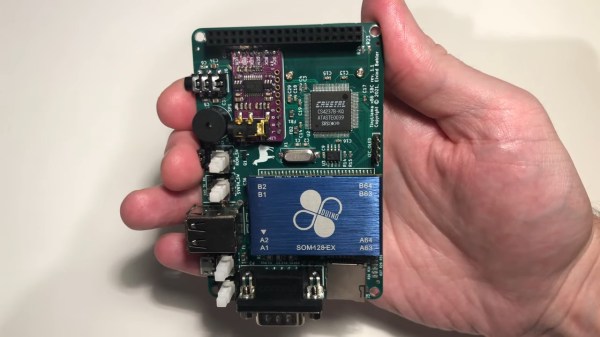
The GameTank was designed to be easy to build by anyone, and is therefore largely constructed from DIP chips that can be bought new at any component distributor. The main CPU is a WD65C02 running at 3.5 MHz, assisted by a 6522 I/O controller and 32 kB of RAM. Composite video is generated by a clever circuit made out of discrete logic chips. The video card comes with DMA for fast transfers and even includes a blitter, which enables it to move images around the screen quickly without loading the CPU.

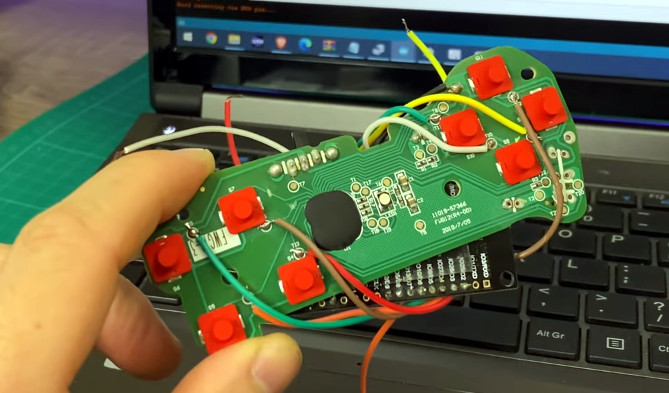
For the controllers, [Clyde] decided to go for the more-or-less industry standard DE-9 connector gamepads as used on the Sega Genesis and various Atari consoles. He also made his own controller, a 3D printed one with four directional buttons, three action buttons and a start button. The buttons are implemented with Cherry MX Clear switches — an unusual choice for a gamepad perhaps, but they’re apparently very comfortable for long gaming sessions.

The console itself is also housed in a printed enclosure with a design reminiscent of the Nintendo 64. Game cartridges are inserted at the top and contain an EEPROM chip that can be written with a special programmer. The cartridge port also brings out several internal signals and can therefore be used as an expansion port, similar to the way Super NES cartridges could accommodate enhancement chips.

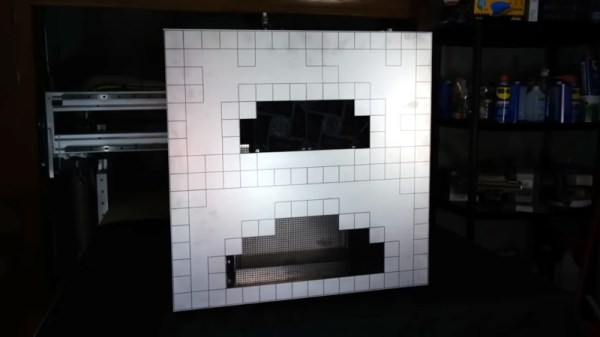
Games currently available include Tetris, the office-themed platformer Cubicle Knight, a Zelda-style adventure named Accursed Fiend, and a remake of the classic viral animation Bad Apple. [Clyde] provides a comprehensive stack of tools and example code and invites anyone interested to help develop more software for the platform. There’s also a hardware-accurate emulator, which is not only useful if you’re writing new code for the system but also if you simply want to try out the existing games in your browser.

Rolling your own 6502 system is great fun, and we’ve seen several examples over the years: some are built with huge bundles of wire, some are come with a clever programming language, some are so tiny they fit on your wrist, and some are simply beautifully made.

Continue reading “The GameTank Is The Latest And Greatest 8-bit Game Console”

Combat Gets A Computer Controlled Opponent

If you ever spent some time playing on the Atari 2600, there’s an excellent chance you went through a few rounds of Combat. The two-player warfare game not only came with the console but was actually one of the more technically impressive titles for the system, offering nearly 30 variations of the core head-to-head gameplay formula.

But unfortunately, none of those modes included single player. That is, until [Nick Bild] got on the case. While some concessions had to be made, he has succeeded where the original developers failed, and added a computer-controlled enemy to Combat. What’s more, the game still runs on the stock 2600 hardware — no emulator tricks required. The true aficionados can marvel at the snippets of source code he’s provided, but the rest of us can just watch the video below the break and marvel at the accomplishment.

If you’ve never worked on such a constrained system, this might not seem like a big deal. But [Nick] does a great job of explaining not just what he did, but why it was so hard to pull off in the first place. For example, the console has no video buffer, so everything needs to be done during the VBLANK period where the game doesn’t need to be drawing to the screen. Unfortunately that didn’t give him enough free cycles, so he had to split his code up to run across three frames instead of just one. That mean’s the original game logic is now only running 27 frames out of the 30 per second, but he says you can’t really tell in practice.

That said, some cuts had to be made. He needed to remove the surprisingly complex engine sounds to free up some resources, and had to bump the 2 KB cartridge up to 4 KB to hold the new code and data. Turns out the 2600 could handle far larger cartridges via bank switching though, so this wasn’t actually a problem.

Given its age and limited capabilities compared to more modern consoles, you might think the Atari 2600 would be little more than a footnote in gaming history. But there’s a devoted group of folks who enjoy squeezing everything they can out of the system’s 45-year-old hardware which leads to labors of love like this one.

Continue reading Combat Gets A Computer Controlled Opponent”

Tiny Arcade Uses Tiny CRT

Restoring vintage electronics is a difficult hobby to tackle. Even the most practical builds often have to use some form of modern technology to work properly, or many different versions of the machine need to be disassembled to get a single working version. Either way, in the end someone will be deeply hurt by the destruction of anything antique, except perhaps with [Marco]’s recent tiny arcade with a unique CRT display.

The CRT is a now-obsolete technology, but Arcade and MAME purists often seek them out because of the rounded screen and vintage feel these devices have when compared to modern LCD or LED displays. For a build this small, though, [Marco] couldn’t just use parts from an old TV set as there wouldn’t be clearance in the back of the cabinet. An outdated video conferencing system turned out to have just the part he needed, though. It has a CRT mounted perpendicularly to a curved screen in order to reduce the depth needed dramatically.

The final build uses a tiny Namco system meant to plug into the RCA jack on a standard TV, but put in a custom case that makes it look like an antique video game cabinet. It’s an interesting build that doesn’t destroy any valuable antique electronics, while still maintaining a classic arcade feel. If you’re building a larger arcade cabinet which will still satisfy the purists out there, make sure you’re using a CRT with the right kind of control system.

Continue reading “Tiny Arcade Uses Tiny CRT”

Purpose-Built Plotter Pitches In To Solve Wordblitz On Your Phone

It seems like most hackers have never played a game without at least wondering how to cheat at it. It’s not that we’re a dishonest lot, at least not as a rule. It’s more that most games hold less challenge for us than does figuring out how to reverse engineer the game’s mechanics. We don’t intend to cheat; it just sort of happens.

Or at least that’s the charitable way to look at such smartphone game cheats as this automated word-search puzzle solver. The game is Wordblitz, which is basically an implementation of classic Boggle along with extra features to release more dopamine and keep you playing. Not one to fall for that trick, [ghettobastler] whipped up a quick X-Y gantry from MDF using a laser cutter, added a stylus in the form of a cotton swab tipped with aluminum foil, and a vision system based on a simple web camera. The bed of the gantry has a capacitive plate so the stylus can operate the phone, along with a frame of ArUco fiducial marker to aid in locating the phone.

A Raspberry Pi handles the machine vision part of the process, which uses OpenCV to estimate the phone’s location and extract the current game tiles. The words in the game field are located by a solver that [ghetto] had previously written; a script then streams G-code to the plotter to peck out the answers at blazing speed, or at least faster than even [Peggy Hill] could manage. See the video below for a sample game being solved.

One word of warning if you choose to build this: [ghettobastler]’s puzzle-solving algorithm is based on a French dictionary, so you’ll have to re-teach it for other languages. But whatever language it’s in, this reminds us a bit of some of the Wordle solvers we’ve seen recently.

Continue reading “Purpose-Built Plotter Pitches In To Solve Wordblitz On Your Phone”

A small PCB with a microcontroller, two 7-segment LED displays, a speaker and some buttons

Hunt The Lunpus Is An ATtiny-Based Minimalist Game Console

In a world where game consoles come with ever-higher resolutions and ever-faster frame rates, it’s refreshing to see someone going in the opposite direction: [Doug McInnes]’s latest project is a tiny handheld game console with probably the lowest-resolution graphics possible. Hardware-wise, it’s a small PCB containing an ATtiny84, two seven-segment LED displays, a speaker and a handful of buttons. It’s the software that gives this project its magic, and all of it is available on GitHub, along with schematics and a PCB layout.

The game is called Hunt the Lunpus, and as the name suggests it’s inspired by the 1970s classic Hunt the Wumpus. The player moves through a maze of interconnected rooms, trying to avoid slime pits and marauding bats while searching for the Lunpus, a sleeping monster that will eat the player unless they defeat it first by shooting it with arrows. Four pushbuttons provide directional control, with a fifth serving as an “action” button to start the game and fire those arrows.

Whereas Wumpus was originally a text-based adventure game, Lunpus is fully graphical: the seven-segment displays indicate the cave’s walls, and flash in different ways to alert the player to the various hazards. [Doug] explains the events as they happen in the video embedded below; while it might take a bit of practice to find your way at first, we can already picture ourselves wandering through the caves with our quiver full of arrows, ready to hunt some Lunpus. Who needs 4K graphics, anyway?

If you’re into minimalist game consoles, there’s plenty to choose from: the LEDBOY renders Space Invaders on just a few LEDs, while TWANG needs nothing more than a single LED strip. You can also explore more mazes on this 8×8 LED matrix, or even hunt Wumpuses in a slightly-higher resolution.

Continue reading “Hunt The Lunpus Is An ATtiny-Based Minimalist Game Console”

Design Cities In A Snap With Buildify

Designing 3D environments is hard, but it doesn’t have to be. A week ago, if you decided to design an entire city in Blender, say for a game or animation, you probably would have downloaded some asset pack full of building shapes and textures and painstakingly placed them over the course of days, modifying the models and making new ones as needed. Now, you would just need to download Buildify, feed it an asset pack, and watch the magic happen.

Buildify, made by [Pavel Oliva], is one of the most impressive bits of Blender content we’ve seen in a long time. It lets you generate entire cities by drawing the outlines of buildings. You can grab walls and resize individual structures, and the walls, windows, doors, textures, and everything else will automatically rearrange as needed. You can even select a region on Open Street Maps and watch as Buildify recreates the area in Blender using your chosen asset pack (maybe a KiCad PCB design could be used as the source material too?). It’s really something incredible to see, and you’ve just got to watch the video below to understand just how useful this tool can be.

The pay-what-you-want .blend file that you can grab off of [Pavel]’s website doesn’t include all the beautiful assets you can see in the video, but instead generates simple grey block buildings. He made one of the packs used in the video, and will be releasing it online for free soon. In the meantime, he links to other ones you can buy, or you can get really ambitious and create your own. We know it won’t be long until we’re seeing animations and games with Buildify-generated cities.

Continue reading “Design Cities In A Snap With Buildify”

Tiny Pinball Machine Also Runs X86 Code

As arcades become more and more rare, plenty of pinball enthusiasts are moving these intricate machines to their home collections in basements, garages, and guest rooms. But if you’re not fortunate enough to live in a home that can support a space-intensive hobby like pinball machines, there are some solutions to that problem. This one, for example, fits on the palm of your hand and also happens to run some impressive software for its size.

The machine isn’t a mechanical pinball machine like its larger cousins, though. Its essentially a 3D printed case made to look like a pinball machine with two screens attached. It does have a working plunger for launching the ball and two buttons on the sides for the approximation of authenticity, but it’s actually running Pinball Fantasies — a pinball simulator designed to run on x86 hardware from the 90s. This sports an ESP32 on the inside, which has just enough computing capability to run an x86 emulator that can load these games in DOS.

The game includes haptic feedback and zips along at 60 frames per second, which really brings the pinball experience to its maximum level given the game’s minuscule size. It’s impressive for fitting a lot into a small space, both from physical and software points-of-view. For more full-sized digital pinball builds, take a look at this one which comes exceptionally close to replicating the real thing.

Continue reading “Tiny Pinball Machine Also Runs X86 Code”