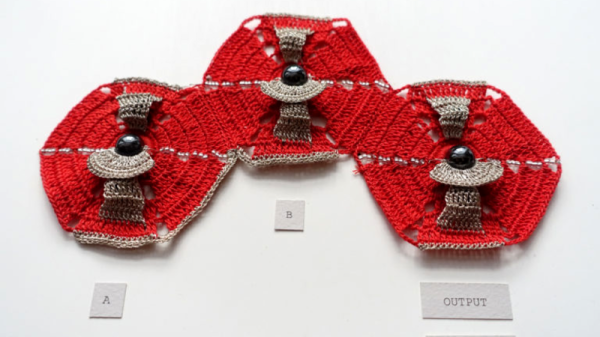
Breadboarding With E-Paper

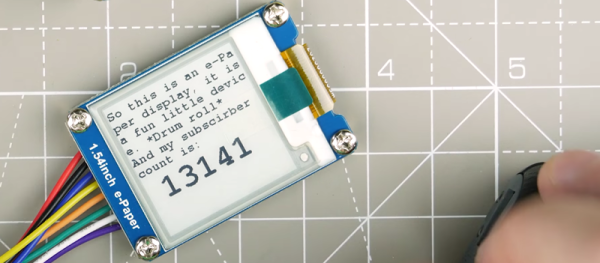
[David Watts] picked up an inexpensive Waveshare e-Paper display. He made a video about using it with a breadboard, and you can see it below.

The E-Paper or E-Ink displays have several advantages. They are low power, they retain their display even without power, and they are very visible in direct light. The downside is they don’t update as fast as some other display technologies.

Continue reading “Breadboarding With E-Paper”

A Noob’s Guide To McMaster-Carr

For the penny-pinching basement hacker, McMaster-Carr seems like a weird go-to resource for hardware. For one, they’re primarily a B2B company; and, for two, their prices aren’t cheap. Yet their name is ubiquitous among the hacker community. Why? Despite the price, something makes them too useful to ignore by everyday DIY enthusiasts. Those of us who’ve already been enlightened by the McMaster-Carr can design wonders with a vocabulary of parts just one day away at the click of a button.

Today, this article is for those of us who have yet to receive that enlightenment. When used wisely, this source of mechanical everything brings us a world of fast parts at our fingertips. When used poorly, we find nothing but overpriced stock components in oversized shipping boxes.

Since we, the McMaster-Carr sages, are forever doomed to stuff our desk drawers with those characteristic yellow baggies till the end of time, we thought we’d give an intro to the noobs that are just beginning to flex their muscles with this almighty resource. Grab another cup of coffee as we take you on a tour of the good and good-grievances of McMaster-Carr.

Continue reading “A Noob’s Guide To McMaster-Carr”

The Components Are INSIDE The Circuit Board

Through-hole assembly means bending leads on components and putting the leads through holes in the circuit board, then soldering them in place, and trimming the wires. That took up too much space and assembly time and labor, so the next step was surface mount, in which components are placed on top of the circuit board and then solder paste melts and solders the parts together. This made assembly much faster and cheaper and smaller.

Now we have embedded components, where in order to save even more, the components are embedded inside the circuit board itself. While this is not yet a technology that is available (or probably even desirable) for the Hackaday community, reading about it made my “holy cow!” hairs tingle, so here’s more on a new technology that has recently reached an availability level that more and more companies are finding acceptable, and a bit on some usable design techniques for saving space and components.

Continue reading “The Components Are INSIDE The Circuit Board”

Bodging On More Flash Memory

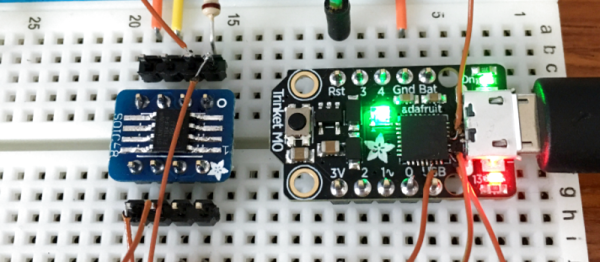
[Curmudegeoclast] found himself running out of flash memory on a Trinket M0 board, so he decided to epoxy and fly-wire a whopping 2 MB of extra flash on top of the original CPU.

We’ll just get our “kids these days” rant out of the way up front: the stock SAMD21 ARM chip has 256 kB (!) of flash to begin with, and is on a breakout board with only five GPIO pins, for a 51 kB / pin ratio! And now he’s adding 2 MB more? That’s madness. The stated reason for [Curmudegeoclast]’s exercise is MicroPython, which takes up a big chunk of flash just for the base language. We suspect that there’s also a fair amount of “wouldn’t it be neat?” in the mix as well. Whatever.

The hack is a classic. It starts off with sketchy wires soldered to pins and breadboarded up with a SOIC expander board. Following that proof of concept, some degree of structural integrity is brought to the proceedings by gluing the flash chip, dead-bug, on top of the microcontroller. We love the (0805?) SPI pullup resistor that was also point-to-point soldered into place. We would not be able to resist the temptation to entomb the whole thing in hot glue for “long-term” stability, but there are better options out there, too.

This hack takes a minimalist board, and super-sizes it, and for that, kudos. What would you stuff into 2 MB of free flash on a tiny little microcontroller? Any of you out there using MicroPython or CircuitPython care to comment on the flash memory demands? 256 kB should be enough for anyone.

Sparkfun’s Alternate Reality Hardware

SparkFun has a new wing of hardware mischief. It’s SparkX, the brainchild of SparkFun’s founder [Nate Seidle]. Over the past few months, SparkX has released breakout boards for weird sensors, and built a safe cracking robot that got all the hacker cred at DEF CON. Now, SparkX is going off on an even weirder tangent: they have released The Prototype. That’s actually the name of the product. What is it? It’s a HARP, a hardware alternate reality game. It’s gaming, puzzlecraft, and crypto all wrapped up in a weird electronic board.

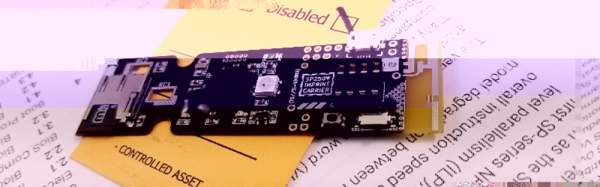
The product page for The Prototype is exactly as illuminating as you would expect for a piece of puzzle electronics. There is literally zero information on the product page, but from the one clear picture, we can see a few bits and bobs that might be relevant. The Prototype features a microSD card socket, an LED that might be a WS2812, a DIP-8 socket, a USB port, what could be a power switch, a PCB antenna, and a strange black cylinder. Mysteries abound. There is good news: the only thing you need to decrypt The Prototype is a computer and an open mind. We’re assuming that means a serial terminal.

The Prototype hasn’t been out for long, and very few people have one in hand. That said, the idea of a piece of hardware sold as a puzzle is something we haven’t seen outside of conference badges. The more relaxed distribution of The Prototype is rather appealing, and we’re looking forward to a few communities popping up around HARP games.

PocketCHIP As A Hardware Hacker’s Terminal

Conferences these days can be tricky places to be at – especially hardware and hacker cons. If you aren’t the one doing the hacking, then you can be sure your devices are being probed, pinged and possibly, hacked. It certainly isn’t the place to bring your precious laptop. Besides, as the day wears on and your feet start aching, regular laptops start feeling bigger and heavier. What you need is a burner laptop – one that is lightweight, cheap and that you don’t mind getting hacked. [dalmoz] wrote a short, to-the-point, tutorial on making use of PocketCHIP as a hardware-hacker’s best friend when it comes to UART connections. It’s also handy to use as a stand alone serial monitor for your projects without having to dedicate a USB port and screen real estate.

The PocketCHIP is a dock for the C.H.I.P. microcomputer and adds a LED backlit touchscreen display, QWERTY keyboard and LiPo battery in a lightweight, molded case. For $70, you get a 1 GHz ARM v7 processor, 512MB RAM, Mali 400 GPU, WiFi and Bluetooth. It’s light enough to be hung around your neck via its lanyard slot. And all of the GPIO pins are conveniently broken out, including the UART pins. Right now, it’s in the hands of Kickstarter backers, but the Next Thing Co website indicates availability sometime this month.

On the hardware side, all you need to do is add header pins to TX, RX and GND (and maybe 5 V and 3 V if required) on the PocketCHIP GPIO header and you’re good to go. On the software side, things are equally easy. The UART pins are meant to provide debug access to the CHIP itself and need to be released from internal duty. Once the UART port is identified, a single terminal command frees its status as a debugging interface. After that, use any terminal emulator – [dalmoz] recommends Minicom – and you’re all set. In the unlikely event that all you have is an Arduino lying around, [dalmoz] posted a simple sketch that can be used to make sure you have it working. Great hacking tip, ’cause it is as simple as it gets. If you’d like to know more about the CHIP project, check out its documentation and Github repository – it’s all open source.

Switching: From Relays To Bipolar Junction Transistors

How many remote controls do you have in your home? Don’t you wish all these things were better integrated somehow, or that you could add remote control functionality to a random device? It’s a common starting point for a project, and a good learning experience for beginners.

A common solution we’ve seen applied is to connect a relay in parallel to all the buttons we want to press. When the relay is triggered, for example by your choice of microcontroller, it gets treated as a button press. While it does work, relays are not really the ideal solution for the very low current loads that we’re dealing with in these situations.

As it turns out, there are a few simple ways to solve this problem. In this article, we’re going to focus on using common bipolar junction transistors instead of relays to replace physical switches. In short, how to add transistors to existing electronics to control them in new ways.

Continue reading “Switching: From Relays To Bipolar Junction Transistors”