Fitness Tracker Teardown Is A Lesson In Design For Manufacture

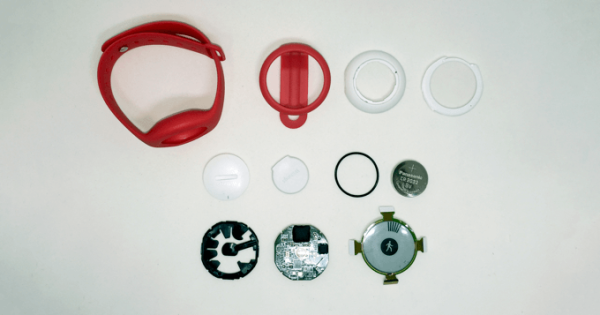
If the trends are anything to go on, after the success of Fitbit we are nearing a sort of fitness tracker singularity. Soon there will be more fitness trackers on wrists and ankles then there will be stars in the sky. We will have entire generations who will grow up not knowing what life is like without the ever-present hug of a heart monitor strapped across their chest. Until then though, we can learn a bit of design for manufacture from this excellent teardown of a watch shaped fitness tracker.

This tracker has a nice round e-paper screen, which could be a welcome part in a project if they start washing up on the shores of eBay. The rest of the watch is a basic Bluetooth low energy module and the accessory electronics wrapped in a squishy plastic casing.

There’s a lot of nice engineering inside the watch. As far as the electronics go, it’s very low power. On top of that is plenty of clever cost optimization; from a swath of test points to reduce quality issues in the hands of consumers to the clever stamped and formed battery tabs which touch the CR2032 that powers it.

The teardown covers more details: the switch, what may be hiding behind the epoxy globs, the plastics, and more. One thing that may be of interest to those that have been following Jenny’s excellent series is the BOM cost of the device. All in all a very educational read.

Quick Hack Creates A Visual Beep Alarm

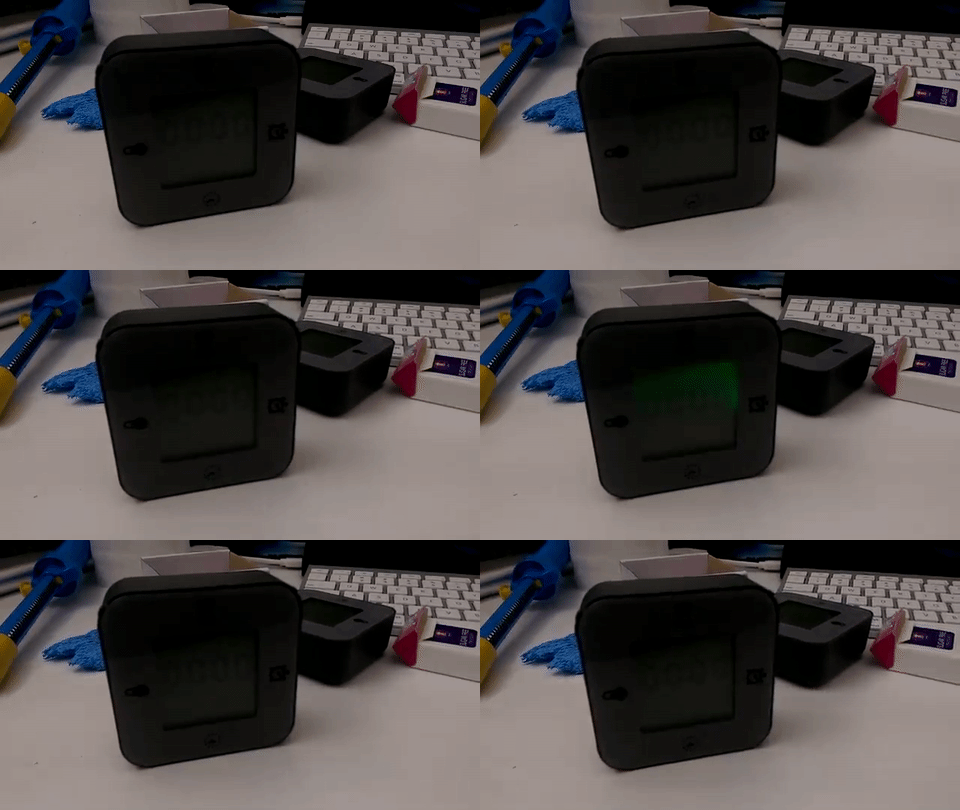
Sometimes a simple modification is all it takes to get something just the way you want it. The Ikea LÖTTORP clock/thermometer/timer caught [Mansour Behabadi’s] eye. The LÖTTORP  has four functions based on its orientation. [Mansour] loved the orientation feature, but hated the clock’s shrill beeping alert. Visual beeps or alarms can be handy when working with headphones or in a loud environment. With this in mind [Mansour] decided to crack his LÖTTORP open and rewire it to produce a visual beep for the timer function.

The clock is backlit, so [Behabadi] decided to use the backlight for his visual beep. Once the inside was exposed, [Behabadi] noticed that the buzzer’s positive terminal was wired to the red LED anode — a clever design choice, since the red LED is only used with the clock function. Simply removing the buzzer and soldering its terminal to the noticeable green LED provided the desired effect.

We meant it when we said he cracked it open. The screws were hidden behind the front plate, so the handyman’s secret weapon helped in reassembling the clock after this quick hack.

We’ve featured plenty of classy, unique, and ingenious clocks on Hackaday, so this modification is in good company.

Game Pie Advance Brings Retro Gaming To Your Fingertips

We love our Game Boy and RetroPie mods here at Hackaday because the Raspberry Pi Zero has made it easier than ever to carry a pocket full of classic games. [Ed Mandy] continues this great tradition by turning a matte black Game Boy Advance into a RetroPie handheld.

Details are scant on how [Mandy] built his Game Pi Advance, but we can glean a few details from the blog post and video. A Raspberry Pi Zero running RetroPie appears to be piggybacking on a custom PCB that slots neatly into the GBA case. This provides easy access to the Pi Zero’s USB and micro HDMI via the cartridge slot to connect to an external screen, as well as a second controller to get some co-op NES and SNES action on. It’s worth noting here that [Mandy] has foregone adding X and Y buttons in the current version.

Continue reading “Game Pie Advance Brings Retro Gaming To Your Fingertips”

How I²C EEPROM Talks To The Bus

You will probably be familiar with I²C, a serial bus typically used for not-very-fast communication with microcontroller peripherals. It’s likely though that unless you are an I²C wizard you won’t be intimately familiar with the intricacies of its operation, and each new device will bring a lengthy spell of studying data sheets and head-scratching.

If the previous paragraph describes you, read on. [Clint Stevenson] wrote a library for interfacing I²C EEPROMs to Arduino platforms, and when a user found a bug when using it on an ATtiny85, he wrote up his solution. The resulting piece is a clear explanation of how I²C EEPROMs talk to the bus, the various operations you can perform on them, and the overhead each places on the bus. He then goes on to explain EEPROM timing, and how since it takes the device a while to perform each task, the microcontroller must be sure it has completed before moving to the next one.

In the case of [Clint]’s library, the problem turned out to be a minor incompatibility with the Arduino Wire library over handling I²C start conditions. I²C has a clock and a data line, both of which are high when no tasks are being performed. A start condition indicates to the devices on the bus that something is about to happen, and is indicated by the data line going low while the clock line stays high for a while before the clock line starts up and the data line carries the I²C command. He’s posted samples of code on the page linked above, and you can find his library in his GitHub repository.

If you want to know more about I²C, take a look at Hackaday Editor [Elliot Williams’] masterclasses on the subject: What could go wrong, I²C edition, and Embed With Elliot, I²C bus scanning.

Serial EEPROM die picture, By Epop (Own work) [CC0], via Wikimedia Commons.

EL Wire Gets Some Touching After Effects

If you thought glowy wearables have had their time, guess again! After a few years designing on the side, [Josh] and [his dad] have created a nifty feature for EL wire: they’ve made it touch sensitive. But, of course, rather than simply show it off to the world, they’ve launched a Kickstarter campaign to put touch-sensitive El Wire in the hands of any fashion-inspired electronics enthusiast.

El Wire (and tape) are composed of two conducting wires separated by a phosphor layer. (Starting to sound like a capacitor?) While the details are, alas, closed for now, the interface is Arduino compatible, making it wide open to a general audience of enthusiasts without needing years of muscled programming experience. The unit itself, dubbed the Whoaboard, contains the EL Wire drivers for four channels at about 10ft of wire length.

El Wire has always been a crowd favorite around these parts (especially in Russia). We love that [Josh’s] Whoaboard takes a conventional material that might already be lying around your shelves and transforms it into a fresh new interface. With touch-sensitivity, we can’t wait to see the community start rolling out everything from costumes to glowy alien cockpits.

Have a look at [Josh’s] creation after the break!

Continue reading “EL Wire Gets Some Touching After Effects”

Arduino + Software Defined Radio = Millions Of Vulnerable Volkswagens

As we’ve mentioned previously, the integrity of your vehicle in an era where even your car can have a data connection could be a dubious bet at best. Speaking to these concerns, a soon-to-be published paper (PDF) out of the University of Birmingham in the UK, states that virtually every Volkswagen sold since 1995 can be hacked and unlocked by cloning the vehicle’s keyfob via an Arduino and software defined radio (SDR).

The research team, led by [Flavio Garcia], have described two main vulnerabilities: the first requires combining a cyrptographic key from the vehicle with the signal from the owner’s fob to grant access, while the second takes advantage of the virtually ancient HiTag2 security system that was implemented in the 1990s. The former affects up to 100 million vehicles across the Volkswagen line, while the latter will work on models from Citroen, Peugeot, Opel, Nissan, Alfa Romero, Fiat, Mitsubishi and Ford.

Continue reading “Arduino + Software Defined Radio = Millions Of Vulnerable Volkswagens”

Hackerspacing: Making A Temperature Logger

The folks at Swindon Makerspace took possession of a new space a few months ago after a long time in temporary accommodation. They’ve made impressive progress making it their own, and are the envy of their neighbours.

A small part of the new space is a temperature logger, and it’s one whose construction they’ve detailed on their website. It’s a simple piece of hardware based around a Dallas DS18B20 1-wire temperature sensor and an ESP8266 module, powered by 3 AA batteries and passing its data to data.sparkfun.com. The PCB was created using the space’s CNC router, and the surface-mount components were hand-soldered. The whole thing is dwarfed by its battery box, and will eventually be housed in its own 3D printed case. Sadly they’ve not posted the files, though it’s a simple enough circuit that’s widely used, it looks similar to this one with the addition of a voltage regulator.

The device itself isn’t really the point here though, instead it serves here to highlight the role of a typical small hackspace in bringing simple custom electronic and other prototyping services to the grass roots of our community. Large city hackspaces with hundreds of members will have had the resources to create the space program of a small country for years, but makers in provincial towns like Swindon – even with their strong engineering heritage – have faced an uphill struggle to accumulate the members and resources to get under way.

So to the wider world it’s a simple temperature logger but it really represents more than that — another town now has a thriving and sustainable makerspace. Could your town do the same?

If you’ve never used a Dallas 1-wire temperature sensor like the one the Swindon folks have in their logger, we suggest you read our primer on the parts and their protocol.