Sluggy Wind Speed Sensor

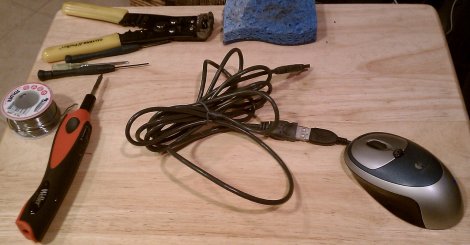
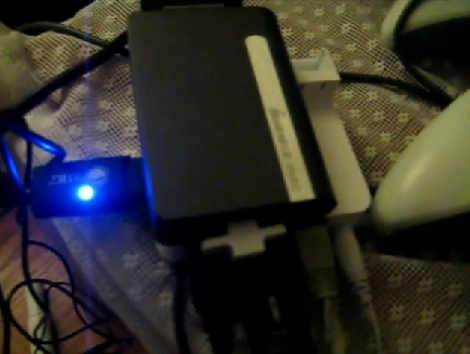
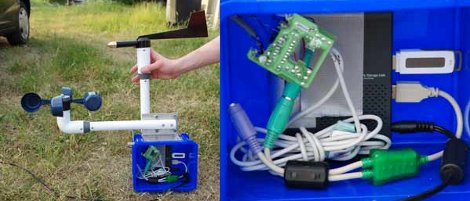
Sometimes when we look at a hack, its to see how someone chose those parts for the project. In this case, it would have been hard to see it coming. [Janne Jansson] decided to combine a set of measuring cups, a hacked Linksys NSLU2 NAS, and a PS/2 Mouse together to make a self-contained Wind Speed Sensor for his roof. The measuring cups act as wind catchers, which in turns drives the rotation of one of the mouse ball sensors. This data is then logged and transmitted by the NSLU2. The NSLU2 is running a custom Linux based firmware, similar to how OpenWRT works for wireless routers.

To calibrate the device, he also made the best logical choice: to duct tape it to the hood of his car along with a much more expensive wind sensor and use that data to make his own device as accurate as possible. When placed atop his house with a 1500VA 220V UPS, the device managed 250 days of uptime before meeting its demise. Those 250 days also included 5 days of being frozen solid, yet still transmitting (somewhat meaningless) data. All of the relevant code and build instructions are available, for those of you with similar parts to spare.

Chumby Webserver Using Upgraded Internal Storage

The Chumby One has an internal SD card offering a fair amount of storage. [Kenneth Finnegan’s] came with a 1 GB card that had about 500 MB left over which he filled with a collection of MP3s. But he wanted to do more and so installed a pre-compiled version of lighttpd to act as a web server. The problem is that this binary requires a thumb drive to be plugged in because it maps the storage directory to the mounted USB folder. He wasn’t happy with that so he upgraded the internal SD card and rolled his own webserver to run from the internal SD card.

The upgrade involved going from a 1 GB to an 8 GB microSD card. In order to run the webserver internally he needed to recompile lighttpd to use a different root directory. This meant setting up an ARM cross-compiler and eventually finding a new place for the start up script. The location change for the ‘lighty’ directory leaves us wondering if a symlink couldn’t have solve the problem without recompilation. But we don’t have the hardware on hand to try this out ourselves.

But if you want to give it a shot, check out [Bunnie’s] post about Chumby-based hardware. Looks like you can head out to the big-box store and have one in hand without shelling out too many clams.

Dungeon Crawler Game For IM-ME (and Linux)

[Joby Taffey] takes the prize for the first completed homebrew game for the IM-ME. Over the last few weeks we’ve seen [Travis Goodspeed] working with sprite graphics, and [Emmanuel Roussel] developing game music for the pink pager. But [Joby] didn’t really use either of those.

[Travis’] sprites were using a framebuffer that fills up a lot of valuable RAM. [Joby] decided to draw the room screens (all of them have been stitched together for the image above) as a one-time background image to keep the memory free. From there, the screen is updated in 8×8 blocks based on cursor movement. He also decided not to add music as he feels the high-pitched piezo is not capable making sound without driving everyone crazy.

Source code is available and for those of you who don’t own this pretty handheld, the game can also be compiled in Linux.

How-to: Program PICs Using Linux

Arguably, Microchip’s PIC microcontrollers do not get enough posts here. One of the drawbacks for some of us is that Linux support for PICs is not very well known. The information is out there, but no one has laid out the process of going from writing C code to programming a chip. Written for Linux users that are familiar with microcontrollers, basic circuits, the C programming language, and can read a datasheet, this how-to should get you up and programming a PIC quickly with Linux.

Continue reading “How-to: Program PICs Using Linux”

Augen E-Go Booting Linux

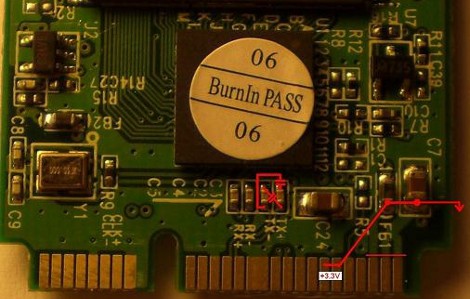
The Augen E-Go is billed as a Netbook that ships with Windows CE. [Moogle] got it to boot the Linux kernel after a bit of hardware snooping. He found a UART connector on the main board and discovered that if you tie the enable pin to ground you can send an ARM bootloader to the device during boot up. His past experience hacking the Didj and the Explorer helped him recognize the processor used in the Augen. This lead to using a zimage from the Didj to boot the Linux kernel. So far the process halts at a kernel panic, but that’s because he hasn’t built the image with a file system for the device yet.

If the E-Go ends up playing nicely with Linux, [Moogle] may have found a suitable replacement for the Zipit.

Update: Looks like we’ve got the wrong version of the E-Go pictured above (and linked below). Check out [Moogle’s] comment for model numbers.

[Augen photo credit: Newegg.com]

Building Linux Images For ARM Architectures

Want to try your hand at building a Linux package for an embedded device? [SnowBot] decided to give it a try and set out to build Ubuntu for a GumStix. The single-board computer will cost you about $150 to get started, plus a way to connect to the device’s serial port. But once you’ve got your hands on it there is a lot of power in a tiny package.

He’s using the RootStock package to assist in the build. This is a suite of tools that generates the root file system that can be loaded onto an SD card for use with the Gumstix. It’s not quite building from the ground up, but there’s already enough hoops to jump through that this package is a welcomed shortcut.

Already rolling your own Linux packages for embedded hardware? We want to hear about it.

$169 Linux Tablet… Sortof

The Insignia Infocast is a $169 simple media device being sold at Best Buy. Marketed as a way to share photos and run Chumby apps, hackers are starting to release packages to extend its features. [Bunnie] shows us one package in particular that allows it to be used as a web browser with an external keyboard. With an 800Mhz processor, an 800×600 touch screen, and 2 GB of memory, we can see that this is just scratching the surface of what is possible. [Bunnie] points out that some people are working on porting Android to the device, and if you really feel adventurous, you can dig into the hardware.