The Digistump Oak; An ESP8266 On Kickstarter

When it was first released, the ESP8266 was a marvel; a complete WiFi solution for any project that cost about $5. A few weeks later, and people were hard at work putting code on the tiny little microcontroller in the ESP8266 and it was clear that this module would be the future of WiFi-enabled Things for the Internet.

Now it’s a Kickstarter Project. It’s called the Digistump Oak, and it’s exactly what anyone following the ESP8266 development scene would expect: WiFi, a few GPIOs, and cheap – just $13 for a shipped, fully functional dev board.

The guy behind the Oak, [Erik Kettenburg], has seen a lot of success with his crowdfunded dev boards. He created the Digispark, a tiny, USB-enabled development board that’s hardly larger than a USB plug itself. The Digispark Pro followed, getting even more extremely small AVR dev boards out in the wild.

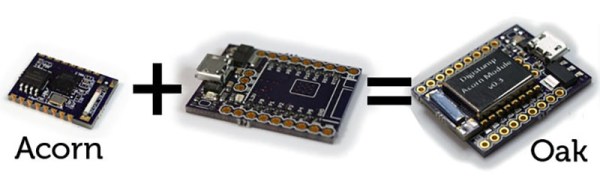
The Digistump Oak moves away from the AVR platform and puts everything on an ESP8266. Actually, this isn’t exactly the ESP8266 you can buy from hundreds of unnamed Chinese retailers; while it still uses the ESP8266 chip, there’s a larger SPI Flash, and the Oak is FCC certified.

Yes, if you’re thinking about building a product with the ESP8266, you’ll want to watch [Erik]’s campaign closely. He’s doing the legwork to repackage the ESP into something the FCC can certify. Until someone else does it, it’s a license to print money.

The FCC-certified ESP8266 derived module, cleverly called the Acorn, will be available in large quantities, packaged in JEDEC trays sometime after the campaign is finished. It’s an interesting board, and we’re sure more than one teardown of the Acorn will hit YouTube when these things start shipping.
Brewdoo Helps Keep The Office Coffee Fresh

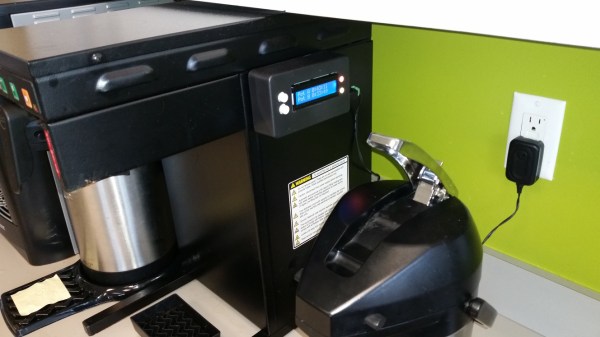
Until about lunch time, the coffee goes pretty fast in our office. Only a few of us drink it well into the afternoon, though, and it’s anyone’s guess how long the coffee’s been sitting around when we need a 4:00 pick-me-up. It would be great to install a coffee timer like [Paul]’s Brewdoo to keep track of these things.

The Brewdoo’s clean and simple design makes it easy for anyone in the office to use. [Paul]’s office has two carafes, so there’s a button, an RGB LED, and a line on the LCD for each. Once a pot is brewed, push the corresponding button and the timer is reset. The RGB LED starts at green, but turns yellow and eventually red over the course of an hour. Brewdoo has a failsafe in place, too: if a timer hasn’t been reset for four hours, its LED turns off and the LCD shows a question mark.

[Paul] knew he couldn’t touch the existing system since his company leases the equipment, so the Brewdoo lives in an enclosure that [Paul] CNC’d with custom g-code and affixed to the brewing machine with hard drive magnets. Although [Paul] designed it with an Arduino Uno for easy testing and code modification, the Brewdoo has a custom PCB with a ‘328P. The code, Fritzing diagram and Eagle files are up at [Paul]’s GitHub.

Simple Keypad Scanning With SPI And Some Hardware

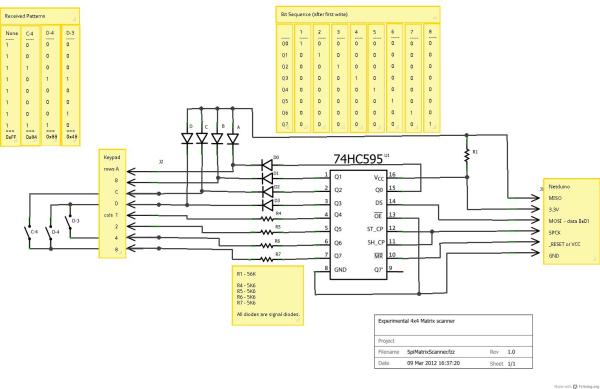
16-button keypads have a clever method of encoding their data into 8 pins. Pins are mapped to four rows and four columns on the keypad. A user reads the keypad by bringing each row up to logic: HIGH, and reading the corresponding column values, (HIGH or LOW). Keypad scanning can be farmed out to a microcontroller with a simple finite-state machine and some button debouncing techniques. [Mario], [Glen], and [Paul] on the Netduino forums took an entirely different route: they’ve designed and implemented a Keypad Scanner using any microcontrollers SPI peripheral and a 74HC595 Shift register.

The trio’s solution is an elegant adventure into circuit design. With two diodes and a voltage divider, they devise a simple circuit that pulls the SPI MISO line LOW if a button in the corresponding circuit’s row is pushed closed. Copied four-fold, this circuit joins the rows and columns of the 74HC595 to the keypad matrix. To scan across the four columns, the microcontroller performs an SPI transfer of the key value: 0x01. To decode which button is pushed, the value received back from the SPI bus encodes which button was pushed out of the 16 possible buttons. Note: some cases for ambiguity as to “which button was pressed” do exist if multiple buttons are pushed at the same time, but for the general case where we’re punching in values one-by-one, this circuit works perfectly.

The team’s hack is a clever use of existing hardware to outsource a microcontroller’s software problem to hardware while leveraging the SPI peripheral to cleverly decrypt and retrieve data back from the keypad. Kudos to the team of three over at the Netduino Forums, and we’re always thrilled to see and idea grow from one person to the next. In case you want to take a step lower and build up the keypad itself, here’s a blast from the past that does just that.

Showing An AVR Programmer Who’s Boss

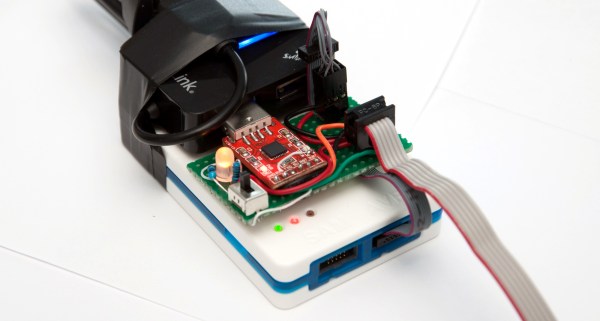
[Bogdan] makes a good point. When you use a dev board you get programming, debugging, power sourcing, and usually a UART. When you go to the trouble of hooking up a programmer why don’t you get the same thing? Astutely, he points out that all you usually get with programmers is programming. So he set out to add features to the hardware he uses to program XMEGA.

The first part of the trick hinges on his use of PDI programming. This is slightly different from ISP programming. Both use a six-pin connector cable but with PDI two of these pins are unused. He took this opportunity to reroute the chip’s TX and RX pins through the cable, which now gives him an avenue to use a UART-to-USB adapter without adding any cables to his target board. Rather than add a second USB cable he rolled a USB hub into the mix. An LM1117 regulates the 5V USB rail down to 3.3V as a source for the target board.

The programmer being used is an Atmel ICE. As you might imagine he didn’t want to make permanent alterations to it. His modifications are all handled externally, with one IDC cable connecting the programmer to his added circuitry and another headed off to the target board. For now he’s jumpering RX/TX to the programming header but plans to route the signals on future PCBs.

Even More Emulated Microcomputers: 8080 On A Stellaris Launchpad

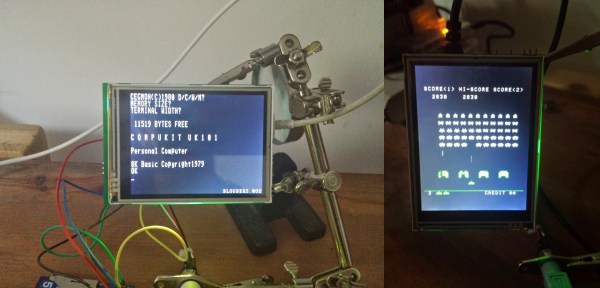
[Steeeve] just sent us his work on emulating a handful of 8080-based microcomputers on a Stellaris Launchpad, including the bare-metal to run Space Invaders. We know what you’re thinking: Is that all you folks are doing these days?!?!? There must be something in the water.

[Steeeve]’s build is based on the Launchpad with an external 64kB of SPI RAM, a nice little TFT display, and a built-in SD card for all of your storage needs. Add in an 8080 emulator and a keyboard and you’ve got a tiny microcomputer. (Is that redundant?)

What’s really neat about [Steeeve]’s project is that he’s cloned not just one target computer, but a whole bunch of computers including (GitHub links follow) the 8080-based UK101/Superboard, the CPM/80, and the machine that ran Space Invaders, as well as the 6502-based Commodore PET and Apple-1.  And as a bonus, you can save the state onto the built-in SD card so that you can hibernate the microcomputer and pick up right back where you left off at a later date. Snazzy.

He’s also built a library which provides an emulation framework if you want to build on this work yourself. And did we mention he can play Space Invaders? Bravo [Steeeve]!

Building Super Small Linux Computers From Scratch

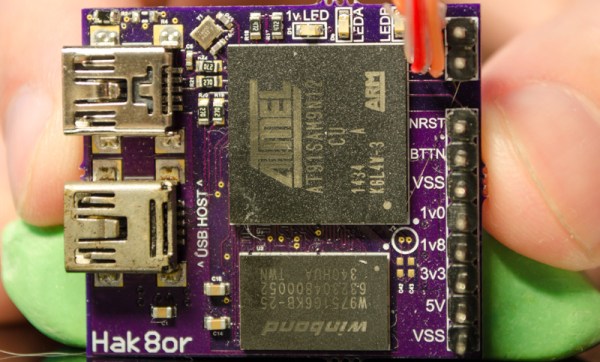
Conventional wisdom says small, powerful embedded Linux like the Raspberry Pi, Beaglebone, or the Intel Edison are inherently manufactured devices, and certainly not something the homebrew tinkerer can produce at home. [hak8or] is doing just that, producing not one, but two completely different tiny Linux computers at home.

The first is based on Atmel’s AT91SAM9N12 ARM processor, but the entire board is just about two inches square. On board is 64 MB of DDR2 DRAM, a USB host and OTG port, and not much else. Still, this chip runs a stripped down Linux off of a USB drive.

The second board is based on the Freescale i.MX233. This board is similar in size and capabilities, but it’s not exactly working right now. There’s an issue with the DRAM timings and a capacitor underneath the SD card is a bit too tall.

The real value of [hak8or]’s project is the incredible amount of resources he’s put into his readme.mds for these repos. If you’ve ever wanted to build an embedded Linux device, here’s your one-stop shop for information on booting Linux on these chips.

High Voltage AVR Programmer

The most common way of programming AVR microcontrollers is the In System Programming port. That little six-pin header with MOSIs and MISOs coming out of it will program every AVR you’ll ever come across. The ISP does have a downside – fuses. Set your fuses wrong, and without a High Voltage Serial Programmer, your chip is bricked. [Dilshan] designed his own HVSP that’s less expensive than the Atmel STK500 and has a nice GUI app.

Instead of following in the footsteps of the USBtinyISP, [Dilshan] is using a PIC18F as the main microcontroller in the programmer. This chip was chosen because of its built-in USB functionality. Because the High Voltage part of a HVSP operates at 12V, actually providing that voltage needed to be taken into consideration. For this, [Dilshan] is using standard 78xx regulators with an 18V input.

The app to control this programmer does everything you would expect, including all the usual AVRdude commands. A great build, and just what we need to reset the fuses on a few dozen chips we have sitting around.