Arduino-based Temp Control Via SMS

smsTempController

As connected as we are, reliable and affordable internet is still a luxury in the far reaches. [kohleick’s] country home is not just remote; with temperatures dropping to -30C in the winter, it’s practically Arctic. His solution for controlling the thermostat from afar was to take advantage of the GSM network and implement a SMS-based heater controller. The unit typically operates in “antifreeze mode,” but sending a simple text message prior to visiting causes the heater to kick it up to a more comfortable setting for your arrival. Daily logs report the system’s status, and an alert will trigger when temperatures fall below a set limit, thus indicating potential faults with the heater.

The build uses a Freeduino paired with an external GSM modem for communication and an LCD to display current status and menus, which users access via three buttons on the side of the picture frame. [kohleick] connected two temperature sensors: one directly to the Freeduino’s shield and a second outside the house. After the temperature sensors detect deviance from the set point, or upon SMS instruction, the Freeduino will crank up the heat through a 5V relay attached to the home’s boiler. Head over to the Instructables page linked above for a bill of materials, schematics, and the code. The Siemens GSM modem in this build is nothing to worry about, but be careful if you try to reproduce this project with an Arduino GSM shield, or your house might really heat up.

Building A Brushless Motor Controller Around An ATmega Chip

You know when you see something like this it’s just going to be awesome, and we weren’t disappointed by our first impression. [Davide Gironi] built a brushless motor controller from the ground up using an ATmega8 as the brain. If you want to understand every aspect of a subject this is how to do it. Lucky for us he explains what each portion of the prototype does.

Brushless motors have no brushes in them (duh). But what does that really mean? In order to spin the motor a very carefully crafted signal is sent through the motor coils in the stationary portion (called the stator), producing a magnetic field that pushes against permanent magnets in the rotor. A big part of crafting that signal is knowing the position of the rotor. This is often accomplished with Hall Effect sensors, but can also be performed without them by measuring the back EMF in the coils not currently being driven. The AVR-GCC compatible library which [Davide] put together can be tweaked to work with either setup.

Get a good look at the system in action after the break.

Continue reading “Building A Brushless Motor Controller Around An ATmega Chip”

Tiny Chess Playing Computer

We have covered many chess computers in the past, but we think this might just be the smallest. Enter the PIC Blitz: A tiny low-cost low-power computer that can play lightning chess.

It’s based on a PIC16F628A microcontroller, which only has 3.5kbytes of flash and a mere 224 bytes of RAM. For comparison, Boris (one of the first consumer chess computers), utilized an 8-bit microprocessor with 2.5 kbytes of ROM and 256 bytes of RAM.

PIC Blitz has a full fledged chess library: it knows all the moves, all the basic openings and even changes its evaluation function weights as the game progresses to keep the game interesting. The creator [Mark Owen] quips about some of the additional techniques he utilized to make up for the limited processing power; including “pondering time”, a difficult and slow user interface, and of course, a barely-comprehensible LCD.

If you’re interested he has released the files under Creative Commons, and has a link to the PCB layout on the project page – we won’t link it directly though, since it goes straight to a download.

[Thanks Martin!]

Motobrain: A Bluetooth Controlled PDU

motobrain

If you’ve ever considered modding your vehicle’s electrical system, [Josh Oster-Morris’s] Motobrain PDU (power distribution unit) might make life easier by providing precision control and protection for auxiliary 12V outputs in your car, bike, boat, etc. Once the Motobrain is paired to a phone over Bluetooth, a companion app displays real-time telemetry and lets you program up to 8 output channels.

Each of these 8 outputs can be directly controlled in the app, but the real power lies in the 4 programmable inputs. Here you can tie systems together and dictate exactly how one should respond to the other, e.g. detecting high-beams and disabling the auxiliary light bar you added. There’s even a “delayed on” option. Programming also has PWM capabilities, so flipping a switch could raise the brightness of some lights over 4 levels of intensity. If those lights are LEDs, the Motobrain can also provide constant current to specification. Each circuit can supposedly handle 15A continuous current and has a programmable circuit breaker, which would make fuses optional.

You can watch an overview video after the break to get a better idea of how it all works, but stop by [Josh’s] project blog to see all the features explained across multiple videos and blog posts as they are developed and tested.

Continue reading “Motobrain: A Bluetooth Controlled PDU”

Homemade LED Helmet

LEDHelmet

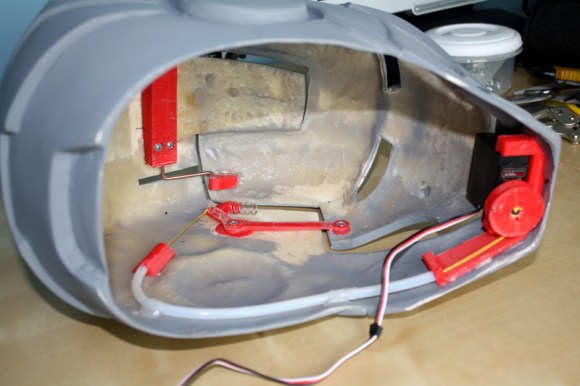
We’ve all seen Daft Punk helmet builds, but [George’s] project is a homemade LED helmet that takes no shortcuts and packs the visor full of hundreds of individual lights. He started with a prototype that uses a PIC 18F4580 microcontroller connected to a MAX7221 LED driver, which gave him control over some dot matrix displays to test the wiring and sample script. He then used this prototype setup to develop a scrolling text function.

With testing complete, [George] wired hundreds of LEDs into 8×8 block sections, using a cardboard jig to keep everything straight. He could have stopped there, but [George] took the build further, adding an LCD display and a 7-segment clock module to the inside of the helmet, in view of the wearer. The clock displays the helmet’s current beats per minute rate, while the LCD shows the content being displayed (pattern, text / Pacman, stripes). It’s possible to see out between the bottom of the display and the chin of the helmet. If you need better visibility we’d recommend a bike helmet matrix that isn’t as dense.

You can watch a video of the helmet running different patterns below. (Warning: music). When you’re done with that, why not LED all the things: from Infinity Mirrors to LED Sneakers.

Continue reading “Homemade LED Helmet”

Antares: One Bare Metal Build System To Rule All Microcontrollers

antares-build-system

[Andrew Andrianov] has the same itch we do when it comes to the variety of inexpensive dev boards out there. They put hardware in your hands but when it comes to the IDE it tends to be a very mixed bag. Some offer hobbled copies of proprietary software, but in most cases you’re on your own for any kind of open source development environment support. He and a couple of friends are working to change that. What they’ve come up with is Antares: a single build system which can compile code for multiple microcontrollers.

The idea is to make the coding environment agnostic from the compile/burn process. This serves a few purposes; it lets you use the IDE you’re most comfortable with, be it Eclipse or emacs. It also seeks to ease the pain of writing libraries that will work with multiple different chips. So far the package supports several of the usual suspects: AVR, msp430, STM32 ARM chips, as well as AT89,and STC variants of 8051. Other chips can be added as more hands make light work (in other words, roll up your sleeves and help these guys out!). Right now development targets Linux dev platforms but OS X has been shown to work with some patches.

The link above is a rather daunting readme from the Github repo. If you need a better overview before diving in hit up the RC1 announcement on [Andrew’s] blog.

A Really, Really Tiny Microcontroller Board

Here’s something very cool from the wonderful world of Adafruit: The Trinket, an Arduino compatible microcontroller platform that’s not only small enough to fit in your pocket, it’s small enough to lose in your pocket.

Like the similarly specced Digispark, the Trinket features an ATTiny85 microcontroller with 5 IO pins. Unlike the Digispark, the Trinket is a bit more substantial, featuring 3.3 and 5 Volt regulators along with a real USB port and mounting holes. As this is based on the ‘tiny85, it’s possible to connect this up to I2C and SPI sensors and peripherals

One thing to note about the Trinket is the fact that it’s so cheap. Either version of the Trinket goes for about $8, inexpensive enough to simply leave in a project when you’re done with it. Given the cool stuff we’ve already seen created with the Digispark, including a homebrew stepper motor and an Internet meme and lame pun assessment tool, we can’t wait to see what’s made with the Trinket,