Pyxis 3 Hits Beta; Rebranded As Gadgetos

The beta version of Pyxis 3 is now available. Skewworks continues to develop the ARM operating system, and with the transition to version 3 they’ve given it a new name: Gadgetos. One big difference from Pyxis 2 is that the new kernal is closed source. But they’ve taken steps to ensure that the OS is still hardware independent. This is done by reworking the kernel to allow driver loading at run time from an SD card.

The user interface has also changed a bit. Gadgetos relies entirely on a context-based menu system. The minimum input hardware requires a touchscreen LCD and one tactile button. By holding that button, a menu pops up in the center of the screen. This menu is different based on where it is called (this is where context comes in). If you’re at the desktop screen, you get options to load programs, etc. If you pull up the menu while running an application you’ll see the options available for that app. To see more about the new navigation system check out the video after the break.
Continue reading “Pyxis 3 Hits Beta; Rebranded As Gadgetos”

Tiny Audio Switcher Eliminates Repetitive Plug Swapping

usb-audio-switcher

[Phil] uses both his computer’s speakers and a set of headphones while working at his desk, but he was growing tired of constantly having to remove the headset from his sound card in order to insert the speaker plug. He’s been meaning to rig something up to make it easier to switch outputs, but never seemed to get around to it until he recently saw this LAN-enabled audio switcher we featured.

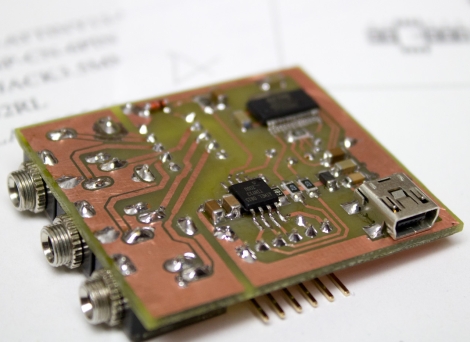
His USB-controlled switch features a single audio input and two audio outputs, which he mounted on a nicely done homemade double-sided PCB. The switch can be toggled using any terminal program, sending commands to the on-board ATtiny13A via an FT232R USB to serial UART chip.

The switch’s operation is really quite simple, merely requiring [Phil] to type in the desired audio channel into the terminal. The ATiny and a small relay do the rest, directing the audio to the proper output.

Echo Box Shakes Itself To Make Sound

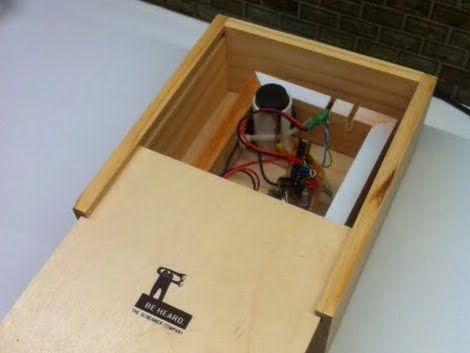
The echo box performs exactly as its name implies. If you tap out a rhythm on the lid, it will tap the same thing back to you. Except it isn’t tapping to make the sound, but vibrating.

The concept is similar to the Knock Block. In that hack, a piezo element detected a rapping on the wooden enclosure and repeated the rhythm by striking the lid with a solenoid. This iteration also uses a piezo element as the sensor. In the image above you can see a segment of PVC pipe in the upper corner. That houses the element, sandwiched between two pieces of wine bottle cork. That cork just touches the lid of the box, transferring the vibrations to the element.

The sound is created by a motor with an offset weight on its spindle. When the motor spins, it causes vibrations. The enclosure is one wood box inside of another, so the vibrating motor cause the inner box to shake against the outer one to make noise. Hear it for yourself in the clip after the break.

Continue reading “Echo Box Shakes Itself To Make Sound”

AVR External Memory Interface (XMEM) Reads Input Matrix

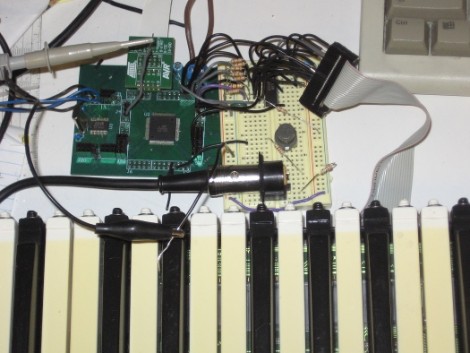
Reading from a large number of inputs, like this piano keyboard, can be tedious. Even when multiplexing there’s a lot to keep track of. But if you choose the right microcontroller, you may have hardware assistance. Here’s an ATmega640 is using it’s external memory interface to read the key matrix.

You may remember the Open Music Labs article about reading from a shift register using just one pin of a microcontroller. This time around a shift register is still used, but instead of pulling in a long line of parallel inputs, the switches are multiplexed to reduce the number of I/O pins used to read them.

A 74HC573 is used to facilitate the multiplexing. We won’t go into how that part is accomplished; there’s a separate post that explains the process. What’s unique here is that the XMEM peripheral of the AVR microcontroller is used to grab the data. This is intended for external memory chips, but if you get the timing just right, it greatly simplifies reading in a matrix of up to 128 inputs.

Binary Division When Your Processor Lacks Hardware Division

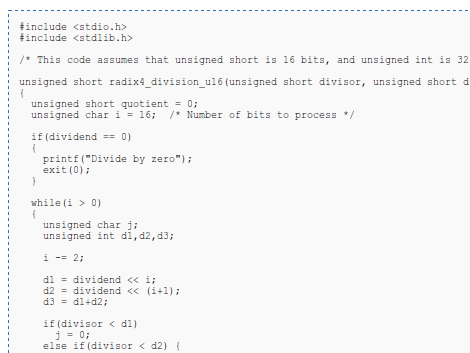
[Hamster] wanted to take a look at division operations when the chip you’re using doesn’t have a divide instruction. He makes the point that the divide instruction takes a lot of space on the die, and that’s why it’s sometimes excluded from a chip’s instruction set. For instance, he tells us the ARM processor used on the Raspberry Pi doesn’t have a divide instruction.

Without hardware division you’re left to implement a binary division algorithm. Eventually [Hamster] plans to do this in an FPGA, but started researching the project by comparing division algorithms in C on an AMD processor.

His test uses all 16-bit possibilities for dividend and divisor. He was shocked to find that binary division doesn’t take much longer than using the hardware instruction for the same tests. A bit of poking around in his code and he manages to beat the AMD hardware divide instruciton by 175%. When testing with an Intel chip the hardware beats his code by about 62%.

He’s got some theories on why he’s seeing these performance differences which we’ll let you check out on your own.

Lamp Fading And Remote Control For The Lazy

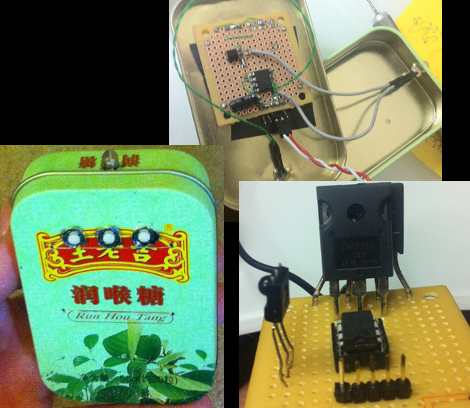
[Dmitry Grinberg] has to walk all the way across his bedroom to switch the lamp on and off. The drudgery of this finally became too much, so he built a remote control and added dimming for good measure. Above you can see the circuitry for the remote and the receiver, as well as the finished remote housed in what he calls a ‘Chinese Altoids tin’.

After the break you’ll find [Dmitry’s] demo video. The remote control is quite responsive, and the dimming has great resolution. That’s thanks to a power N-channel MOSFET which switches the AC with the help of a full wave rectifier. The PIC 12F617 that controls the MOSFET is powered separately, and [Dmitry] mentions that you must use a transformer and not a switch-mode power supply to avoid a fire. We’d like to know more about this, so leave a comment if you are able to explain further.

The remote and receiver communicate via Infrared. The protocol is operating with 38 kHz signals using an easily sourced receiver tuned to that frequency. [Dmitry] shares all the details about the encoding scheme that he uses. Recreating this communications pairing is a great way to test your understanding of this technique. But if you need a refresher, here’s a tutorial to push you in the right direction. Continue reading “Lamp Fading And Remote Control For The Lazy”

Adding Sound And Light To Your Radio Controlled Vehicles

[Nicholas] wanted to add some flair to his RC car. In addition to the headlights that you see above, there’s brake lights, and a horn that plays “Dixie” like the General Lee in the Dukes of Hazard. All of this is triggered by the wireless controller, but he figured out a way to monitor the servo signals in order to add the additional features.

The hack is driven by a Propeller chip. [Nicholas] patches into the servo lines by adding a servo-in and servo-out header to his prototyping shield. With that in place he’s able to tap into the voltage and ground pins to power the microcontroller. By attaching a 4k7 resistor to the control line, he can listen in on the servo signals using the Propeller.

This RC car has a throttle servo. So when the throttle is opened all the way up the Propeller chip flashes some white LEDs in the headlights, and uses an LM386 audio amplifier to play a tune. When the throttle is pulled all the way back the brake lights are activated. Don’t miss the test footage of this which is embedded after the break.

Continue reading “Adding Sound And Light To Your Radio Controlled Vehicles”