Why Do Rifa Capacitors Fail?

Anyone who works with older electronic equipment will before long learn to spot Rifa capacitors, a distinctive yellow-translucent component often used in mains filters, that is notorious for failures. It’s commonly thought to be due to their absorbing water, but based upon [Jerry Walker]’s long experience, he’s not so sure about that. Thus he’s taken a large stock of the parts and subjected them to tests in order to get to the bottom of the Rifa question once and for all.

What he was able to gather both from the parts he removed from older equipment and by applying AC and DC voltages to  test capacitors, was that those which had been used in DC applications had a much lower likelihood of exhibiting precursors to failure, and also a much longer time before failure when connected to AC mains.

Indeed, it’s only at the end of the video that he reveals one of the parts in front of him is an ex-DC part that’s been hooked up to the mains all the time without blowing up. It’s likely then that these capacitors didn’t perform tot heir spec only when used in AC applications. He still recommends replacing them wherever they are found and we’d completely agree with him, but it’s fascinating to have some light shed on these notorious parts.

Continue reading “Why Do Rifa Capacitors Fail?”

A bench setup with a spectrum analyzer and a PCB under test

Clever Test Rig Clarifies Capacitor Rules-of-Thumb

If you’ve done any amount of electronic design work, you’ll be familiar with the need for decoupling capacitors. Sometimes a chip’s datasheet will tell you exactly what kind of caps to place where, but quite often you’ll have to rely on experience and rules of thumb. For example, you might have heard that you should put 100 µF across the power supply pins and 100 nF close to each chip. But how close is “close”? And can that bigger cap really sit anywhere? [James Wilson] has been doing research to get some firm answers to those questions, and wrote down his findings in a fascinating blog post.

A PCB used to measure the effect of capacitor placement
The test board has two-layer and four-layer sections. The inter-layer capacitance greatly affects the PDN’s performance in each case.

[James] designed a set of circuit boards that enabled him to place different types of capacitors at various distances along a set of PCB traces. By measuring the impedance of such a power distribution network (PDN) across frequency, he could then calculate its performance under different circumstances.

The ideal tool for those measurements would have been a vector network analyzer (VNA), but because [James] didn’t have such an instrument, he made a slightly simpler setup using a spectrum analyzer with a tracking generator. This can only measure the impedance’s magnitude, without any phase information, but that should be good enough for basic PDN characterization.

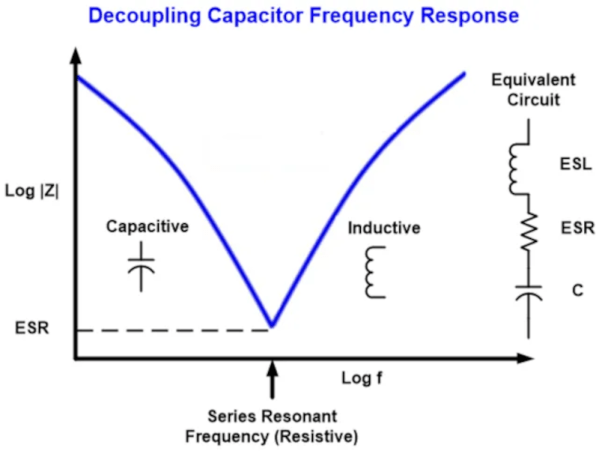
The results of [James]’s tests are pretty interesting, if not too surprising. For example, those 100 nF capacitors really ought to be placed within 10 mm of your chip if it’s operating at 100 MHz, but you can get away with even 10 cm if no signals go much above 1 MHz. A bulk 100 µF cap can be placed at 10 cm without much penalty in either case. Combining several capacitors of increasing size to get a low impedance across frequency is a good idea in principle, but you need to design the network carefully to avoid resonances between the various components. This is where a not-too-low equivalent series resistance (ESR) is actually a good thing, because it helps to dampen those resonances.

Overall, [James]’s blog post is a good primer on the topic, and gives a bit of much-needed context to those rules of thumb. If you want to dive deeper into the details of PDN design or the inductance of PCB traces, our own [Bil Herd] has made some excellent videos on those topics.

MOSFET Heater Is Its Own Thermostat

While we might all be quick to grab a microcontroller and an appropriate sensor to solve some problem, gather data about a system, or control another piece of technology, there are some downsides with this method. Software has a lot of failure modes, and relying on it without any backups or redundancy can lead to problems. Often, a much more reliable way to solve a simple problem is with hardware. This heating circuit, for example, uses a MOSFET as a heating element and as its own temperature control.

The function of the circuit relies on a parasitic diode formed within the transistor itself, inherent in its construction. This diode is found in most power MOSFETs and conducts from the source to the drain. The key is that it conducts at a rate proportional to its temperature, so if the circuit is fed with AC, during the negative half of the voltage cycle this diode can be probed and used as a thermostat. In this build, it is controlled by a set of resistors attached to a voltage regulator, which turn the heater on if it hasn’t reached its threshold temperature yet.

In theory, these resistors could be replaced with potentiometers to allow for adjustable heat for certain applications, with plastic cutting and welding, temperature control for small biological systems, or heating other circuits as target applications for this type of analog circuitry. For more analog circuit design inspiration, though, you’ll want to take a look at some classic pieces of electronics literature.

IBIS Models Explained

If you’ve worked with circuit simulation, you may have run into IBIS models. The acronym is input/output buffer information, and while you can do a lot without having to deal with IBIS, knowing about it can help you have a successful simulation.

IBIS is an industry-standard format that uses ASCII text to describe voltage versus current and voltage versus time about some device’s digital input and output pins. This allows precise simulation without revealing the device’s internals, which is important to some vendors. The first post of this two-part series talks about what IBIS is and how it got started. The second part explains creating and using LTSpice to create your own IBIS models. It also covers why you might want to do that.

Of course, if you don’t care about revealing the internals of a device, you could just create a Spice simulation. However, many tools will accept both models, so it is useful to know how to produce either kind of model. In fact, to create an IBIS model, you’ll want to use a Spice model to generate the data for the IBIS model, so it is a good bet you’ll have both, even if you choose to only publish the IBIS models.

If you need a refresher on Spice, we have a series. If you prefer using something different, try Micro-Cap 12, which was commercial, but went free a few years ago.

A freshly reballed BGA chip next to a clean PCB footprint

Working With BGAs: Soldering, Reballing, And Rework

In our previous article on Ball Grid Arrays (BGAs), we explored how to design circuit boards and how to route the signals coming out of a BGA package. But designing a board is one thing – soldering those chips onto the board is quite another. If you’ve got some experience with SMD soldering, you’ll find that any SOIC, TQFP or even QFN package can be soldered with a fine-tipped iron and a bit of practice. Not so for BGAs: we’ll need to bring out some specialized tools to solder them correctly. Today, we’ll explore how to get those chips on our board, and how to take them off again, without spending a fortune on equipment.

Tools of the Trade

For large-scale production, whether for BGA-based designs or any other kind of SMD work, reflow ovens are the tool of choice. While you can buy reflow ovens small enough to place in your workshop (or even build them yourself), they will always take up quite a bit of space. Reflow ovens are great for small-scale series production, but not so much for repairs or rework. Continue reading “Working With BGAs: Soldering, Reballing, And Rework”

New Part Day: TI Jumps In To The Cheap MCU Market

One of the interesting areas in the world of new parts recently has been at the lower end of the microcontroller market. Not because the devices there have new capabilities or are especially fast, but because they are cheap. There are now quite a few parts from China under 10 cents apiece, but have the Western manufacturers been able to follow suit? Not quite, but Texas Instruments has a new line of ARM Cortex M0+ parts that get under 40 cents in volume in their cheapest form.

That bottom-of-the-range chip is the MSPM0L1105, a single-core 32 MHz part with 32k of Flash and 4k of RAM. It’s got all the usual peripherals you’d expect on a small microcontroller, but the one which made our heads turn was the on-board 1.45-Msps ADC. On a cheap chip, that’s much faster than expected.

So there’s another microcontroller, and it’s not as cheap as some of its competition, so what? Aside from that ADC there are several reasons to be interested, it has TI’s developer support if you’re in that ecosystem, and inevitably it will find its way on to the dev boards and SBCs we use in our community. It remains to be seen how it will fare in terms of the chip shortage though.

Meanwhile, here’s a reminder of that cheaper competition.

Thanks to the several friends who delivered this tip.

This Open Hardware Li-Ion Charger Skips The TP4056

There’s a good chance that if you build something which includes the ability to top up a lithium-ion battery, it’s going to involve the incredibly common TP4056 charger IC. Now, there’s certainly nothing wrong with that. It’s a decent enough chip, and there are countless pre-made modules out there that make it extremely easy to implement. But if the chip shortage has taught us anything, it’s that alternatives are always good.

So we’d suggest bookmarking this opensource hardware Li-Ion battery charger design from [Shahar Sery]. The circuit uses the BQ24060 from Texas Instruments, which other than the support for LiFePO4 batteries, doesn’t seem to offer anything too new or exciting compared to the standard TP4056. But that’s not the point — this design is simply offered as a potential alternative to the TP4056, not necessarily an upgrade.

[Shahar] has implemented the design as a 33 mm X 10 mm two-layer PCB, with everything but the input and output connectors mounted to the topside. That would make this board ideal for attaching to your latest project with a dab of hot glue or double-sided tape, as there are no components on the bottom to get pulled off when you inevitably have to do some rework.

The board takes 5 VDC as the input, and charges a single 3.7 V cell (such as an 18650) at up to 1 Amp. Or at least, it can if you add a heatsink or fan — otherwise, the notes seem to indicate that ~0.7 A is about as high as you can go before tripping the thermal protection mode.

Like the boilerplate TP4056 we covered recently, this might seem like little more than a physical manifestation of the typical application circuit from the chip’s datasheet. But we still think there’s value in showing how the information from the datasheet translates into the real-world, especially when it’s released under an open license like this.