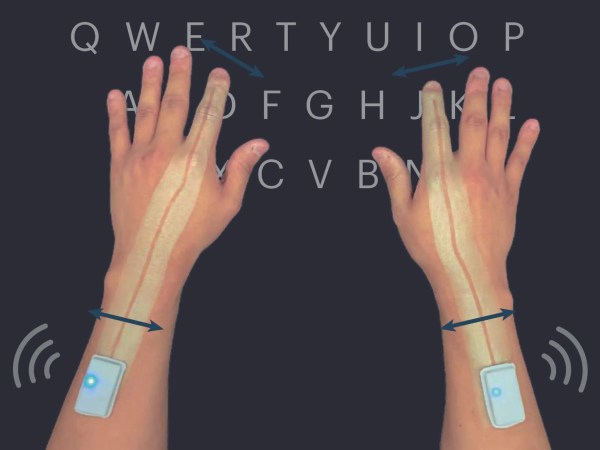
Five-Foot Keyboard Lays It All On The Line

We would bet that among the most technologically-inclined of our readership, there are plenty of hunt-and-peck typists. Because of course, typing quickly and from the home row has nothing to do with intelligence, and everything to do with practice and rote muscle memorization. But what if the keyboard was all home row?

That’s right — Google Japan (translated) is back at it with another joke peripheral that happens to be 100% real and open-source. Whether you want to keep your distance from others while you toil at the coffee shop, or really, really want to get into the pair programming thing, this is the keyboard for you. While the prototype was a whopping seven feet long (or wide, whatever), the final version is shorter and friendlier, and can double as a walking stick on those outdoor sanity breaks with the addition of a protective shoe.

As with their mug keyboard, we appreciate the work that went into making this keyboard real just as much as the joke itself. Our favorite factoid has to be that this is made up of 17 different circuit boards, including the control board. Be sure to check out the fairly hilarious promo video after the break.

Continue reading “Five-Foot Keyboard Lays It All On The Line”

Custom Macro Pad Helps Deliver Winning Formulas

For those of us with science and engineering backgrounds, opening the character map or memorizing the Unicode shortcuts for various symbols is a tedious but familiar part of writing reports or presentations. [Magne Lauritzen] thought there had to be a better way and developed the Mathboard.

With more than 80 “of the most commonly used mathematical operators” and the entire Greek alphabet, the Mathboard could prove very useful to a wide number of disciplines. Hardware-wise, the Mathboard is a 4×4 macro pad, but the special sauce is in the key set implementation firmware. While the most straightforward approach would be to pick 16 or 32 symbols for the board, [Magne] felt that didn’t do the wide range of Unicode symbols justice. By implementing a system of columns and layers, he was able to get 6+ symbols per key, giving a much greater breadth of symbols than just 16 keys and a shift layer. The symbols with a dot next to them unlock variants of that symbol by double or triple-tapping the key. For instance, a lower or capital case of a Greek letter.

The Mathboard currently works in Microsoft Office’s equation editor and as a plain-text Unicode board. [Magne] is currently working on LaTeX support and hopes to add Open Office support in the future. This device was an honorable mention in our Odd Inputs and Peculiar Peripherals Contest. If you’d like to see another interesting math-themed board, check out the one on the MCM/70 from 1974.

An All-In-One Serial Printer Playground

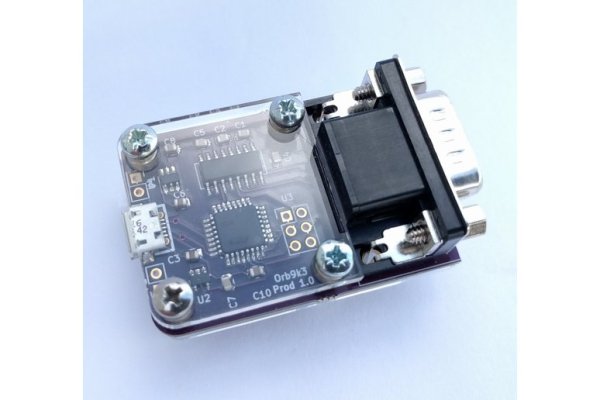
One of the peripherals of most desire for a microcomputer-obsessed youth in the 1980s was a printer, probably a dot-matrix device. In the decades since, printers have passed into being almost a piece of discardable junk as cheap inkjets can be found in any garage sale. That’s not to say that there’s not plenty of fun to be had hacking older types though, and there are plenty of small thermal printers out there to play with. [Tanmoydutta] has provided a platform that may help, in the form of an ESP32-C3-based serial printer controller.

On board is a level shifter for the 5 volt printer electronics and all the appropriate connectors for the printer, as well as the ESP and onboard USB interface. It’s a networked print server, but one which is entirely and completely hackable. We think the printer in question is this one sold by Adafruit.

So this board makes easier a whole host of printer-related projects, and should you try it you will no doubt finding yourself ankle-deep in little curly pieces of paper. This printer’s not the only one in town though, don’t forget the cheap Bluetooth printers!

Mechanical Color Picker Types Hex Codes For You

Hex codes are a simple, unambiguous way to designate colors in digital media. However, going from a color in your head to a hex code can be difficult for the unpracticed. [Guy Dupont] built a little gadget by the name of the Dial Toner to do it for him (Nitter).

The Dial Toner has two dials for each color channel – Red, Green, and Blue. By turning the dials, one can choose a given color in the 8-bit RGB color space, and that color is then displayed on the device’s included RGB LED. Once selected, the button can be pressed to type the selected color’s hex code into a text box. The Dial Toner runs on a Xiao RP2040 microcontroller board, and is coded in CircuitPython.

[Guy] hopes to sell the Dial Toner on Etsy in future, and is even working on a CMYK version for print addicts. We’ve featured [Guy]’s work here before, too, in the form of his extended-play HitClips cartridges. Video after the break.

Continue reading “Mechanical Color Picker Types Hex Codes For You”

Banana Split Macropad Is Dessert For Your Desk

Once again, [Dan Bostian] is ahead of the curve when it comes to bringing bunches of banana puns to the table, but we think you’ll find this banana split macropad quite appealing nonetheless. Does this tasty thing look familiar? It ought to — we discovered, plucked, and uncovered the one-piece version last summer, and this time, [Dan] simply made our two-piece, wireless dreams come true.
Peel back the — oh, forget it. Inside, you’ll find a nice!nano running the show from the right-hand board using ZMK firmware, and a banana-shaped chalk outline on the left-hand silkscreen that represents how completely [Dan] killed it with this build. You can use any switches you want, as long as they’re Cherry MX-compatible in the shoe footprint department.
The PCBs are open source, of course, and so are the printed parts — it’s all there in the repo. As for the stickers, well, you’ll have to produce those yourself.
Illustrated Kristina with an IBM Model M keyboard floating between her hands.

Keebin’ With Kristina: The One With The Hexagonal Keyboard

Well, I didn’t mean to take the whole summer off from Keebin’, it just kind of happened that way. You’d think it would have been #13 that tripped me up, but we ain’t even there yet — this is only the twelfth edition. I kept thinking I should write one and it just wasn’t happening, until I got a tip from [s.ol bekic] about their stunning hexagonal keycaps and the journey toward making an open-source 12-key macropad featuring same.

But let’s back up a bit. Originally, [s.ol] designed a totally sick hybrid MIDI-and-typing keyboard from scratch, which you can see in this short video. It glows, it splits in half, and it snaps back together again quite satisfyingly. And you probably noticed the hexagonal keycaps that look like they might be printed or milled, or perhaps even printed and then milled.

In actuality, [s.ol] threw all the processes at this keycap project — milling, molding and casting, and 3D printing. None of them worked well enough to get much past the prototype stage, but in the end, [s.ol] joined forces with fkcaps.com to create and offer an injection-molded version that I’d really, really like to rock my fingertips around in. Good thing I can pick some up for cheap.

Of course, the real process was all the learning [s.ol] did along the way — both in the early days of making the hybrid keyboard, and after teaming up with fkcaps to make the keycaps and the accompanying macropad into real products. And that was after all the design work it took to get this newfangled honeycomb configuration right.

In case you’re wondering, these are meant for only Kailh chocs, but no matter the switch, the spacing is really important because of all the possible points of friction introduced by the design. Be sure to check out the keycap docs page, macropad docs page, and this gallery of keycaps and macropads.

Continue reading “Keebin’ With Kristina: The One With The Hexagonal Keyboard”

Why You’ve Never Heard About Nintendo’s U-Force

90’s kids think that the Power Glove was the coolest game peripheral of the epoch. We might have thought so too, until we heard about Don’t Touch: The Story of the U-Force from [The Gaming Historian].

The device itself folded up like a laptop, and on the two surfaces had four IR LED/sensor pairs. All of these combined would localize your fist in space for playing Mike Tyson’s Punch Out, or would work with various other passive controller add-ons like a flight yoke for playing Top Gun. (One of the coolest bits is the flip-out IR reflectors triggered by the buttons in the yoke.)

All-in-all, the video’s take is that a number of factors doomed the U-Force to play second fiddle to the Power Glove. Battling Mattel’s marketing prowess is obvious, but other things like manufacturing problems due to bad hinges and inconsistent IR sensors delayed release and added cost. In the end, though, [Dave Capper], the U-Force’s inventor, puts it down simply to non-convincing gameplay. There were no blockbuster games that used it to its full potential.

At the time, the U-Force utilized more IR LEDs than any other consumer electronic device.

We think there’s interesting hacker potential in a simple interface like this. Perhaps its biggest Achilles heel outside of the lack of a killer application was the fact that it required calibration. We can imagine all sorts of awesome interactions, and we’re not afraid of a little tweaking. Or maybe we would update the sensors to something more modern, like those inexpensive time-of-flight distance units.

Thanks [Karl Koscher] for bringing this documentary to our attention in the comments about the very similarly interesting laser theremin project we featured last year. It’s definitely opened our eyes to an old interaction of the past that would seem no less magical today.

Continue reading “Why You’ve Never Heard About Nintendo’s U-Force”