Reliving Second-Hand Nostalgia With The PDP-11

Levy’s Hackers: Heroes of the Computer Revolution is something like required reading for the hacker subculture, and Hackaday by extension. The first section of that book is all about early hackers and their adventures with the PDP-1 at MIT. The PDP-11 has earned a special place in hacker history for being the minicomputer used to write the first Unix. We’re always amazed to find how many of our readers have stories about programming PDP microcomputers, usually the PDP-11. Those of us young enough to have missed out on the PDP experience often have something of a second-hand nostalgia for the old machines. An exceptionally detailed article over at Ars Technica promises to get us started reliving the glory days, even if it is for the first time.

It turns out that there’s an emulator for the old minicomputers, the History Simulator, abbreviated SimH. The article gives step-by-step instructions to get the emulator running, booting Unix 2.11 on a virtual PDP-11. The fun doesn’t stop there. The write-up includes an intro the the PDP-11 hardware, and a crash-course to assembly programming for the beast. It’s a great look at how the stack, branching, and subroutines work under the hood. Most of it still applies to computing today, so it really is worth the read.

Looking for more PDP-11 lore? Check out our coverage of DEC’s history.

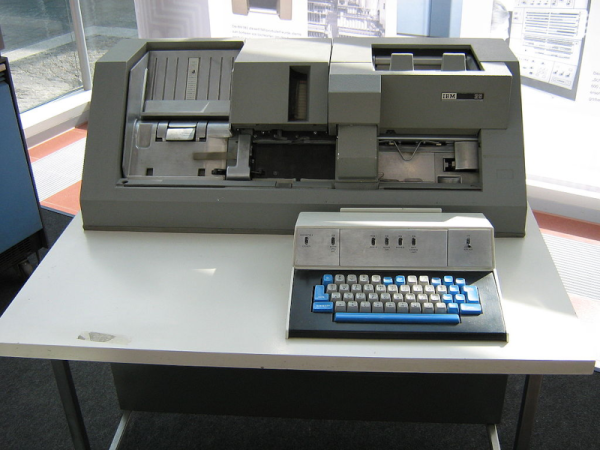
The image above is “PDP-11” by ToastyKen, and is licensed under CC BY 2.0

A Sinclair ZX81 Clone Still Has The Power To Fascinate

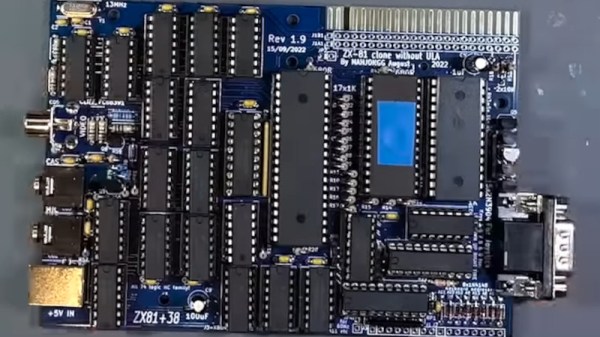
The golden age of 8-bit computing brought us pixelated graphics in bright colours, accompanied of course by chiptune music. This aesthetic is strong enough to define a collective image of a generation’s youth, even if the 1980s reality had much more of the tired 1970s leftovers about it.  The truth was that not all popular 8-bit machines had colour, sound, or good graphics, and among these limited-capability machines was Sir Clive Sinclair’s ZX81. With a Z80, 1k of RAM, a membrane keyboard, and not much else, it helped set the stage for the hugely popular ZX Spectrum which followed it. The fun’s not over though, as [Augusto Baffa] demonstrates with his modern recreation of a machine that can switch between the ’81 and its less-popular ZX80 predecessor.

Rather than a Eurocard-sized mainboard and membrane keypad, this clone copies the ZX80 with a full-sized mainboard the front of which carries the keyboard contacts. It also eschews the ULA found in the ’81 for discrete TTL. It’s based upon the venerable Grant Searle design for a homebuilt Sinclair computer, and all of the files for this version can be found in a GitHub repository.

There is a lot to be said for the ZX81 as a model for retrocomputer experimentation, because of its extreme simplicity. It may have been no great shakes in the computing department compared to many of its competitors, but it remains possibly one of the easiest of the bunch whose operation to completely understand. Also we like it for that paltry 1k of memory, teaching kids about memory constraints is a good thing in our book.

We’ve featured the diminutive ZX more than once, including a couple of years ago in our April Fools coverage.

Introducing The Universal Atari Keyboard Case

[10p6] wondered what it would be like if Atari had used a standardized keyboard across its 16-bit and 32-bit computer lines in 1985. Imagination is fun, but building things is even better, and thus they set out to create such a thing. Enter the Universal Atari Keyboard Case.

The case design is flexible, and can accept a keyboard from models including the Atari ST and Falcon. The keyboard can then be used with an Atari Mega, TT, or desktop-style Atari computers without mods. It also brings modern peripherals to bear on these old Atari platforms, enabling the use of modern USB mice while also using the two onboard joystick ports. Power and floppy LEDs are present, but subtly hidden beneath the case, only becoming visible when illuminated. It also includes 5-watt stereo speakers for getting the best out of the Atari’s sound hardware.

The final part, a full 473mm long, was 3D printed in resin for a high-quality surface finish. The results are so good it almost looks like a genuine factory keyboard.

If you’re regularly playing with your vintage Atari machines and you want a great keyboard to use with them, this could be the design for you. [10p6] has promised to soon upload the design files to Thingiverse for those eager to replicate the work.

We’ve also seen retro Atari keyboard converted to work with modern machines. Video after the break. Continue reading “Introducing The Universal Atari Keyboard Case”

History Of Digital Equipment Corp And Bonus PDP-11 Replica Build

[RetroBytes] takes us on a whirlwind tour of the history of the Digital Equipment Corporation (DEC), its founder Ken Olsen, and during intermission builds up a working replica of the PDP-11 from a kit. DEC was a major player in the early computer industry, cranking out a number of models that were both industrial workhorses and used in computer laboratories to develop many of the operating systems and tools whose descendants we still use today. On top of that, DEC’s innovative, employee-friendly, and lightweight company structure was generally well-liked by its employees and a welcomed departure from the typical behemoths of the day.

This video takes us from the beginnings of DEC and its roots in MIT up to the PIP-11 era, highlighting major architectures and events along the way such as the PDP-1, PDP-8, and PDP-11. [RetroBytes] says he has a DEC Alpha sitting on the sidelines, so there may be a few follow-up videos in the future — perhaps one on the VAX as well.

We’ve covered this particular PDP-11 replica last year, and if these replica kits are your cup of tea, check out our coverage of kit designer [Oscar Vermeulen]’s presentation. Have you ever used real PDP or VAX computers? Let us know your war stories in the comments below.

Continue reading “History Of Digital Equipment Corp And Bonus PDP-11 Replica Build”

A Macintosh Plus computer next to a modern laptop

Remote Desktop Fun For Your Old Macintosh

Remotely accessing your computer’s desktop, files and network from anywhere has enabled remote working (i.e. ‘work from home’) for the last several decades. Modern PCs have more than enough computational grunt for Virtual Network Computing (VNC), but where does that leave our retro computing community? [Marcio Teixeira] has it covered with MiniVNC, a brand-new remote desktop server for (very) vintage Macintosh computers.

Now before you say anything, it’s true that ChromiVNC has existed for some time, and is a pretty decent remote desktop server for old Macs. However MiniVNC has several significant advantages, most notably, MiniVNC is fully compatible with MacTCP. Apple’s very first TCP/IP networking stack landed on the Macintosh platform with System 6. As such, MiniVNC can serve up a remote desktop on some of the oldest Mac computers, including the Macintosh Plus.

It’s hard to overstate just how cool that is – the iconic Macintosh Plus was released in 1986, runs at a pedestrian 8MHz and supports a maximum of 4MB memory. While much of MiniVNC was written in C++, portions of the software (including TRLE encoding) had to be handwritten in 68K assembly language to ensure decent performance. The entire focus of MiniVNC was on performance and flexibility, with accuracy coming in second, which seems like the right decision. The odd screen artifact and missed update seems to be reasonable trade-off to get this running somewhat smoothly on a Motorola 68000 processor.

Continue reading “Remote Desktop Fun For Your Old Macintosh”

Retro Serial Terminal Uses Modern Chips To Get CP/M Machine Talking

The hobbyists of the early days of the home computer era worked wonders with the comparatively primitive chips of the day, and what couldn’t be accomplished with a Z80 or a 6502 was often relegated to complex designs based on logic chips and discrete components. One wonders what these hackers could have accomplished with the modern components we take for granted.

Perhaps it would be something like this minimal serial terminal for the current crop of homebrew retrocomputers. The board is by [Augusto Baffa] and is used in his Baffa-2 homebrew microcomputer, an RC2014-esque Z80 machine that runs CP/M. This terminal board is one of many peripheral boards that plug into the Baffa-2’s backplane, but it’s one of the few that seems to have taken the shortcut of using modern microcontrollers to get its job done. The board sports a pair of ATmega328s; one handles serial communication with the Baffa-2 backplane, while the other takes care of running the VGA interface. The card also has a PS/2 keyboard interface, and supports VT-100 ANSI escapes. The video below shows it in action with a 17″ LCD monitor in the old 4:3 aspect ratio.

We like the way this terminal card gets the job done simply and easily, and we really like the look of the Baffa-2 itself. We also spied an IMSAI 8080 and an Altair 8800 in the background of the video. We’d love to know more about those.

Continue reading “Retro Serial Terminal Uses Modern Chips To Get CP/M Machine Talking”

Bringing IMessage To The Mac

If you’ve invested in the Apple ecosystem, the joys of iMessage likely illuminate your life. Your phone and desktop and laptop all sync your messages. But what if your desktop is running Mac OS 9 or System 2? This is where [CamHenlin’s] MessagesForMacintosh comes in.

Unfortunately, it does require a more modern Mac to act as an access point into the wider iMessage network. The modern Mac sets up a GraphQL database that can be accessed. Then a serial cable connects your “retro daily driver” to a translation layer that converts the serial commands into GraphQL commands. This could be something simple and network-connected like an ESP32 or a program running on your iMessage Mac. [CamHenlin] has a second Mac mini in his demo, seen above.

[CamHenlin] leverages his library known as CoprocessorJS. It allows older machines to hand off complex workloads to more modern machines, allowing modern machines to act as a coprocessor. Getting a single binary to run across many different versions of Mac OS and System is tricky and there were a few tricks involved. Retro68 is a C++17 compiler that targets PowerPC and 68k architectures. Additionally, Nuklear Quickdraw is used to provide a GUI in a performant manner.

It is always a joy to see older hardware do new tricks, often with the help of a bit of modern hardware. Connecting your Mac to the internet can be as easy as Pi.