38 Years Later, The Atari 2600 Learns To Speak

Back in the early 1980s, there was a certain fad in making your computer produce something resembling human speech. There were several hardware solutions to this, adding voices to everything from automated telephone systems to video game consoles, all the way to Steve Jobs using the gimmick to introduce Macintosh to the world in 1984. In 1982, a software-based version of this synthesis was released for the Atari 8-bit line of computers, and ever since them [rossumur] has wondered whether or not it could run on the very constrained 2600.

Fast-forward 38 years and he found out that the answer was that yes, it was indeed possible to port a semblance of the original 1982 Software Automatic Mouth (or SAM) to run entirely on the Atari 2600, without any additional hardware. To be able to fit such a seemingly complicated piece of software into the paltry 128 bytes (yes, bytes) of RAM, [rossumur] actually uses an authoring tool in order to pre-calculate the allophones, and store only those in the ROM. This way, the 2600 alone can’t convert text to phonemes, but there’s enough space left for the allophones, which are converted into sound, that about two minutes of speech can fit into one cartridge. As for why he went through the trouble, we quote the author himself: “Because creating digital swears with 1982 speech synthesis technology on a 1977 game console is exactly what we need right now.”

For this project, [rossumur] has written an incredibly interesting article on speech synthesis in order to explain the SAM engine used here. And this isn’t his first time on the website either, always cramming software where it shouldn’t fit, such as a “Netflix”-like streaming service, or 8-bit console emulators, both on nothing but an ESP32 microcontroller. Check this one out in action after the break.

Continue reading “38 Years Later, The Atari 2600 Learns To Speak”

TMD-1 Makes Turing Machine Concepts Easy To Understand

For something that has been around since the 1930s and is so foundational to computer science, you’d think that the Turing machine, an abstraction for mechanical computation, would be easily understood. Making the abstract concepts easy to understand is what this Turing machine demonstrator aims to do.

The TMD-1 is a project that’s something of a departure from [Michael Gardi]’s usual fare, which has mostly been carefully crafted recreations of artifacts from the early days of computer history, like the Minivac 601  trainer and the DEC H-500 computer lab. The TMD-1 is, rather, a device that makes the principles of a Turing machine more concrete. To represent the concept of the “tape”, [Mike] used eight servo-controlled flip tiles. The “head” of the machine conceptually moves along the tape, its current position indicated by a lighted arrow while reading the status of the cell above it by polling the position of the servo.

Below the tape and head panel is the finite state machine through which the TMD-1 is programmed. [Mike] limited the machine to three states and four transitions three symbols, each of which is programmed by placing 3D-printed tiles on a matrix. Magnets were inserted into cavities during printing; Hall Effect sensors in the PCB below the matrix read the pattern of magnets to determine which tiles are where. The video below shows the TMD-1 counting from 0 to 10, which is enough to demonstrate the basics of Turing machines.

It’s hard not to comment on the irony of a Turing machine being run by an Arduino, but given that [Mike]’s goal was to make abstract concepts easy to understand, it makes perfect sense to leverage the platform rather than try to do this with discrete logic. And you can’t argue with results — TMD-1 made Turing machines clear to us for the first time.

Continue reading “TMD-1 Makes Turing Machine Concepts Easy To Understand”

Discrete-Logic UART Keeps 8-Bit TTL Computer Connected

Pity the poor TTL computer aficionado. It’s an obsession, really — using discrete logic chips to scratch-build a computer that would probably compare unfavorably to an 80s era 8-bit machine in terms of performance. And yet they still forge ahead with their breadboards full of chips and tangles of wire. It’s really quite beautiful when you think about it.

[Duncan] at Shepherding Electrons has caught the TTL bug, and while building his 8-bit machine outfitted it with this discrete logic UART. The universal asynchronous receiver-transmitter is such a useful thing that single-chip versions of the device have been available since the early 1970s. [Duncan]’s version makes the magic of serial communications happen in just 12 chips, all from the 74LS logic family.

As if the feat of building a discrete logic UART weren’t enough, [Duncan] pulled this off without the aid of an oscilloscope. Debugging was a matter of substituting the 2.4576 MHz crystal oscillator clock with a simple 1 Hz 555 timer circuit; the reduced clock speed made it easier to check voltages and monitor the status of lines with LEDs. Once the circuit was working, the full-speed clock was substituted back in, allowing him to talk to his 8-bit computer at up to 38,400 bps. Color us impressed.

For more TTL computer goodness, and to see where [Duncan] got his inspiration, check out [Ben Eater]’s many discrete logic projects — his scratch-built 6502, a low-end video card, or even his take on serial communications.

An Old Calculator Lives Again

There was a time when any electronics student would have a slide rule hanging off their belt. By the 1970s, the slide rule changed over to an electronic calculator which was a pricy item. Today you can buy calculators at the dollar store. [JohnAudioTech] pulled out an old Radio Shack vacuum fluorescent display (VFD) calculator and found it didn’t work. Obviously, that means it is time to open it up.

It is fun to see one of these old devices opened up again. Consumer electronics with big through-hole ICs! Troubleshooting the device wound up being anti-climatic, as a broken wire to the battery compartment explained the whole thing.

As a teardown, though, this is a fun video. Not only are all the parts through-hole, but the PCB is clearly a manual layout with serpentine traces flowing across the board like some sort of art piece. Continue reading “An Old Calculator Lives Again”

ESP32 Altair Emulator Gets Split Personality

If you wanted me to demo CP/M running on an emulated Altair 8800, I’d pull out a tiny board from my pocket. You might wonder how I wound up with an Altair 8800 that runs CP/M (even WordStar), that fits in your pocket and cost less than $10. Turns out it’s a story that goes back to 1975.

When the Altair 8800 arrived back in 1975, I wanted one. Badly. I’d been reading about computers but had no hands-on experience. But back then, as far as I was concerned, the $400 price tag might as well have been a million bucks. I was working for no real pay in my family’s store, though in all fairness, adjusted into today’s money that was about $2,000.

I’d love to buy one now, but a real Altair costs even more today than it did back then. They also take up a lot of desk space. Sure, there are replicas and I’ve had a few. I even helped work the kinks out of Vince Briel’s clone which I’ve enjoyed. However, the Briel computer has two problems. First, it takes a little work to drive a serial port (it uses a VGA and a PS/2 keyboard). Second, while it’s smaller than a real Altair, it is still pretty large — a byproduct of its beautiful front panel.

So to quickly show off CP/M to someone, you need to haul out a big box and find a VGA monitor and PS/2 keyboard — both of which are becoming vanishing commodities. I made some modifications to get the serial port working, but it is still a lot to cart around. You could go the software route with a simulator like SIMH or Z80pack, but now instead of finding a VGA monitor and a PS/2 keyboard, you need to find a computer where you can install the software. What I really wanted was a simple and portable device that could boot CP/M.

Continue reading “ESP32 Altair Emulator Gets Split Personality”

Restoring Commodore’s Unloved Plus/4

The Commodore Plus/4 was not loved by the marketplace after its launch in 1984. Despite its namesake feature of having productivity programs built in, its lack of compatibility with Commodore 64 software and oddball status meant that it struggled to find acceptance. However, like so many retro computers, it maintains a following to this day. [Drygol] had collected a total of eight neglected units, and set to giving them a full workover.

First on the docket is cleaning, and [Drygol] makes short work of disassembling the computers and removing decades of dirt and dust. Keycaps are treated with Retrobright to restore their original color. The black styling of the case means it gets a simple wash down instead, and then a rub with thin oil to restore the plastic’s original sheen.

[Drygol] steps through various popular hacks for the platform too, from 6510 CPU replacements for the often-failing 7501 and 8501, to SD2IEC card interfaces to replace the much-maligned storage original storage options. Damaged keyboard studs are replaced with hacked-up Amiga parts, while LEDs that are long out of production are swapped out for cut-down modern parts.

The impressive thing is just how much community support there is for an also-ran Commodore that never truly caught the public’s eye. Efforts are ongoing, too, with projects like THED aiming to reproduce some of the custom chips used on the platform.

We’ve featured posts on the engineering that goes into Commodore’s 8-bit computers as well, like this excellent piece from [Bil Herd] on the story of the Commodore 128. Of course, if you’re working your own wonders with retro hardware, you know who to call.

45 Minute Podcast Served Up On A Floppy Disk

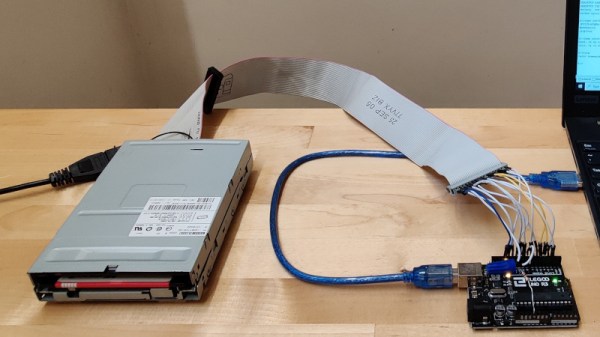
Near the turn of the millenium, portable media players like the iPod led to the development of the podcast. The format generally consists of content similar to talk-based radio, and is typically served up in modern codecs like AAC, M4A and MP3. However, [Sean Haas] decided these were all too chunky, and wanted to see if it was possible to deliver similar content on a floppy disk. The results are predictable, but impressive.

[Sean]’s aim was to try and fit roughly 45 minutes of audio on to a 1.44 MB floppy disk. To pull this off, he looked far and wide for a codec fitting for the task. The choice landed on was Adaptive Multi-Rate, or AMR. Typically used to encode audio for GSM phone calls, it can also be used to create compressed audio files.

Initial attempts weren’t quite good enough to do the job, so [Sean] introduced a pre-processing step with FFMPEG, to speed the audio up 1.2 times. It was then passed through SoX and encoded in AMR at approximately 5 kbit/s. This allowed a 45-minute long MP3 file of 72MB to be compressed down into just 1.2 MB, and thus able to fit onto a floppy disk. Audio quality is predictably poor, as you can hear in the embedded clip below, but definitely intelligible. You’d probably want to skip any musical passages if you were doing this seriously.

Continue reading “45 Minute Podcast Served Up On A Floppy Disk”